
Otomatic.ai is a WordPress plugin that uses artificial intelligence to facilitate the creation of digital content. This tool offers a complete solution for generating and optimizing articles, web pages, and SEO content in just a few clicks.
Designed for bloggers, webmasters, and digital professionals, Otomatic.ai allows you to produce multilingual content, generate bulk articles, and automatically integrate relevant media using advanced AI technologies such as GPT-4, DALL-E 3, and Mistral Large.
Advantages and disadvantages

| Advantages | Disadvantages |
|---|---|
| Complete automation of content creation thanks to advanced AI models such as GPT-4, Claude 3.5, Llama 3 | Heavy reliance on artificial intelligence, which can lead to content that is sometimes generic or lacking in nuance |
| Massive content generation for multiple pages simultaneously, saving significant time | Potentially high cost, with monthly and annual plans that can be restrictive for small budgets |
| Integrated SEO optimization with XML sitemap generation and keyword analysis | Technical complexity of configuration and optimal use of the plugin, requiring expertise |
| Multilingual support for content creation in different languages | Variable quality of generated content depending on the precision of instructions and AI profiles |
| Automatic integration of media (images, videos, social content) | Potential problems of rights and intellectual property of generated content |
| Creation of personalized AI profiles adapted to specific needs | Some documentation only available in French. |
| Compatibility with multiple data sources (XML, JSON, HTML, PDFs) | Performance potentially impacted by complexity of AI processing |
Otomatic.ai in numbers
| Latest version | Version 16 |
| AI models supported | 8 (GPT-4, GPT-4 O Mini, GPT-4 O, Mistral Large, Claude 3.5, Llama 3, DALL-E 3, Stable Diffusion 3) |
| Supported languages | Multilingual (exact number not specified) |
| Generatable content types | Articles, pages, media, bulk content |
Otomatic.ai plugin prices
| Standard | Pro | Enterprise |
|---|---|---|
| $390/year | $690/year | $1,790 |
|
|
|
Otomatic.ai user reviews
Otomatic.ai is a WordPress plugin that generates significant enthusiasm among users, offering a complete and innovative solution for automated content creation.
Users especially praise its ability to generate SEO-optimized content quickly and with great customizability.
What really sets Otomatic AI apart from its competitors is its ability to automate content creation while maintaining a high level of personalization. As a site editor, I’ve always looked for ways to optimize my time, and this plugin helped me do just that.
As soon as I installed Otomatic AI, I was impressed by the simplicity and fluidity of its interface. It integrates seamlessly with WordPress and is quick to learn, even for non-technophiles.
My opinion of Otomatic AI is positive, even very positive. I think this WordPress plugin couldn’t have come at a better time, and the founders are very active in providing comprehensive updates.
Alternatives to Otomatic.ai
All in One SEO (AIOSEO)
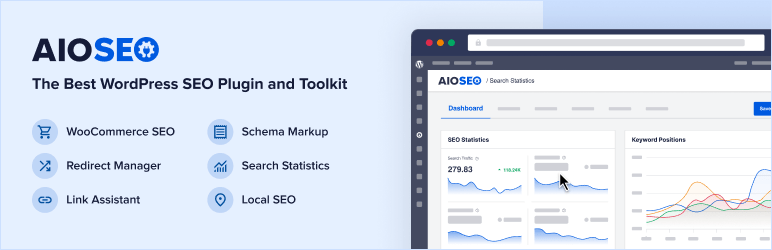
AIOSEO is a powerful SEO plugin for WordPress that integrates AI features to optimize your content. It generates optimized titles and meta descriptions thanks to its integration with ChatGPT.
AIOSEO also helps with internal link optimization and offers search statistics, making it ideal for improving your site’s SEO.
Rank Math
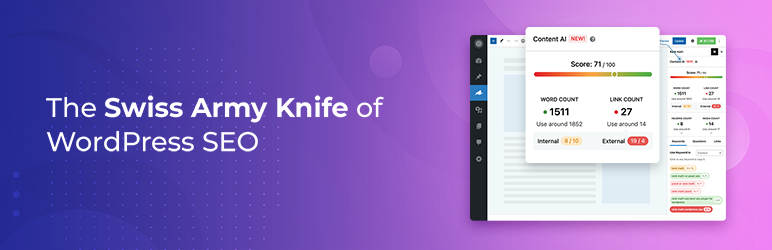
Rank Math is an SEO plugin for WordPress that uses AI to generate keyword suggestions and optimize your content.
It analyzes competitors’ content and offers keyword suggestions for different elements of your content, such as titles and meta descriptions. Rank Math helps improve the quality and SEO optimization of your publications.
AI Engine
AI Engine is a WordPress plugin that integrates AI into your site to generate articles, optimize SEO, and facilitate content writing in just a few clicks.
It stands out for its versatility, efficiency, and ability to automate content creation intuitively and quickly, while guaranteeing optimal quality.
Otomatic.ai FAQs
How do I install the Otomatic.ai plugin on WordPress?
To install the Otomatic.ai plugin on WordPress, you first need to log in to your Otomatic account and download the plugin. Then go to Plugins > Add New > Upload Plugin in your WordPress administration and upload the plugin’s zip file.
Click “Install” and then “Activate” once the installation is complete. You’ll also need to add your required API keys (such as OpenAI API) to activate the plugin’s features.
What are the main features of the Otomatic.ai plugin?
Otomatic.ai offers several key features, including:
- Automated content creation thanks to AI
- Content generation from simple keywords
- SEO optimization
- Creation of personalized AI profiles
- Bulk content generation for multiple pages
- Integration of media such as images and videos
The plugin uses advanced AI models such as GPT-4 and supports multiple languages and data sources.
How can I customize the content generated by Otomatic.ai?
Otomatic.ai allows advanced customization of generated content. You can adjust the content creation parameters to match your desired tone, style, and structure.
The plugin offers ready-to-use content templates and allows you to customize the register and content to suit your target audience.
Can you schedule publications with Otomatic.ai?
Yes, Otomatic.ai allows you to automate the scheduling of publications. You can configure the plugin to publish content instantly or according to a specific frequency per day, as well as choose the days and time intervals for publication.
This feature helps you maintain an active presence on your site with regular publications.
What types of content can Otomatic.ai generate?
Otomatic.ai can generate a variety of content, including blog articles, product descriptions, social media posts, news via RSS feeds, and even content based on Google News searches or URLs.
The plugin also integrates multimedia elements such as images and videos to enrich the user experience.
How do I solve API connection problems with Otomatic.ai?
To resolve API connection problems with Otomatic.ai, make sure you have correctly added your required API keys (such as OpenAI API) in the plugin settings. Also check that your API keys are valid and active.
If the problem persists, please consult the plugin documentation or contact technical support for further assistance.
Can you stop your Otomatic.ai subscription at any time?
Yes, you can stop your Otomatic.ai subscription at any time from your account. This allows you to manage your subscriptions flexibly and adjust them according to your needs.
Thank you for visiting this Otomatic.ai page 🙏
The WPMarmite team hopes you’ve been able to find out more about this WordPress plugin!
To find out more, visit the plugin’s official website.
You can also share your experience with Otomatic.ai by writing a review below. 👇
Found an error on this page? Click here to report it.

