
In today’s digital world, reaching an international audience is a major challenge for websites. The Google Language Translator WordPress plugin offers an affordable solution for automatic translation.
With over 100,000+ active installations and a rating of on the official WordPress directory, this tool automatically translates all your content: posts, pages, menus, and widgets.
Site builders can thus offer a multilingual experience without specific language skills, using Google Translate technology.
Advantages and disadvantages

| Advantages | Disadvantages |
|---|---|
| Free, automatic translation via Google Translate | Variable translation quality, especially for technical or specialized content |
| Full multilingual support (articles, pages, menus, widgets, etc.) | Total dependence on Google service, risk of malfunctions |
| SEO optimization with indexing of translated content and hreflang tags | Advanced features reserved for the paid version |
| Manual translation correction interface | Potentially slower performance due to calls to the translation API |
| Support for right-to-left languages | Possible layout errors for some complex languages |
| Easily customizable floating language selector | Surcharge for neural translations and premium distribution network |
| Compatible with most WordPress themes and plugins | Configuration and customization can be tricky for beginners |
Google Language Translator in numbers
| Latest version | 7.0.1 |
| Date of last update | |
| Active installations | 100,000+ |
| Average rating | |
| Editor | 10Web |
| Supported languages | Over 100 languages |
| Technologies used | Google Translate API, Neural Translation |
Google Language Translator plugin prices
| Free | Custom | Startup | Business | Enterprise |
|---|---|---|---|---|
| $0 | $9.99/month | $19.99/month | $29.99/month | $39.99/month |
|
|
|
|
|
User reviews of Google Language Translator
The Google Language Translator plugin offers a multilingual translation solution that’s relatively easy to set up but has significant limitations.
Users appreciate its ease of installation and automatic translation principle, while acknowledging its technical imperfections, particularly in terms of linguistic accuracy and translation control.
Google Translate is better than nothing, but it can be misleading. What’s more, most languages have different structures: verbs are not placed in the same order.
azztaco
I’m not an expert in website creation, so I use WordPress and its plugins as a very basic user. However, the Google Translator was very easy to install and use, even without any knowledge of site creation. One point worth highlighting is its ability to translate (for free) into many languages, whereas other translators require additional payment for more languages.
albcaval
Google Translate gives you no control over the translation. What’s more, you can’t go back and manually refine translations for many specific languages.
claudie33
Alternatives to Google Language Translator
GTranslate
GTranslate is a popular WordPress translation plugin that uses the Google Translate API to automatically translate your site’s content.
It supports over 100 languages and offers advanced customization options, such as URL translation and browser language detection. The paid version includes additional features such as SEO support and translation review by human specialists.
TranslatePress

TranslatePress is a manual and automatic WordPress translation plugin that lets you control every aspect of your site’s translation.
It offers real-time previews and lets you translate posts, pages, metadata, plugins, and themes directly from your site’s interface. TranslatePress is particularly appreciated for its ease of use and flexibility, especially with the Automatic Translate addon, which uses tools such as Google Translate and Yandex Translate.
Loco Translate
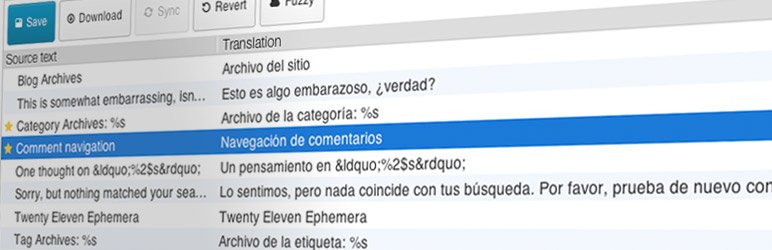
Loco Translate is a freemium plugin that lets you translate WordPress themes and plugins directly in the WordPress dashboard.
It offers advanced features such as in-context editing, translation templates, and integration with version control systems. Loco Translate is appreciated for its visual translation editor and real-time updates, making it easy to manage translation teams.
Google Language Translator FAQs
How do I install and activate the Google Language Translator plugin?
To install and activate the Google Language Translator plugin, go to the “Plugins” section of your WordPress dashboard, then click on “Add new.”
Search for “Google Language Translator” in the search bar, click on “Install now,” and then on “Activate” once the installation is complete.
How do I configure the Google Language Translator plugin?
After installation and activation, access the plugin’s configuration page via Settings > Google Language Translator. Make sure the checkbox to activate the plugin is ticked. Select the original language of your site and choose the target languages.
You can also customize the layout of the language selector, including flag size, colors, and floating widget position.
What are the main features of the Google Language Translator plugin?
The Google Language Translator plugin offers several features, including automatic translation of pages, categories, tags, widgets, and themes. It also integrates Google Analytics, supports right-to-left languages, and offers a floating language selector.
The paid version includes advanced features such as neural translation, multilingual SEO, and compatibility with Yoast SEO and WooCommerce.
How do I add the translation widget to a widget zone?
To add the translation widget, go to Appearance > Widgets in your WordPress dashboard. Find the “Google Language Translator” widget, drag it to the desired widget area, and click “Save” to save it.
This will allow visitors to see and use the translation option on your site.
What should I do if the translation widget doesn’t appear on my site?
If the translation widget doesn’t appear, check that the plugin is installed and activated, and that the activation box is checked in the plugin settings. Also ensure that the wp_footer() function is included in your theme’s footer file.
Check that the “Show language box?” option is enabled and use your browser’s development tools to check that CSS styles are not hiding the translation widget.
How do I solve the problem of languages not being displayed in the language box?
If no language is displayed in the language box, make sure the plugin is installed and activated, and that the activation box is checked in the plugin settings. Contact plugin support if the problem persists.
Is the Google Language Translator plugin compatible with other WordPress plugins and themes?
Yes, the Google Language Translator plugin is designed to be compatible with a wide range of WordPress plugins and themes, including WooCommerce, Yoast SEO, and various visual builders like Elementor and Astra.
Thank you for visiting this page dedicated to Google Language Translator 🙏
The WPMarmite team hopes you’ve been able to find out more about this WordPress plugin!
To find out more, visit the official website and their social networks.
You can also share your experience with Google Language Translator by writing a review below. 👇
Found an error on this page? Click here to report it.

