Something trivial. At first glance, choosing a web hosting provider might seem a bit like that. But on closer inspection, it’s much more than that. In fact, it’s one of the most important decisions you’ll make when launching a WordPress site.
Loading speed, security, ease of use, value for money: everything largely depends on this invisible infrastructure. So you see what I mean: it’s better to choose a provider with solid foundations.
Today, Hostinger is one of the world’s leading hosting providers, thanks to a simple promise: solid performance, an accessible interface and affordable prices.

So much for the general overview. But does Hostinger’s WordPress hosting really deliver on its promises? That’s exactly what you’ll find out after devouring this comprehensive Hostinger guide and review.
On the menu: performance analysis, overview of security features, a look at the hPanel interface, a focus on innovative AI tools, a breakdown of pricing, and a summary of customer reviews.
In short, everything you need to decide whether this hosting provider is right for your project.
- What is Hostinger Managed WordPress Hosting?
- Performance and uptime of Hostinger WordPress hosting
- Hostinger security features
- The hPanel: Hostinger's administration interface
- Introducing Hostinger's AI tools
- Customer service and support
- How much does Hostinger's managed WordPress hosting cost?
- What are the customer reviews for Hostinger?
- Our final review of Hostinger managed WordPress hosting
This page is sponsored. Some links to Hostinger are affiliate links. If you purchase hosting from them, WPMarmite will earn a commission.
Thanks to affiliation, WPMarmite is able to remunerate the research and writing work of the blog’s editors. That said, we remain impartial. If a product isn’t worth it, we’ll say so (or simply not cover it).
What is Hostinger Managed WordPress Hosting?
Introducing Hostinger
Founded in 2004, Hostinger is a Lithuanian web hosting company based in Vilnius. More broadly speaking, it can be considered as a complete platform for the creation and management of websites, whether using the WordPress CMS or any other.
Hostinger offers 4 main types of services: web hosting (WordPress, shared, VPS, cloud), website creation (showcase, ecommerce), AI-powered web applications, domain name registration and email marketing.
Over the years, the company has become one of the world’s leaders in hosting.
A few figures on the company’s homepage give an idea of its success and exponential growth:
- More than 5 million users in over 150 countries
- Ranking in the FT 1000 of Europe’s fastest-growing companies for the sixth year running
- +More than 10 million Hostinger websites created
- +Over 20 years of experience
- A dozen data centers strategically located around the world, in Europe, North and South America, and Asia.

Hostinger has built its reputation around three key promises:
- Very competitive pricing.
- An intuitive, easy-to-use proprietary interface: hPanel.
- Hosting that makes no compromises on performance and security, with support available 24/7.
Among these solutions, managed WordPress hosting is particularly interesting for users who want to focus on their website rather than on the technical side.
What is Hostinger’s managed WordPress hosting plan?
Managed WordPress Hosting is an all-in-one solution designed for WordPress.
Unlike traditional shared hosting, where you have to configure everything manually, Hostinger handles a large part of the technical management for you.
Their hosting plan also includes features not included in conventional web hosting (server/cache optimization, updates and backups, security measures, etc.).
More concretely, how does Hostinger’s managed WordPress hosting work? For its users, Hostinger offers 3 pricing plans (Premium, Business + AI, Cloud Startup + AI) starting at $1.99/month for the first year(more on pricing in a dedicated section at the end of this content).
Whichever plan you choose, you’ll get at least the following features, services and tools:
- One-click automatic WordPress installation
- Automatic updates (WordPress core and plugins)
- Server optimization tailored for WordPress sites (LiteSpeed web Server and LiteSpeed Cache)
- Dedicated security tools integrated as standard
- Integrated server cache system to speed up page loading time
- Automatic activation of certain plugins to handle SEO, form creation, etc.
- Minimum 20 GB file storage (SSD)
- Creation of professional email addresses
- Regular automatic backups (at least weekly)
- Free domain name, Let’s Encrypt SSL certificates to switch your site to HTTPS, and migration
- Free email marketing for one year with Hostinger Reach.
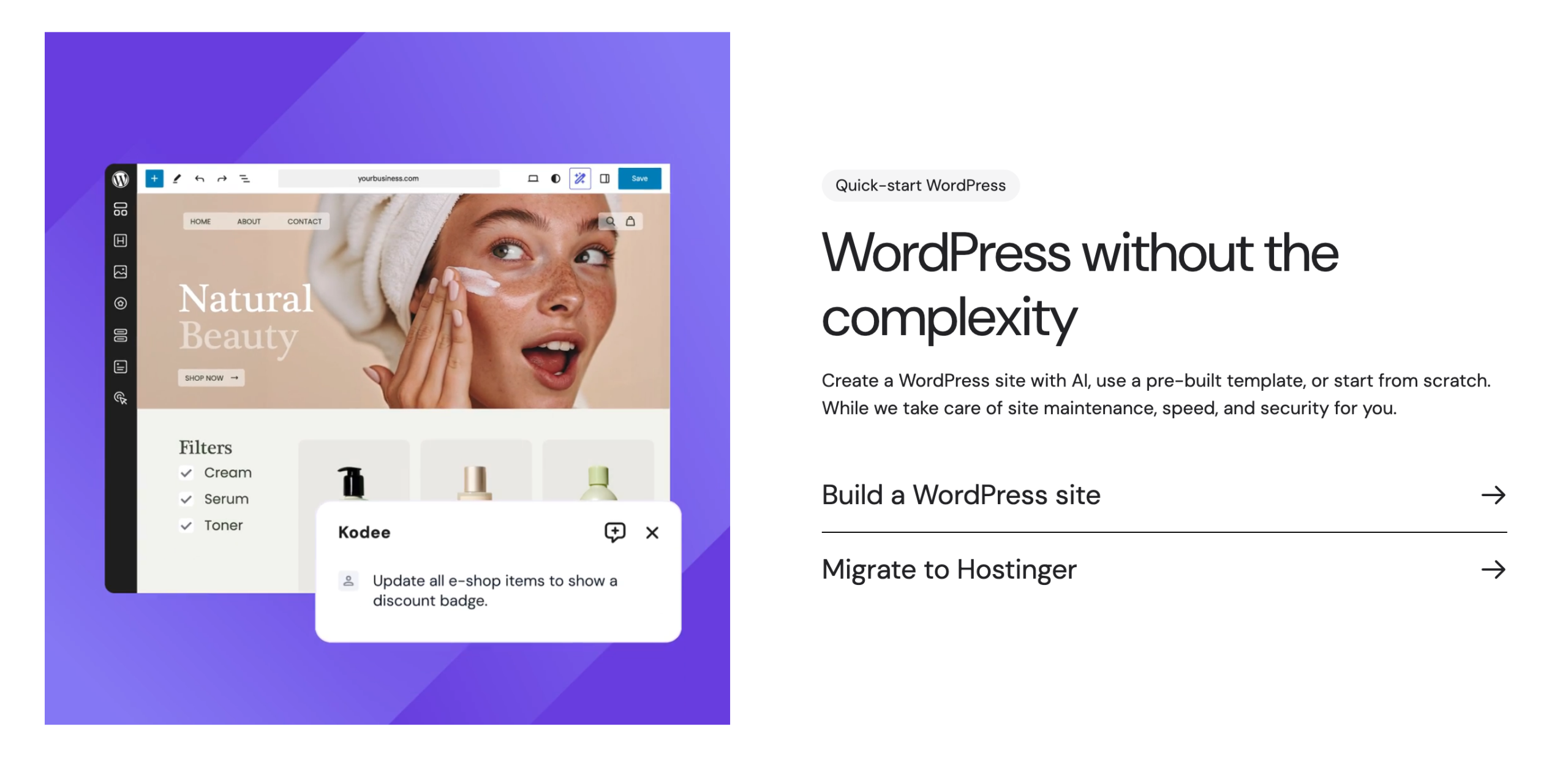
The more comprehensive the plan you choose, the more options you get. For example, the Business + AI, Cloud Startup + AI plans also include:
- AI tools: AI website creator for Elementor and Gutenberg, AI agent for WordPress, AI bug fixing tools
- a free CDN (Content Delivery Network)
- a staging tool .
Thanks to all this, you can create, customize and grow your WordPress site without worrying about server configuration.
Who is Hostinger WordPress hosting for?
Hostinger’s WordPress hosting is aimed at several categories of users. In its FAQ, the Lithuanian company highlights two main target groups.
On the one hand, it appeals to “beginners with no technical knowledge” (bloggers, content creators, small businesses and freelancers), because installation is simplified to the max, the hPanel interface is intuitive even without a technical background, and the very affordable prices mean you can test it without risk.
On the other hand, it mentions“developers looking for a quick installation”, providing them with essential WordPress development tools such as WP-CLI, SSH access, Git integration and PHP version control.
But that’s not all. If you take a closer look at Hostinger’s service offering, you’ll see that its hosting services are also suitable for other types of users, such as:
- Agencies and freelancers, with a managed WordPress hosting package offering, for example, full website isolation and the possibility of managing up to 200 customer sites with a single subscription (and sliding-scale prices)
- WooCommerce store owners.
Performance and uptime of Hostinger WordPress hosting
Now that’s going to sound crazy. According to a consumer study relayed by Google, the stress caused by slow page loading can be comparable to watching a horror movie or solving a complex math problem!
All this to say how performance is crucial for any WordPress hosting.
A slow site means a degraded user experience, visitors fleeing before they’ve even read your first words, and a negative signal sent to Google (which in turn can penalize your SEO).
Hostinger has understood this, and has built its technical proposal around several technological building blocks:
- A modern, optimized infrastructure. Hostinger servers are based on SSD or NVMe disks, depending on the plan, guaranteeing significantly faster data access times than with conventional hard disks. The underlying cloud infrastructure also provides greater resilience and the ability to handle traffic peaks.
- Using LiteSpeed as a web server on its WordPress plans. LiteSpeed is renowned for its superior performance over Apache or Nginx on WordPress architectures, thanks in particular to its caching system (LSCache) which generates and serves static versions of your pages, reducing the load on the database.
- A CDN (content delivery network) integrated from the Business + AI plan, to deliver your site’s files from the server closest to each visitor.
- The use of 10 datacenters around the world (Europe, Asia, North and South America), with servers located in France, as close as possible to your visitors. An essential factor: the closer a datacenter is to the hosted website and its visitor, the faster the site will be displayed.
- An option to manage traffic peaks with a one-week or one-month power boost (with the Cloud Startup +AI plan).
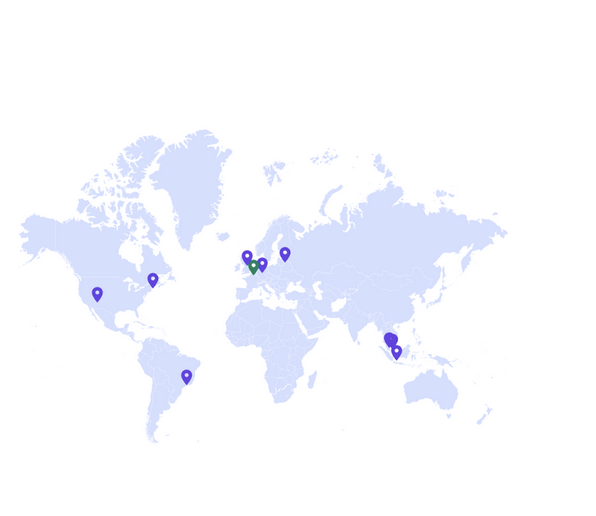
Hostinger also guarantees an uptime of 99.9%, and points out that “your visitors will enjoy the lowest latency and unmatched reliability as we deploy in globally connected Tier-3 datacenters”.
This ensures low latency and optimum reliability: a Tier 3 datacenter has an expected uptime of 99.982%, or just 1.6 hours of downtime per year.
Hostinger security features
As we often say on WPMarmite, no WordPress site is infallible when it comes to security.
But that doesn’t mean you should give up and leave the door open to all outside threats!
While the security of your site depends to a large extent on the best practices you apply on a daily basis (forget “love” or “0000” passwords), your hosting also plays a fundamental role in protecting your website.
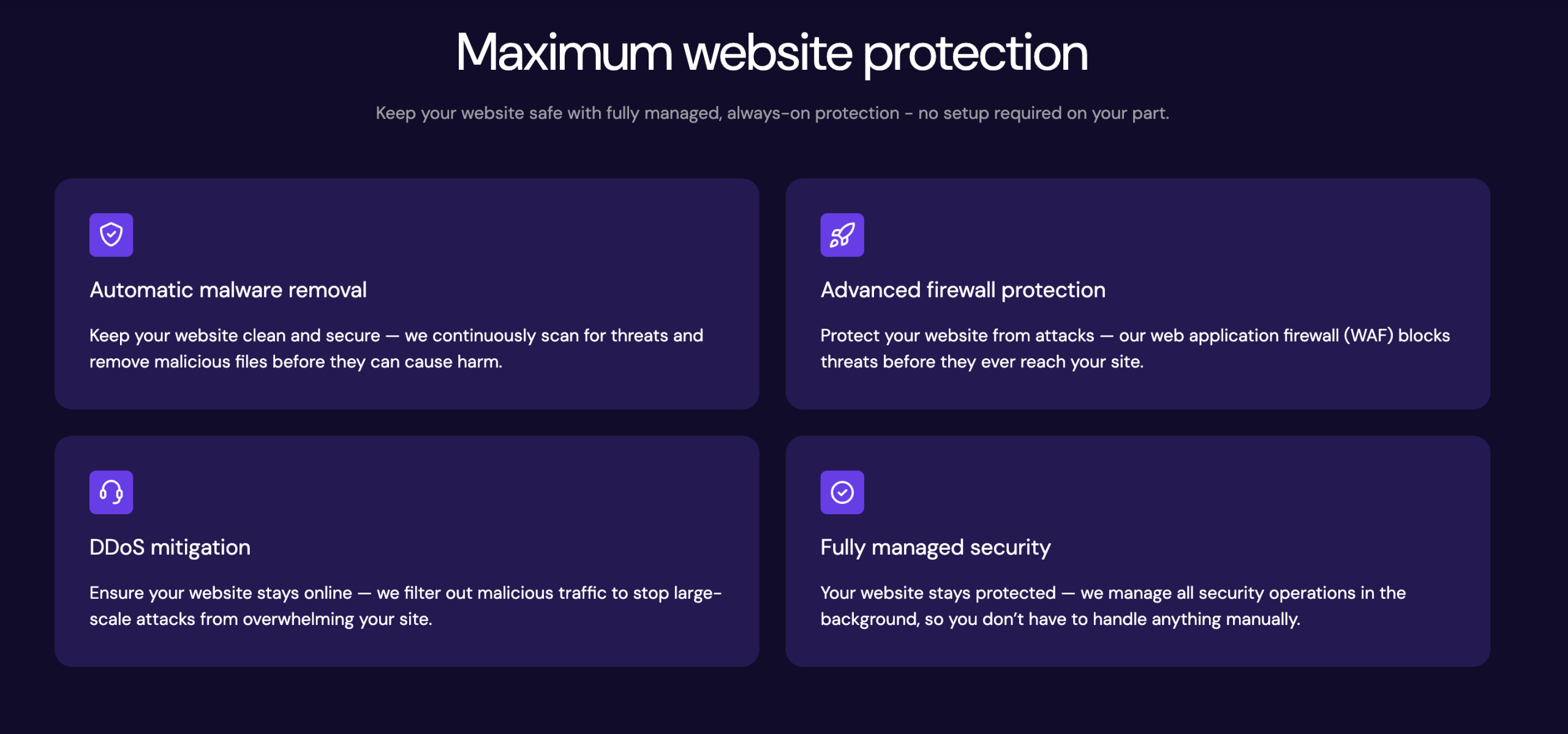
Hostinger includes several defense mechanisms, with “fully managed, always-on protection”:
- Activate your free SSL certificate in just one click. Indispensable for encrypting data exchanges between your site and visitors, SSL has also been a signal of trust for Google for several years now.
- DDoS protection. Hostinger includes protection against distributed denial-of-service (DDoS) attacks, which seek to saturate your server and make it unavailable. This layer of protection filters malicious traffic to prevent large-scale attacks on your site.
- Web Application Firewall (WAF) to block threats before they reach your site. This WAF is particularly useful against SQL injection, cross-site scripting (XSS) and exploitation of known vulnerabilities.
- Automatic malware removal.
- Automatic backups. Depending on the plan you choose, Hostinger offers daily or weekly backups. These backups enable you to restore a previous version of your site in the event of a problem such as hacking, catastrophic updates or an error on your part.
In addition, Hostinger says it follows the latest security industry standards and security best practices to protect its servers, guarantee information security and comply with all applicable laws and regulations, such as GDPR (General Data Protection Regulation).
The hPanel: Hostinger’s administration interface
Having examined Hostinger’s performance and security, let’s now focus on a key element: the management of your hosting services and options.
At Hostinger, this is handled through an in-house solution. We explain it all below.
What is hPanel?
Where most hosting providers rely on cPanel, one of the most widely used server administration interfaces in the world, Hostinger has taken the gamble of developing its own solution: hPanel.
This proprietary dashboard centralizes all your hosting management tools, including (but not limited to):
- WordPress site management (installation, updates, migration)
- Automatic installation of the CMS
- MySQL database management
- Management of domain names, files and DNS
- Configuration of professional email addresses
- Access to error logs and statistics
- Management of backups (with restore options) and SSL certificates
- Speed test
- One-click CDN activation
- Automatic updates
- PHP version configuration
- IP address manager
- SFTP/SSH access.
User experience and getting started with hPanel
The interface stands out for its modern, uncluttered design and intuitive navigation. Menus are logically organized, and the most common tasks (installing WordPress, creating an email, managing a domain) are accessible in a few clicks without having to search through complex sub-menus.
Easy to learn and use, we also appreciate that it is adapted to the Hostinger ecosystem. In short, it’s a real success. Judge for yourself:
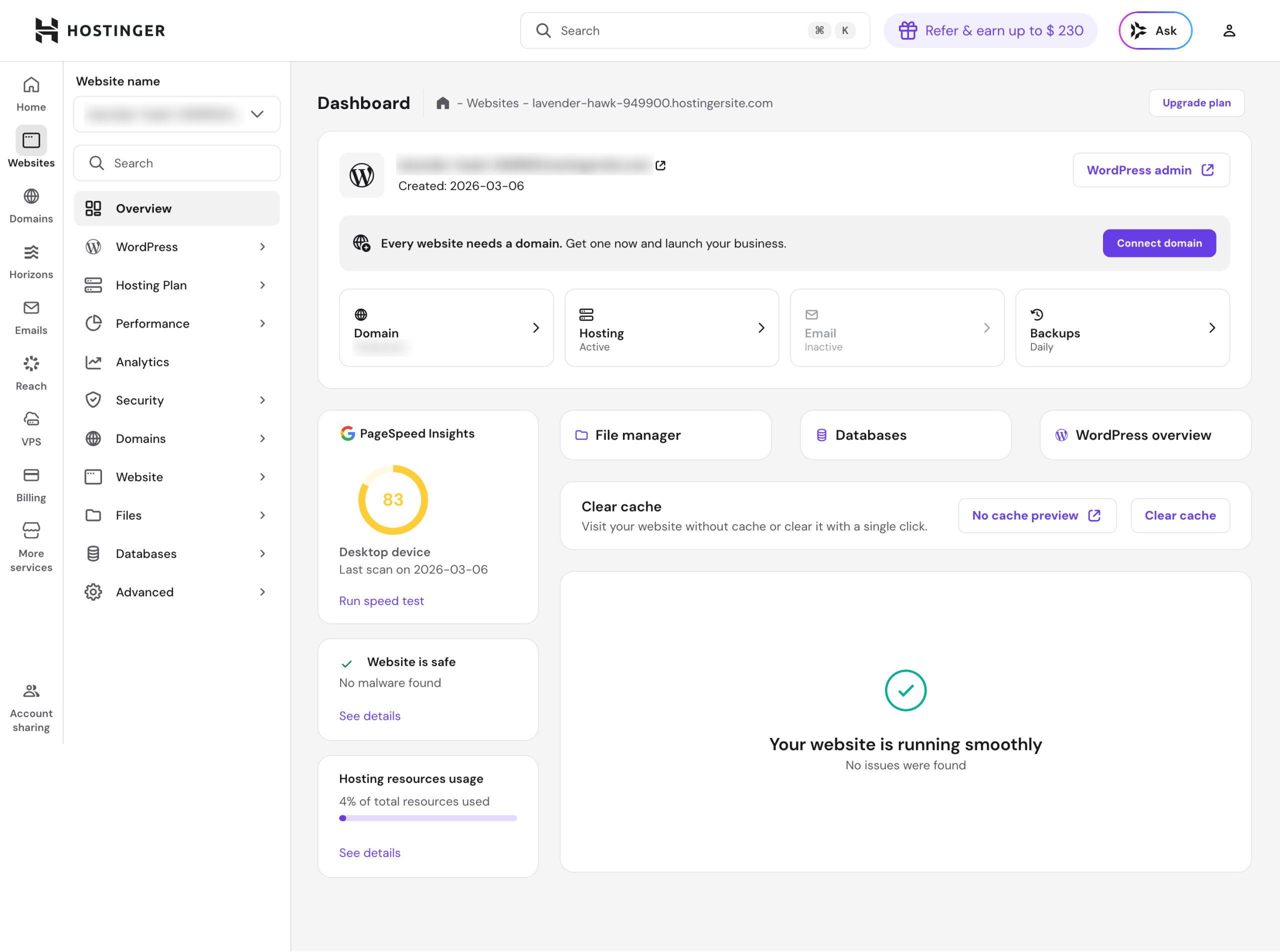
From the hPanel, you can of course automatically install WordPress and WooCommerce with a single click.
If you wish, all this can be done in advance, as soon as you purchase managed WordPress hosting and log in to your customer account.
To make your life easier, Hostinger offers you a top-notch onboarding experience, with a few simple steps and suggested priority actions, in which you are guided step by step.
The host will discuss with you the type of site you want to create, your geographical location (for choosing a data center), the plugins you want to activate, the domain name, the choice of your admin credentials and above all the way you want to create your site, with the possibility of using AI.
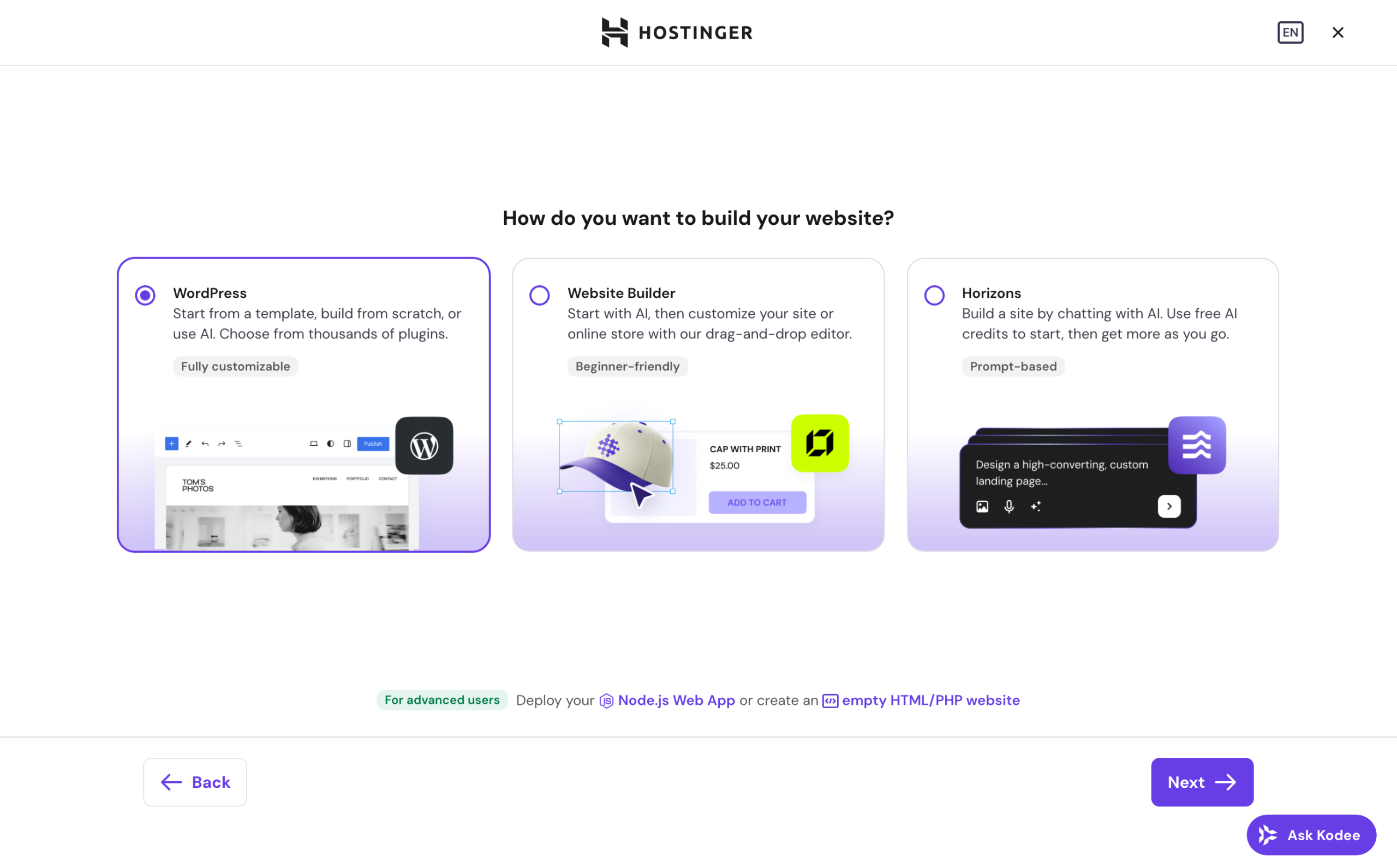
The installer also offers pre-configured themes and site templates to suit your activity (blog, portfolio, online store, restaurant, etc.), so you can start from a functional ready-to-use design rather than a blank page.
In short: from account creation to launching your WordPress site, everything is designed to minimize friction.
What are the differences with cPanel and MyKinsta?
While hPanel has a lot to offer its users, it also stands out against a number of “competing” interfaces offered by other hosting providers, first and foremost the well-known cPanel, or MyKinsta, the proprietary platform developed by the hosting provider of the same name.
Find out more about the differences between them:
- hPanel vs cPanel. The cPanel interface is more comprehensive in terms of options, but also less modern and intuitive than hPanel.
Although more powerful, its interface is outdated, and some of its advanced technical options make it more complex for beginners to learn. - hPanel vs MyKinsta. MyKinsta is an excellent tool, offering a very high level of detail and control (granular performance analyses, advanced management of staging environments, real-time logs, etc.).
On the other hand, the learning curve is steeper than with hPanel, which is more accessible to non-technical users, while still covering the essentials of current needs.
Let’s move on to the next topic, already discussed above: artificial intelligence. Hostinger communicates quite a bit about AI, with a range of services already well-developed on the subject.
Introducing Hostinger’s AI tools
Hostinger integrates artificial intelligence at several levels of its platform. These tools are designed to make it even easier to create and manage sites, even without technical skills.
Here’s an overview of the main AI features available at the time of publishing this page.
AI Agent Kodee
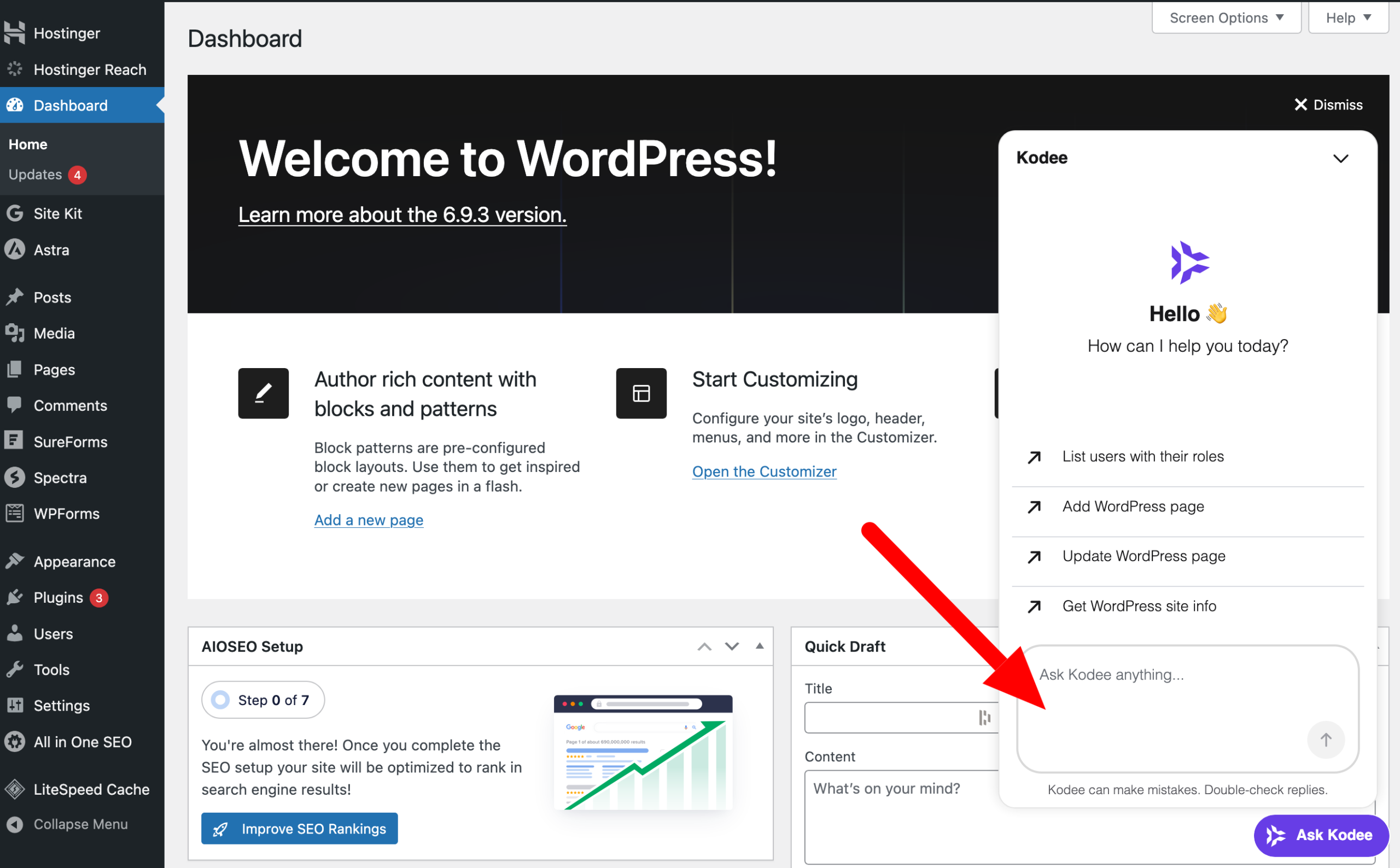
Kodee is Hostinger’s intelligent virtual assistant. Available directly in hPanel and support, and especially on your WordPress admin interface, the Kodee chatbot helps you manage your online presence with instant, proactive assistance.
For example, it can :
- answer technical questions
- guide you through the settings, with advice on how to manage and optimize your site, the plugins to install and how to configure them
- suggest solutions to common errors
- perform certain actions for you, such as creating or updating a page.
AI Website Builder
From the “Business + AI” package, you can also benefit from an AI-based website builder compatible with the WordPress editor (Gutenberg) and Elementor.
The AI Website Builder allows you to create a complete website in just a few minutes, starting with a simple text description.
You describe your project, activity or goal, and the AI automatically generates a site structure, a coherent design and starter content (text and images).
With it, you can design any type of site (showcase website, WooCommerce store, portfolio, landing page, blog, etc.) without touching a single line of code.
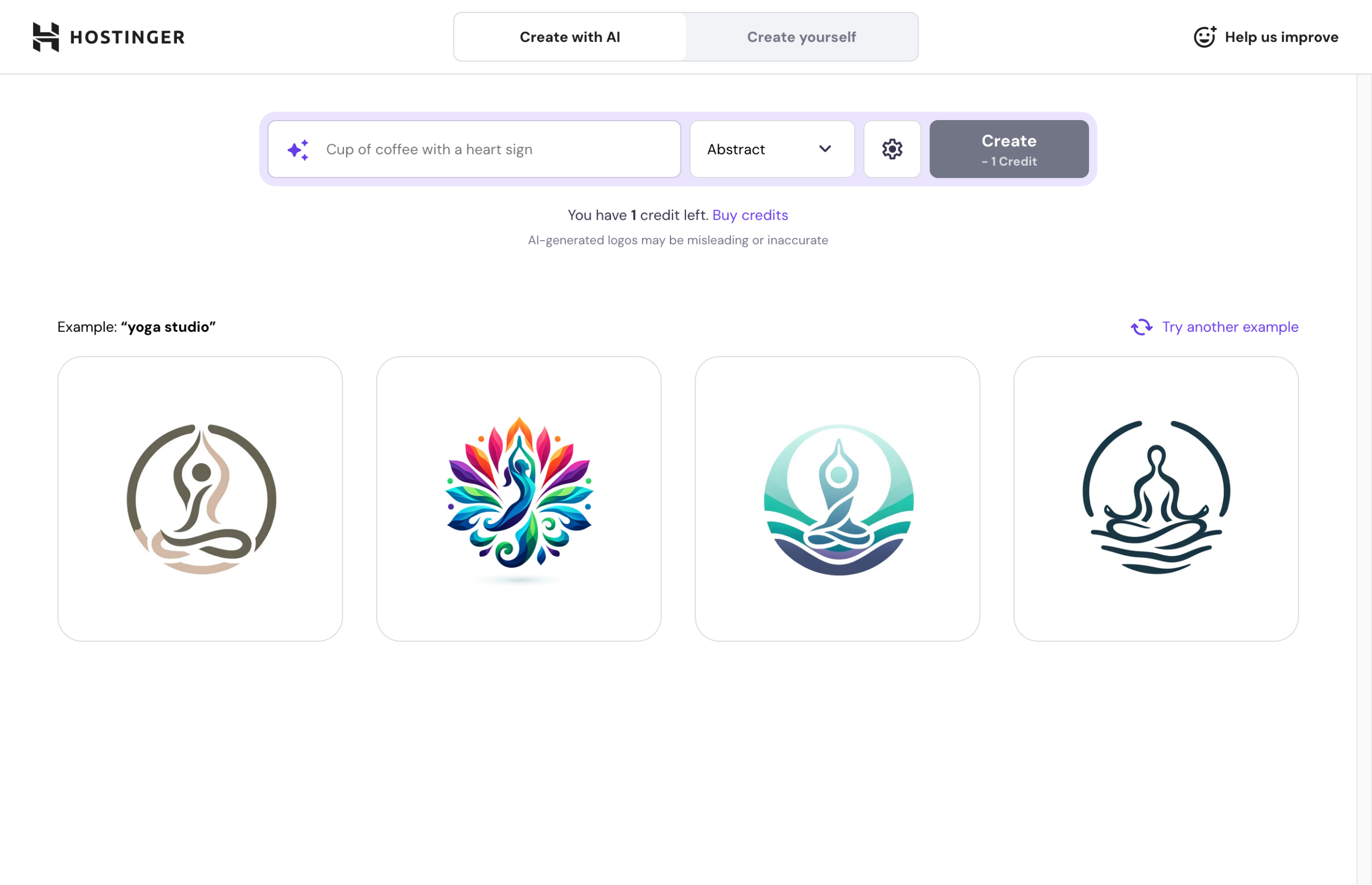
On hPanel, you can even use other AI tools (via a credit system) to create a logo, generate images and more.
AI Troubleshooter
Speaking of hPanel, let’s stick with Hostinger’s third in-house tool: AI Troubleshooter.
It is capable of detecting certain errors (403, 404, 500, 503, etc.), then provides you with diagnostics and recommendations for corrective action in just one click, without any technical intervention on your part.
It’s an invaluable tool for identifying issues without digging through technical logs.
AI Site Optimizer
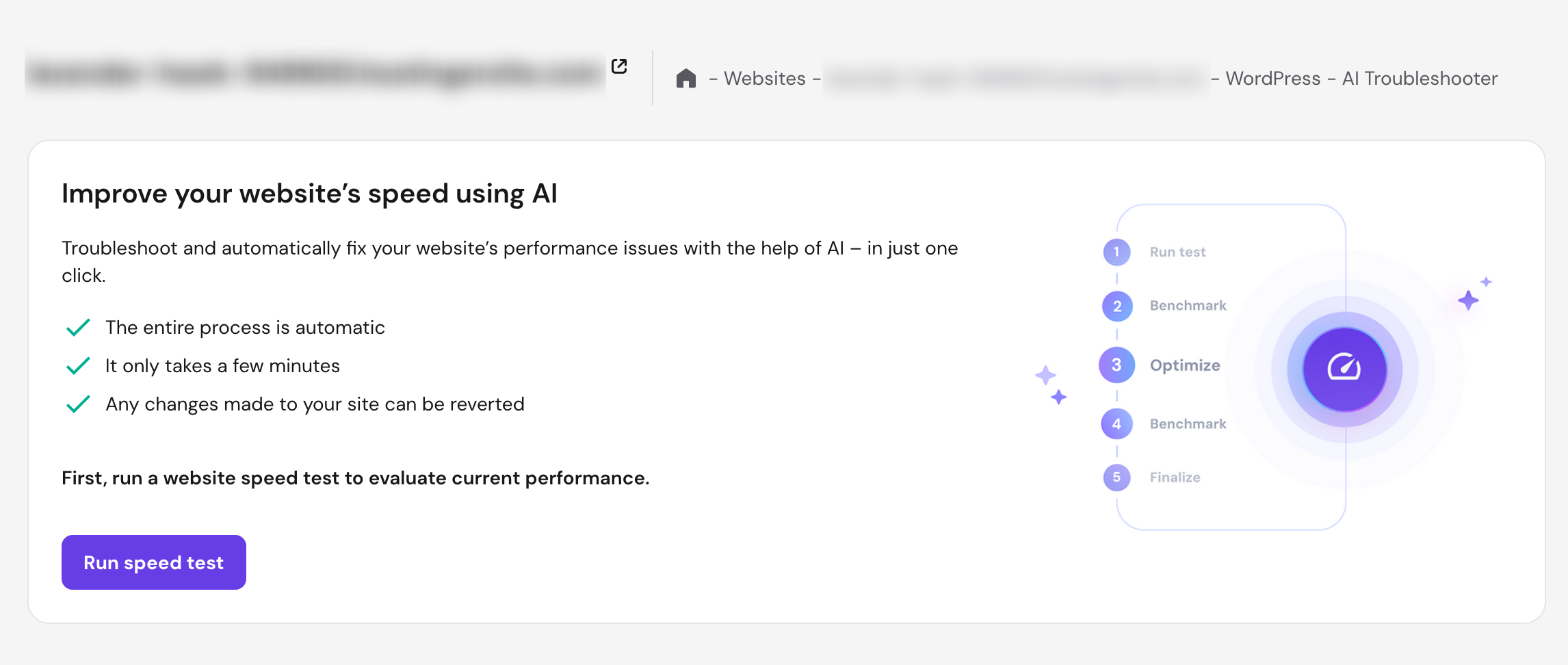
The same principle has been adapted to loading speed, with AI Site Optimizer, capable of boosting your website’s performance by 20%, according to Hostinger.
Here, AI applies LiteSpeed optimizations and automatically detects slow requests, giving you a faster, more reliable website.
Hostinger Reach
Finally, the AI marketing tool “Reach” helps you create and send personalized email campaigns in seconds to develop your audience and increase conversions.
Each email can contain your logo, colors and writing style, with free delivery of up to 200 emails per month to 100 subscribers.
Customer service and support
Without further ado, let’s move on to another key aspect: customer support. Just as important as performance and security when choosing a quality hosting provider.
At Hostinger, the human technical team is available 24/7 via live chat or email.
Hostinger explains that this is a deliberate choice, “because it’s much more efficient than the telephone”.
Hostinger’s stated aim is to get back to you within 2 minutes. While this isn’t always guaranteed, response times are generally fast in practice.
Additional support resources include:
- a documentation center, with hundreds of complete articles (including screenshots) to help you get to grips with all their tools and services
- a blog with tutorials on Hostinger, WordPress and ecommerce
- the Kodee assistant as the first level of support. Before calling in a human agent, Kodee can answer many common technical questions and filter out simple requests, reducing waiting times for more complex cases
- a YouTube channel (“Hostinger Academy”) with practical, quick and to the point videos, like this one:
Overall, user feedback on Hostinger’s support is generally positive, although some report variable response times during busy periods.
The absence of direct telephone support is sometimes mentioned as a limitation, but this is offset by the responsiveness of the chat and the richness of the knowledge base.
How much does Hostinger’s managed WordPress hosting cost?
Hostinger is one of the most affordable web hosting providers on the market, and this is often the main reason why users choose it.
Managed WordPress plans are available in three tiers, with introductory prices ranging from $1.99 (excluding VAT) /month to $9.99 (excluding VAT) /month, depending on the plan and the length of your commitment.
For a 12-month commitment, you can choose:
- Business + AI plan at $4.49/month plus VAT (then $18.99/month upon renewal).
- Premium plan at $3.49 excl. VAT/month (then $12.99/month on renewal).
- Cloud Startup + AI plan at $9.99 ex. tax/month (then $27.99/month).
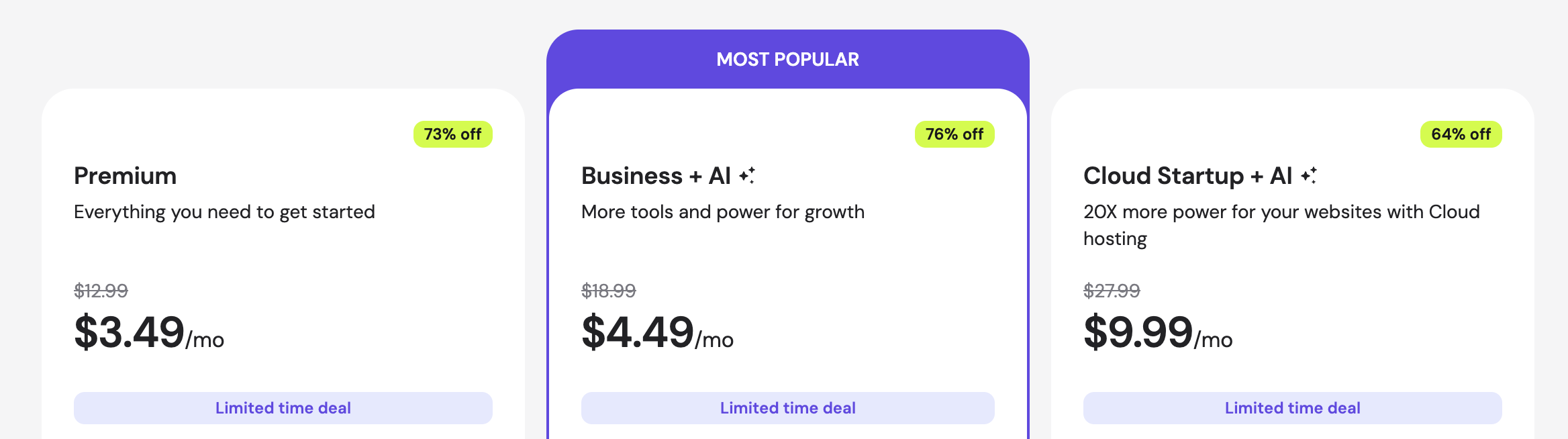
Depending on the plan you choose, you can benefit from:
- management of a single site or dozens of sites
- a free domain name for the first year
- professional email addresses included
- more or less SSD/NVMe storage
- increased performance (more RAM, more CPU)
- a larger number of daily backups
- AI tools (except in the premium offer).
Each offer comes with a 30-day money-back guarantee, with the option of committing to 24 or 48 months to lower the initial bill.
What we see: Hostinger rates are generally promotional prices valid for the first subscription period (often 1, 2 or 4 years).
The renewal price is considerably higher, as is common practice with the vast majority of web hosting providers.
On the other hand, if you commit to a longer term from the start (e.g. 48 months), the overall cost remains extremely competitive compared to the market.
An example? For the Business + AI package, you’ll pay a total of $143.52 plus VAT for 4 years, which is a very, very attractive price.
In any case, we advise you to read the terms and conditions carefully before making a long-term commitment, and to factor renewal pricing into your medium-term budget.
What are the customer reviews for Hostinger?
To get an objective view of the actual user experience offered by Hostinger, it’s also useful to look at the community’s opinions.
Overall, Hostinger enjoys a very positive reputation on the major verified review platforms.
Trustpilot, one of the best-known, is rated “excellent”, with a total of 4.7/5 out of more than 64,000 reviews submitted at the time of writing.
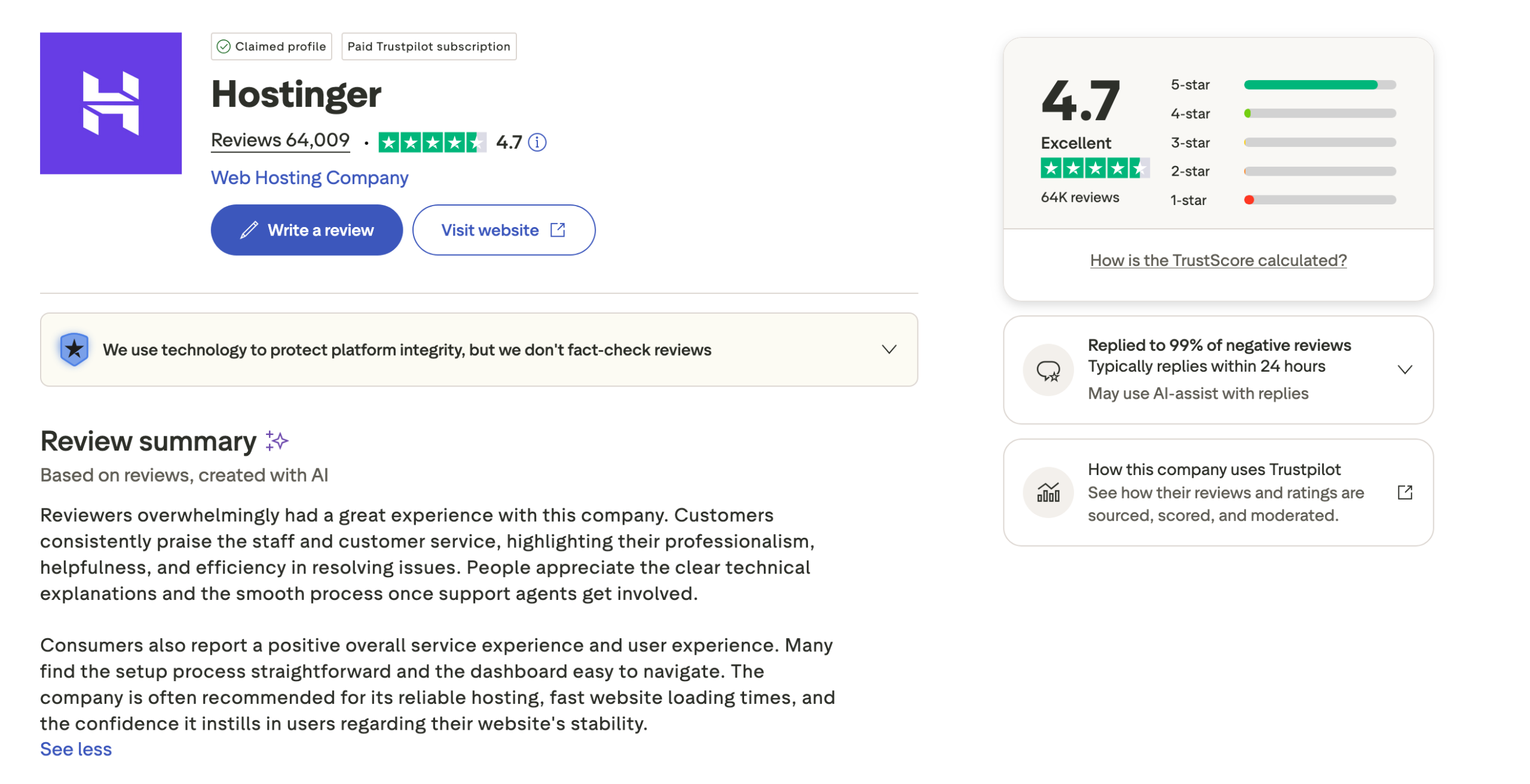
A very large panel, likely to be fairly representative, therefore. According to a summary based on the reviews posted on the company, the elements particularly appreciated are the following:
- speed, responsiveness and quality of customer support
- very positive user experience, with a fluid and fast interface
- professionalism, helpfulness and efficiency of the support team
- fluidity and speed of the interface, judged to be simple and effective, even for beginners.
Our final review of Hostinger managed WordPress hosting
After analyzing its performance, features and interface, it’s time to take stock and conclude: what’s Hostinger’s WordPress hosting really worth?
Like all web hosts, it has its strong points, but also a few limitations, which we’ll cover in our Hostinger review.
Benefits
- Very competitive prices, among the lowest on the market for entry-level plans.
- Modern, intuitive hPanel interface for beginners.
- Automatic WordPress installation in just a few minutes, with no technical skills required.
- Solid performance (LiteSpeed, NVMe, CDN) for the price.
- Innovative AI tools (Kodee, AI Builder, AI Troubleshooter, AI Optimizer).
- Free SSL certificate, DDoS protection and firewall.
- Automatic backups included depending on the plan.
- 24/7 chat support.
Disadvantages
- Limited resources on entry-level plans. The cheapest plans may show their limits if your site receives a lot of traffic.
- Promotional prices that increase with renewal. As is the case with many accommodation providers, the rates quoted at the outset are often introductory prices.
- Fewer advanced features than some premium hosting providers. High-end solutions sometimes offer more advanced tools for performance or environment management.
- Support can be variable, depending on how busy it is. Even though customer service is available 24/7, response times can vary.
- Lack of direct telephone support.
WPMarmite’s review of Hostinger WordPress hosting
At WPMarmite, we think Hostinger’s WordPress hosting is a great way to get started with a WordPress site.
Its many assets range from performance to security, not to mention its in-house proprietary interface (hPanel), which is very pleasant and easy to use.
With its wide range of plans, Hostinger can suit any profile, from beginner to advanced, whatever the project you want to implement (showcase website, WooCommerce store, blog, portfolio, etc.).
On the other hand, you need to be careful to select a plan that’s right for your needs (in terms of resources and the number of sites to be created), and check the renewal prices of your plan, which can double your bill (this is the main drawback).
But in this respect, Hostinger is transparent and clear from the start, with renewal prices displayed on its price list.
All in all, their WordPress hosting remains a reliable, simple and cost-effective solution for launching your next site under the right conditions.
If you would like to test this solution, discover their plans by clicking on the button below:
