Buzzwords have always existed. From “yo” to “FOMO”, for example. Since late 2022, there’s been the GOAT, summed up in two letters: AI.
If you manage a WordPress site, you hear about artificial intelligence everywhere… without always knowing what it can concretely change for you.
A portmanteau word par excellence, AI covers very different realities depending on the tools and providers.

At Hostinger, one of the world’s most popular hosting platforms, AI is not just a marketing argument.
It is a set of features integrated directly into the hosting environment, designed to simplify the creation, management, and growth of your WordPress site.
Tools aimed both at beginners and experienced users.
In this guide, we explain precisely what Hostinger offers regarding AI, who these tools are intended for, and especially how to use them in your daily WordPress site creator life.
Ready for a “banger” with truly “solid” content? Follow us!
Transparency note: This page is sponsored. Some links to the Hostinger host are affiliate links. If you purchase web hosting from them, WPMarmite will receive a commission.
Thanks to affiliation, WPMarmite can pay for the research and writing work of the blog editors. Know that we remain impartial. If a product isn’t worth it, we say so (or we don’t talk about it).
Hostinger AI: a new generation of tools for site creators
Why AI is becoming essential to create and manage a WordPress site?
Select a theme. Work on design and graphic interface. Publish some articles. And that’s it.
Not so long ago, creating a WordPress site could be limited to these few key actions, in some cases. Today, it’s… no way.
You need to optimize performance, regularly write content, manage updates and maintenance, monitor security, fix technical errors, set up email campaigns. The task list grows, while available time stays the same.
Since late 2022 and the OpenAI big bang (launch of ChatGPT), artificial intelligence is changing the game.
By automating some repetitive tasks, suggesting optimizations, or generating initial content, AI tools allow you to save precious time on time-consuming actions in your daily WordPress site creator workflow.
Speaking of artificial intelligence (AI), Hostinger has chosen to integrate these features directly into its hosting interface.
The idea is simple: to offer you an all-in-one environment where AI can assist you at every step of managing a site.
The advantages of Hostinger’s AI tools are structured around several areas:
- reduce time to launch: AI can generate a first version of your site in a few minutes based on your answers to a guided questionnaire
- permanent technical assistance: no need to wait for human support to diagnose a common error
- continuous optimization: you benefit from automated recommendations to improve speed, SEO, and user experience
- marketing automation: create and send email campaigns with AI help, without specific technical skills
- adaptation for non-technicians and beginners: no need to be a developer to enjoy Hostinger’s AI tools
To better understand the interest of these tools, let’s take a concrete image. Imagine you just opened a restaurant.
Without AI, you’re alone to cook, welcome customers, manage reservations, and do accounting.
With the right automated tools, some of these tasks run by themselves, and you can focus on what truly counts: cooking delicious dishes. 😉

What does Hostinger offer in terms of AI tools?
Speaking of that, know that Hostinger has developed several AI tools integrated into its hosting interface (we’ll detail all that just after, don’t worry).
Unlike third-party plugins that you install separately, these features are directly accessible from your hPanel admin area.
They cover the entire lifecycle of a website:
- AI Website Builder: AI-assisted site creation.
- Kodee: conversational AI assistant for content management and daily tasks.
- AI Troubleshooter: automated diagnosis and resolution of technical issues.
- AI Site Optimizer: analysis and optimization of loading performance.
- Hostinger Reach: emailing tool integrating AI features for campaign creation.
Another important point to remember: these tools work together. They share site-related information and fit into a coherent ecosystem, which avoids compatibility issues sometimes encountered with third-party solutions.
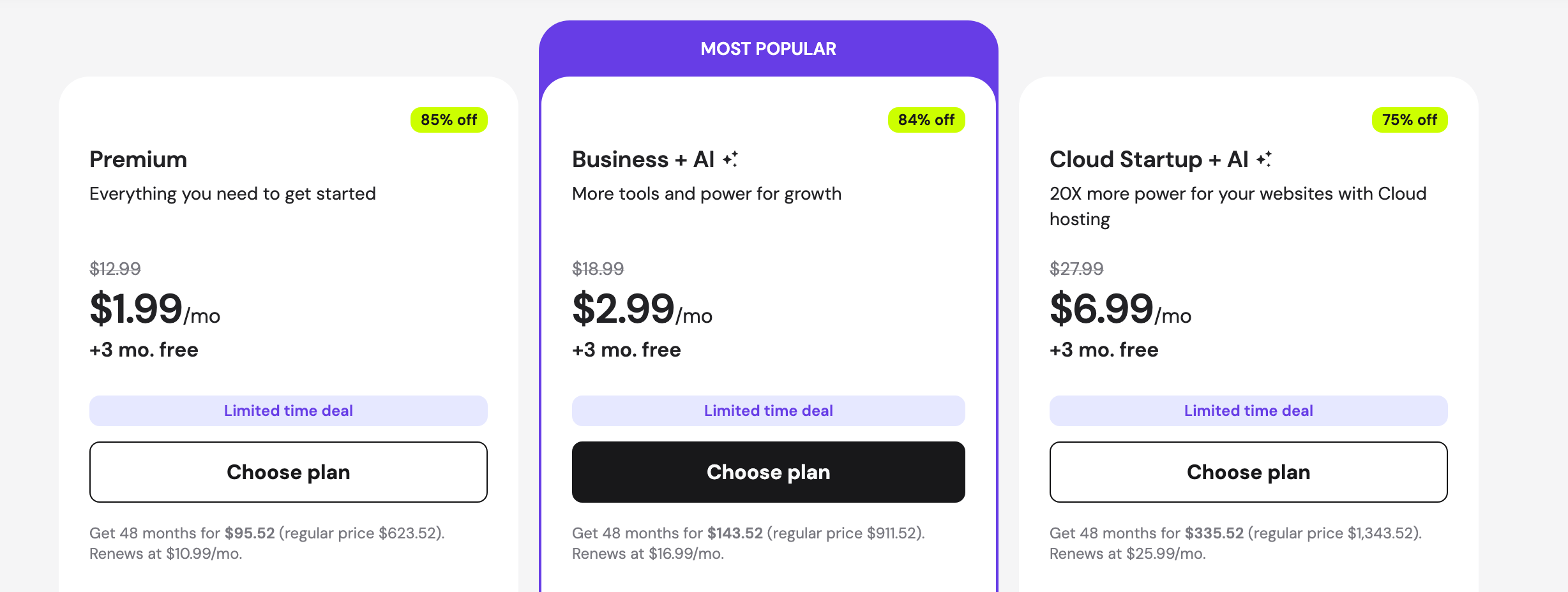
Hostinger’s AI tools are available in the following managed WordPress hosting plans: “Business + AI” and “Startup Cloud + AI”. The “Premium” hosting pack does not include AI tools, however.
Presentation of Hostinger
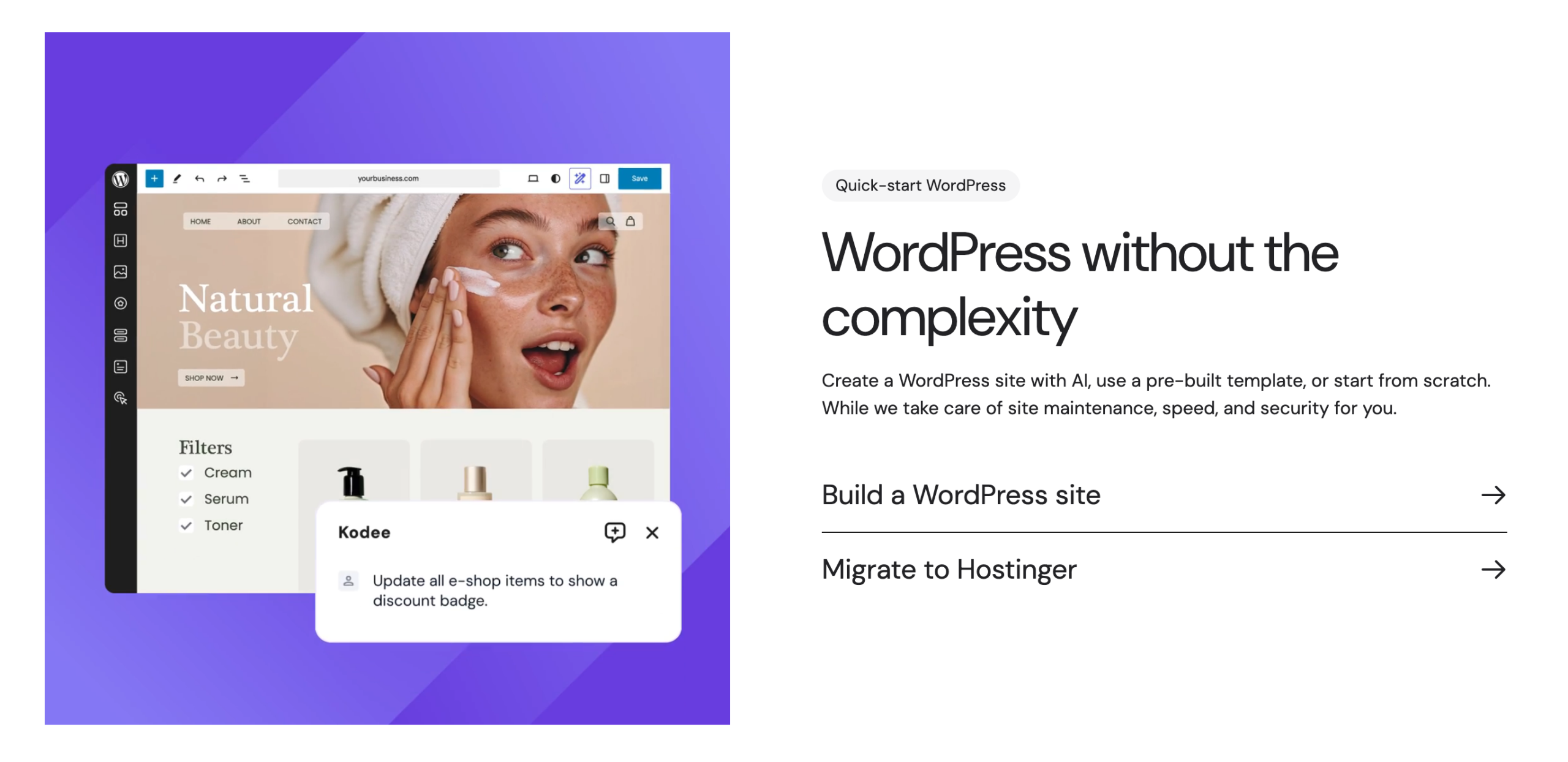
Before going further, let’s briefly recall what Hostinger is. Founded in 2004 in Lithuania, Hostinger is today one of the most used web hosts worldwide, with over 5 million clients in more than 150 countries.
Its reputation is based on several strengths, such as:
- Very competitive entry-level prices, starting at $1.99 excluding VAT per month.
- Hosting that makes no compromises on performance and security, with 24/7 available support.
- An easy-to-use interface (hPanel) accessible to all technical levels, from beginners to advanced technicians.
Hostinger offers shared hosting plans, VPS servers, cloud hosting, and optimized WordPress hosting.
It is precisely in the latter segment – WordPress hosting – that the host has invested the most in recent years, notably by integrating its AI tools directly into the user journey.
All this makes Hostinger much more than just a host. Overall, it is a complete solution to foster the growth of your WordPress site.
Hostinger AI tools, for whom?
Is it clearer for you? Promise, we’ll quickly move to the practical part. But just before that, let’s clarify an important aspect: the core target audience of Hostinger’s AI tools.
On this question, there isn’t just one good answer, but several. According to us, Hostinger’s AI tools primarily target four user profiles:
- Beginners in website creation, who never used WordPress or want to launch their first project faster.
- Bloggers and content creators, who need regular support to produce and optimize their texts, without mastering technical SEO.
- Freelancers and WordPress agencies who want to save time on certain tasks: site creation, maintenance and technical tasks, performance optimization, etc.
- SMBs and independents managing their sites alone, for whom every hour gained on technical tasks is an hour more for their core business.
In practice, the vast majority of WordPress users (bloggers, consultants, small e-merchants, associations, etc.) fit the profiles for which these tools were designed.
All good for you? Then let’s speed up in the next part, where you will discover how Hostinger’s AI tools can be used in your daily life.
By the way, a small warning about AI. Keep in mind that the goal is not to replace your work, but to assist you at certain key steps and save you time.
In short: don’t rely solely on AI, and keep using your brain, it’s important!
Practical cases: how to use Hostinger’s AI tools?
How to create a WordPress site with AI Website Builder?
Let’s start our demo series with Hostinger’s AI Website Builder. This one allows you to generate a complete WordPress site from a guided questionnaire.
You don’t need to pick a theme, configure plugins, or manually structure your pages. AI takes care of it, based on your answers.
To rely on this AI site builder from Hostinger, you must have hosting with them with either the “Business + AI” or “Cloud Startup + AI” plan.
Once that’s done and you’re logged into your client dashboard (hPanel), go to the menuWebsites > Websites list. Click the “Add website” button, then “Hostinger Website Builder”:
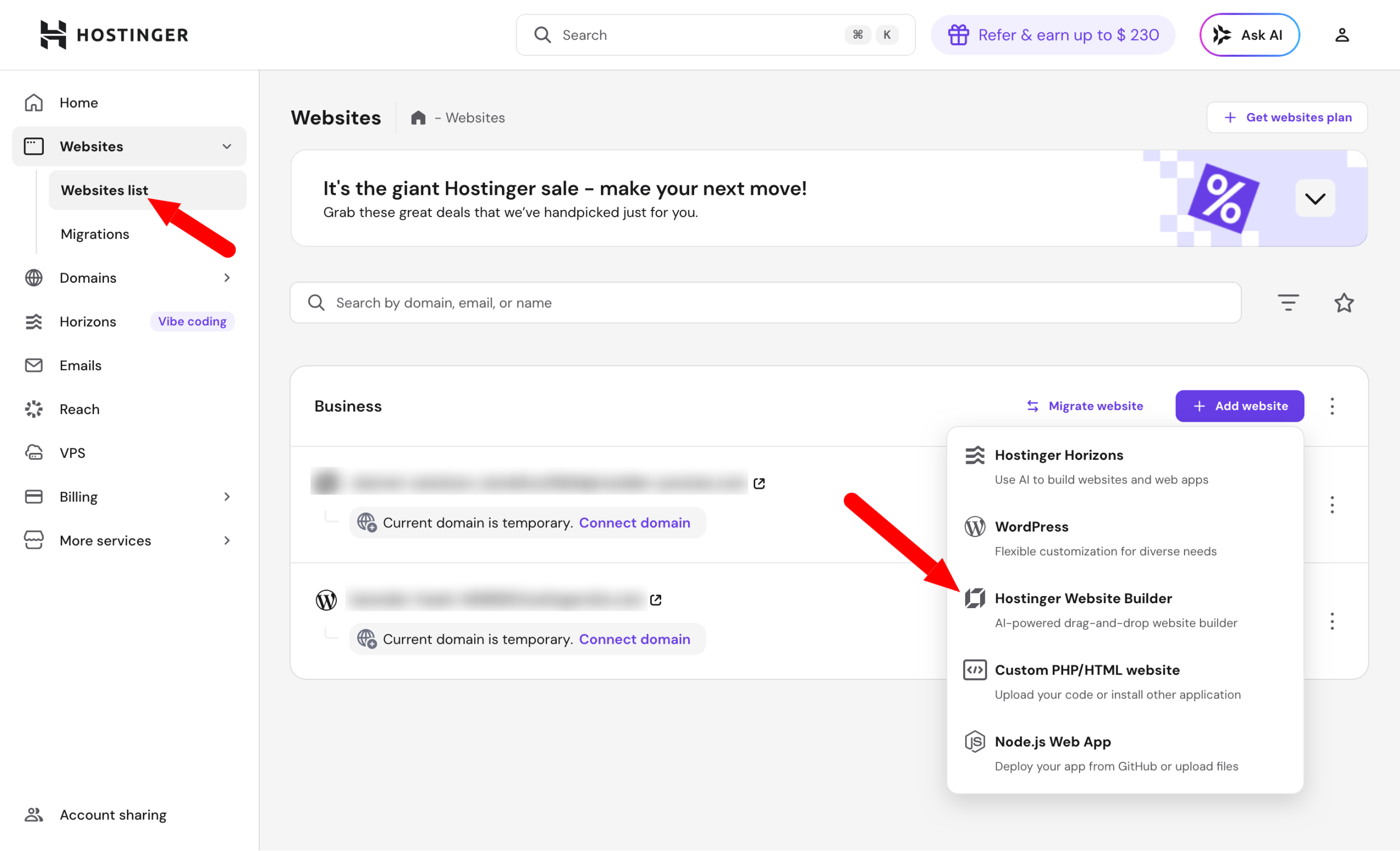
Then, follow the steps displayed on screen by the setup assistant.
Select the type of site to create with Hostinger’s AI Website Builder
First describe your site or business. The tool offers you a list of choices (blog, portfolio, online store, one page, professional site, restaurant site, etc.). You can also use a ready-to-use template.
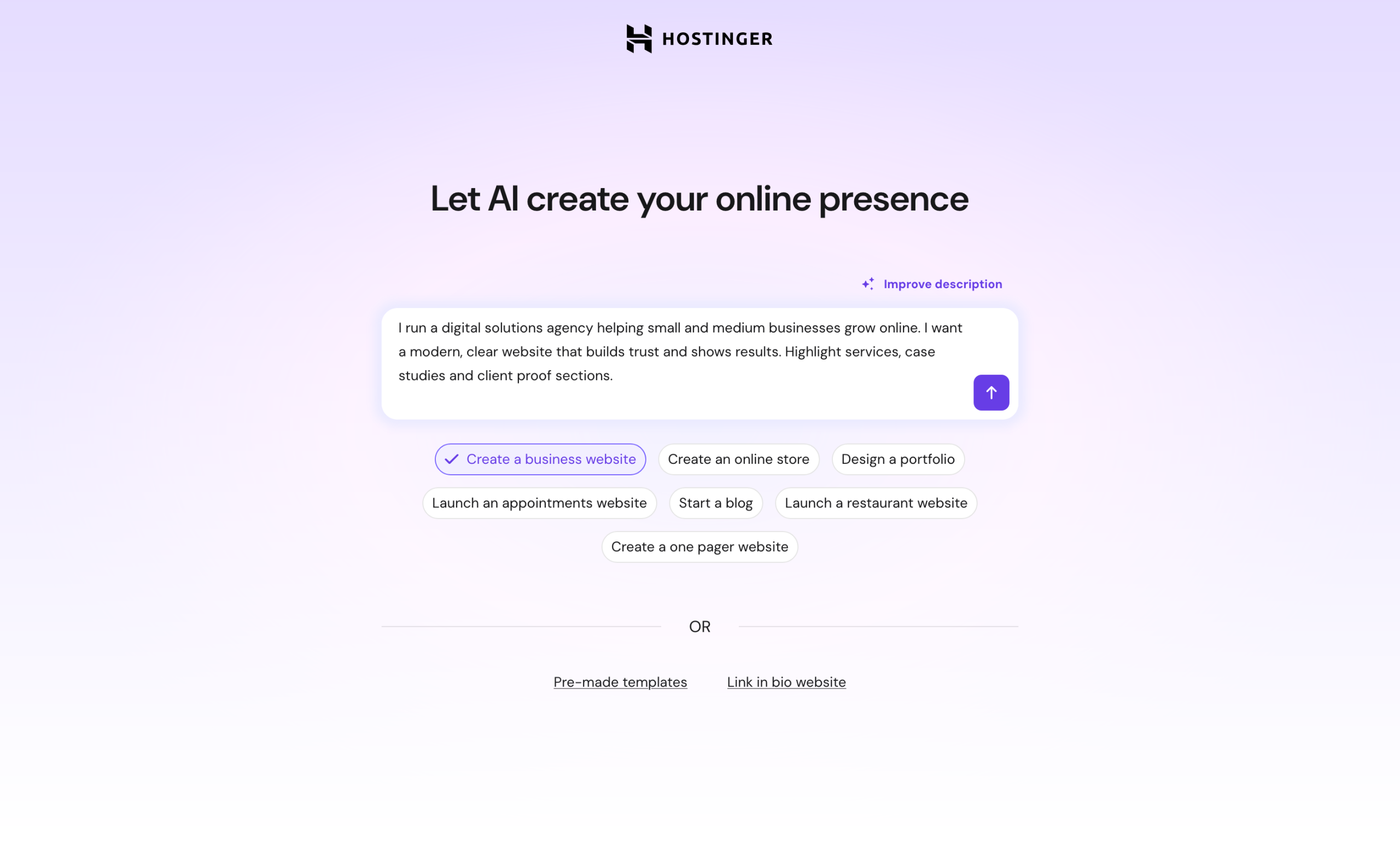
Wait a bit (for us it took less than a minute), while AI generates a complete website with design, content, and features adapted to your business and sector.
Adapt the resulting site
Hostinger then offers you a first draft, where you can edit the general idea, at the top right:
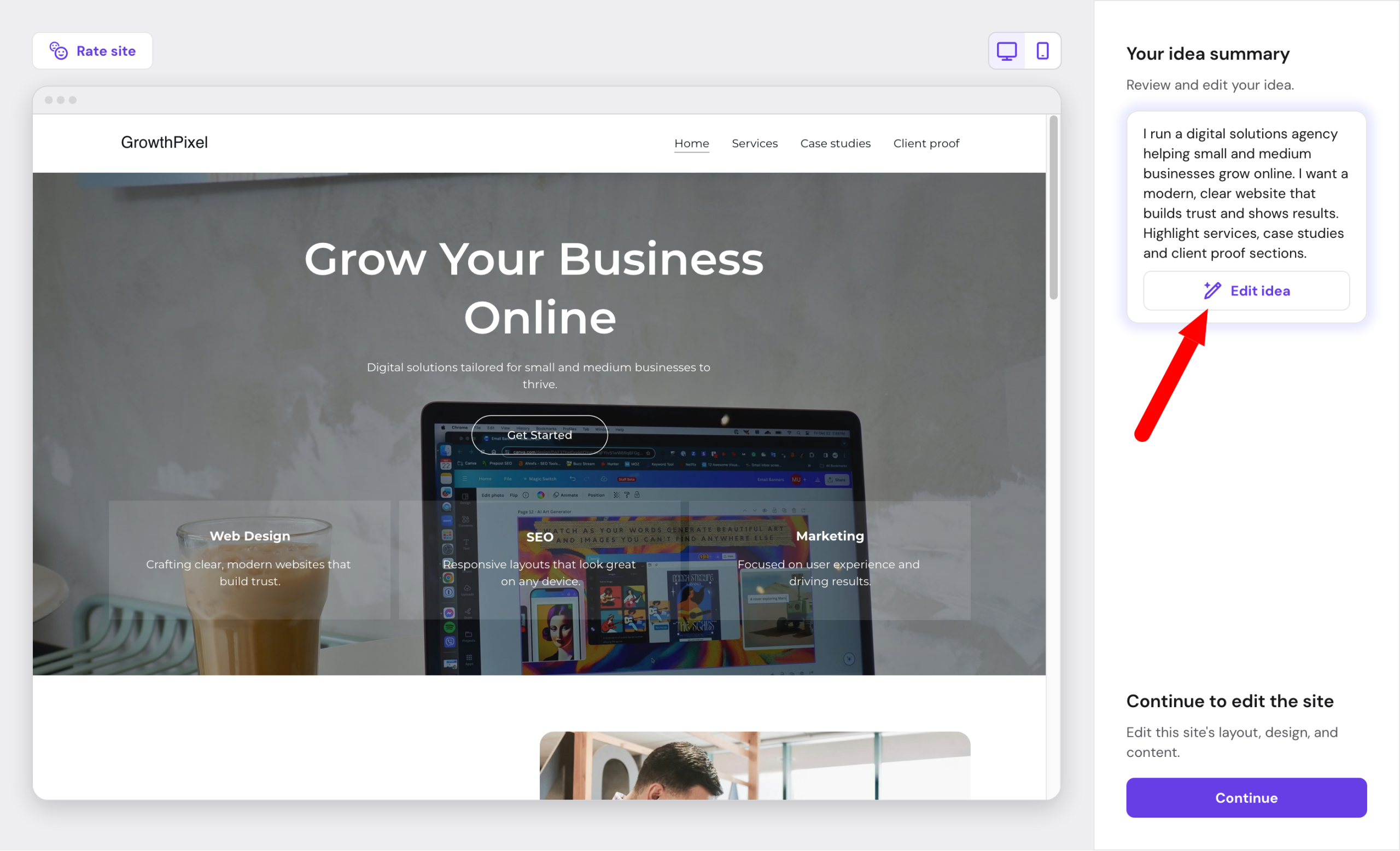
Look closely at the quality of the automatically generated content: it’s not just generic text.
AI adapts the wording to your sector and proposes page structures that meet the usual visitors’ expectations in your field.
Keep in mind the result is not a finished, perfect site. It is a solid base you’ll need to refine according to your visual identity, tone, and specifics.
Think of it as a first draft that saves you several hours of initial work.
Modify layout, design, and content
When you’re satisfied with this first sketch, move on to modifying visual and textual aspects.
Once on Hostinger’s AI page builder, you’ll see that editing is WYSIWYG (What You See Is What You Get).
Modifications happen in real-time, thanks to a drag-and-drop interface, which makes it easy to handle.
In the end, it’s very simple to find your way and understand how AI Website Builder works, even when discovering it for the first time.
On the left of the interface, you have access to all builder menus:
- Elements: to add elements (Text, button, image, video, map, form, social icons, etc.) inside your page
- Pages: lists your site’s pages with the option to add more
- Site styles (colors, fonts, buttons, animations)
- AI Tools (image, text, page, section, blog, product sheet generators, SEO assistant, logo creator)
- Shop: to turn your site into a WooCommerce store
- SEO: to perform on-page SEO tasks, like generating Title and Meta-description tags for your pages
- More: to access other options like adding multiple languages to your site
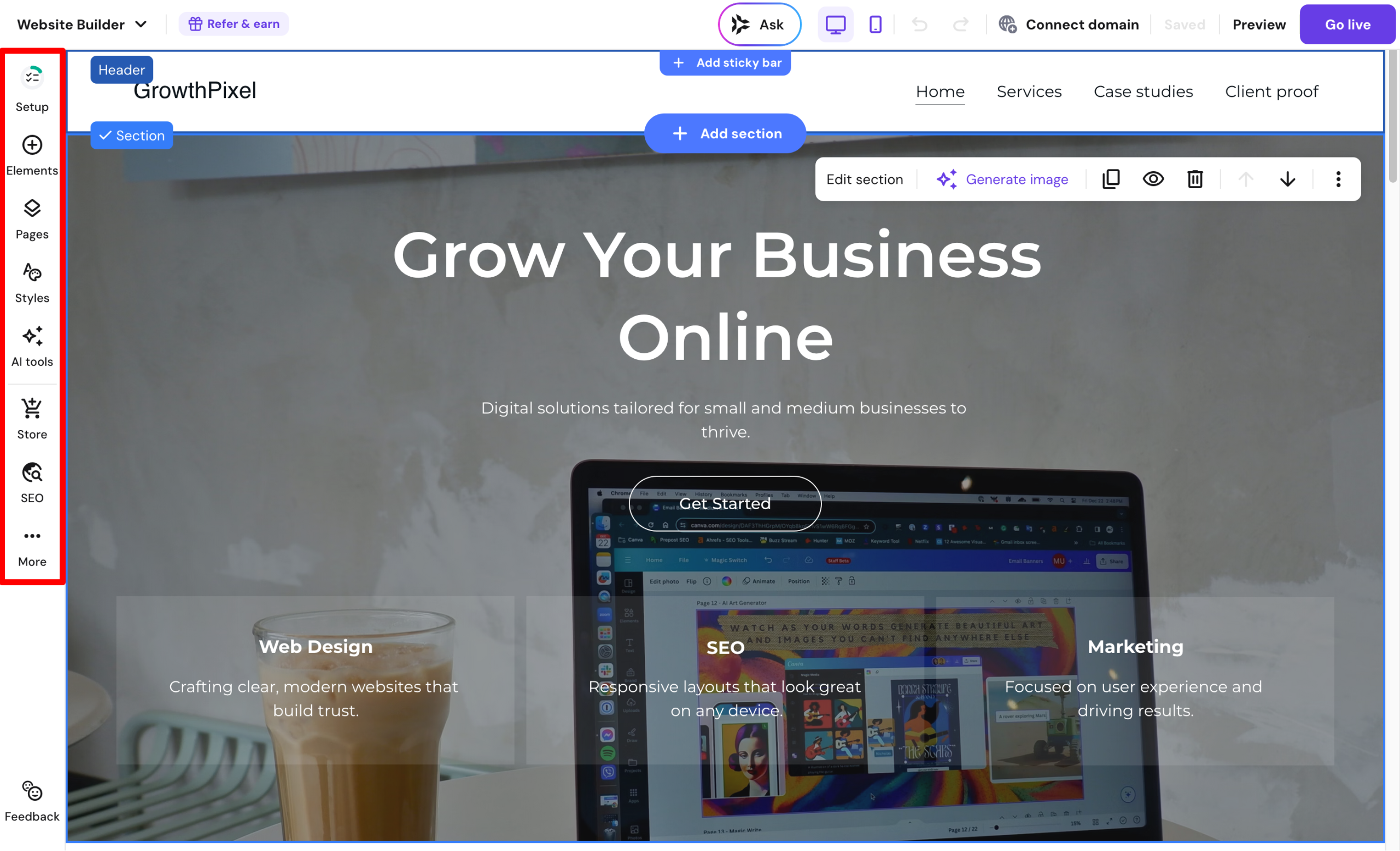
You have control over all aspects of your site, with no technical skills required: you don’t have to touch code.
To use the AI tools offered, simply go to the “AI Tools” menu, or select the area you want to modify on the page.
For example, if you click on a text area to change, you’ll see “AI Writer” appear with various options (rephrase, lengthen, shorten, check grammar, change tone, create text, etc.).
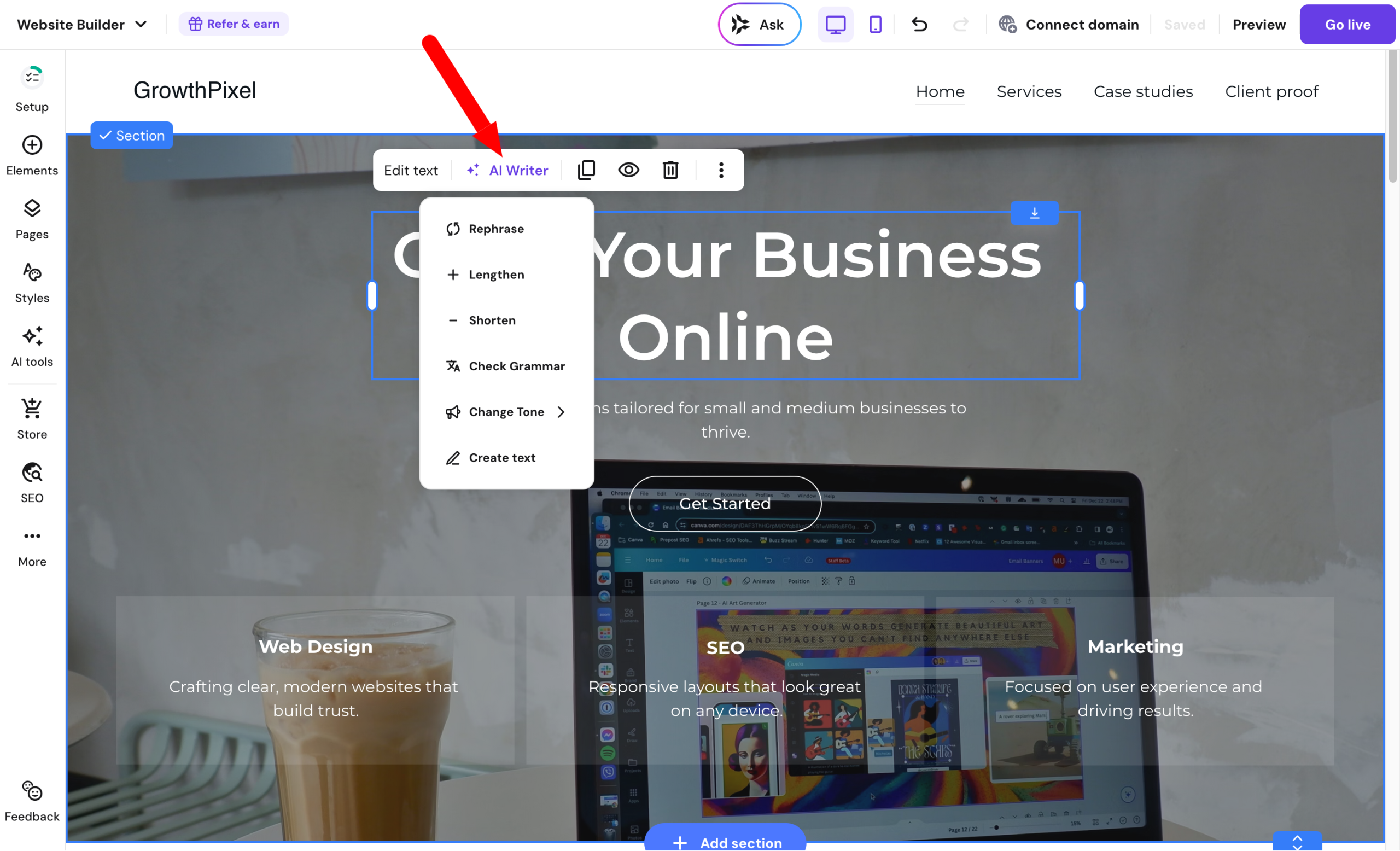
When your work is done, simply click the “Go live” button at the top right of the page.
Your website goes live instantly thanks to hosting, SSL certificates, and automatic management of all technical details.
To go further with customizing your site, I invite you to watch this instructive video:
Alright, but we see where you’re going. If you dug a bit into menus and the technical side, you probably realized one thing: the created site isn’t a WordPress site! Aargh, is that serious, doctor?
Not really, as Hostinger has it all covered. To transform your creation into a WordPress site, just go to the menu More > Export content to WordPress (accessible from the AI Website Builder interface).
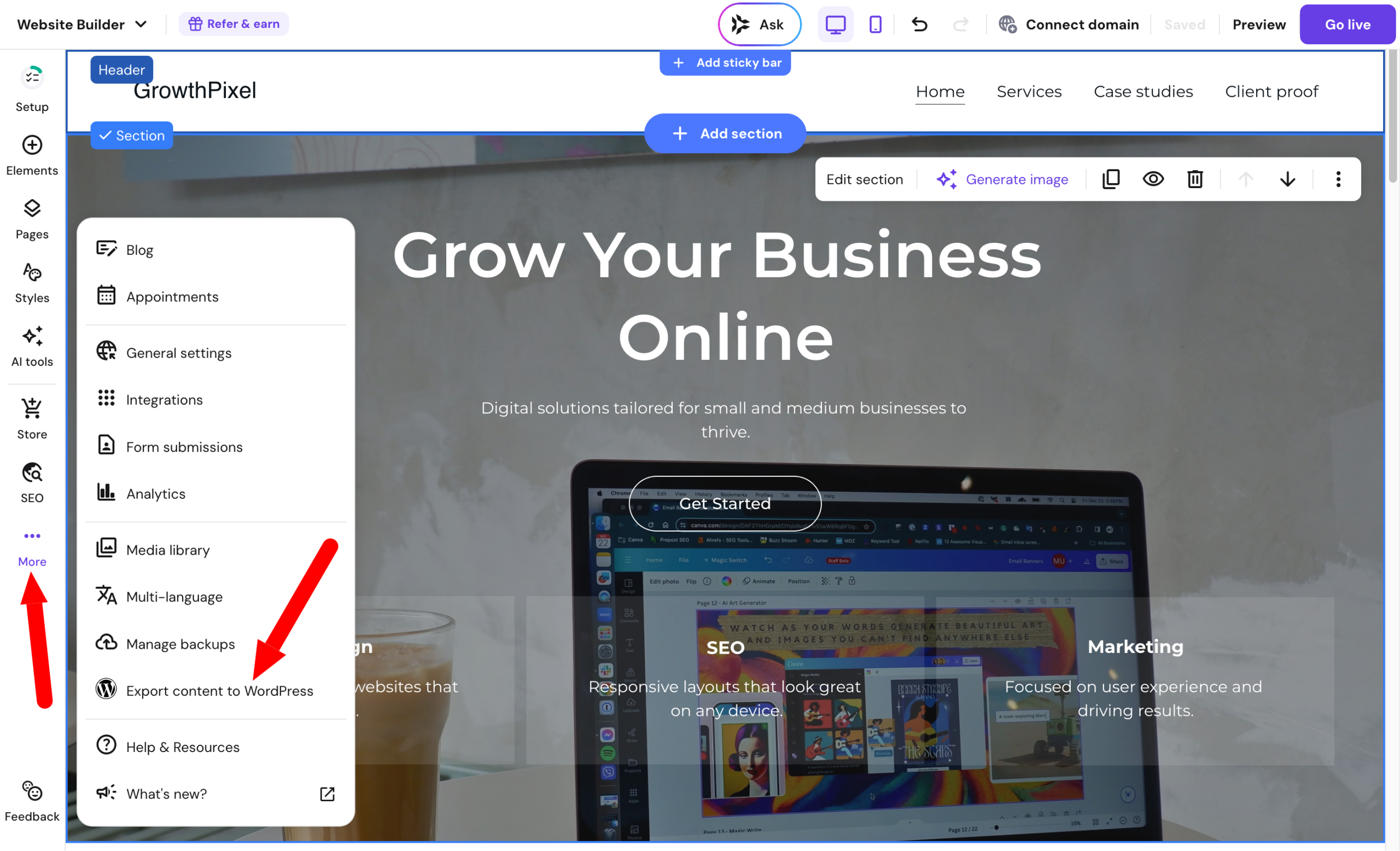
Enter your domain name, then create an application password on your WordPress admin interface (instruction manual here).
Start the export and wait a bit: the site you designed is now editable in your back office.
About that, we will see what you can do next in the following part.
How to manage your content and tasks with Kodee?
Kodee, Hostinger’s smart virtual assistant
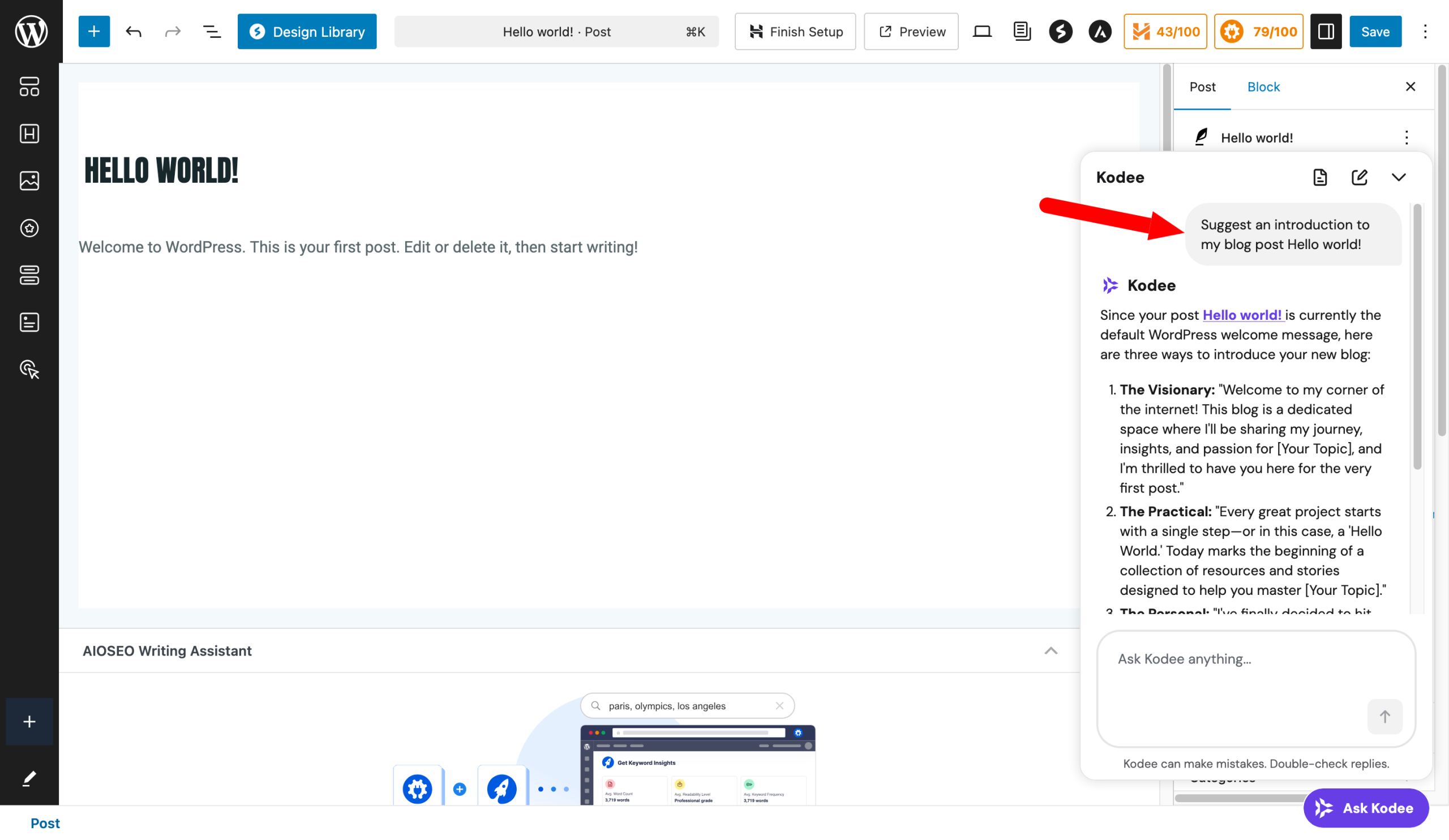
Once logged into your WordPress dashboard, you’ll notice a new element at the bottom right of your screen: a purple button labeled “Ask Kodee”.
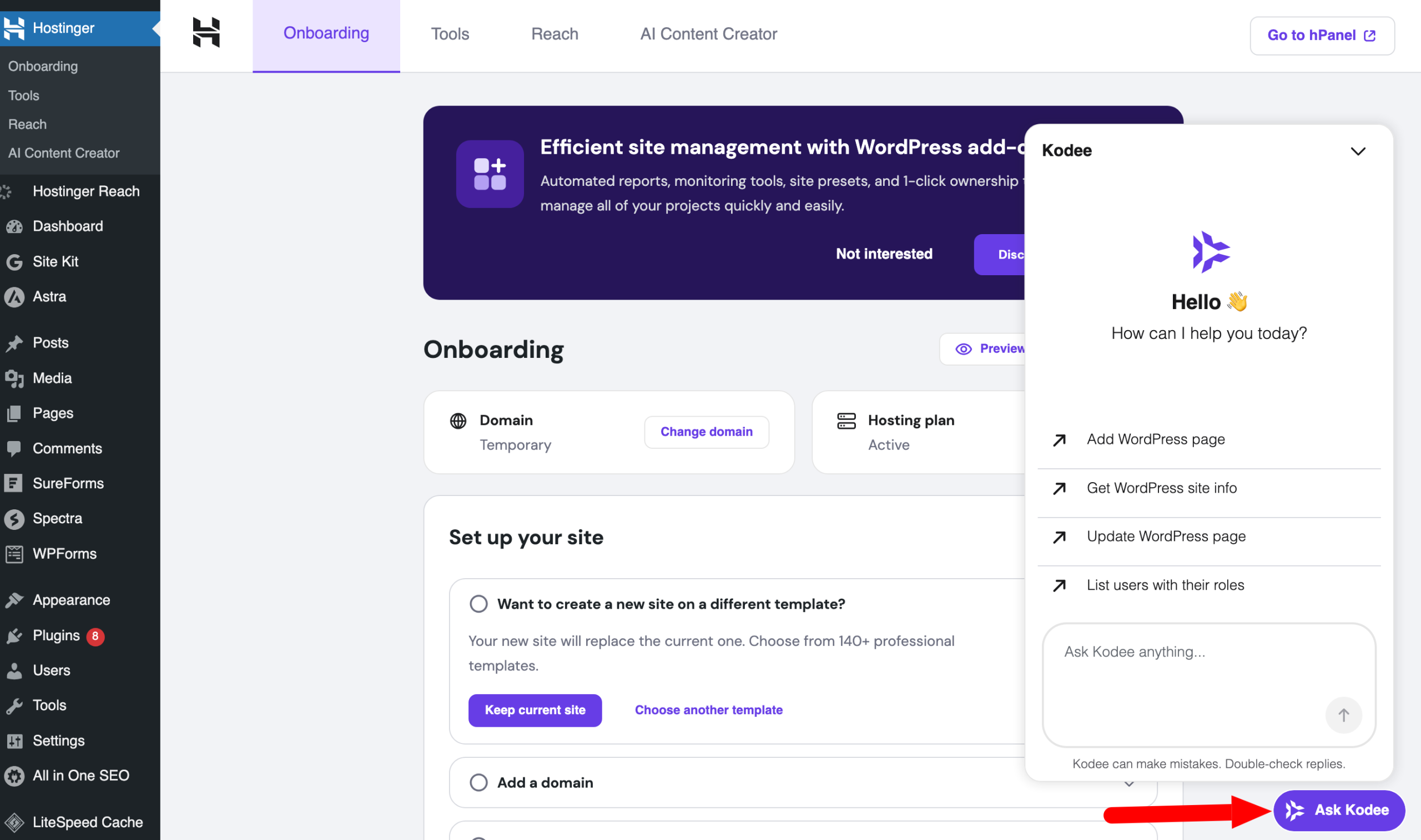
Kodee is Hostinger’s intelligent virtual assistant. Also available on your hPanel interface, this chatbot helps you manage your online presence with instant, proactive assistance.
For example, it can:
- answer technical questions
- guide you in settings, with advice on site management and optimization, which plugins to install, and how to configure them
- suggest solutions to common errors
- perform certain actions for you, like creating or updating a page
So don’t hesitate to ask it. Example? If you want to change colors and fonts on your site, ask Kodee for suggestions.
Also, Kodee is available in the WordPress Editor (Gutenberg). If you’re stuck editing content, ask it to help you with whatever you want.
It can, for instance, help you find titles, create text, optimize your SEO, add products or forms, generate images, change colors, switch fonts, etc. Basically, there’s a lot you can do.
Hostinger’s AI Content Creator
Once you are more familiar with Kodee, discover Hostinger’s AI Content Creator via the menu Hostinger > AI Content Creator.
You can use it to generate articles and pages via AI with several options:
- Content type: article, page, or form
- Writing tone: neutral, formal, reliable, friendly, or humorous
- Content length: short, medium, or long
- Content topic
- Main content keywords
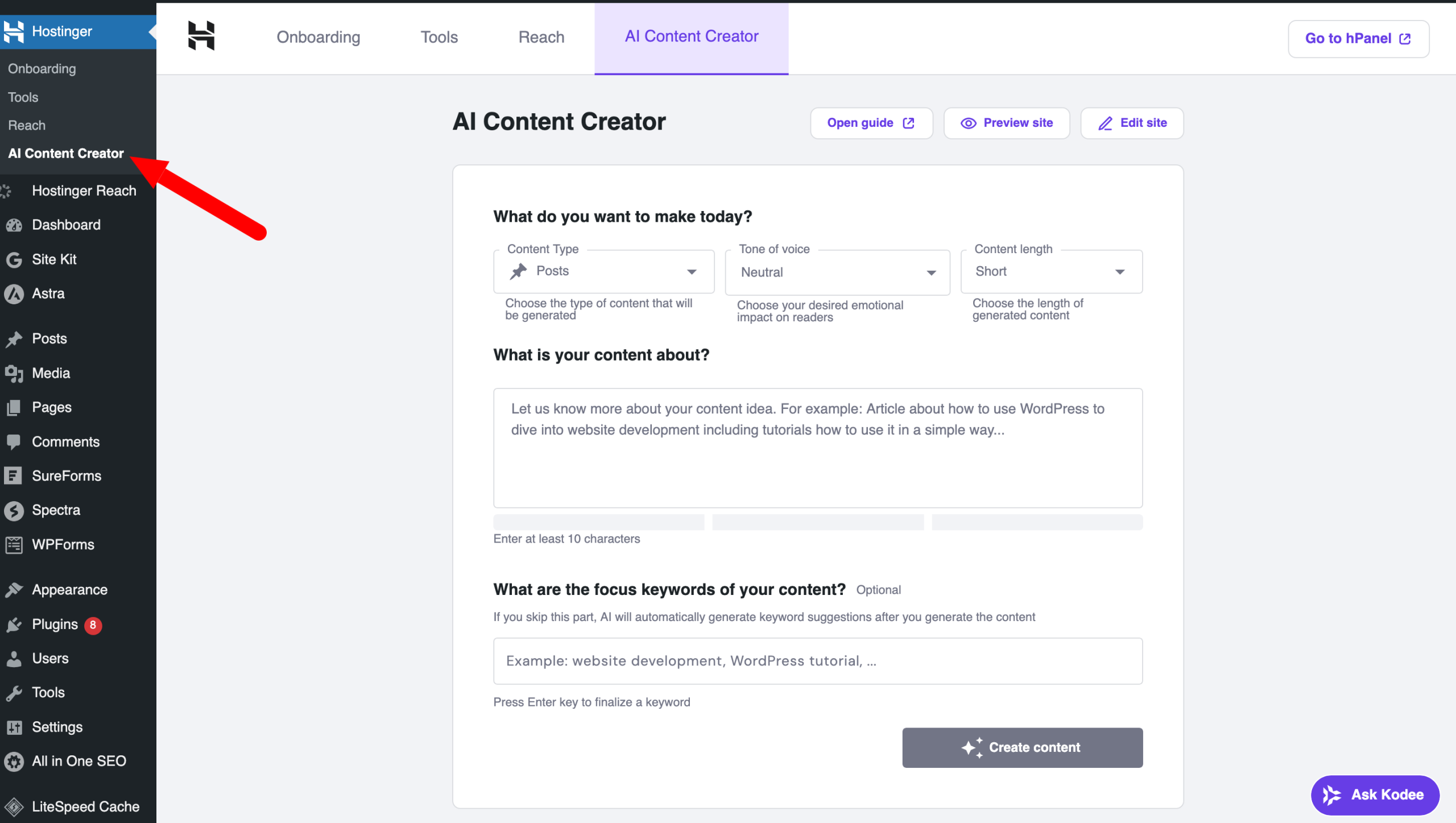
Once the article is generated, you can edit it in the WordPress editor (Gutenberg) like any other content, then publish it online when you want.
Managing updates, fixes, and maintenance with AI Troubleshooter
AI Troubleshooter is one of Hostinger AI’s most useful tools if you manage your WP sites on your own.
Its role? Detect certain errors (403, 404, 500, 503, etc.) and automatically fix common technical problems affecting a WordPress site.
When an issue is detected, you are notified on your hPanel dashboard:
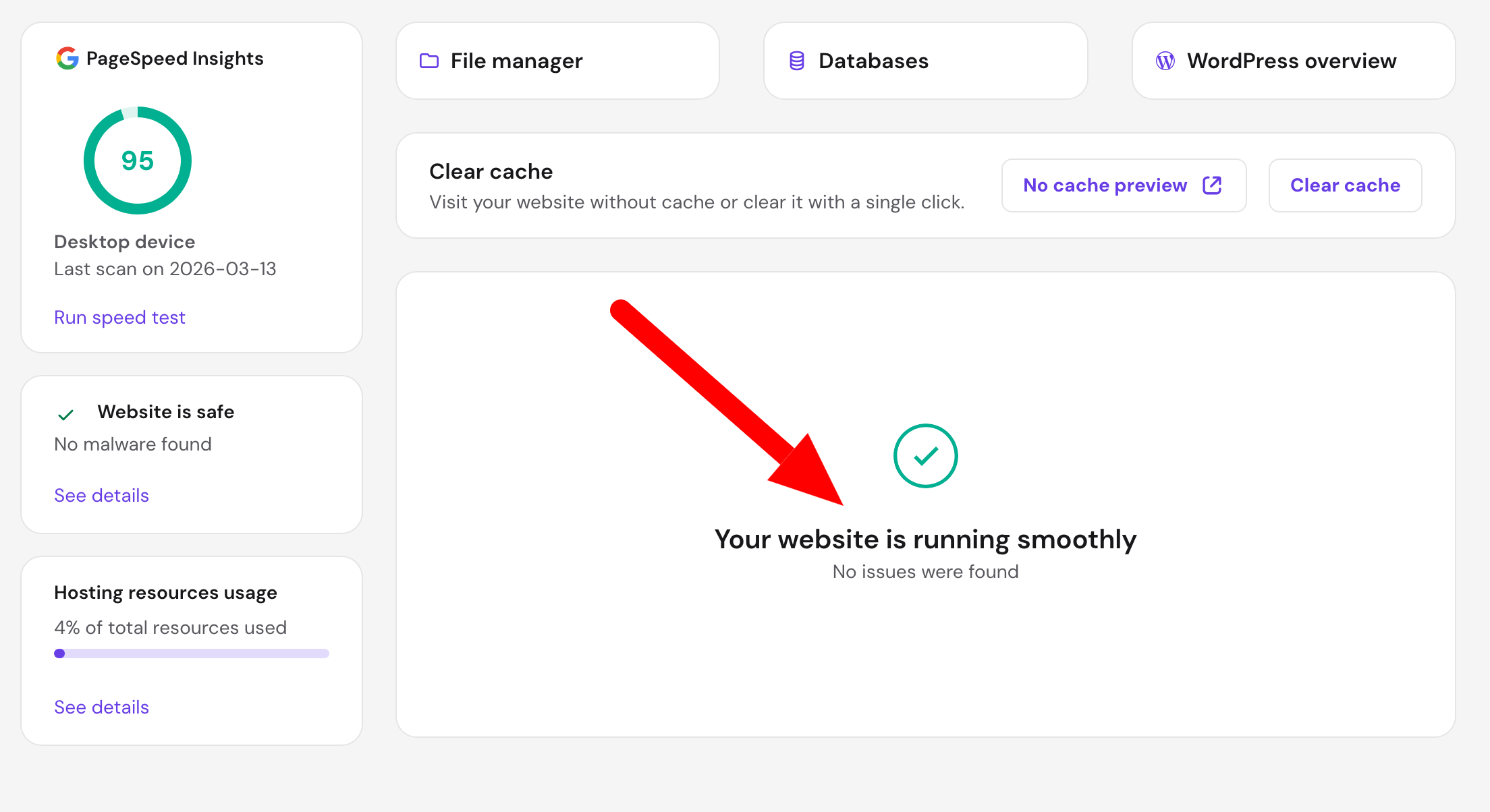
You can then watch a dedicated tutorial video, read an article about the error, and try to fix it yourself, or fix it with AI.
This last option takes you to the AI Troubleshooter tool. It will analyze your site by checking server info and your website data, error logs, and files.
In a few moments, the tool will provide a one-click applicable solution.
How to optimize your site’s loading speed with AI Site Optimizer?
Let’s continue our overview of Hostinger’s AI tools with AI Site Optimizer. It detects slow areas of your WordPress site, then automatically applies the most effective optimization settings to improve loading speed.
It also allows comparing performance before and after changes, with the option to undo optimizations if needed.
To use it, head to hPanel. When you have selected your WordPress site, go to WordPress > AI Bug Fixer (AI Troubleshooter).
Click the “Run speed test” button to start the analysis:

If areas for improvement are detected, the tool will notify you. If you want to optimize your site, a button to optimize performance will be offered to you.
The tool will use the best optimization settings based on your WordPress site’s specific results and automatically apply them to improve its performance.
You will be able to follow the progress during automatic implementation.
Once performance improvements are complete, you can check current speed results and site changes.
Emailing with Hostinger AI Reach
To finish this series of practical cases on Hostinger AI tools, let’s focus on a very important aspect to maximize WordPress site growth: marketing.
On this subject, Hostinger offers its own in-house emailing solution called “Reach”. This tool is “intended for small businesses and creators”, Hostinger specifies.
Before adding: “It handles your entire email marketing journey: from contact list creation to campaign sending to results tracking.”
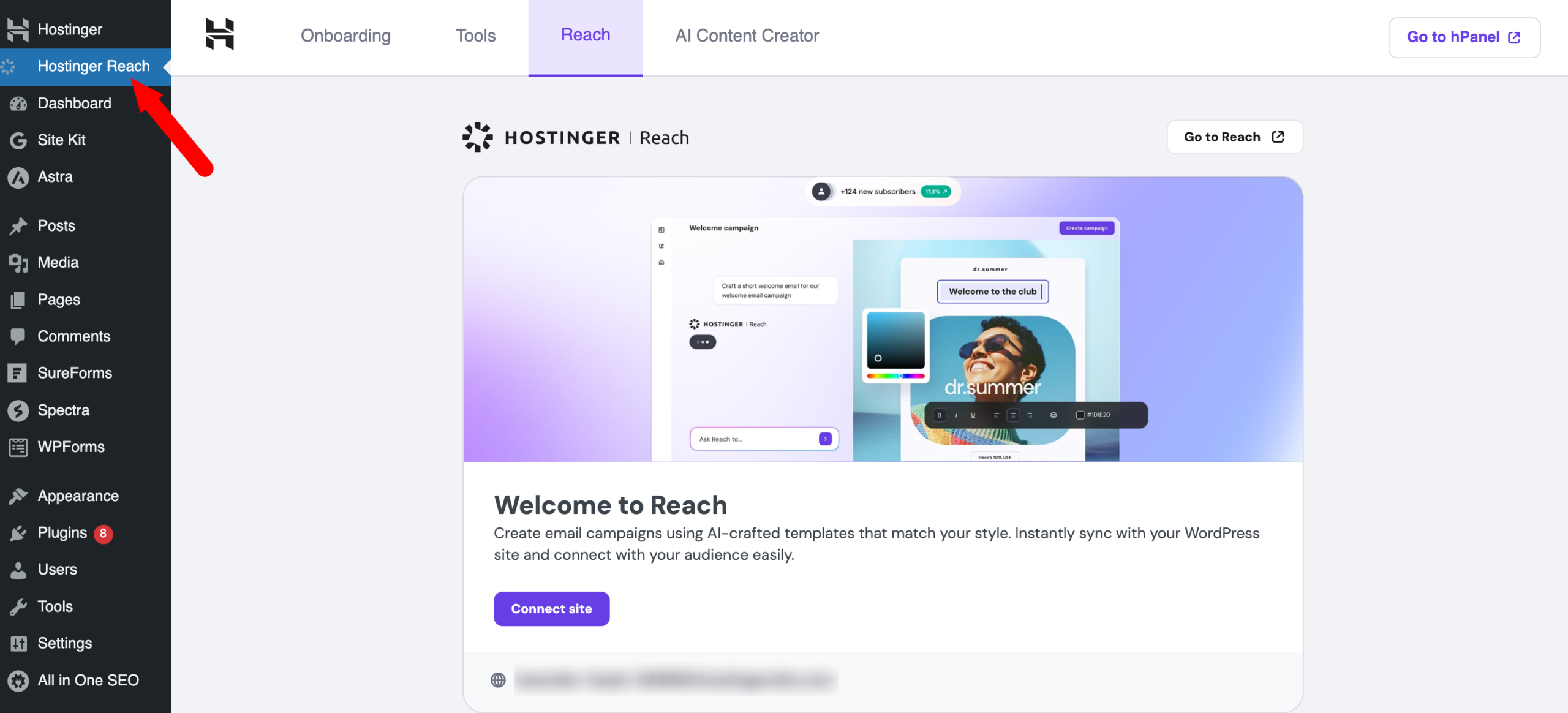
Reach has several advantages:
- It can be used without technical setup, complex integrations, or prior marketing or design experience.
- The tool includes an AI-optimized template creator: it writes and suggests the most relevant layout for your message.
- Hostinger handles the technical details: GDPR compliance, deliverability, and spam filters notably.
- Integrated into Hostinger’s ecosystem, Reach allows you to set up a professional domain name and dedicated email address to send emails from your own branded address.
- You can schedule and automate email sending (e.g., welcome email after a new subscriber registers).
- Reach offers a free one-year plan, allowing you to send 200 emails and reach 100 unique subscribers per month. Paid plans are based on how many unique contacts you want to reach and how many emails you send monthly.
Besides, you can automatically sync new subscribers to your list, who registered, for example, via a sign-up form, in two different ways:
- Via the website builder (AI Website Builder): your contacts are transferred in real time to Reach.
- Via the WordPress plugin Hostinger Reach.
To learn more, watch this video:
To be fully exhaustive about AI within Hostinger’s ecosystem, know that the Lithuanian platform also offers “Hostinger Horizons”, an AI-powered tool that helps you create custom web applications without coding.
We’ve finished the practical part. Let’s continue below with the pricing aspect.
Hostinger’s AI tools, how much do they cost?
It’s often the last question… but the first one on people’s minds: price.
Good news: Hostinger’s AI tools don’t constitute an additional billing line in most cases.
All features described above are built into Hostinger’s WordPress hosting plans, except the “Premium” plan.
So, the “Business + AI” and “Cloud Startup + AI” plans are concerned.
In other words, if you subscribe to one of these two plans, you get AI tools at no specific extra cost. It’s not a premium module to unlock separately.
Hostinger’s WordPress hosting plans are available at very affordable prices (starting at $1.99 excl. VAT/month for the “Premium” plan the first year).
For Hostinger Reach more specifically, pricing varies depending on email volume sent. Some sending limits are included in hosting plans:

Overall, the features-to-price ratio of Hostinger’s plans with integrated AI is hard to beat on the current WordPress hosting market.
You get a set of tools that, if taken separately, would require several subscriptions to third-party services.
Note there is a 14-day free trial to test AI Website Builder risk-free.
Our final opinion on Hostinger’s AI tools
After reviewing all the features, what is our conclusion on Hostinger’s AI features?
Our opinion is overall positive, with some important nuances.
What works well
- Native integration into hPanel and your WordPress dashboard is a real strong point. No need to juggle between multiple interfaces, manage API keys, or configure tool connections. Everything is accessible in the same place, reducing friction for non-technical users.
- AI Website Builder delivers on its promises if you seek a quick launch. The result isn’t perfect, but it’s more than enough as a starting point, especially for a first site.
- AI Troubleshooter may be the most useful tool day-to-day. It addresses a real pain point for WordPress site managers: fast fixing of technical problems without needing a developer or hours spent Googling.
- The overall value-for-money is excellent. For the price of regular shared hosting, you get an AI tool ecosystem that represents real added value.
Points of caution
- Hostinger’s AI tools are designed to simplify, not replace your expertise. Kodee can make mistakes, AI Website Builder produces generic content to refine, and AI Site Optimizer doesn’t fix all performance issues. They are assistants, not autonomous experts.
- As with any AI tool, it’s essential to keep a critical eye on generated outputs, especially for content intended for publication. AI-generated text should always be proofread, reworked, and personalized before publishing on your site.
In summary, AI at Hostinger is not a technological revolution strictly speaking (other hosts also bet on AI with proprietary solutions).
However, their pragmatic approach is well executed. It provides real value for the users these tools were designed for.
If you are already a Hostinger client, it would be a shame not to explore these features, already included in your subscription.
And if you’re choosing a WordPress host, Hostinger’s AI ecosystem is a serious argument in its favor, especially if you value simplicity and autonomy in managing your site.
To learn more about their offers, click the button just below:
