
Content creation is a constant challenge for webmasters and content creators. With the emergence of intelligent technologies, AI Power offers an innovative solution for optimizing editorial production on WordPress.
This artificial intelligence plugin enables you to generate, enhance, and optimize content rapidly. With over 10,000+ active installations, AI Power has received generally positive user reviews on the official WordPress directory.
Aimed at bloggers, web editors, and marketing professionals, AI Power offers advanced features such as automatic article generation, AI-driven image creation, and multilingual SEO optimization.
Advantages and disadvantages

| Advantages | Disadvantages |
|---|---|
| Automated content generation Enables rapid creation of articles, product descriptions, and other textual content | Complex configuration Interface potentially difficult to learn for less technical users |
| Advanced multi-functionality Integrates text generation, images, chatbots, and SEO optimization in a single plugin | Dependence on AI models Variable content quality depending on the performance of the AI templates used |
| WooCommerce compatibility Automatic generation of product descriptions and e-commerce content | Potential cost Pricing may increase as functionality and templates evolve |
| Multilingual support Available in over 40 languages, suitable for international sites | Risk of standardized content Content generation may lack originality or personalization |
| Integration with OpenAI Use of high-performance GPT-3.5 and GPT-4 templates | Consumption of credits Potential limitation of number of generations depending on subscription |
| Test playground Allows you to experiment with functionalities without the risk of modifying the site | Data confidentiality Potential concerns over use and storage of generated content |
AI Power in numbers
| Latest version | 2.4.97 |
| Date of last update | |
| Active installations | 10,000+ |
| Average rating | |
| Launch date | June 2023 |
| Price | $9.99/month for Pro version |
| Supported languages | 40 |
| AI models used | GPT-3.5, GPT-4, DALL-E, Stable Diffusion |
| Compatibility | WooCommerce, SEO Plugins |
AI Power plugin pricing
| Free version | Pro Version |
|---|---|
| $0 | $9.99/month |
|
|
AI Power user reviews
The AI Power WordPress plugin receives very positive overall reviews from its users, with an average rating close to 5 stars on the official directory.
In particular, users praise its ease of use, advanced artificial intelligence features, and excellent technical support.
Regularly mentioned highlights include automatic content generation, chatbot integration, and the ability to quickly create AI-powered applications.
Honestly, I’d keep this plugin’s potential a secret, but I don’t want to defy the Universe by being selfish and will sincerely recommend it to anyone aiming to make good use of it.
Teira Naahi
This is by far the most feature-packed and easy-to-use AI plugin on WordPress. With daily updates, it continually evolves based on our feedback.
lavvx5
My life will never be the same! Thank you for giving me my life back and my family thanks you! Download unless you like to spend hours in front of a computer, the automatic content feature is amazing.
mlg4035
Alternatives to AI Power
AI Engine
AI Engine is a versatile WordPress plugin that lets you create chatbots, generate content, and rename multimedia files. It supports several AI models, including GPT-3 and GPT-4, and offers a user-friendly interface.
AI Engine includes statistics to monitor OpenAI usage and internal integration with other plugins, making it highly versatile for content and image generation needs.
AI Bud
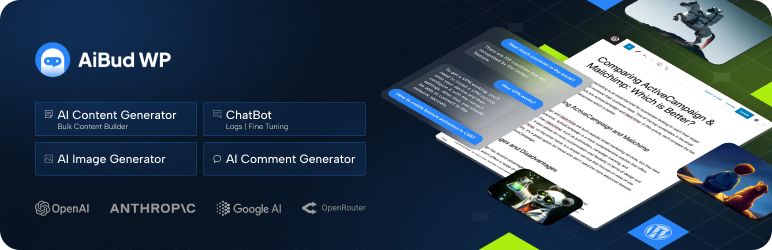
AI Bud is an innovative plugin that uses artificial intelligence to transform content creation. It generates high-quality images and engaging content, and manages chatbots and website optimization.
AI Bud uses advanced templates like GPT-3, GPT-4, and Google Gemini, and it offers integrations with SEO plugins like Yoast SEO and RankMath in its Pro version.
Uncanny Automator
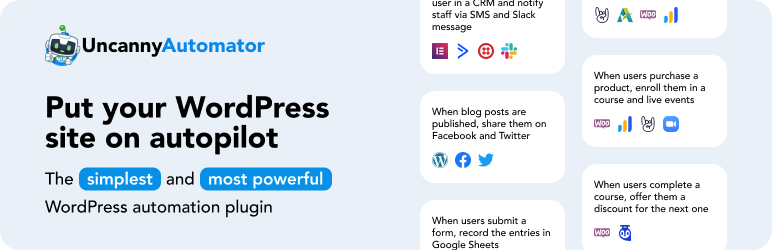
Uncanny Automator, combined with ChatGPT, offers a robust solution for generating images and content via AI. This plugin allows you to create automated workflows to generate images and blog posts using ChatGPT’s AI templates.
It also integrates tools such as WPForms and automatically uploads AI-generated images to the WordPress media library.
AI Power FAQs
How do I install the AI Power plugin on WordPress?
To install the AI Power plugin, access your WordPress dashboard, then go to Plugins > Add New. Search for “AI Power” and click on “Install now.”
Once installed, activate the plugin. You can also download the plugin from WordPress.org and upload it manually via the “Upload plugin” option.
What are the main features of the AI Power plugin?
The AI Power plugin offers a variety of features, including:
- Text and image content generation
- A chat widget
- An automatic content generator
- An authoring tool for WooCommerce products
- An audio converter
- AI training
- Integrations with various AI models such as GPT-4, GPT-3.5, Claude, Gemini, and more
It also includes customization options and integration with WooCommerce.
How do I configure the chat widget with AI Power?
To configure the chat widget with AI Power, you first need to activate the chatbot module in the plugin settings. Then you can customize the chatbot’s responses and behaviors using your own content and products.
You can also use the AI training option to train the chatbot to answer your customers’ specific questions.
What AI models does AI Power support?
AI Power supports a wide range of AI models, including GPT-4, GPT-3.5, Assistant API, Claude, Gemini, Azure, Grok, Mistral, LLaMA, Yi Chat, and Alpaca.
It also uses specific templates such as o1-mini, o1-preview, GPT-4o, GPT-4o-mini, and GPT-4 Vision.
How do I use AI Power to generate content for WooCommerce?
To generate content for WooCommerce with AI Power, use the “Product Writer” module to create titles, descriptions, tags, and more for your WooCommerce products.
You can provide a product title and the plugin will automatically generate the necessary content.
How much does it cost to use AI Power?
Using AI Power requires an OpenAI API key to access advanced AI templates like GPT-4.
Costs are based on a pay-as-you-go model, with a free start-up credit followed by fees for using AI models.
How do I solve OpenAI API connection problems with AI Power?
If you have problems connecting to the OpenAI API with AI Power, first check that your API key is correct and properly configured in the plugin settings.
See the official AI Power documentation for detailed instructions and solutions to common problems.
Thank you for visiting this page dedicated to AI Power 🙏
The WPMarmite team hopes you’ve been able to find out more about this WordPress plugin!
To find out more, visit the official website and their social networks:
You can also share your experience with AI Power by writing a review below. 👇
Found an error on this page? Click here to report it.

