
Schema – All in One Schema Snippets is a WordPress plugin designed to simplify the integration of rich snippets on your site. With over 30,000+ active installations, this tool automatically optimizes the SEO of your content.
The aim: to generate structured tags that improve visibility in search results and potentially increase click-through rates.
Advantages and disadvantages

| Advantages | Disadvantages |
|---|---|
| Wide variety of structured tag types (events, products, articles, recipes, etc.) | Possible compatibility issues with other WordPress plugins |
| Easy to implement without in-depth technical knowledge | Dependence on Google algorithm updates |
| Significantly improved visibility in search results | Potential slowdown in performance if too many tags are added |
| Interactive display with visual elements (stars, photos, prices) | Manual configuration required for each content item |
| Compatibility with social network sharing | Risk of penalization if tags do not comply with Google guidelines |
| Potential increase in click-through rate (CTR) | Learning curve to understand all parameters |
| Detailed customization of snippets | Regular updates required |
Schema – All in One Schema Snippets in numbers
| Latest version | 1.7.9 |
| Date of last update | |
| Active installations | 30,000+ |
| Rating | |
| Supported tag types | 12 |
| Available languages | Multilingual |
| WordPress compatibility | 3.7 and above |
Schema – All in One Schema Snippets pricing
| Free | Pro |
|---|---|
| $0 | $79/year or $249 for a lifetime license |
|
|
Schema – All in One Schema Snippets user reviews
The Schema – All in One Schema Snippets WordPress plugin receives very positive feedback overall from users, who mainly emphasize its ease of use and effectiveness in improving site visibility in search results.
Users particularly appreciate its simple interface and the ability to add structured tags without advanced technical skills.
This plugin is incredibly easy to use and has really improved my site’s visibility in search results. I installed and configured it in just a few minutes.
WP Beginner (5/5)
This plugin is free and offers a lot of features. It’s ideal for SEO beginners and experts alike. I highly recommend it.
Anonymous (5/5)
The plugin works well, but the front-end metadata display is not very pretty. However, you can customize the appearance with CSS.
Anonymous (3/5)
Alternatives to Schema – All in One Schema Snippets
Schema & Structured Data for WP & AMP
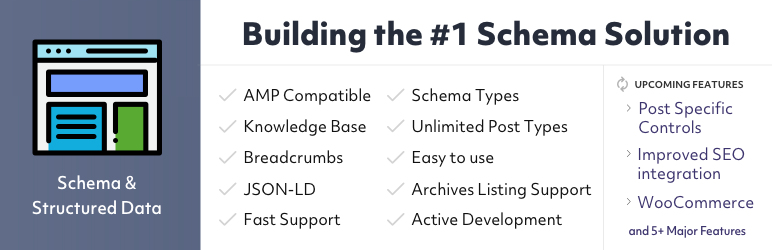
Schema & Structured Data for WP & AMP is a robust alternative to Schema – All in One Schema Snippets. This plugin is designed to adhere strictly to Schema.org guidelines, improving your site’s visibility in search results.
It offers over 35 tag types and is also compatible with AMP, ensuring your site loads quickly on mobile devices.
What’s more, it supports Knowledge Base and Google Reviews, as well as a rating module for creating your own rating boxes.
Schema App Structured Data

Schema App Structured Data is another solid alternative to Schema – All in One Schema Snippets. This plugin automates the creation and deployment of Schema.org tags, enabling your pages to qualify for enriched results and thus improving their visibility in search results.
It simplifies Schema tagging and maximizes the SEO potential of your existing content without the need for coding. Configuration is user-friendly, and you can easily activate the plugin, add your company details, and see how it automatically enhances your pages, articles, author profiles, etc.
Schema

Schema is a lightweight, efficient alternative to Schema – All in One Schema Snippets. This plugin is designed to easily add Schema.org markup in the JSON-LD format recommended by Google.
It is highly appreciated for its ease of use, with few adjustments to be made, and assisted configuration for setting certain parameters. It supports a wide range of tag types and is compatible with most WordPress themes.
The free version supports structured data for posts, while the Pro version offers additional features such as rich snippets for recipes, products, and FAQs.
Schema – All in One Schema Snippets FAQs
How do I install the Schema – All in One Schema Snippets plugin?
To install the Schema–- All in One Schema Snippets plugin, access your WordPress dashboard, then go to Plugins > Add New. Search for “Schema – All in One Schema Snippets,” click “Install,” and then “Activate” once the installation is complete.
What types of schema are supported by the Schema – All in One Schema Snippets plugin?
The Schema – All in One Schema Snippets plugin supports a variety of schema types, including articles, people, products, organizations, events, videos, audio, and more.
It lets you add structured data for a variety of content types without requiring advanced technical skills.
How do I configure the Schema – All in One Schema Snippets plugin?
To configure the plugin, go to the “Schema” section in your WordPress dashboard. Select the appropriate schema type for your content and fill in the required fields.
You can add information such as titles, authors, descriptions, prices, availability, etc., depending on the chosen schema type.
What are the advantages of using the Schema – All in One Schema Snippets plugin?
Using the Schema – All in One Schema Snippets plugin improves the visibility of your pages in search results by providing enriched snippets.
This helps search engines to better understand the content of your pages, which can increase click-through rates and improve your site’s SEO.
Why aren’t my rich snippets showing up in search results?
If your rich snippets aren’t showing up, check that the structured data is correctly configured and aligned with the page content. Use Google’s structured data testing tool to identify and correct errors.
Also make sure you respect Google’s structured data policies and regularly update your WordPress site, theme, and plugins.
Is the Schema – All in One Schema Snippets plugin free?
Yes, the Schema – All in One Schema Snippets plugin is free. It offers an easy-to-use solution for adding structured data to your WordPress site at no extra cost.
A premium version is also available, with more features and full support for structured data.
How do I solve common problems with the Schema – All in One Schema Snippets plugin?
To solve common problems, check the plugin’s support forum, visit Google’s structured data forum, and check the structured data section in your Google Search Console.
Be sure to update your WordPress site, theme, and plugins regularly to avoid incompatibilities.
Thank you for visiting this page dedicated to Schema – All in One Schema Snippets 🙏
The WPMarmite team hopes you’ve been able to find out more about this WordPress plugin!
To find out more, visit the official website and their social networks:
You can also share your experience with Schema – All in One Schema Snippets by writing a review below. 👇
Found an error on this page? Click here to report it.

