
Discover WP Sitemap Page, the essential WordPress plugin for optimizing your website navigation. With over 200,000+ active installations and an average rating of , WP Sitemap Page effectively meets the challenges of content discoverability for visitors and search engines alike.
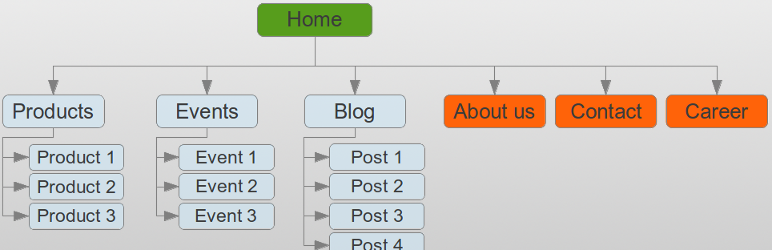
Opinions on WP Sitemap Page are unanimous: this plugin easily generates a customizable HTML sitemap using a short code. Compatible with a variety of content types, it lets you quickly create a clear, hierarchical navigation page, enhancing your site’s user experience and SEO.
Advantages and disadvantages
| Advantages | Disadvantages |
|---|---|
| Easy generation of a readable HTML sitemap page | Does not generate XML sitemaps for search engines |
| Full customization via admin panel | Total dependence on shortcodes |
| Multilingual support (over 15 languages) | Potentially reduced performance with large amounts of content |
| Option to exclude specific pages or content types | Limited customization without CSS skills |
| Hierarchical content display | Initial configuration may be complex for beginners |
| Enhanced user navigation | Additional SEO plugin required |
WP Sitemap Page in numbers
| Latest version | 1.9.6 |
| Date of last update | |
| Active installations | 200,000+ |
| Average rating | |
| Launch date | 2016 |
| Founder | Tony Archambeau |
| Available languages | 15 languages |
| WordPress compatibility | 3.0 or more |
WP Sitemap Page plugin prices
| WP Sitemap Page |
|---|
| Price: Free |
Main features:
|
WP Sitemap Page user reviews
The WP Sitemap Page plugin seems to be a popular tool with WordPress users, offering a simple and effective solution for generating sitemaps.
Feedback highlights its key strengths, including ease of use and its positive impact on user experience and SEO.
I’ve been using this plugin for around 3 years on all my websites. It’s one of those plugins you take everywhere with you. When you start a new site, it’s a must-have plugin. Excellent for indexing purposes.
jamaicahomes
One of the best plugins I’ve ever tried. It does exactly what it says on the box and it does it very well. I find it very useful if you want to offer a summary page on your site. Now I just need to figure out how to customize the style a bit, but that’s my limit. Thanks to the developer!
vincentlemonde
This plugin should be used on all websites. Perhaps you should create a block for better integration in the block editor.
Sébastien SERRE
Alternatives to WP Sitemap Page
Simple Sitemap

Simple Sitemap is a popular option for creating HTML sitemaps. It offers a free version that works for most sites, as well as a premium version for more customization, especially if you use custom post types and taxonomies.
You can display your sitemap as a list, a grid, or even separate tabs for each post type. Configuration is done visually using the block editor or shortcodes.
Companion Sitemap Generator

Companion Sitemap Generator is a free plugin that allows you to create both XML and HTML sitemaps. It automatically updates your sitemaps when content is added or removed, and lets you customize the look and layout of your HTML sitemap.
You can adjust the frequency and priority of updates for each post type and taxonomy in your XML sitemap.
WP Sitemap Page FAQs
How do I install the WP Sitemap Page plugin?
To install the WP Sitemap Page plugin, navigate to the “Plugins” section of your WordPress dashboard. Click on “Add a new plugin,” then search for “WP Sitemap Page.” Once found, click “Install” and then “Activate” to activate the plugin.
How do I add an HTML sitemap with the WP Sitemap Page plugin?
To add an HTML sitemap to your site, use the shortcode [ wp_sitemap_page]. You can insert this shortcode into any page or post on your WordPress site.
This will automatically generate a list of your site’s pages, posts, categories, and custom post types.
What types of content can be displayed with the WP Sitemap Page plugin?
The WP Sitemap Page plugin allows you to display all your site’s pages, posts, categories, custom post types, and taxonomies. You can also choose to display only a specific type of content by using attributes in the shortcode.
How do I customize the sitemap display with WP Sitemap Page?
You can customize the sitemap display via the plugin’s administration panel. You can exclude specific pages or post types by providing a list of page IDs not to be displayed.
You can also use CSS classes to customize the sitemap’s appearance.
Does the WP Sitemap Page plugin support multiple languages?
Yes, the WP Sitemap Page plugin is available in several languages, including English, French, Russian, Italian, Spanish, Dutch, Czech, and Persian. You can also add your own translations.
How do I uninstall the WP Sitemap Page plugin?
To uninstall the WP Sitemap Page plugin, navigate to the “Plugins” section of your WordPress dashboard. Find the plugin in the list of installed plugins and click on “Deactivate,” then on “Remove” to remove it permanently from your site.
Does the WP Sitemap Page plugin improve my site’s SEO?
Yes, the WP Sitemap Page plugin helps improve your site’s SEO by providing a clear structure for your content, making it easier for search engines to understand your site and increasing the likelihood of your pages being indexed.
Thank you for visiting this page dedicated to WP Sitemap Page 🙏
The WPMarmite team hopes you’ve been able to find out more about this WordPress plugin!
To find out more, visit the official website.
You can also share your experience with WP Sitemap Page by writing a review below. 👇
Found an error on this page? Click here to report it.

