Ferrari, Porsche, Subaru. Imagine a race car. But a car where you never get your hands dirty.
No hood to lift. No oil to change. No maintenance to perform. Well, Cloudways is exactly that… but for web hosting.

This managed cloud hosting platform allows you to deploy your WordPress site on high-performance servers, without touching the heavy technical stuff.
No need to know what a VPC, an advanced firewall, or a multi-node cluster is.
Cloudways manages the entire infrastructure, you simply manage your site. Each to their own job, and everyone is happy.
On paper, it sounds appealing. But is this platform really efficient? How does it work? And above all, can it really suit you to host your upcoming sites?
This is what you will know after reading this article. In this Cloudways review and test, we have actually gotten our hands dirty for you.
Features, performance, security, pricing, customer support: we tell you about this unique hosting platform.
- What is Cloudways?
- What services does Cloudways by DigitalOcean offer?
- Getting started and ease of use
- Features of the Cloudways admin interface
- Performance of this host (speed and availability)
- Customer service and support at Cloudways by DigitalOcean
- Pricing and hosting plans offered by Cloudways
- What do customers say about Cloudways?
- Our final verdict on Cloudways
This page is sponsored. Some links to Cloudways are affiliate links. If you purchase hosting from them, WPMarmite will earn a commission.
Thanks to affiliation, WPMarmite is able to remunerate the research and writing work of the blog’s editors. That said, we remain impartial. If a product is not worth it, we say so (or we simply don’t talk about it).
What is Cloudways?
Cloudways by DigitalOcean is a managed cloud hosting platform “that offers choice, simplicity, and performance to e-commerce businesses, startups, agencies, and developers.”
Its specialty? It relies on the technical infrastructure of five major hosting server providers (you can choose whichever you want):
- Amazon Web Services (AWS).
- Google Cloud Engine.
- Linode.
- Vultr.
- Digital Ocean.
Founded in 2011 in Pakistan by four co-founders, Cloudways’ mission at the time was “to forge partnerships with SMEs to save them time and money and enable them to grow their business with peace of mind and increased productivity.”
After steady growth, the company was acquired in 2022 by DigitalOcean, an American cloud infrastructure provider. To date, it claims to serve over 100,000 customers worldwide.
What services does Cloudways by DigitalOcean offer?
Cloudways, a flexible, high-performing, and scalable hosting platform
Cloudways first presents itself as a scalable and flexible solution. With it, you remain in control since you have the choice among 5 hosting servers for your WordPress site.
But don’t worry, installation is straightforward. Everything is done in a few clicks, regardless of the chosen server (AWS, Google Cloud, etc.).
Cloudways takes care for you of all the technical aspects (server configuration, updates, security, etc.) and maintenance.
On your side, you benefit from a premium network infrastructure, designed for top performance with several key features:
- an optimized caching system based on Memcached, Varnish, and Redis
- an enterprise-level Cloudflare CDN ($4.99 per domain)
- free updates to the latest PHP versions
- use of a proprietary caching plugin (Breeze)
- storage on SSD servers
- dedicated server environment.
Since November 2025, Cloudways offers a new proprietary application technology called “Lightning Stack”. This uses a modern NGINX and PHP-FPM architecture designed for low latency and consistent throughput. The result? Measurable gains in speed (backend and frontend), efficiency, and stability. Cloudways claims, for example, a WordPress admin interface load time up to 33% faster.
Flexible by nature, Cloudways can be used with the software of your choice, including WordPress, of course.
The platform even offers two types of hosting plans:
- “Cloudways Flexible”: you have full control over server resources and the choice of hosting server
- “Cloudways Autonomous”: a managed web server for high-traffic sites, such as large e-commerce stores.
Advanced security features
While Cloudways places strong emphasis on performance, it does not forget security. A crucial criterion for any reputable host.
To protect your WordPress site, Cloudways offers the following security features at the server level:
- an application firewall (powered by Imunify 360)
- protection against login attempts (brute force) that blocks suspicious activity
- frequent security updates at the server level
- one-click SSL certificate installation to switch WordPress to HTTPS
- vulnerability scanners for WordPress core, plugins, and themes, with real-time notifications
- DDos protection
- Custom IP addresses whitelisting and blacklisting.
Optimized workflows and collaboration
To make your life easier, especially if you work in a team and/or with others (your clients, for example), Cloudways offers several interesting features, including for developers:
- Git integration and live auto-deployment
- ability to assign more or less access to your server and applications to people of your choice
- organization of your sites into projects
- SSH access
- creation of staging environments with the ability to push changes live
- servers cloning, etc.
Additionally, note that each server has 24/7 real-time monitoring.
Cloudways also stands out with its expert support service, including free migration service provided by their technical teams if you want to switch hosts.
We tell you more about that in the customer experience section. Before addressing it, let’s look at Cloudways’ usability and ease of use in the next section.
Getting started and ease of use
Creating a Cloudways by DigitalOcean client account
User experience, intuitiveness, and ease of use are part of the selection criteria when choosing a host.
How does Cloudways rate on this point? To find out, we first looked at the client account creation process (Cloudways offers a 3-day free trial without the need to enter your credit card).
You can either fill in some basic information in seconds (name, first name, email, password, etc.) or log in with a Google, GitHub, LinkedIn, or DigitalOcean account to go even faster:
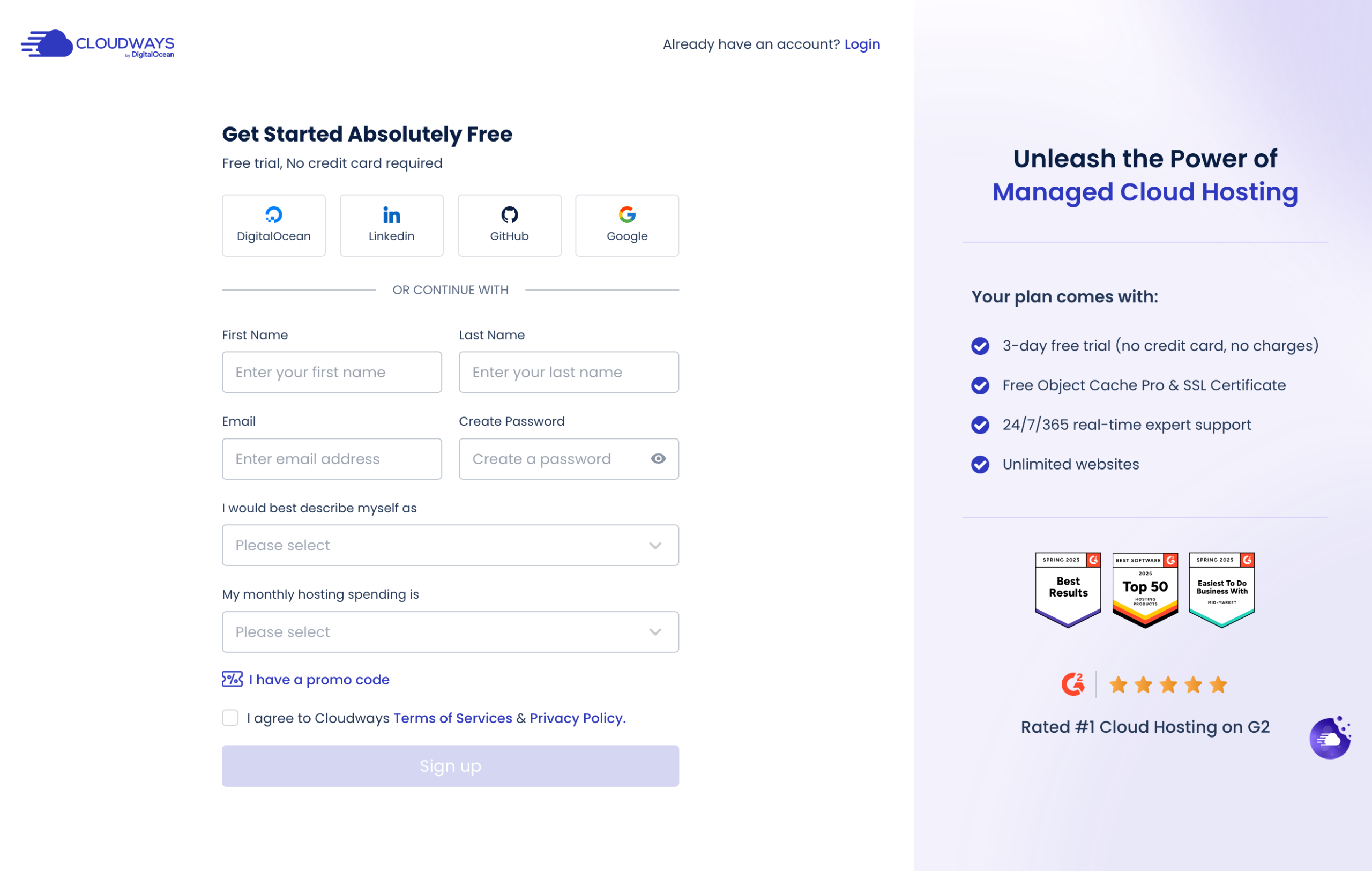
For added security, Cloudways by DigitalOcean then sends you a code via SMS, and once entered, you must choose one of the two hosting solutions offered:
- Cloudways Autonomous: for hosting critical WordPress sites with high traffic or delegating all their management to Cloudways. Starting at $100/month.
- Cloudways Flexible: to take control of your servers and cloud provider. Here, you pay as you go based on the chosen cloud provider, processor, RAM, bandwidth, and storage. Starting at $14/month.
If you’re starting out and have a site with normal traffic and/or want to test Cloudways, go with the Flexible offer.
Summary: the client account creation process is quick, clear and efficient. However, you need to understand the difference between Cloudways Autonomous and Cloudways Flexible offers to find the best fit for your needs. If you “mistake” this step, no worries. You can switch between offers very easily later, in a few clicks.
What does the Cloudways dashboard look like?
Once your Cloudways client account is created, you land on your dashboard.
Simply put, you have:
- Your main setting menus on the left, in a sidebar, with for example access to your applications, servers and other projects. You can also easily add users to your interface (the “Teams” feature) and manage projects by creating dedicated folders.
- Your current task in the middle of the screen. In the screenshot below, you see the option to install WordPress and choose your hosting server.
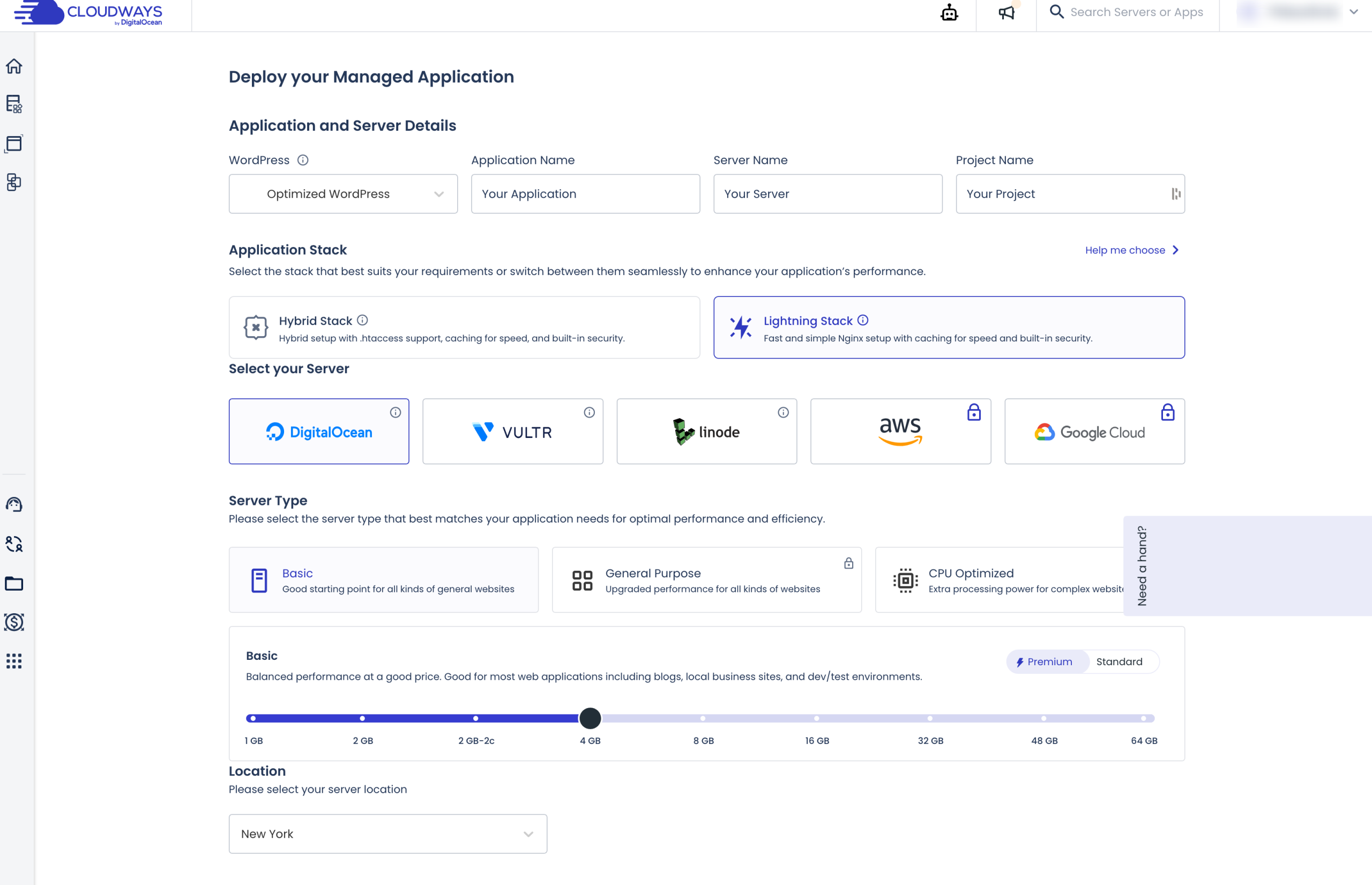
Summary: The dashboard is understandable, clean and user-friendly. Most operations take just 2-3 clicks, easily, and navigation is straightforward. The interface is fast (it responds instantly) and modern, which facilitates overall onboarding.
Installing a WordPress site with Cloudways, a simple or complex task?
Now let’s get practical: installing a WordPress site and its hosting server.
To do this, you have 5 actions to perform:
- Configuring your WordPress installation. Name your application, server, and project. Then you can choose to install either a showcase site or an optimized WooCommerce (with the Breeze and Object Cache Pro caching plugins active) or not.
- Selecting your application stack. You have the choice between “Hybrid Stack” (for complex app configurations relying on .htaccess handling) and “Lightning Stack” (for apps that are little or not dependent on .htaccess).
- Selecting your hosting server. In the trial version, you can choose between DigitalOcean, Linode and Vultr (AWS and Google Cloud are not included in the 3-day free trial).
- Choosing the server type. Within the selected server infrastructure, you can also choose a standard installation (for blogs, showcase sites), “high frequency” for high traffic sites, or “General Purpose” and “CPU Optimized”. Price increases or decreases based on options.
- Server location.

When ready, click the “Launch Now” button to deploy your WordPress site.
Wait for the creation to complete. During our test, it took about 10 minutes.
Once done, you can easily connect to your WordPress admin interface. To do so, click on the “Applications” tab, then select the site you just installed:
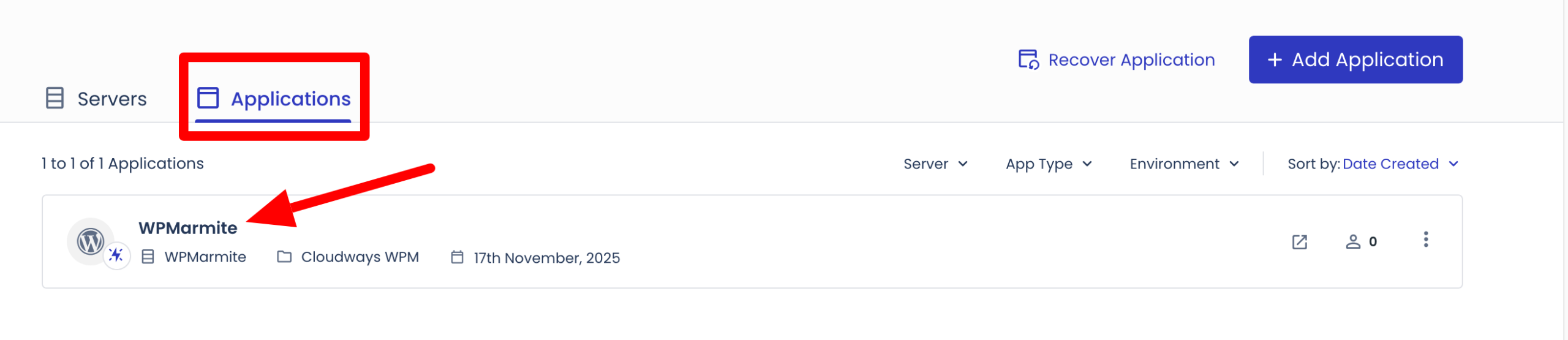
Then, in the “Admin Panel” menu, click the provided link. On the login page, just enter your username and password to access your back office:

Summary: What to remember from all this? Well, two points. On one hand, the server deployment process is simple. If we break it down, you just check options here and there.
On the other hand, there’s a downside: you need some basic knowledge to understand which configuration to choose. For example, Cloudways does not tell you why to pick Google servers rather than AWS or DigitalOcean (and vice versa).
The explanations about the differences between “Hybrid Stack” and “Lightning Stack” options are also brief.
Without good briefing on the subject, the choice is a bit of a stab in the dark. However, you can still contact support in the left bar to get guidance.
Features of the Cloudways admin interface
Once your site is installed and configured (find our complete tutorial to achieve this), there is no escaping it.
To keep it performant, secure, and up to date, you will have to get involved and manage it daily.
For that, Cloudways offers multiple options at your site’s settings on your dashboard:
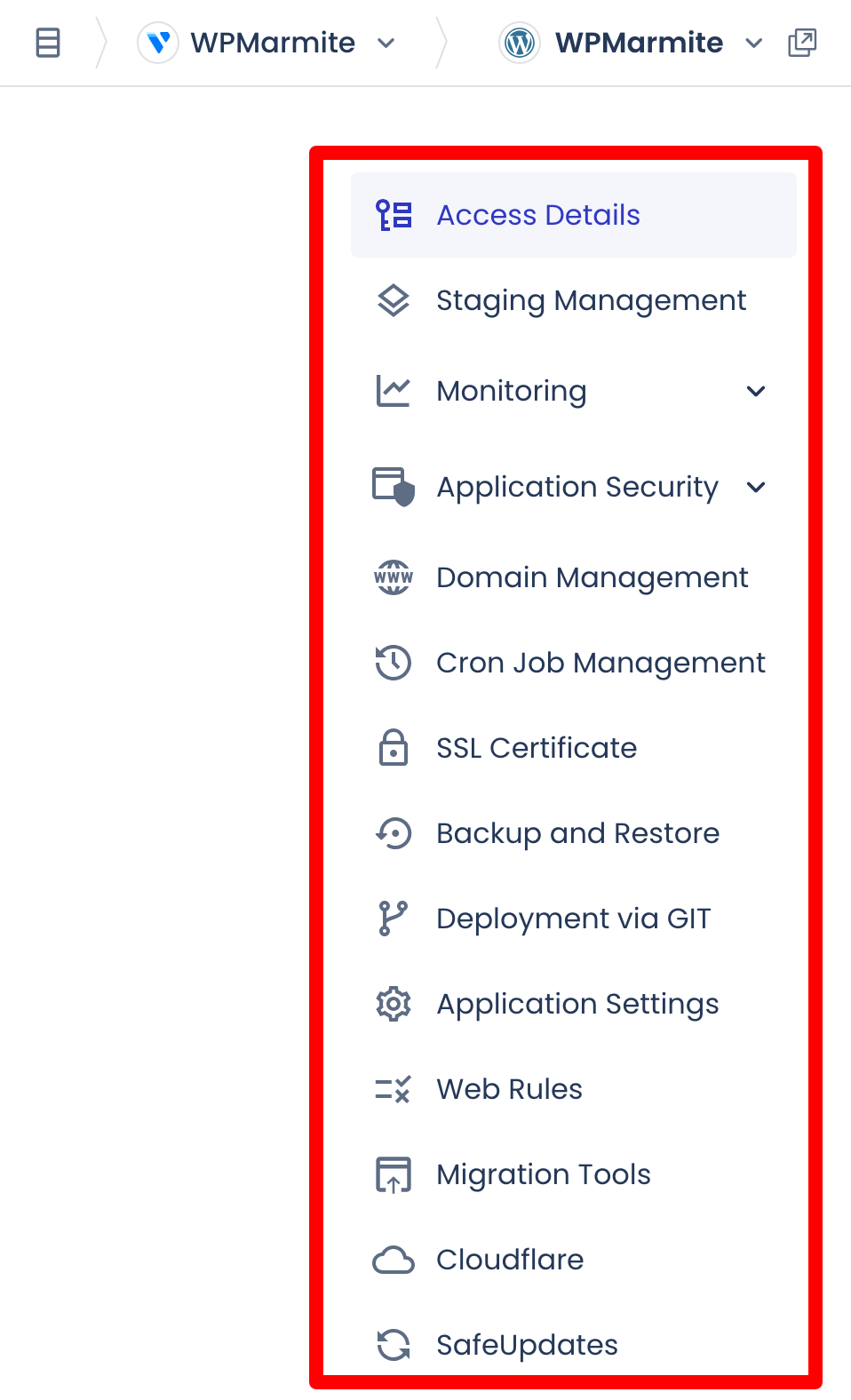
Through the 14 main menus, you can perform most basic technical actions on a site and hosting server. For example:
- create an isolated staging environment to have a copy of your production site and run tests safely. Once your changes are made, you can push them online (all or part of the modifications) in one click
- monitor your site: access to stats (traffic, PHP, MySQL, Cron, disk usage) and logs
- activate malware protection (starting at $2/month)
- access the Cloudways vulnerability scanner
- manage your domain names (add a subdomain, for example)
- create an SSL certificate
- manually back up your WordPress site and restore it in one click
- deploy a Git repository
- configure WordPress-specific settings: enable XMLRPC, PHP file access, multisite, or Object Cache Pro
- migrate your site from another hosting server
- activate Cloudflare Enterprise (starting at $4.99/month) to benefit from a CDN, DDos protection, image optimization, schedule updates of your WP site (Core, plugins and themes) starting at $2/month.
- create, modify and manually manage your databases (SQL queries, import, export, table creation, privileges, etc.).
At the server level, you can for example schedule backups, add custom firewall rules, or easily monitor your server resources:
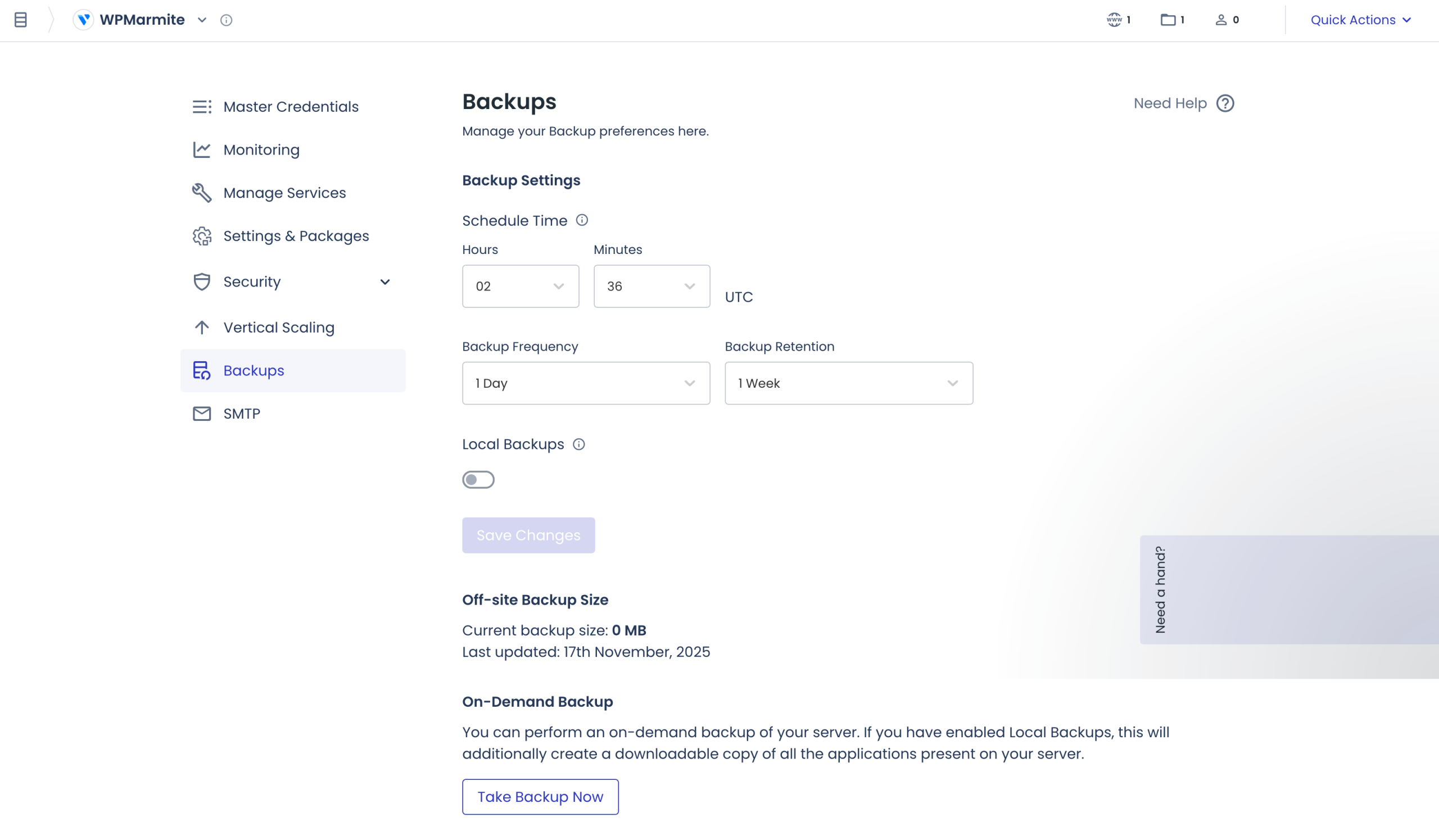
Unlike many hosts, Cloudways has its own interface (like Kinsta or Infomaniak) and does not rely on cPanel for its server admin interface.
Performance of this host (speed and availability)
Now that you have a more complete and concrete overview of Cloudways’ operation and options, let’s look at a very important metric: the performance of this host.
Having a fast site is essential today at several levels:
- for user experience, considered by Google among its Core Web Vitals metrics
- for your bounce rate, which increases if your pages load too slowly (and Google really dislikes that)
- for your conversions. With a sluggish site, you will make fewer sales, get fewer newsletter signups, or get fewer quote requests, for instance.
A performant host is a bit like your home’s foundation. Just essential if you want your pages to load quickly.
Overall, we can say that Cloudways’ performance is good. In detail, it depends case by case, since the cloud platform uses the infrastructure of partners like AWS or Google Cloud.
To give you an idea, Google Cloud is renowned worldwide for its highly provisioned, low-latency network, known for its reliability and high performance.
Google has points of presence all over the world ensuring excellent built-in redundancy.
Among other Cloudways advantages in loading speed, note:
- an uptime rate announced by Cloudways of 99.9%, which means a maximum downtime of about 40 minutes maximum per month
- usage of a modern stack (Nginx, Apache, PHP-FPM, Redis, Varnish) ensuring very good performance
- the ability to choose a datacenter close to your visitors, which helps reduce latency. Cloudways has 116 datacenters in 55 cities worldwide
- the cloud model (not classic shared) means resources are dedicated or at least better isolated. A real plus when targeting thousands of visitors or managing a WooCommerce site
- the possibility to benefit from Cloudflare Enterprise (and its CDN, for example) for only $4.99/month.
Customer service and support at Cloudways by DigitalOcean
Without further ado, let’s move on to the next part of our Cloudways review and test: support (customer assistance).
A point at least as important as performance. Indeed, in case of technical issues or a simple question, you need responsive support… and fast if possible.
To contact someone from Cloudways technical support, you have two options:
- A live chat with an average response time of 90 seconds. In our test, answers were ultra-fast (just seconds) and well-detailed.
- Raising a ticket (written message) which will be treated “as a priority.”
You can access it 24/7 directly from your admin interface by clicking on the small “Support Center” icon:

Cloudways also has a knowledge base split into 9 categories (account management, server administration, billing, onboarding, etc.) with about a hundred well-documented resources.
You can also find help on a Cloudways users Facebook group with nearly 4,000 members, or on the official Cloudways YouTube channel which counts about 400 videos.
All of this is free and included in your hosting plan. If you want more personalized assistance, Cloudways also offers premium support starting at $100/month.
Regarding support, Cloudways also provides a freemium suite of tools called Cloudways Copilot, which can continuously monitor critical server components, detect possible issues and offer fast and concrete solutions thanks to artificial intelligence.
Pricing and hosting plans offered by Cloudways
Now let’s move on to pricing at Cloudways.
First thing to understand: Cloudways by DigitalOcean works on a “pay-as-you-go” model: you only pay for the resources you use. This way, there’s no waste. 😉
Prices also depend on which hosting plan you choose: Cloudways Flexible or Cloudways Autonomous.
Pricing of the Cloudways Flexible plan
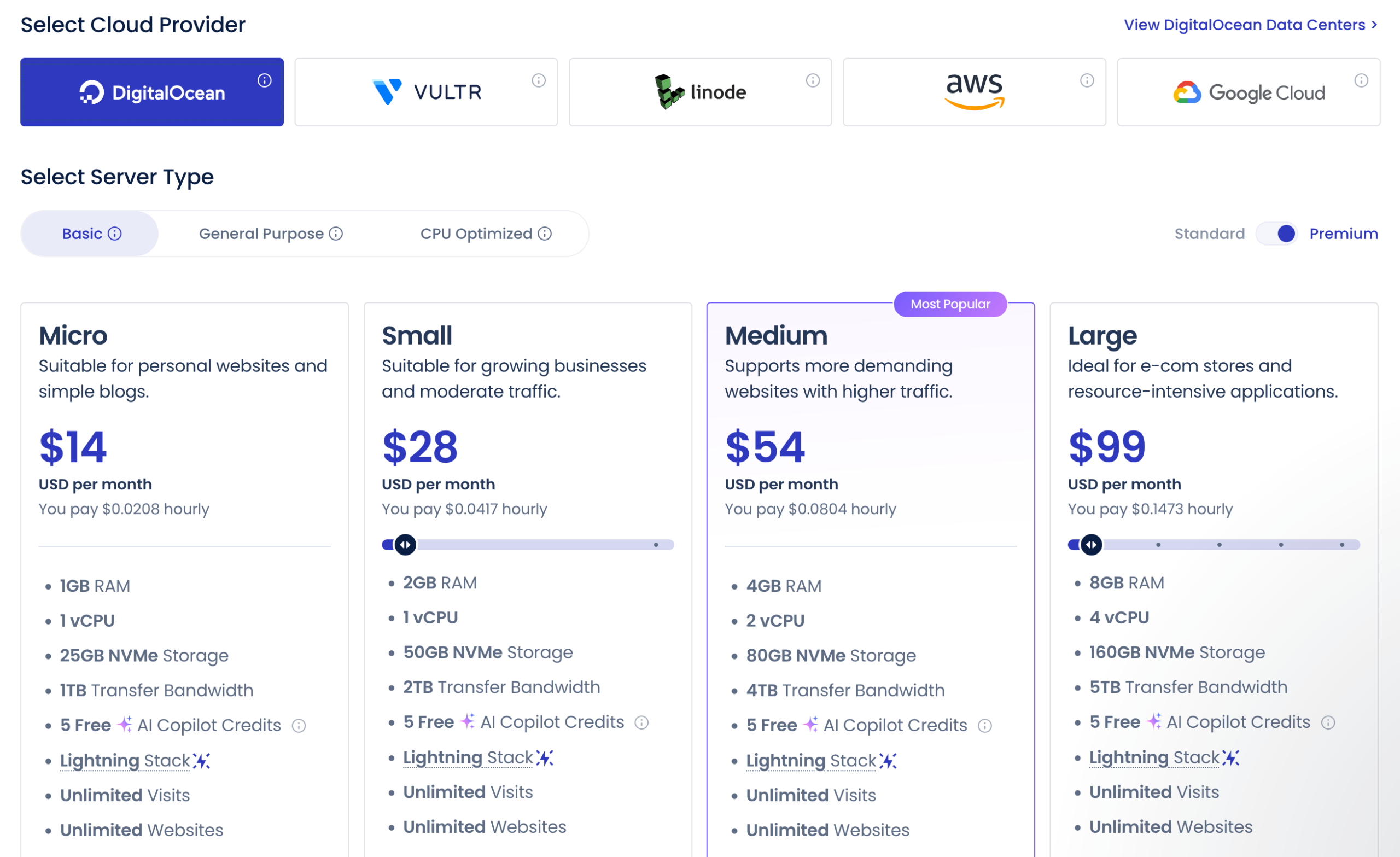
In the Cloudways Flexible plan, prices vary according to:
- the type of cloud provider chosen (DigitalOcean, Vultr, Linode, AWS, Google Cloud: from cheapest to most expensive)
- the type of server selected: a server with optimized CPUs will be more expensive than a standard server.
Based on this, expect significant disparities. For instance, you will pay:
- $14/month with DigitalOcean for the following options (1GB RAM, 1 vCPU, 25GB NVMe storage, 1TB bandwidth, unlimited visits)
- $37.33/month with Google Cloud infrastructure for the following options (1.7GB RAM, shared CPUs, 20GB storage, 1GB bandwidth, unlimited visits).
Pricing of the Cloudways Autonomous plan
The Cloudways Autonomous plan is a bit more “simple”. It mainly targets high-traffic sites, especially large online stores.
Prices start at $100/month for use on a single site (20GB disk space, unlimited visits (monthly traffic on your site), 150GB bandwidth).
They go up to $400/month or more depending on your needs:

Whatever the plan chosen, you have access to:
- a 3-day free trial
- 24/7 support
- staging environments
- Object Cache Pro
- free SSL certificates
- application firewall at the server level
- automated backups.
If needed, you can also subscribe to paid add-ons like Cloudflare Enterprise CDN (from $4.99/domain/month, included in the Autonomous plan) or access to Rackspace email at $1/month per address.
What do customers say about Cloudways?
“The leading managed cloud hosting platform on G2” (G2 is a well-known software review platform). This is what Cloudways by DigitalOcean highlights on its official homepage.
But what do actual users think of Cloudways’ services? To find out, you can get a first impression from some customer case studies Cloudways shares on its website and YouTube channel.
And naturally, the feedback is excellent (Cloudways wouldn’t sabotage itself by publishing negative reviews…).
For more user opinions, head to the verified review platform Trustpilot. As we write this, Cloudways’ page has nearly 3,200 reviews, with an overall rating of 4.6/5. A score rated excellent by Trustpilot.
Positive reviews prevail. Among the appreciated points, we particularly note:
- the efficiency and speed of customer service
- the host’s performance.

Our final verdict on Cloudways
Well, after all these nice words, it’s time for the final verdict. To conclude, let’s review the strengths and limitations of the host, and share our opinion on Cloudways.
Advantages of Cloudways by DigitalOcean
- A modern and intuitive interface to manage all your services related to your hosting.
- Flexibility, since you have the choice among five hosting server providers.
- Excellent performance, ensuring fast-loading pages on your sites with very good uptime. Cloudways includes by default Nginx, Apache, Varnish, Memcached, and Redis, plus its proprietary Breeze caching plugin.
- Servers are managed: Cloudways takes care of all maintenance for you.
- The “pay as you go” model, allowing you to actually pay only for the resources you use.
- 24/7 support available via chat.
- Built-in security features (firewall, DDos protection, automatic backups, etc.).
- The ability to create staging environments in a few clicks, with an option to push online only the changes you made in staging.
- Your site migration is simple, thanks to a free proprietary plugin: Cloudways WordPress Migrator.
- There is no limit on the amount of traffic your sites receive, regardless of the hosting plan chosen.
Disadvantages of the cloud host
- The variety of cloud providers and server options can be confusing for new users at first.
- Prices can rise quickly if you have significant resource needs, especially if you use AWS or Google Cloud servers.
- A learning curve is required, especially if you come from “turnkey” shared hosting. Some terms (CPU, vCPU, RAM, Varnish cache) and advanced features remain technical, especially for beginners.
- There is no free email address creation associated with your hosting account. To get this, you must use Rackspace service, starting at $1/month per mailbox.
- Cloudflare is not a domain registrar: you cannot buy hosting and a domain name together there.
- The free trial period lasts only 3 days.
WPMarmite’s opinion on Cloudways
In our view, Cloudways is a quality host with many strengths. Designed for WordPress, it offers excellent performance, an intuitive interface and no compromise on security.
However, it is not for everyone and can confuse WordPress beginners.
Plus, it is not the most budget-friendly host. So if you have a tight budget and a small showcase site or blog without much traffic or commercial stakes, you’d better look for shared hosting instead.
If you have an intermediate or advanced profile with good technical knowledge, Cloudways ticks many boxes.
If you’re looking for flexibility, performance, are comfortable with a somewhat advanced interface, and are ready to pay for quality, Cloudways is a safe bet.
Especially if you already receive a fair amount of traffic, for example, on a WooCommerce-like online store.
To take things to the next level with Cloudways, click the button below:
