
Optin Forms is a WordPress plugin dedicated to the creation of opt-in forms, designed for site creators wishing to develop their contact list.
With 2,000+ users, this plugin offers powerful tools for generating customizable and effective forms.
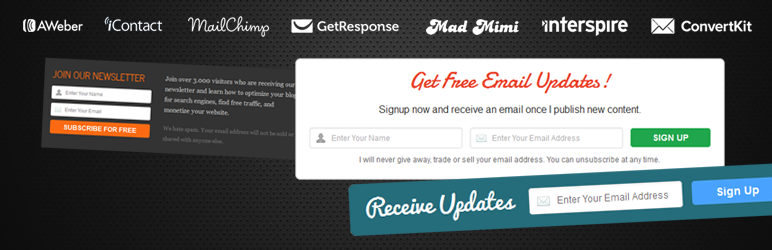
Compatible with major emailing platforms such as Mailchimp and AWeber, Optin Forms offers five professional design templates. User reviews of Optin Forms highlight its ease of use, confirmed by an average rating of .
Advantages and disadvantages
| Advantages | Disadvantages |
|---|---|
| Ease of use: no technical knowledge required to create forms | Limited number of templates (only 5 ready-to-use templates) |
| Numerous integrations: compatible with several email marketing solutions (AWeber, Mailchimp, ConvertKit, etc.) | Basic functionality compared to more advanced plugins like OptinMonster |
| Full customization: texts, fonts, colors, and sizes can be modified | Lack of advanced targeting and segmentation features |
| Easy to add to pages/articles via short code or simple interface | Potentially limited performance for complex marketing campaigns |
| Compatible with multilingual sites: translation possible | Potentially basic technical support |
| Quick to learn: intuitive interface | Relatively limited design and layout options |
Optin Forms in numbers
| Latest version | 1.3.7.2 |
| Date of last update | |
| Active installations | 2,000+ |
| Average rating | |
| Form templates available | 5 |
| Integrated email marketing solutions | 7 |
Optin Forms plugin prices
| Free |
|---|
| $0 |
|
Optin Forms user reviews
The Optin Forms plugin seems to be a useful email capture solution, offering a simple and customizable approach for WordPress sites.
Users particularly appreciate its ease of creating forms without specific technical skills, with extensive possibilities for customizing designs, fonts, and colors.
The plugin’s flexibility enables webmasters to quickly create attractive opt-in forms adaptable to their site’s visual identity.
These forms can be used to create dazzling sign-up interfaces for your blog or website, without requiring any knowledge of HTML or CSS.
Traprock
You can easily modify all texts, fonts, and font sizes and change the colors of any element thanks to an intuitive color selector.
DarkDjadai
Excellent plugin, no problems so far. No impact on speed. Thank you for your attention.
wol
Alternatives to Optin Forms
MailOptin

MailOptin is a dedicated lead generation plugin designed to convert your site visitors into subscribers and customers. It offers pre-designed and customizable opt-in form templates.
With six different display options such as lightbox pop-up, notification bar, slide-in, sidebar widget, and inline or integrated forms, MailOptin helps optimize email capture.
You can also run A/B tests to determine which forms and designs perform best.
Thrive Leads

Thrive Leads is one of the most powerful opt-in plugins for WordPress, offering nine types of opt-in forms. These include lightbox pop-ups, floating ribbons, inline forms, and multi-step forms.
The plugin features pre-designed templates, advanced targeting options, and detailed reporting. Its A/B testing technology enables you to compare and optimize the performance of different form types.
Hustle

Hustle is a multi-functional plugin that helps build an email list, increase social network following, and create targeted ads. It uses shortcodes, widgets, slide-ins, and pop-ups to maximize your lead generation strategy.
Its intuitive interface lets you customize the appearance of forms, including layout, images, typography, and colors. Hustle can even bypass ad blockers to display pop-ups and slide-ins on your site.
Optin Forms FAQs
How do I install the Optin Forms plugin on WordPress?
To install the Optin Forms plugin, download and unzip the plugin file. Upload the optin-forms folder to the wp-content/plugins/ directory of your WordPress site.
Then go to the Plugins menu in your WordPress dashboard and activate the plugin. Once activated, click on Optin Forms in the navigation menu to access the configuration options.
Which email marketing services are compatible with Optin Forms?
Optin Forms is compatible with several email marketing services, including AWeber, iContact, MailChimp, GetResponse, MadMimi, Interspire Email Marketer, ConvertKit, and MailerLite.
You can select your preferred email marketing service and configure the form accordingly.
How do I customize opt-in forms with Optin Forms?
With Optin Forms, you can customize the look and feel of your opt-in forms by choosing from 5 pre-designed templates.
You can modify all text, fonts, and font sizes, as well as the colors of the elements using a color selector. These modifications can be made without any knowledge of HTML or CSS.
How do I add an opt-in form to a page or post with Optin Forms?
To add an opt-in form to a page or article, you can do so with a simple click or by using a short code.
Once you’ve configured and customized your form, you can place it in your articles and pages directly from the forms management interface.
Where can I get help if I have problems with the Optin Forms plugin?
If you’re having trouble with the Optin Forms plugin, you can get help by posting your question on the support forum. The support team will be there to help you solve your problems.
Can the Optin Forms plugin be translated into other languages?
Yes, the Optin Forms plugin can be translated into your language. You can take part in translating the plugin to make it accessible to a wider audience.
Thank you for visiting this page dedicated to Optin Forms 🙏
The WPMarmite team hopes you’ve been able to find out more about this WordPress plugin!
To find out more, visit the official website.
You can also share your experience with Optin Forms by writing a review below. 👇
Found an error on this page? Click here to report it.

