
WP Simple Pay is the best Stripe payment forms and Stripe payments plugin for WordPress that helps you quickly accept credit cards, Apple Pay, iDEAL, and other payment types on your WordPress site.
With over 8,000+ active installations and an average rating of , WP Simple Pay is a popular WordPress e-commerce plugin.
Advantages and disadvantages

| Advantages | Disadvantages |
|---|---|
| Advanced form builder Drag-and-drop interface for creating customized payment forms with various fields | Limitations in the free version Some advanced features reserved for premium version |
| Variety of form types Offers 3 types of display: embedded, overlay, and Stripe payment form | Dependence on Stripe Requires a Stripe account to operate |
| Flexible payments Supports one-off and recurring payments, with the option of creating subscription plans | Complexity for non-technical users Configuring advanced forms and options can be tricky |
| International compatibility Support for over 30 languages, 45 countries, and 135 currencies | Potentially limited performance May slow down site slightly, depending on configuration |
| Extensive customization Customization options for confirmation details and payment fields | Cost of premium features Advanced features require financial investment |
| High-quality technical support Available team and comprehensive documentation | Updates and compatibility Need to keep plugin up to date to avoid problems |
WP Simple Pay in numbers
| Latest version | 4.17.4.1 |
| Date of last update | |
| Active installations | 8,000+ |
| Average rating | |
| Supported languages | More than 30 languages |
| Supported countries | 45 countries |
| Accepted currencies | 135 currencies |
| Payment options | 10 options |
WP Simple Pay plugin prices
| Lite version | Personal | Plus | Professional | Elite |
|---|---|---|---|---|
| Free ($0) | $49.50/year | $99.50/year | $199.50/year | $299.50/year |
|
|
|
|
|
WP Simple Pay user reviews
WP Simple Pay is a Stripe payment WordPress plugin renowned for its ease of use, flexibility, and mobile optimization. Users particularly appreciate its drag-and-drop form builder, compatibility with different payment methods, and secure integration.
The solution is suitable for both small businesses and organizations with occasional payment needs, offering a lightweight alternative to complex e-commerce platforms.
The plugin was perfect for us. It’s light, simple, and does what we want. Technical support has been very patient in resolving issues. We were treated like a valued customer, with immediate responses that exceeded our expectations.
Anonymous user – 5/5
We found WP Simple Pay incredibly easy to use. The drag-and-drop form builder allowed us to create payment forms in minutes. The plugin is fully optimized for mobile devices with great payment flexibility.
IsItWP – 5/5
An ideal platform if you want to sell a single product or collect one-off payments without having to learn complicated settings. The drag-and-drop builder makes it easy to create professional payment forms.
WPBeginner – 4/5
More testimonials on WP Simple Pay
Find out how WP Simple Pay stacks up in terms of user satisfaction on these customer review platforms:
| Platform | Rating |
|---|---|
| WP.org | |
| TrustPilot | 3.6 out of 5 |
| Capterra | 4.8 out of 5 |
Alternatives to WP Simple Pay
WP Full Pay

WP Full Pay is considered the best direct alternative to WP Simple Pay. Acquired by the Themeisle team in November 2024, this plugin offers the ability to accept payments in a wide range of formats.
It supports credit cards, digital wallets like Google Pay and Apple Pay, as well as bank transfers. The user interface is easy to navigate and the plugin is generous in terms of features.
Payment Page
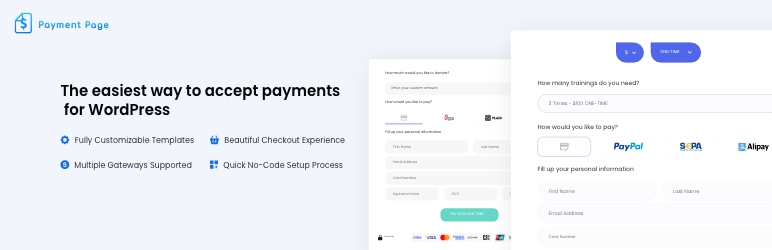
Payment Page is a solid alternative to WP Simple Pay, notable for its library of fully customizable payment form templates.
This plugin supports credit card payments, digital wallets like Google Pay and Apple Pay, as well as PayPal and bank transfers. It offers great flexibility and ease of use.
Forminator

Forminator is a versatile plugin that not only accepts payments via Stripe and PayPal, but also creates various types of forms.
It lets you generate contact forms, surveys, quizzes, newsletter sign-ups, and more. The plugin offers great versatility by allowing you to add payment options to any type of form.
WP Simple Pay FAQs
How do I install and activate WP Simple Pay on my WordPress site?
To install and activate WP Simple Pay, download the plugin from your user account, then access your WordPress dashboard. Go to Plugins > Add New, and click “Upload.”
Select the plugin ZIP file and install it. Once installed, activate the plugin. You’ll then need to enter your license key to activate all the plugin’s features.
What payment methods does WP Simple Pay accept?
WP Simple Pay accepts a variety of payment methods, including credit and debit cards, US bank accounts, SEPA Direct Debit, Afterpay, Klarna, Google Pay, Apple Pay, and other cardless payment services.
How do I create a payment form with WP Simple Pay?
WP Simple Pay features a drag-and-drop payment form builder. You can create payment forms in just a few minutes, without writing any code.
You can choose from different form types (embedded, overlay, or Stripe payment form) and add custom fields such as checkboxes, text fields, radio buttons, and coupon codes.
Is WP Simple Pay secure for payment processing?
Yes, WP Simple Pay uses Stripe’s PCI-compliant servers to process and store payments. This ensures that transactions are secure and that customer data is protected. In addition, the plugin supports secure customer authentication (SCA).
Can I accept donations with customized amounts with WP Simple Pay?
Yes, WP Simple Pay allows customers to enter custom values, which is particularly useful for websites that accept donations. You can configure the custom amount field in the form’s payment options.
How do I set up recurring subscriptions with WP Simple Pay?
You can configure recurring subscriptions in the subscription options tab of the form builder. You can choose between a single subscription plan or a more customizable user-selected plan.
You can also add free trials and setup fees.
What types of payment forms are available with WP Simple Pay?
WP Simple Pay offers three types of payment forms: the built-in form, the overlay form, and the Stripe payment form. Each of these types can be customized to suit your needs.
Thank you for visiting this page about WP Simple Pay 🙏
The WPMarmite team hopes you’ve been able to learn more about this WordPress plugin!
To find out more, visit the official website and their social networks:
You can also share your experience with WP Simple Pay by writing a review below. 👇
Found an error on this page? Click here to report it.

