
WooCommerce is a must-have WordPress plugin for creating an online store. With over 7,000,000+ active installations and an average rating of , it makes it easy to transform a site into an e-commerce platform.
This versatile solution is suitable for all types of online store: physical products, digital products, or services. WooCommerce offers essential features such as inventory management, varied payment options, and advanced customization, all while remaining accessible to entrepreneurs without in-depth technical skills.
Advantages and disadvantages
| Advantages | Disadvantages |
|---|---|
| Free and open-source, allowing complete customization | High learning curve for beginners |
| Smooth, native integration with WordPress | Performance can degrade with many plugins |
| Large ecosystem of extensions and themes | Additional costs possible via premium themes and extensions |
| Comprehensive product management (physical, digital, variable) | Technical configuration can be complex |
| Numerous payment and shipping options | Requires technical skills for advanced optimization |
| International compatibility (currencies, taxes, languages) | High consumption of server resources |
| Integrated reporting and statistics tools | Basic default design requiring customization |
| Active global community support | Updates may generate incompatibilities |
WooCommerce in numbers
| Latest version | 11.2.1 |
| Date of last update | |
| Active installations | 7,000,000+ |
| Average rating | |
| Launch date | september 27, 2011 |
| Publisher | Automattic (formerly WooThemes) |
| Original founders | Mark Forrester, Magnus Jepson, Adii Pienaar |
| E-commerce market share | 38.76% |
WooCommerce plugin pricing
| WooCommerce |
|---|
| Free |
|
WooCommerce user reviews
WooCommerce is a widely used WordPress e-commerce plugin, offering a versatile solution for creating online stores.
Users appreciate its free features, ease of use, and flexibility, while pointing out a few potential limitations such as the cost of add-on extensions and performance.
“Software used every day for over two years. Value for money, ease of use, customer support, possibility of recommending the product.”
Anonymous user – Rating 10/10
“WooCommerce is a free WordPress plugin, which makes it a cost-effective option for us small businesses. It’s easy to use, especially if you’re already familiar with the WordPress ecosystem.”
E-learning company – Rating 9/10
“Slow loading on the user side impacts the WooCommerce solution. Extensive caching work and an appropriate server installation are required.”
Anonymous user
Other WooCommerce testimonials
Find out how WooCommerce ranks in terms of user satisfaction on various customer review platforms.
Alternatives to WooCommerce
Easy Digital Downloads
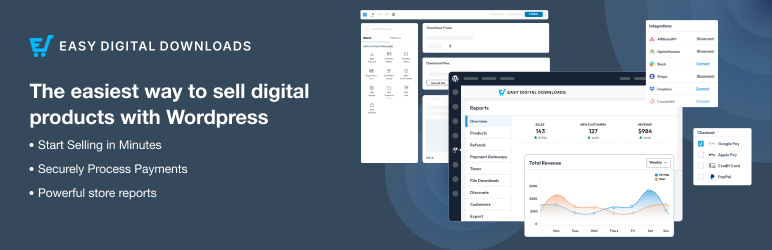
Easy Digital Downloads (EDD) is an excellent alternative to WooCommerce, specially adapted for the sale of digital products such as e-books, software, files, templates, and so on.
EDD also supports subscriptions and recurring payments. The plugin offers native integration with popular payment gateways such as PayPal and Stripe, and even its free version is packed with powerful features.
WP Simple Pay

WP Simple Pay is an ideal alternative to WooCommerce if you don’t need a full-featured shopping cart system.
It’s ideal for selling one-off services or products and accepting one-off or recurring payments. The plugin offers pre-built templates and a drag-and-drop form builder, and it supports several payment gateways such as PayPal, Stripe, and Authorize.net.
It’s easy to configure, and lets you add “Buy Now” buttons and accept donations.
Ecwid Ecommerce Shopping Cart

Ecwid Ecommerce Shopping Cart is another solid alternative to WooCommerce.
This plugin allows you to integrate your online store with WordPress and sell on various social networking platforms. It offers features like automatic calculation of shipping and taxes, and supports over 40 payment gateways, including PayPal and Stripe.
Ecwid also lets you manage your store via mobile apps and sell on marketplaces like eBay and Amazon.
WooCommerce FAQs
How do I install the WooCommerce plugin?
To install the WooCommerce plugin, you need to follow these steps:
- Make sure your PHP version is 5.4 or higher and your WordPress version is 3.6 or higher.
- Go to Plugins > Add New in your WordPress dashboard.
- Search for “WooCommerce” and install it, then activate it.
You can also download the plugin and upload it manually to the /wp-content/plugins/ directory of your WordPress site, then activate it via the “Plugins” menu.
What are the main features of WooCommerce?
WooCommerce transforms your WordPress site into a fully-featured online store.
It offers features such as physical and digital product sales, payment integration (PayPal, checks, bank transfers), inventory management, shipping, subscriptions, and taxes.
It also includes statistics and advanced personalization options.
How do I configure shipping options in WooCommerce?
To configure shipping options in WooCommerce, go to the “WooCommerce” menu and select “Shipping.” There you can specify shipping zones and modes, as well as delivery options and associated charges.
This configuration allows you to customize the delivery of your products according to your needs.
Can I use extensions to customize WooCommerce?
Yes, you can use extensions to customize and enhance the functionality of WooCommerce. There are a variety of extensions available, covering areas such as payments, delivery, customer service, marketing, and much more.
These extensions can be found in the “WooCommerce” menu under the “Browse” tab, and can be filtered by domain.
How do I create FAQs for products with WooCommerce?
To create FAQs for products with WooCommerce, you can use specific plugins like Happy WooCommerce FAQs or YITH FAQ Plugin.
These plugins allow you to create unlimited FAQs and display them on product pages or in a dedicated section of your site. You can assign FAQs to product categories or individual products and customize their display.
Can I allow customers to customize products with WooCommerce?
Yes, with the WooCommerce Product Add-Ons extension, you can allow customers to customize products by adding options such as text fields, drop-down lists, checkboxes, and even images.
This extension allows customers to customize products directly on the product page, before proceeding to checkout.
How do I manage orders and customers in WooCommerce?
In WooCommerce, you can manage orders and customers via the respective submenus. The “Orders” menu lists all past orders and lets you add orders manually.
The “Customers” menu displays detailed information on your customers, including their orders, total spend, and location. You can sort and filter this information according to various criteria.
Thank you for visiting this page dedicated to WooCommerce 🙏
The WPMarmite team hopes you’ve been able to learn more about this WordPress plugin!
To find out more, visit the official website and their social networks:
You can also share your experience with WooCommerce by writing a review below. 👇
Found an error on this page? Click here to report it.

