
WP Activity Log is a WordPress plugin designed to track activities and events on a website. It allows you to track and record all modifications, connections, and actions carried out by different users.
With over 300,000+ active installations and an average rating of , this plugin offers advanced monitoring features for WordPress sites.
User reviews of WP Activity Log are generally positive, highlighting its detailed tracking capabilities, customizable notifications, and multisite integration that meet the needs of webmasters concerned about traceability and security.
Advantages and disadvantages

| Advantages | Disadvantages |
|---|---|
| Complete monitoring Detailed log of all activity on the WordPress site | Complex configuration Potentially intimidating interface and settings for novice users |
| Customizable notifications Customizable email and SMS alerts for important events | Cost of advanced features Premium version required for full functionality |
| Powerful integrations Compatible with CloudWatch, Loggly, Slack, external logging systems | Potential impact on performance Possible slight overload of database and site |
| Multisite support Centralised log management for WordPress networks | Large volume of data Risk of saturation and search difficulties with large sites |
| Configurable retention policy Precise control over log retention | Learning curve Requires time to master all features |
| Enhanced security Full traceability of user actions | System resources Memory and processor consumption when logs are recorded |
WP Activity Log in numbers
| Latest version | 5.6.7 |
| Date of last update | |
| Active installations | 300,000+ |
| Average rating | |
| Publisher | Melapress |
| Type of plugin | Security and logging |
| Key features | Real-time monitoring, notifications, multisite |
WP Activity Log plugin prices
| Free | Premium | Enterprise |
|---|---|---|
| $0 | $139/year | $189/year |
| – Detailed activity log for WordPress – Activity log for WooCommerce, Yoast SEO, and other plugins – Basic search – No limits/restrictions on activity logging – Configurable permissions for logs and settings – Exclusion of objects from the activity log – Enable/disable specific event IDs – Support via forums only | – Everything included in the Free plan – Advanced search filters – Instant email notifications – Instant SMS notifications – Activity log and statistical reports – Automated and scheduled email reports – Overview of active user sessions and real-time activity – User session management – Import/export plugin settings – Deletion of specific data from the activity log – Premium email support | – Everything included in the Premium plan – Log mirroring to Splunk, AWS Cloudwatch, Loggly, and other SIEM solutions – Activity log written to a log file – Save activity log to an external database – Archive activity logs – Priority support |
WP Activity Log user reviews
The WP Activity Log plugin has received largely positive reviews, with users unanimously praising its monitoring and security capabilities.
Website professionals and administrators particularly appreciate its ability to provide detailed activity logs, improve user management, and enhance the security of WordPress sites.
We needed a plugin that would help us track and find the actions that led to website problems. This is a great plugin for that, and the support team is great! Thank you very much!
Juliamc
I had a problem that turned out to be an oversight on my part. Support responded quickly and solved my problem in no time. It’s a great way to treat customers!
mattlempert
This plugin is very useful for seeing who is doing what on a WP installation and the support is excellent.
one3rdnerd
Other testimonials about WP Activity Log
Find out how WP Activity Log ranks in terms of user satisfaction on the following customer review platforms.
| Platform | Rating |
|---|---|
| WP.org | |
| TrustPilot | 3.2 out of 5 |
Alternatives to WP Activity Log
Simple History
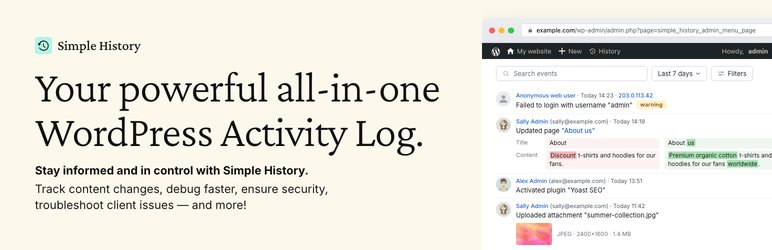
Simple History is an easy-to-use plugin that logs almost every action on your WordPress site. It’s ideal for those who don’t need very detailed logs but want a simple and intuitive interface.
The plugin displays logs directly on the dashboard homepage, making it easy to monitor recent activity on your site.
User Activity Log
User Activity Log is a plugin that focuses on monitoring user activity on your site. It logs user details including roles, IP addresses, and email addresses.
The plugin supports many popular third-party plugins such as WooCommerce, Easy Digital Downloads, and Yoast SEO. It offers filter and search options as well as email notifications and log export to CSV.
WP Activity Log FAQs
How do I install and activate the WP Activity Log plugin?
To install and activate the WP Activity Log plugin, you must first download it from the WordPress repository or purchase it from the plugin’s official website.
Once downloaded, you can install it via the WordPress admin panel by going to Plugins > Add New > Upload and selecting the plugin ZIP file. Once installed, activate the plugin.
If you have a premium version, you will need to enter your licence key and click Accept & Activate Licence to activate it fully.
What types of changes can the WP Activity Log plugin record?
The WP Activity Log plugin logs a wide range of changes to your WordPress site, including:
- Changes to posts, pages, and custom post types
- Changes to tags and categories
- Widgets and menus
- User and user profile changes
- User activities such as logins and logouts
- Updates to WordPress core and site settings
- Changes in multisite networks
- Plugin and theme installations, activations, deactivations, and updates
- Changes to the WordPress database and site files
How can I monitor user activity in real time with WP Activity Log?
To monitor user activity in real time, you can use WP Activity Log’s premium features. You can see who is logged into your site in real time by going to WP Activity Log > Logged In Users.
In addition, you can receive email and SMS notifications for important and critical events, and use the search filters to quickly find specific events.
How do I generate reports with the WP Activity Log plugin?
To generate reports with WP Activity Log, go to WP Activity Log > Reports. You can customize reports based on various criteria such as activity type, specific users or roles, and severity level.
Reports can be exported in HTML and CSV formats, making them easy to share and store.
How do I configure notifications and alerts with WP Activity Log?
To set up notifications and alerts with WP Activity Log, you can create custom alerts and notifications to monitor additional features.
You can set triggers to receive real-time email and SMS notifications when specific actions are performed on your site. This allows you to respond quickly to potential security threats or errors.
How can I restrict access to the WP Activity Log?
To restrict access to the WP Activity Log, you can configure the security settings in the plugin’s “Settings” section.
You can decide who can see the activity log based on users or roles, and even hide the plugin from the list of installed plugins to prevent certain users from seeing it.
How do I archive and store old activity logs with WP Activity Log?
To archive and store old activity logs, WP Activity Log offers log retention options. You can configure retention policies to archive old activity logs in another database, improving the security and scalability of your site.
Thank you for visiting this page about WP Activity Log 🙏
The WPMarmite team hopes you’ve been able to find out more about this WordPress plugin!
To find out more, visit the official website and their social networks:
You can also share your experience with WP Activity Log by writing a review below. 👇
Found an error on this page? Click here to let us know.

