
Live Composer is a free, open-source WordPress page builder designed to simplify website creation.
With over 10,000+ active installations and an average rating of , this tool offers an intuitive solution for WordPress site builders wishing to customize their site without advanced technical skills.
Advantages and disadvantages

| Advantages | Disadvantages |
|---|---|
| Mostly free, open-source page builder | Unintuitive to use, especially for beginners |
| No coding skills required for basic use | Austere, unattractive user interface |
| WYSIWYG front-end interface with real-time visualization | Basic modules missing from the free version (e.g. menu) |
| Premium extension to customize WooCommerce | Infrequent updates |
| Fast performance and SEO-optimized code | High pricing to unlock full functionality |
| Ability to create custom templates and modules | Less active community than competitors |
| Responsive design with customization by device | Less flexibility than other builders like Elementor |
| Detailed customization options for each module |
Live Composer in numbers
| Latest version | 2.1.22 |
| Date of last update | |
| Active installations | 10,000+ |
| Average rating | |
| Launch date | January 2014 |
| Publisher | Live Composer Team |
| Type of plugin | Page builder |
| WordPress compatibility | Version 4.7 or higher |
| Supported languages | Over 60 languages |
Live Composer plugin pricing
| Free page builder | Premium extension pack |
|---|---|
| Free | From $69 |
|
|
Live Composer user reviews
Live Composer is a WordPress page builder that has received mixed reviews overall.
In particular, users point to usability issues, interface complexity, and functional limitations, but also to the sheer number of possibilities offered by the free version of the page builder.
Simply complete, if you buy the Pro version, it’s even better, I hope it won’t be abandoned, I love this plugin, it makes my work so much easier.
August Obsb
Nice plugin, you can build whatever you want and there’s no need to code!
Jaryszek
The only front-end editor that’s completely free, so you can create your entire page at no cost. Try the others and you’ll see that you can’t modify page headers/footers, create page templates, or insert dynamic content (blog/post). With LC, you can do it all! Sure, it could be better/easier/have more features/blocks, but you know… it’s completely free!
kasade
More Live Composer testimonials
Find out how Live Composer ranks in terms of user satisfaction on various customer review platforms.
| Platform | Rating |
|---|---|
| WP.org | 4.4 out of 5 |
| TrustPilot | 3.2 out of 5 |
Alternatives to Live Composer
Elementor
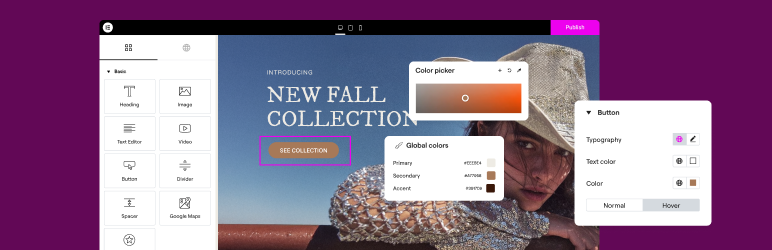
Elementor is one of the most popular page builders for WordPress, with 10M+ active installations. It offers an intuitive drag-and-drop interface with real-time previews.
This plugin has an extensive library of templates and widgets, including WooCommerce support. Elementor is suitable for both beginners and advanced users, and features built-in performance optimization tools for fast-loading pages.
Divi

Divi is an all-in-one solution that combines a theme, a page builder, and a theme builder. It offers an intuitive drag-and-drop interface with real-time previews.
Divi allows advanced customization of every element, including headers, footers, and templates for blog and WooCommerce pages.
Oxygen Builder

Oxygen Builder is an advanced WordPress page builder designed for developers and experienced users. It offers a drag-and-drop interface with real-time previews, and stands out for its focus on performance and code optimization.
It lets you create and edit Gutenberg blocks and features over 20 highly configurable WooCommerce elements.
Live Composer FAQs
How do I activate Live Composer on a page?
To activate Live Composer on a page, visit the page you wish to modify and click on the green “Activate editor” button at the bottom right of the screen. The page will then reload in Live Composer mode.
Is Live Composer compatible with any WordPress theme?
Live Composer should work with any standard WordPress theme. You can also find free and premium themes designed specifically for this plugin.
How do I install Live Composer on WordPress?
To install Live Composer, access your WordPress dashboard, go to Plugins > Add New, search for “Live Composer Page Builder,” click “Install,” and then click “Activate.”
What are Live Composer’s main features?
Live Composer offers an intuitive drag-and-drop interface, a wide range of customizable modules (text, images, buttons, videos, etc.), responsive design, Gutenberg compatibility, and premium extensions for advanced features like WooCommerce, contact forms, and animations.
Is Live Composer compatible with popular SEO plugins?
Yes, Live Composer is compatible with popular SEO plugins such as Rankmath, Yoast SEO, and All-in-one SEO, helping to improve your site’s visibility on search engines.
What extensions are available for Live Composer?
Live Composer offers both free and premium extensions, including navigation links for blog posts, additional animations, contact forms, mega menus, and integration with WooCommerce.
You can find these extensions on the official Live Composer website.
Does Live Composer support multiple languages and right-to-left text (RTL)?
Yes, Live Composer supports multiple languages and right-to-left text (RTL), and is compatible with translation plugins such as WPML, Polylang, TranslatePress, and Weglot.
Thank you for visiting this page dedicated to Live Composer 🙏
The WPMarmite team hopes you’ve been able to learn more about this WordPress plugin!
To find out more, visit the official website and their social networks:
You can also share your experience with Live Composer by writing a review below. 👇
Found an error on this page? Click here to report it.

