“Yeah, well.” Generating text with artificial intelligence (AI) often leads to this kind of reaction. With all too few exceptions, it’s disappointing (unless your aim is to slap together copy with no flavor or added value).
So when you see a new tool for creating content with AI, you have to wonder. Will satisfaction finally win out over disappointment?

That’s what we set out to find out by testing ContentShake AI. This tool from the Semrush platform is not new; it’s been around for several months. Until now, it was only capable of writing articles in English.
The situation has recently changed. New languages are available, including French. As you’d expect from WPMarmite’s France-based team, this made us want to check it out!
So we shook up our friend ContentShake AI (pun intended) to see what he’s got up his sleeve.
After giving it a good whirl, is it solid on its feet? That’s what you’ll find out after reading our ContentShake AI review. In the end, you’ll know all the features of this tool, and above all how to use them.
And as a bonus, we’ll be sure to introduce you to Semrush’s other content marketing features. That way, you’ll have everything you need to create text that pulsates!
- What is ContentShake AI (and content marketing tools)?
- ContentShake AI: for what and for whom?
- What's the interface of Semrush's ContentShake AI tool like?
- How to create an article from scratch with ContentShake AI
- What other options does ContentShake AI offer?
- Other Semrush content marketing tools
- How much does ContentShake AI cost?
- What are the alternatives to ContentShake AI?
- Our final review of ContentShake AI

This article is sponsored and contains affiliate links to the ContentShake AI tool. This means that WPMarmite will earn a commission if you decide to use it (at no extra cost to you).
Affiliate revenue enables WPMarmite to pay for the research and writing work of the blog’s editors. However, we remain impartial. If a product isn’t worth it, we’ll say so (or we don’t tell you about it). Find out more about transparency in our publishing policy.
What is ContentShake AI (and content marketing tools)?
Introducing ContentShake AI

ContentShake AI is a content writing tool that combines the artificial intelligence (AI) capabilities of ChatGPT with real-time SEO data from the Semrush platform. It helps you write and improve your texts faster and in greater quantity.
Presented in the form of a Semrush application, ContentShake AI is able to design unique, search engine-optimized content, tailored to your tone and editorial policy.
All with guaranteed speed and efficiency. Its creator, Semrush, claims that by using ContentShake AI, content creation goes 12 times faster (than if you didn’t use it)!
This premium marketing tool takes care of the entire copywriting process for you, which can be summed up succinctly as follows:
- Looking for ideas
- Creating content optimized for search engines like Google
- Automatic publication of the text on your WordPress site, if required
An application integrated into the Semrush content marketing toolbox
ContentShake AI is Semrush’s latest flagship tool, at the time of writing.
If you’re new to the wonderful world of WordPress and SEO, you may be wondering: “What the heck is Semrush?” Let’s have a quick introduction.
Semrush is a premium online platform offering over 55 tools for digital marketing (SEO, advertising, content, PR, and social media marketing).
It helps you increase your online visibility and manage your content marketing activities.

This all-in-one software is frequently used to carry out a wide range of SEO-related actions:
- Keyword search
- Setting up audits
- Competitive analysis
- Monitoring your positioning
- Backlink research
- Etc.
Semrush also offers a comprehensive Content Marketing Toolkit. Inside, you’ll find ContentShake AI alongside tools such as:
- Topic Research, for content ideas
- SEO Content Template, for generating copywriting briefs
- SEO Writing Assistant, to improve the editorial content of your text
- Brand Monitoring, to track social mentions, press articles, and backlinks around your brand
Want to find out how Semrush works and get started step by step? Take a look at our dedicated guide.
ContentShake AI: for what and for whom?
What are the features of this content writing tool?
Let’s get back to ContentShake AI, shall we? In detail, here’s what this tool is able to do for you, without any effort on your part:
- Find topic ideas related to your target audience and your preferred geographic location. ContentShake AI is able to suggest content ideas based on trends in your target country or city. The application also optimizes each article according to local search trends.
- Generate SEO-friendly content in English, French, Spanish, Dutch, German, Italian, or Portuguese, optimized for your target keywords and search intent. The application is capable of generating an outline and all text from A to Z, as well as AI-generated, royalty-free images.
- Optimize your content. The tool gives you an overall score out of 100 for your text, and suggests improvements for SEO, readability, and content tone. You can apply and correct them immediately with just a few clicks, thanks to AI.
- Create unique, personalized content tailored to your style (you can submit your own writing samples) and to your persona (a fictional representation of your ideal customer).
- Transfer your blog posts to Google Docs to facilitate collaborative editing with your customers and/or team members.
- Publish your content automatically on WordPress, using a dedicated plugin (and without leaving the ContentShake AI interface).
- Create publications on social networks (Facebook, LinkedIn, X, Instagram) thanks to AI.
- Write and rewrite your content from within the Chrome browser, thanks to a dedicated plugin: ContentShake AI for Chrome.

Whom is it for?
ContentShake AI takes care of every stage of content creation, making it a tool for all kinds of users.
Simple to use and easy to learn, you don’t need any special technical knowledge to benefit from it.
In fact, Semrush specifies that its tool is ideal for:
People who want to “devote fewer resources to content creation and more time to developing their business.”
ContentShake AI is particularly suited to marketing and SEO professionals who want to “increase their content production” and “improve their content quality control process.”
Specifically, this could include:
- Freelancers and entrepreneurs
- Agencies and in-house marketing teams
- SEO consultants
- Site editors
Finally, please note that ContentShake AI is appropriate if you want to address a foreign audience.
The tool is capable of generating articles in 7 different languages: French, English (American and British), Spanish, German, Italian, Portuguese and Dutch.

Let’s move on to the technical side of this application, starting with a presentation of its dashboard.
What’s the interface of Semrush’s ContentShake AI tool like?
To start using ContentShake AI (a free 7-day trial is offered by the tool), you need a Semrush account.
Once logged in, click on the “Content Marketing” drop-down menu in the left-hand sidebar. Continue by clicking on “ContentShake AI”:

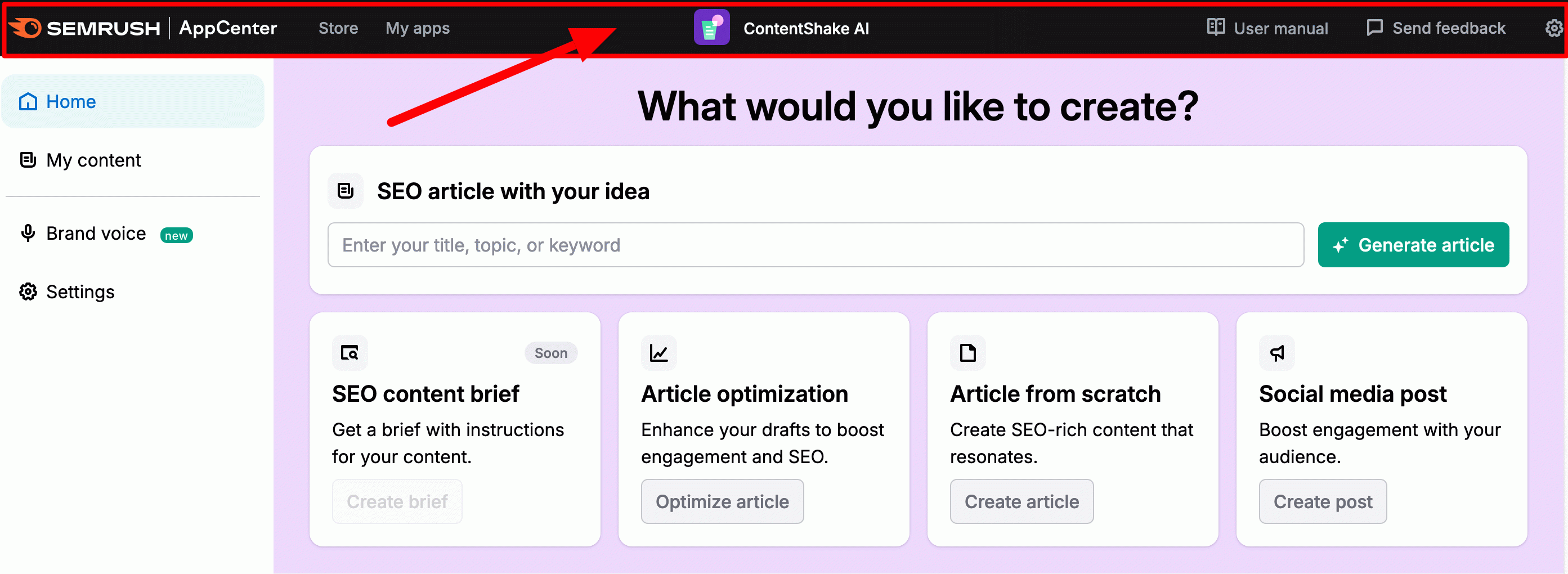
You’ll land directly on the application’s dashboard. This can be divided into three major zones.
The ContentShake AI sidebar
First, there’s a sidebar on the left of the screen, with four main menus:
- Home: displays your general dashboard (what you see when you join the application).
- My content: lists all content generated with the tool.
- Brand voice: to create your writing style and tone, to be applied in the content generation process by the AI.
- Settings: the tool settings. This is where you describe your business and enter your geographical location and preferred language.

The central zone
Then there’s the central part of the screen. This is where you can begin the text creation process, with several elements:
- A search bar, which allows you to generate a text if you already have an idea of the subject, title, or keyword
- Inserts for direct access to the tool’s main functions: article optimization, creating articles from scratch, and social media post ideas
- A section at the bottom of the screen for generating personalized ideas for future posts.

The top bar
Finally, at the top of the screen, a top bar offers several links to:
- Semrush’s application store (“Store”)
- A menu to manage all your applications (“My apps”)
- Tool documentation (“User manual”)
- A button to send feedback or report a bug (“Send feedback”
- Authorize email notifications (cogwheel icon)
Is that clearer for you? Now you can see how to create content with ContentShake AI from A to Z. In order to test the tool thoroughly, we’re going to let it take care of everything (idea and text generation).
How to create an article from scratch with ContentShake AI
Step 1 of ContentShake AI: Describe your business
First of all, we recommend that you make a few settings to ensure that your content is as personalized as possible. To do this, go to the “Settings” menu.
In the “General” tab, start by describing your activity in the search bar. You can use the examples provided by Semrush.
If that’s not representative and precise enough, type in the words that best represent your business. For example, for WPMarmite, I might put: wordpress, gutenberg, plugins, themes, SEO, webmarketing, tutorials, etc.
Continue by entering your target country/city and the language you’d like the tool to write in. Click on “Apply changes” to save:

You can change your settings up to three times a day if you feel that the ideas proposed are not relevant enough.
Step 2: Choose a topic idea with ContentShake AI
After a few seconds, the application offers you ideas for topics in the “Generate article using ideas” section.
Several general categories are offered, each with ideas for articles. For example, for the category “divi pricing,” the tool suggests some of the following topics:
- Evaluating if Divi is worth the price
- Understanding Divi pricing plans
- How to choose the right Divi plan
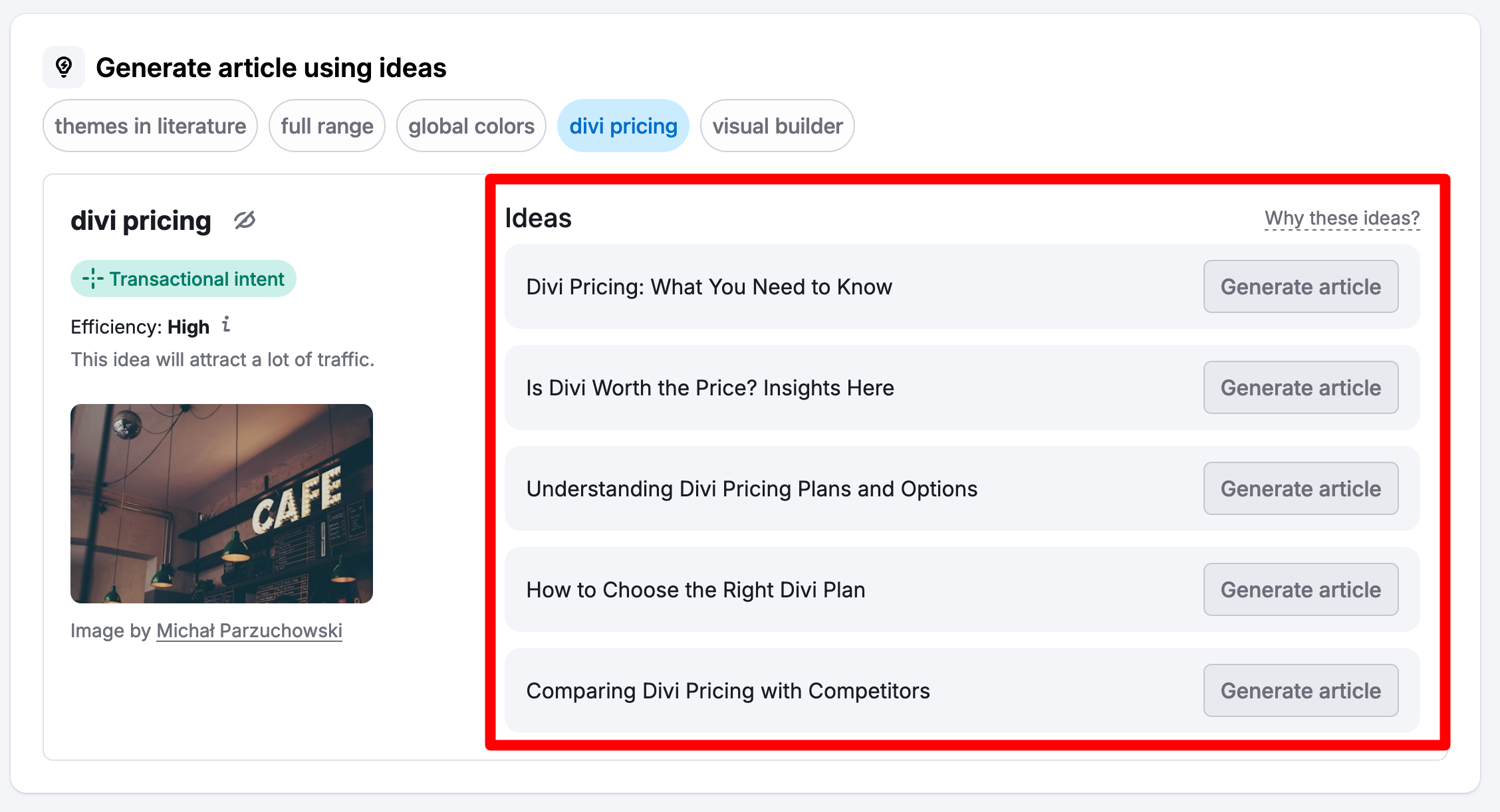
Generally speaking, the recommendations are quite relevant and in line with the description we gave earlier. On the other hand, you should be very specific about the words that best represent your business. For example, in our case, we got a lot of ideas for webmarketing topics, whereas the priority was WordPress in general.
For each keyword, Semrush provides information on search intent, as well as data on search volume and keyword difficulty:

Once you’ve identified a topic to start with, click on the associated “Generate article” button.
Not satisfied with the ideas? You can refine your search by entering new keywords in the settings. Or specify your idea or keyword in the search bar at the top of the page, if you’ve had some inspiration in the meantime, as below:

Step 3: Set up your future article
On the next page, the tool has set various parameters for the article that will then be generated by the AI. You can, of course, modify them as you wish.
You have control over:
- Audience location
- The title of the article
- Your target keywords
- Word count
- The tone of your article (“Brand voice”). You can create this by clicking on the associated button, then copy and paste a text of 200 to 1000 words that best represents your writing style. This could be content from a well-written blog post, your home page, or your About page.
- The option of adding an “SEO boost” to optimize your content using competitive search data to help it rank better
- The ability to add royalty-free images from the Unsplash library
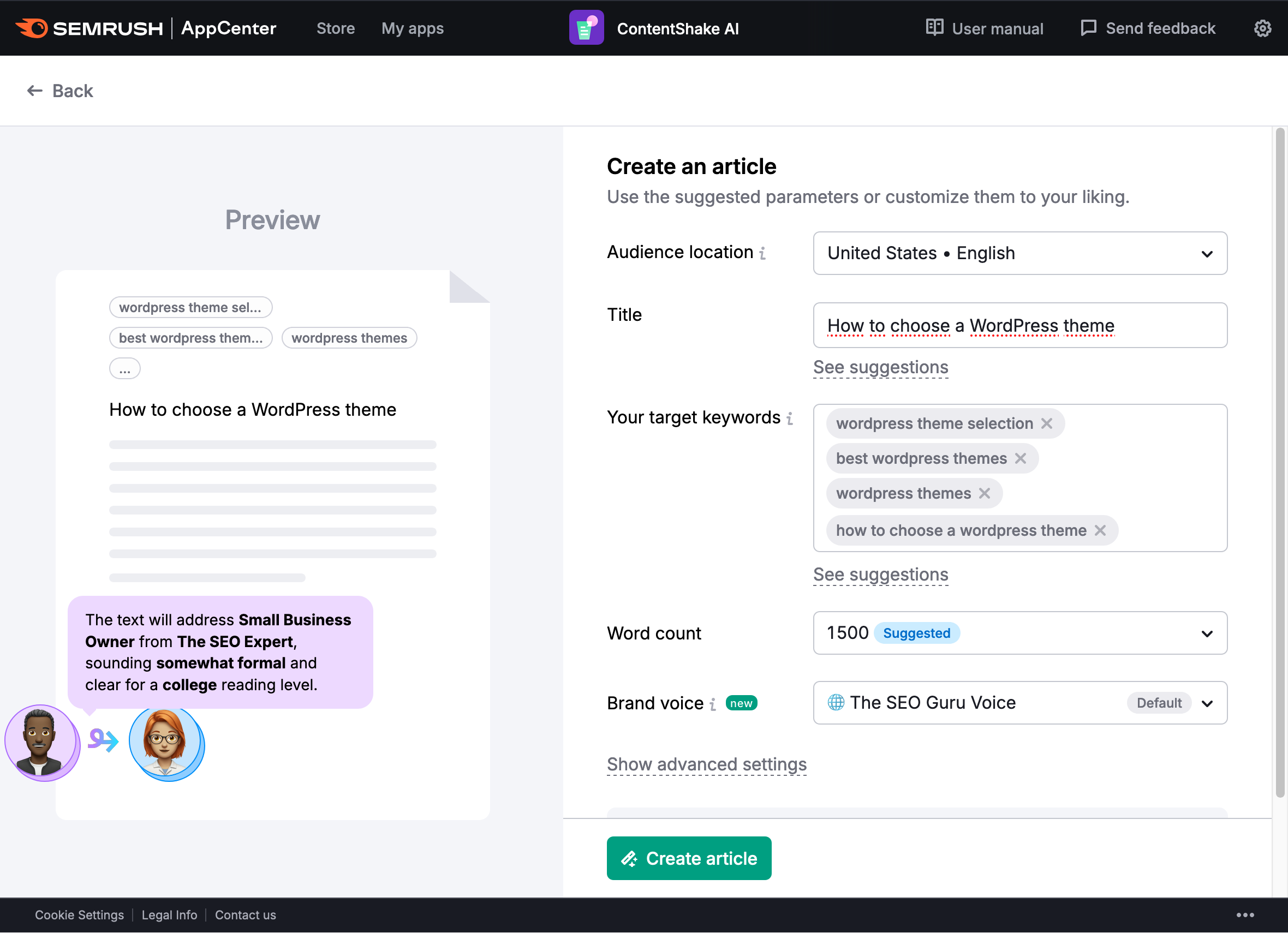
When you’re finished, click on “Create article” and ContentShake AI will propose a complete article. The process can take up to 4 minutes if you have chosen the “Add an extra SEO boost ” option.
Step 4: Personalize and enhance your content
Once ContentShake AI has finished its work, you can either:
- Publish the text on your WordPress site
- Customize the article
- Relaunch article creation if you’re not at all satisfied with the result (“Regenerate quickly”)

Even if you’re satisfied with the quality, we strongly recommend that you put your own stamp on the product by personalizing it. Think of it first and foremost as a working base that you can improve as you go along.
Customize ContentShake AI manually
To do this, you can freely write, correct, and modify text directly in the editor. You also have a few formatting options at the top of the page:

Feel free to highlight the passages of your choice. You’ll then benefit from an extended toolbar with practical new options for:
- Rephrasing your text
- Simplifying it
- Expanding it
- Summarizing it
- Turning it into a bulleted list

If you’d like to continue to be guided and take advantage of AI to enhance your content, that’s also possible thanks to the options below, which you’ll find on the right-hand side of the interface:

Chat with AI (AI Chat)
Think your generated content needs a refresh, but you’re stuck? Let ContentShake AI chat help you out.
It’ll be happy to come up with titles, introductions, structures, images, and more. Note that it doesn’t start from scratch; the conversational robot remembers the text previously written, so it can provide you with even more precise contextual elements.
You are also free to ask questions via the “Ask AI to write” search bar:

Note that this feature is also available directly in the text, as soon as you place your mouse cursor on the word of your choice:

You can also let ContentShake AI write new paragraphs by clicking on “Compose with AI”:

Add images
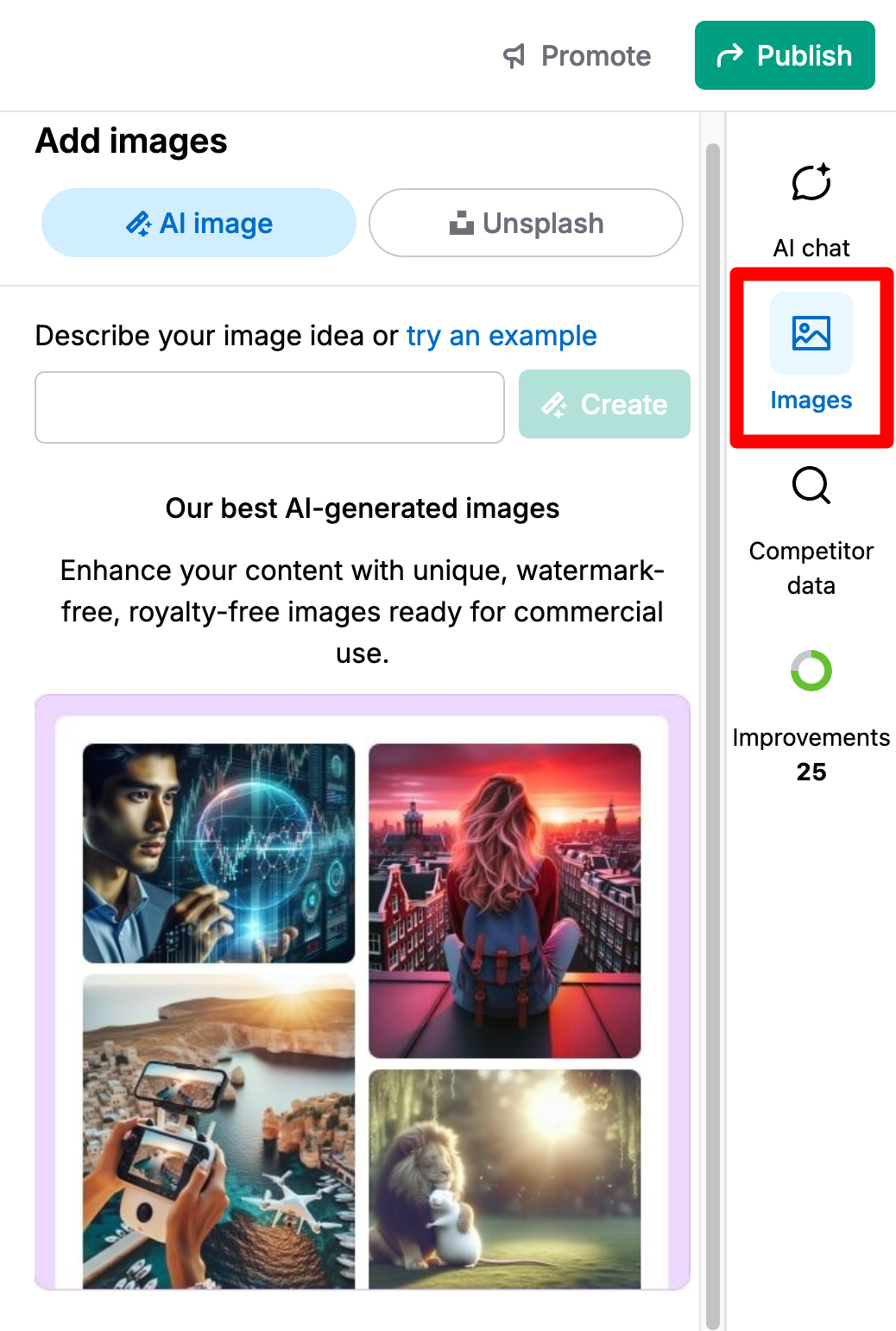
If the images aren’t to your liking, or if you’d like to add some more, go to the “Images” menu. You can ask the tool to:
- Generate new images via AI
- Download illustrations from Unsplash
- Type in a keyword and let the tool create an associated image based on this keyword
You can also add alternative text to your image by clicking on it.
Get inspiration from your competitors
Let’s continue with the “Competitor data” menu. Here, the tool will show you what your main competitors are doing, and suggest ways of improving your content at various levels:
- Titles
- Introductions
- Images
- Structures
- Inspirational articles
Each suggestion can be reformulated using AI and then pasted into your text in a couple of clicks by clicking on the corresponding icons:
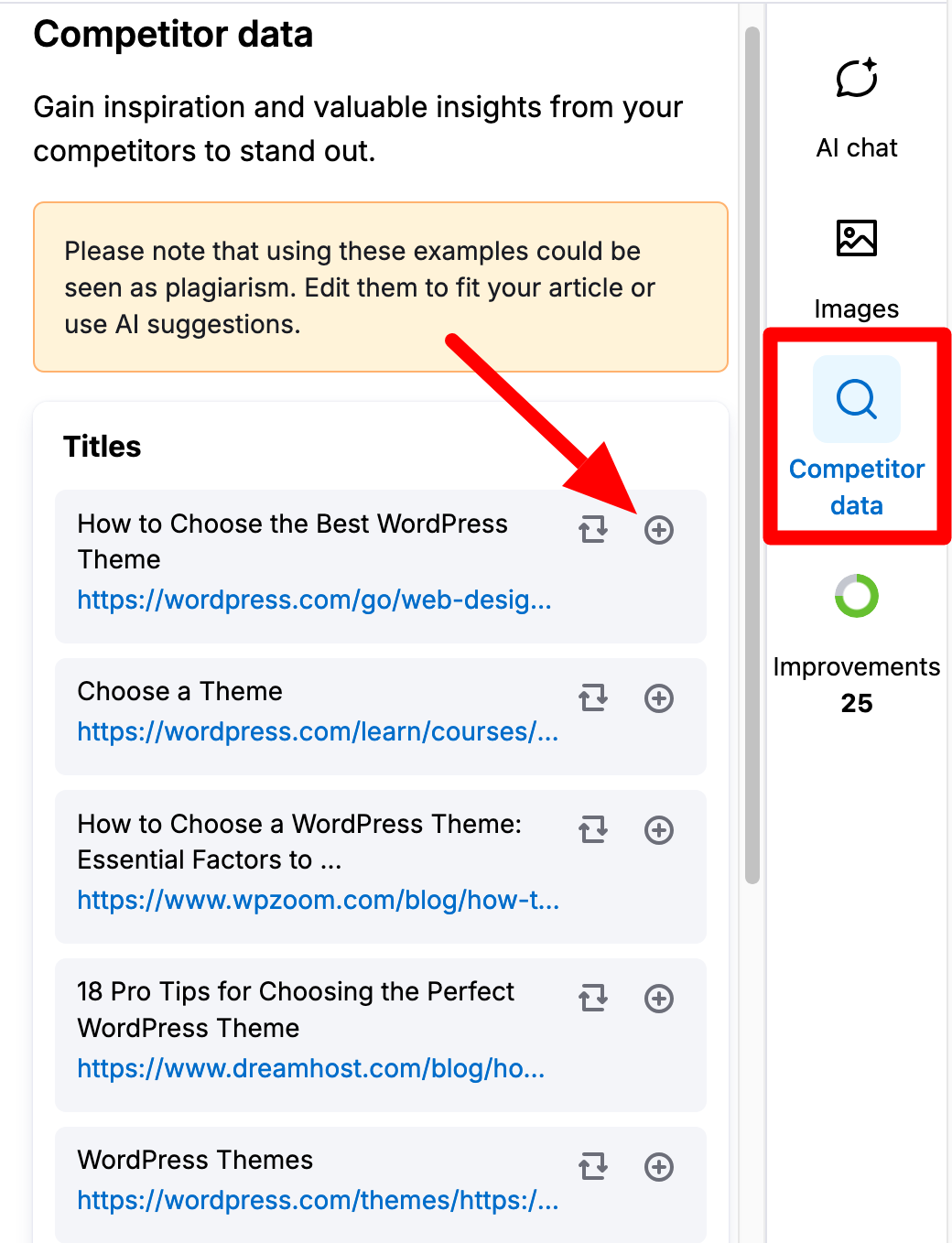
Don’t copy and paste content created by your competitors. Draw inspiration from them to write text that is adapted to your target audience and your editorial policy.
Take advantage of ContentShake AI’s suggestions for improvement
Finally, you can improve your text on three levels: SEO, readability, and style (tone). ContentShake AI gives you an overall score out of 100.
The application suggests improvements in each area, under the “Improvements” menu.
To implement them, click on the highlighted problem, then apply one of the options available in the editor (reformulate, simplify, lengthen, summarize, or convert to a list).

Step 5: Publish your content on Google Docs and/or WordPress
At this stage, your content should meet your expectations. All that’s left is to click on “Publish.”
A highlighted window will open with three possible options:
- Publish the article directly on WordPress using a dedicated plugin. Simply click on “Install plugin” and follow the instructions to link it to your WordPress site.
- Send the article to Google Docs to collaborate with others.
- Share with read-only access. Click on “Share with read-only access” to generate a link that you can transfer to the person of your choice.

At last, you should be set. You’ve just finished creating your first article with ContentShake AI. And you know what: the tool still has more surprises in store for you. Stay tuned for more.
What other options does ContentShake AI offer?
Content optimization
ContentShake AI can also be a great ally when it comes to optimizing existing content.
To do this, click on “Optimize article” in the “Article optimization” menu on your dashboard.
You’ll be dropped into the tool’s editor, empty of any text.
Select your geographical location, then enter at least three keywords (the first defines the main subject) in the “Your target keywords” section. Paste the text to be optimized:
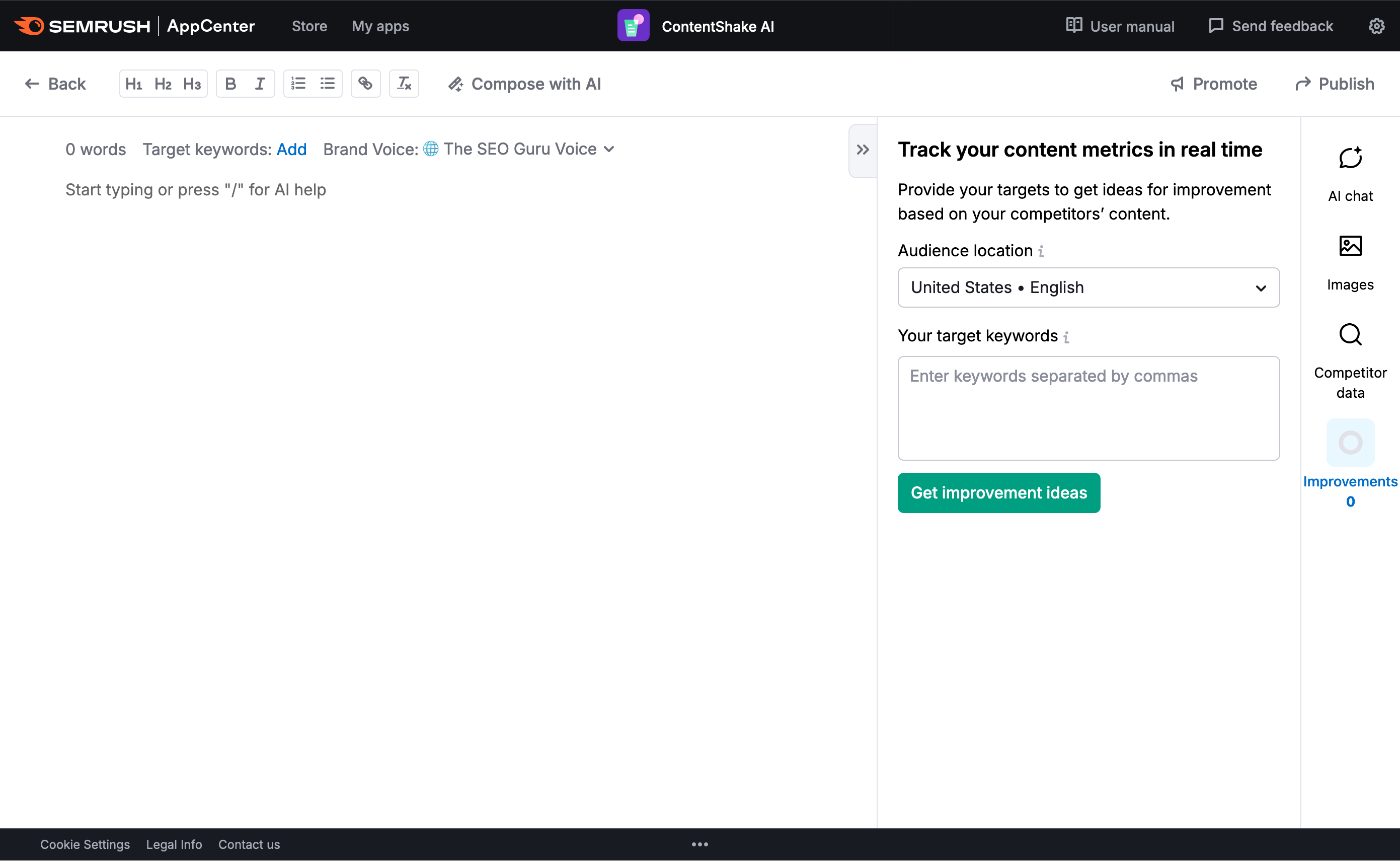
You’ll then get personalized improvement suggestions to apply by clicking on each problem identified, as we’ve already seen.
Writing from scratch
Another option is to design an article from scratch. Choose “Article from scratch” on your dashboard.
In this case (and this is the main difference with the 5-step process described above), no pre-existing content will have been generated by the AI when you land on the editor. There will be no text at all.
To fill it in, use the tools and functions detailed above (AI chat, Images, Competitor data, Improvements, etc.).
Creating publications on social networks
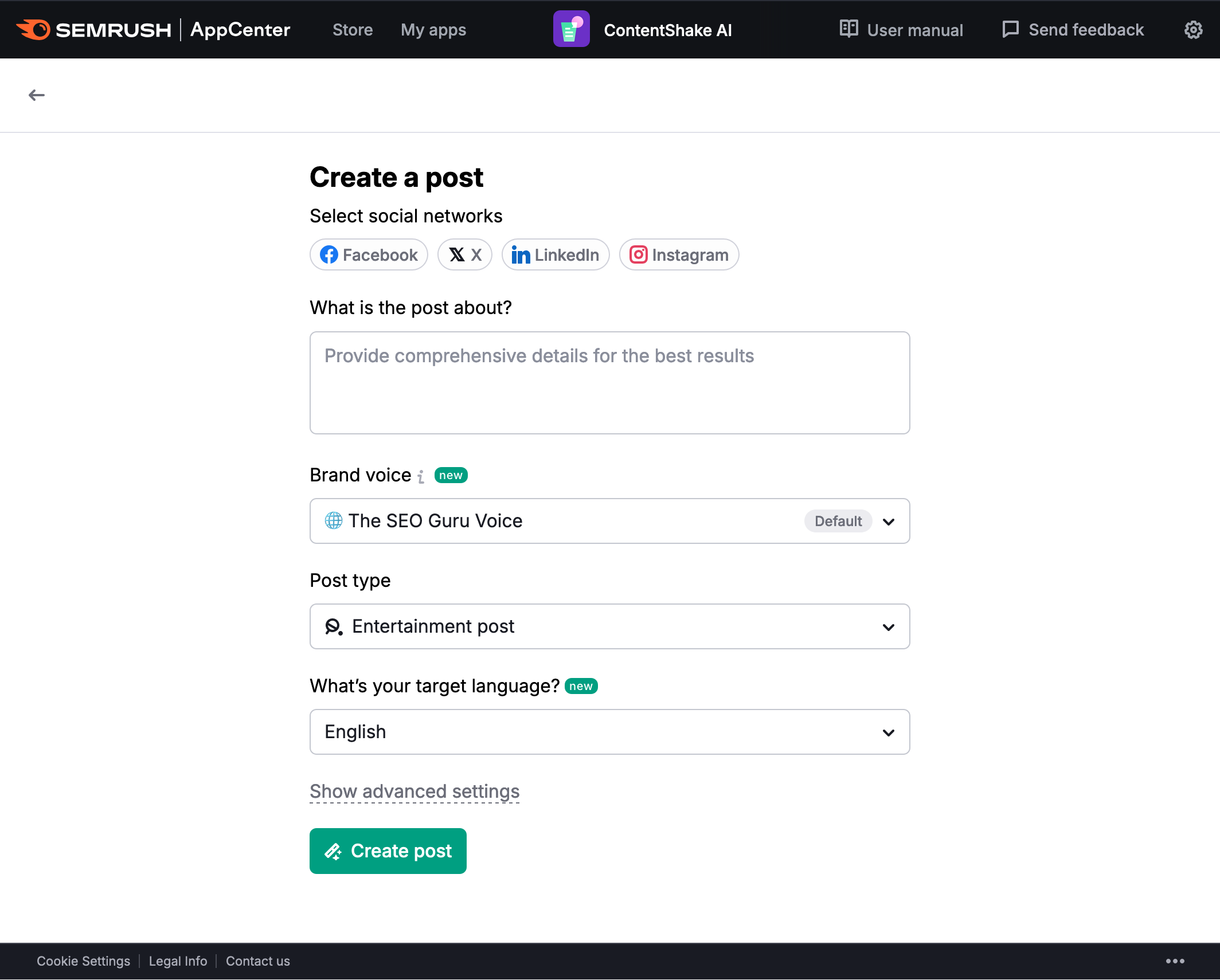
As a self-respecting content-marketing platform, Semrush then offers an AI-assisted post creation function for social networks.
Click on the “Social media post” menu in your dashboard to access it. Then enter the following information:
- The social network on which to publish (Facebook, X, Instagram, or LinkedIn)
- Description of the publication to be created, providing as many details as possible (subject, target, etc.)
- Your writing style (brand voice)
- The type of content to be designed (educational, sales, entertainment)
- The language of the publication
- The tone to be used (formal, neutral, casual, etc.)
Brand Voice
Finally, you can set what ContentShake AI calls “Brand Voice” (go to the menu in your sidebar by the same name to access it).
Your brand voice is your writing style, the one that the AI should adopt when generating your content.
Semrush defines it as follows:
Brand voice refers to the unique personality and tone a company or organization adopts in its communications. It encompasses written content, social media posts, customer interactions, and marketing materials.
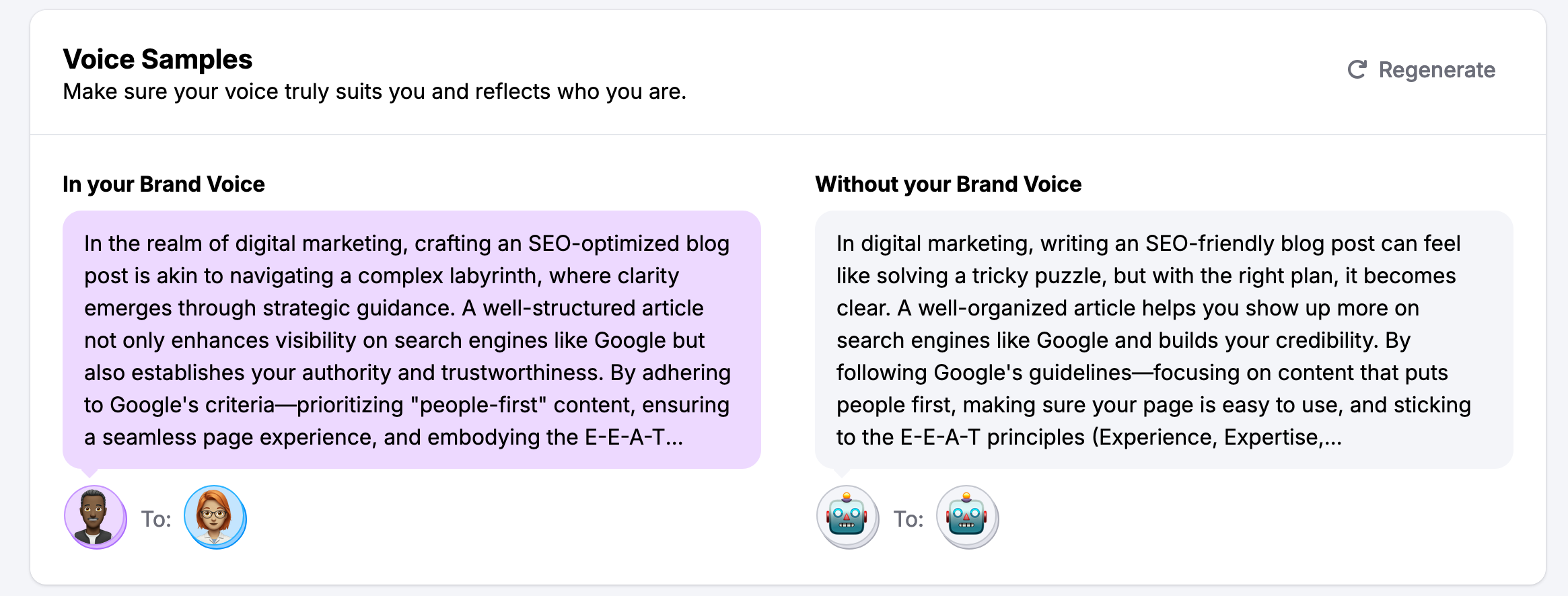
To define it, start by selecting a text that reflects the style and tone you’re aiming for (between 200 and 1,000 words).
To refine what ContentShake AI offers, you can then edit:
- The description provided, and adapt the tone and readability
- Your audience, by modifying or creating one or more new personas (fictitious representations of your ideal customers)
- Check that the sample voices provided truly reflect your identity
Other Semrush content marketing tools
If you’ve been paying close attention since the beginning of this article, you should have noticed that ContentShake AI is a tool integrated into a general content marketing platform (Content Marketing Toolkit) composed of several tools for:
- Planning content
- Creating and optimizing content
- Monitoring what’s being said about your brand
You can find the tools concerned in the “Content marketing” menu of your Semrush dashboard.
On the other hand, please note that the tools of the Semrush “Content marketing” platform (with the exception of ContentShake AI, which is not included in Semrush packages) are only accessible in their entirety with a “Guru” or “Business” package.
If you wish, you can take advantage of a free 7-day trial of Semrush “Guru”:
After this interlude, let’s move on to a brief presentation of the tools included in this package. They’ll be particularly useful if you want to take advantage of the Semrush platform without using ContentShake AI (which offers features similar to those you’ll discover below).
Topic Research
The “Topic Research” tool allows you to find ideas for content and topics that are relevant to your audience.
You can also use it to find trending topics in your sector and identify topics for which your competitors are already ranking.
To take advantage of this, enter a theme or general keyword, for example, and you’ll find yourself with dozens and dozens of topic ideas and their monthly search volume.
All data can even be displayed in the form of mind maps.
SEO Content Template
If you’re used to working with copywriters, Semrush’s “SEO Content Template” tool should appeal to you. It helps you create content briefs based on the keyword of your choice.
By studying the Top 10 articles of your main organic competitors, Semrush advises you on the optimum length of content to write, the keywords semantically associated with your main keyword, the average readability score, and even the backlinks to acquire from different domains.

SEO Writing Assistant
Once your article has been written, you can use the SEO Writing Assistant tool to obtain suggestions for improvement in terms of readability, SEO, tonality (consistency score for English texts of over 100 words), and originality (to check for plagiarism).
This tool can be used from your Google Doc account, MS Word, WordPress, or the Semrush interface.
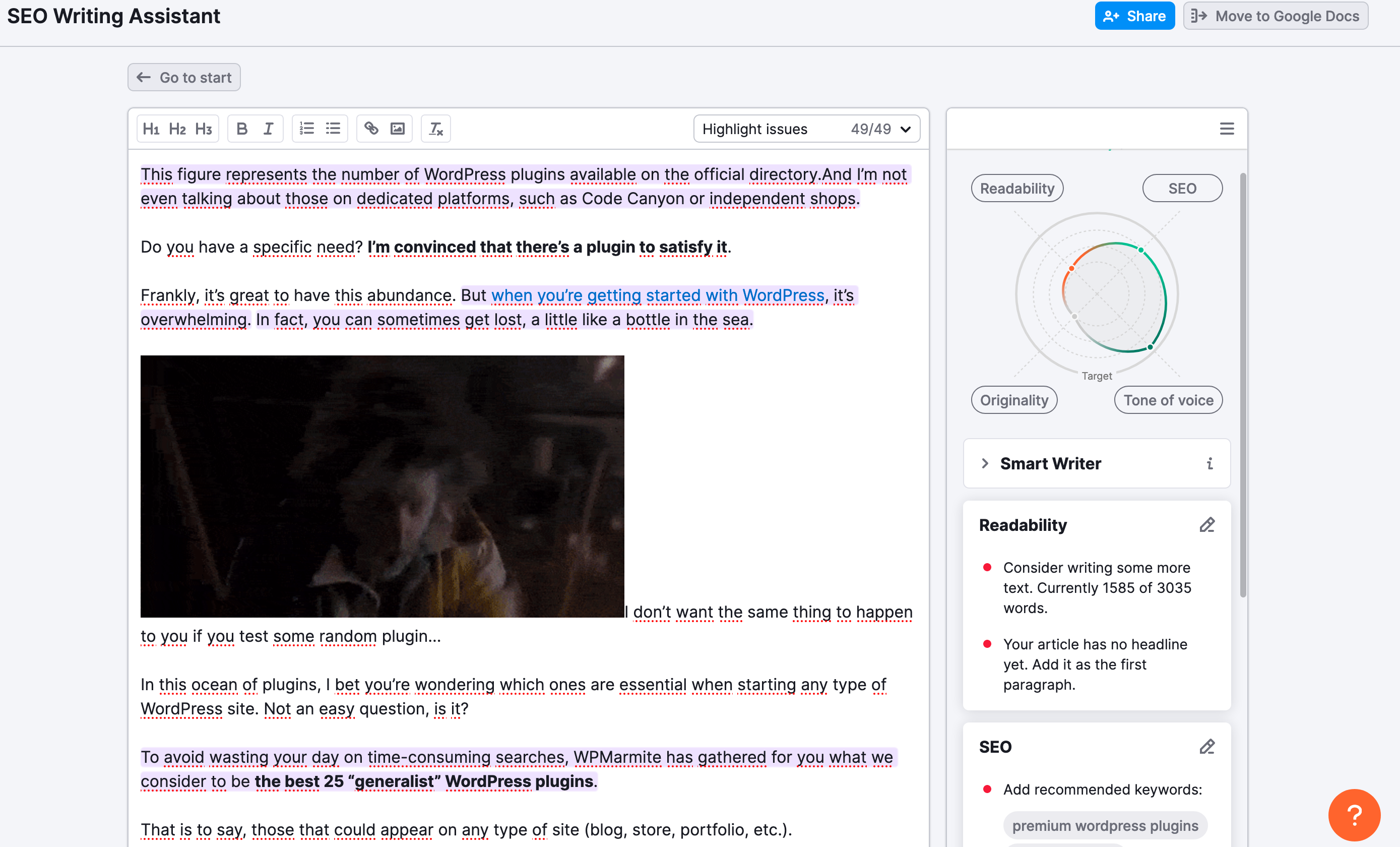
To try out these tools with a free 7-day trial of Semrush Guru, click here.
Brand Monitoring
Finally, the Content Marketing toolbox includes a tool called Brand Monitoring. It tracks mentions of your brand (and those of your competitors) on social networks, press articles, and backlinks.
For effective monitoring, you can receive email alerts and notifications (daily, weekly, monthly).
Like ContentShake AI, this application can be purchased on its own, without the need for a Semrush plan (Pro, Guru, or Business).
It is priced at $59/month, with a 7-day free trial.

How much does ContentShake AI cost?
ContentShake AI is a separate Semrush application. It can be purchased on its own, without the need for a premium package (Pro, Guru, or Business).
It costs $60/month to access all its features:
If you’d like to form your own opinion and test the tool to see if it’s right for you, Semrush offers a free 7-day trial.
On the other hand, the trial version inevitably has limitations to keep in mind:
- You can only generate three paragraphs per article with AI
- AI features (e.g. AI Chat) are limited to 30 units of use per month
- Not all text editing options are available
What are the alternatives to ContentShake AI?
After the pricing issue, let’s take a look at the alternatives to ContentShake AI.
After all, what does it have that a famous tool like ChatGPT, for example, which is available free of charge, doesn’t?
Quite frankly, ContentShake AI is much more complete for copywriting. With ChatGPT, you can only get text, which won’t always live up to your expectations. Far from it.
To obtain an interesting base, you need to give it precise instructions and master the art of the prompt (the request made to ChatGPT). Not everyone can do this.
ContentShake AI goes much further. In addition to detailed text, you get:
- Real-time competitive data
- SEO data from Semrush’s gigantic database (search volume, keyword difficulty, etc.)
- Images to illustrate your texts
- A less robotic, more human text that reflects your writing style and brand identity
In terms of efficiency, you won’t lose out on ChatGPT, since ContentShake AI is based on the generative AI model offered by OpenAI, the company that publishes… ChatGPT.
And since there’s more to life than ChatGPT, note that other tools such as Jasper, Copy AI, TextBulker, and SurferSEO can also help you design AI-based content.
Our final review of ContentShake AI
Now it’s time to wrap things up. Before delivering our final review of ContentShake AI, let’s recap its advantages and limitations.
Tool benefits
- Ease of use.
- Huge time savings. The tool creates content 12 times faster.
- A complete application, capable of generating text and images, while optimizing your text for SEO based on search intent and competition.
- No bugs or latencies encountered during our test. The tool works very well.
- Takes into account your brand’s tone and personality to offer personalized content, thanks to the “Brand Voice” feature.
- Integration of Semrush analytical and statistical data.
- Convenient content editing and enhancement features: simply click to apply automatically.
- A tool that’s constantly improving. While the tool was initially offered in English only, 7 languages are now available. A feature for creating SEO briefs is also in the pipeline.
- Automatic publishing of your content on WordPress.
- The ability to send your texts to Google Docs for collaborative editing.

Disadvantages of ContentShake IA
- Even if it’s not very high, there’s still an additional cost to factor into your budget if you want to use ContentShake AI.
- Unlike the Semrush platform, the ContentShake AI interface is only available in English.
- Tools are no substitute for people. To create content that stands out from the crowd, especially on technical subjects that go into great detail, you’ll need to rewrite, rephrase, and add additional information to your content.
- If you’re used to designing articles in the form of “tests” (like this one), ContentShake AI will be limited. It won’t be able to literally test a tool, provide you with screenshots, and so on.
What does WPMarmite think?
ContentShake AI is a highly effective tool that we’ve enjoyed using. In every way, it fulfills the promise it makes to its future users: “produce more quality articles” for their website.
In our test, the result was very satisfactory. The article was well-constructed, with several levels of relevant hn titles, airy paragraphs, and above all content that was relevant, interesting, and related to the requested topic.
There was clearly added value in the text. On the other hand, we also encountered a few limitations:
- Some of the images offered had nothing to do with the subject. For example, the tool included a photo of a beach with birds in the introduction, to talk about creating a WordPress theme…
- The text lacked concrete details to show in a practical way how to create a WordPress theme, e.g. with code, etc.
If you want to add value and do better than your competitors, your involvement is essential. In fact, Semrush encourages it:
“We draw your attention to the fact that AI-assisted tools always require human control,” explains the SEO platform. “ContentShake AI is designed to help you save time and optimize your content, as long as you know what you’re writing about. If you use this tool to write about a topic you don’t know, you risk creating less relevant content for which it will be difficult to rank.”
Duly noted. In short, we believe that ContentShake AI can be a real added value for you if:
- You need to produce a large number of articles on a frequent basis and are short of time. This can be the case if you’re an agency, freelancer, or website publisher.
- You regularly suffer from writer’s block, which prevents you from finding your words and wastes your time.
- You’re running out of ideas for your next articles and/or pages.
- You’re looking for a time-saving tool backed up by advanced SEO data.
If this sounds like you, take a look at this must-have application:

Receive the next posts for free and access exclusive resources. More than 20,000 people have done it, why not you?


Continue reading
Articles posted in WordPress TutorialsHow to update the PHP version of your WordPress site
What comes to mind when you think of WordPress speed and security? Your favorite plugins, perhaps? You should also think about… PHP! If you’re looking for a site that loads fast, while offering a solid shield against hacker attacks, there’s a…
How to create an effective HubSpot conversion funnel on WordPress (complete guide)
In the drawers of a kitchen, there are often two very useful utensils lying around. The first is the colander. And to illustrate, some WordPress sites unfortunately resemble it. Why? Well, because visitors arrive on the site in question… then…
How to fix the ERR_CONNECTION_REFUSED error: A complete guide
Does your browser display the ERR_CONNECTION_REFUSED message when you try to access a website? This error means that the target server – or your own configuration – is actively rejecting the connection request, leaving you at a dead end. But…