A neatly trimmed green mustache doubling as the crossbar of the letter H. From a marketing standpoint, HostPapa’s logo hits the mark. It catches the eye and sticks in your mind.
That said, let’s be clear: a nice mustache doesn’t necessarily make a good WordPress host.

While HostPapa’s mustache helps the Canadian brand stand out visually, we were more interested in what goes on behind the scenes, on the technical side: servers, performance, security, interface, support, and pricing.
Because when it comes to choosing where to host your WordPress site, you’re better off looking beyond the logo and the sales pitch.
Reliability, performance, and the quality of customer support matter a whole lot more.
So, does the Canadian host live up to its promises? That’s what you’ll find out in our HostPapa review and test.
Okay, enough mustache talk: let’s put HostPapa under the microscope!
- What is HostPapa: overview and services
- HostPapa hosting performance and reliability
- What does HostPapa offer in terms of security?
- HostPapa's interface: is it easy to use?
- User assistance and customer support at HostPapa
- What hosting plans and prices does HostPapa offer?
- What do customers say about HostPapa?
- Our final verdict on HostPapa
This page is sponsored. Know that we remain impartial. If a product isn’t worth it, we say so (or we don’t cover it at all).
What is HostPapa: overview and services
HostPapa in a nutshell

HostPapa is a global provider of web hosting and cloud services that helps small and medium-sized businesses (SMBs) build, manage, and grow their online presence.
Founded in 2006, the company is based in Burlington, Ontario (Canada). Today, it claims more than 500,000 customers worldwide, with a particularly strong presence among freelancers, bloggers, and SMBs using WordPress.
On its “About” page, HostPapa states a clear mission: “to simplify the digital transition for businesses.”
Its positioning rests on several key pillars:
- Beginner-friendly plans.
- A full range of plans that can grow with your site, with environments optimized for a CMS like WordPress.
- Human support available 24/7.
- Transparency and clarity: the sign-up and renewal prices of each hosting plan, as well as the resource limits included in each plan, are clearly stated.
With HostPapa, you can start with simple WordPress hosting, then move up to more powerful solutions if your traffic or your needs grow over time.
The Canadian host also plays the all-in-one card. Hosting, domain name, SSL certificate, professional email, website building, security, and migration: the goal is to bring everything together with a single provider, to make your life easier.
Now that we’ve set the scene, let’s move on. As you’re about to see, HostPapa’s catalog goes well beyond simple web hosting.
What services does HostPapa offer?
Hosting solutions for different needs
When it comes to pure hosting, HostPapa offers the following services:
- shared web hosting (based on cPanel)
- optimized WordPress hosting
- managed WordPress hosting
- VPS (virtual private server)
- dedicated servers
- reseller hosting, to manage your clients and websites under your own brand
- PapaCare, an add-on service that lets you hand off the day-to-day management and security of your WP site to expert priority support.
Shared hosting and the WordPress plans are enough in most cases. VPS and dedicated servers are better suited to projects that need more resources or more control.
Website builder and artificial intelligence
HostPapa also offers its own AI-powered website builder, starting at $5.95 per month.
This tool, which requires no technical or design skills, can generate a site structure, text, images, and an SEO-optimized layout in a few minutes, based on a simple description of your business.
Page templates and a drag-and-drop editor make it easy to get started, even if you’re a beginner.
It’s not what interests us most in a WordPress-focused review, but this solution can meet the needs of an entrepreneur who wants to set up a very simple online presence without dealing with a CMS.

On top of this AI website builder, HostPapa also offers a “Do-It-For-Me Website Design” service if you’d rather hand off the creation of your WordPress site entirely (starting at $99/month).
Domains, professional email, migrations, and collaboration tools
On top of that, there are several additional services:
- registration, renewal, and transfer of domain names
- HostPapa professional email addresses using your domain name
- the option to add collaboration suites like Google Workspace or Microsoft 365 to centralize email, calendars, and file storage
- SSL certificates, to switch your WordPress site to HTTPS
- automated backups
- the Protection Power tool to strengthen security
- a 30-day money-back guarantee on most hosting plans.
HostPapa also offers free migration of your domain name and WordPress site, if needed.
A dedicated team handles the transfer of your files, database, and settings.
WordPress: a CMS at the heart of HostPapa’s offer
HostPapa doesn’t just let you install WordPress on a general-purpose server.
The company sells a range of plans designed specifically for the world’s most popular CMS.
On the optimized WordPress plans, WordPress comes preinstalled and maintained (a one-click install through Softaculous is still available if you’d rather stay in control).
You also get WP Toolkit, a tool that brings together several common tasks such as installation, configuration, security, and updating your WordPress site (more on that later).

WordPress core updates are automatic, which reduces the security risks of running an outdated version.
Theme and plugin updates, on the other hand, remain optional and can be handled manually.
In addition, depending on the plan you choose, you also get a staging environment to test your changes, as well as round-the-clock malware protection.
Overall, there’s a real effort to integrate with the WordPress ecosystem, even though HostPapa remains a general-purpose host rather than a 100% WordPress specialist like some more focused players.
We also feel HostPapa’s approach makes sense for its target audience: keeping technical tasks to a minimum while leaving enough tools for users who want to go further.
One key question remains: is this infrastructure solid enough to serve your site quickly? Find out in the next section.
HostPapa hosting performance and reliability
NVMe storage and a 99.9% uptime guarantee
A host’s speed never comes down to a single technology. The WordPress theme you use, your plugins, images, caching, and the overall optimization of your site also have a major impact.
On the infrastructure side, HostPapa puts forward several interesting arguments.
Let’s start with storage. The WordPress plans use high-performance NVMe (Non-Volatile Memory Express) drives.
Without getting into a computer architecture lecture, just remember that this technology provides much faster data access than older storage solutions (HostPapa claims loading speeds up to 3 times faster than with traditional storage).
And WordPress constantly calls on files and a database. Reducing data access times helps make your site more responsive.
HostPapa also advertises a 99.9% uptime guarantee. In other words, its infrastructure is designed to keep your site available almost all the time, allowing for about 43 minutes of downtime per month.
Note that this figure, while not bad, doesn’t put HostPapa among the top performers in the industry. Some competitors offer 99.99% guarantees, which means an annual downtime margin nearly ten times smaller.
It’s no deal-breaker for typical use, but it’s something to keep in mind if uptime is a non-negotiable criterion for your business.

Data centers in North America and Europe
Another thing to know before choosing your hosting plan: where the data centers are located.
HostPapa has servers in the United States, Canada, and Europe (in Amsterdam, in the Netherlands).
For a site aimed at a North American audience, choosing a server in the United States or Canada keeps latency (a server’s response time) to a minimum.
A CDN to speed up content delivery
On the WP Growth, WP Premium, and WP Elite plans, HostPapa includes a global CDN. Your site’s static content can then be served from servers closer to your visitors.
The fully managed WordPress offer goes further, since it includes Cloudflare Enterprise, with a global content delivery network.
On paper, the combination of NVMe, optimized servers, and a CDN provides solid technical foundations.
That said, it doesn’t mean you can skip optimizing WordPress. Installing 45 useless plugins and uploading 8 MB photos will always end up taking a toll, no matter who your host is.
Performance may be a major criterion when choosing a host, but it isn’t everything.
A fast site that gets hacked is useless, which is why a secure infrastructure is so important as your first line of defense.
What does HostPapa offer in terms of security?
SSL and CloudLinux to secure the hosting environment
First essential element: an SSL certificate is included for free with the WordPress hosting plans.
SSL encrypts the data exchanged between your visitors’ browsers and your server. It’s also what allows your WordPress site to be served over HTTPS.
These days, it’s no longer really a bonus: it’s a prerequisite for running a website seriously.
Another security building block included on all shared hosting plans: CloudLinux. This technology comes in very handy.
As you may already know, on a shared server, several sites share the same resources.
If one of them is attacked or gets a sudden traffic spike, it can, in theory, slow down or even affect the other sites hosted on the same server.
With CloudLinux, no more worries on that front. The technology isolates each account to prevent this domino effect.
If a site runs into trouble, its resources are throttled or the site is temporarily paused while the incident is resolved, without affecting the other users on the server.

Protection against malware and attacks
For malware protection, HostPapa relies on Imunify360 on its optimized WordPress hosting plans, with a web application firewall (WAF), intrusion detection, and automated malware removal.
The higher-tier plans (Premium, Elite) add Protection Power, a service that combines DDoS protection and real-time security alerts.
What about backups at HostPapa?
Backups are included too, but take a close look at the terms of your hosting plan.
On some optimized WordPress plans, the amount of data backed up varies, and this feature may only be free for a limited time.
On the other hand, the managed WordPress offer includes automatic off-site backups on every plan in the range.
Whatever your host, keep an independent backup strategy for important sites, for example with a dedicated plugin such as WP Umbrella or UpdraftPlus.
As you’ve just seen, HostPapa’s technical foundations are serious. But you still need to be able to manage all of this without spending twenty minutes looking for every button. Let’s head over to the dashboard to see how it fares.
HostPapa’s interface: is it easy to use?
The HostPapa dashboard to manage everything in one place
To get to your HostPapa dashboard, click the “Sign In” button at the top right of the host’s official homepage:

Once logged in, you’ll find yourself on an all-in-one interface that brings together options for both the administrative side (invoices, services, support access) and the technical side of your WordPress site.
For example, you have access to the various tools and services included in your WordPress hosting plan through tabs such as “My WordPress,” “My Domains,” and “My Services”:

cPanel and WP Toolkit to manage your WordPress hosting
To manage the hosting itself, HostPapa relies mainly on cPanel. From the HostPapa dashboard, you can access it through the “My WordPress” menu or the “My cPanel” menu, depending on your plan.
Once in cPanel, click “WordPress Management” in the left sidebar to use the features offered by WP Toolkit.

You’ll then land on a dashboard that lets you configure and manage your WordPress site.
Here’s some of what you can do:
- install WordPress in one click
- manually run bulk updates of your themes and plugins
- manage your databases (creating and editing them in phpMyAdmin)
- upload themes and plugins
- use a file manager
- back up and restore your site
- clone your site for testing
- access your WP site’s logs (activity logs)
- use WP-CLI (the command-line interface)
- log in to your WordPress dashboard automatically
- turn on maintenance mode
- manage debugging
- password-protect your site
- turn on Smart Update, an option that lets you test WordPress updates without affecting your live site.

If needed, you can of course still use the standard cPanel interface provided by HostPapa.
Our take on HostPapa’s interface
After trying it out, we were won over by HostPapa’s interface and its wealth of features, especially thanks to the integration of WP Toolkit.
WP Toolkit really makes the day-to-day management of a WordPress site easier by bringing together the main tasks you’ll need in one place.
On the other hand, the whole thing isn’t necessarily the cleanest or most intuitive on the market. The general dashboard that groups all the menus still looks dated and not very modern.
What’s more, having the HostPapa dashboard, cPanel, and WP Toolkit side by side takes a little getting used to when you’re starting out.
Don’t worry: nothing that’s a deal-breaker in our eyes. Once you’ve found your bearings, the environment proves to be complete, practical, and accessible enough to manage a WordPress site without advanced technical skills.
Struggling or running into a problem? If you get stuck, that’s where support comes in. That’s precisely one of the arguments HostPapa pushes the most with its (future) customers.
User assistance and customer support at HostPapa
Support available 24/7, in several languages
At HostPapa, the PapaSquad is the name of the support team, with real humans behind their screens.
Beyond the (very clever) marketing name, the service has a concrete advantage: it runs 24/7, 365 days a year.
Three channels are available to contact it:
- phone
- live chat on the website
- email or support ticket from your client dashboard, in the My Support > Open New Ticket tab.

Support is available in several languages, including English, French, Spanish, and German.
According to information provided by HostPapa, the average response time is under five minutes and the first-contact resolution rate reaches 99%.
If these figures hold up over time (we don’t have enough long-term perspective to confirm it), they set the bar high compared with the industry average.
A support team that knows WordPress
The support team also has specific WordPress experience, since a large share of the host’s customers use the CMS.
In addition, HostPapa provides a very comprehensive knowledge base, with an impressive 3,500+ articles!

You’ll find, among other things, tutorials on WordPress, cPanel, email, domain names, and managing your HostPapa account.
And if you’re hungry for more, the Canadian host also has around a hundred video tutorials to help you solve a problem:
PapaCare for more hands-on help
HostPapa also sells PapaCare if you want more hands-on help.
On top of managed hosting, this service adds priority support, daily backups, and help with security, performance, email, and some scripts or applications.
At this point, you probably have a very practical question in mind: how much does all this cost? Let’s take a closer look at the prices of the WordPress plans.
What hosting plans and prices does HostPapa offer?
Now let’s get down to the nitty-gritty: price. HostPapa offers two main families of plans designed for WordPress:
- Optimized WordPress hosting (shared).
- Managed WordPress hosting, more “high-end.”
HostPapa’s optimized WordPress hosting prices
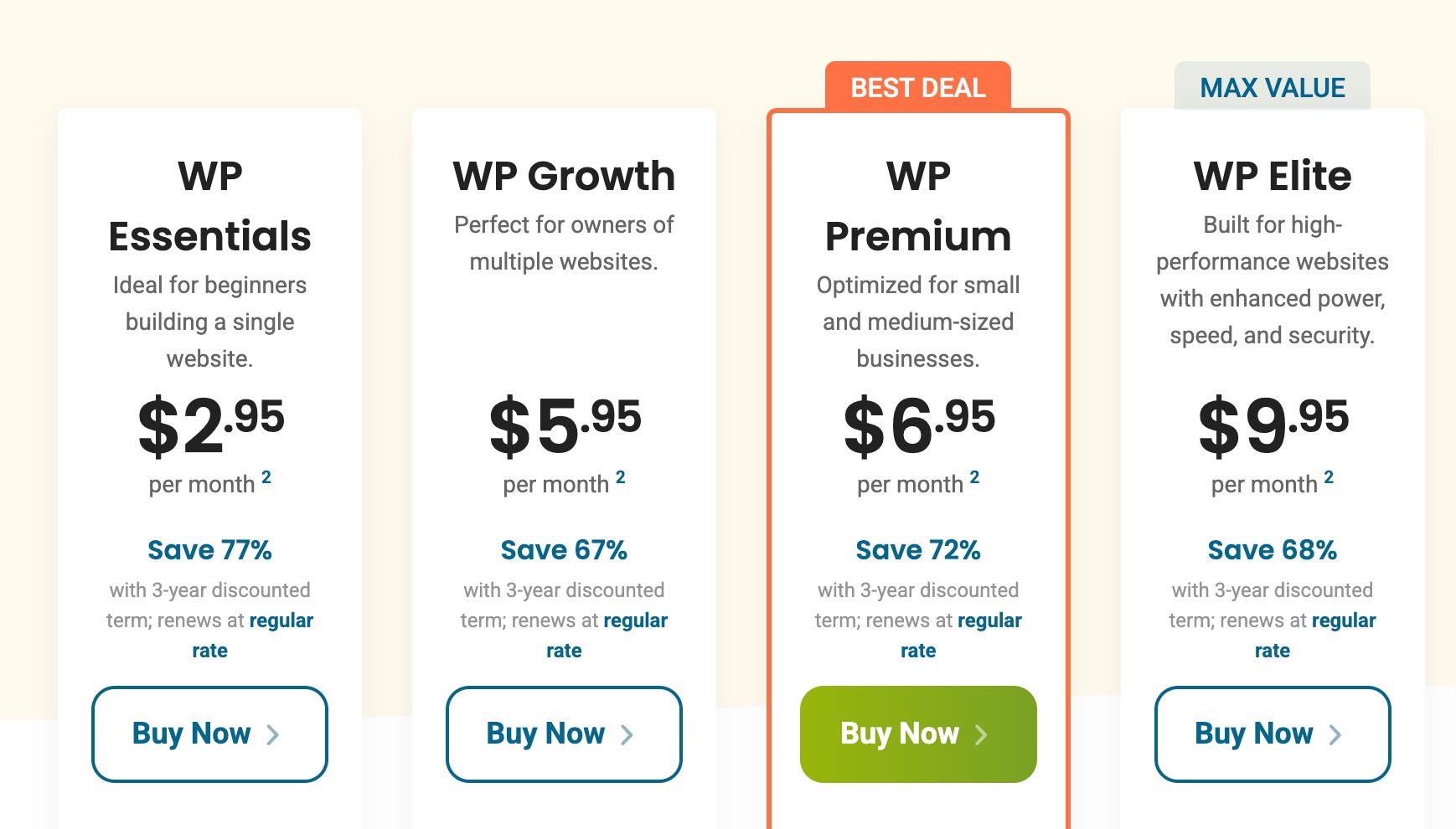
At the time of writing, the optimized WordPress offer starts at $2.95/month (WP Essentials plan) on a three-year promotional term.
The WP Essentials plan covers a single website, with 25 GB of NVMe storage and 1X server resources. This plan is mainly suited to launching a first site and to beginners.
Other plans are also available, such as:
- WP Growth ($5.95/month): 5 WordPress sites, 100 GB of NVMe storage, 2X server resources. This plan can be a good fit if you manage several WP sites
- WP Premium ($6.95/month): unlimited sites, 200 GB of NVMe storage, 4X server resources. This plan targets agencies, freelancers, and growing businesses with multiple sites in their portfolio
- WP Elite ($9.95/month): unlimited sites, unmetered NVMe storage, 8X server resources. Here, HostPapa specifically targets high-traffic sites and/or WooCommerce stores.
What about managed WordPress hosting?
If you’d rather hand off more technical tasks, HostPapa offers a second range: managed WordPress hosting.
The entry-level plan (MWP Core) starts at $14.95/month, with a two-year term.
This plan lets you host one WordPress site with 30 GB of NVMe storage and up to 50,000 unique visits per month, according to HostPapa.
The higher-tier plans then ramp up:
- MWP Standard: $34.95/month, 3 WordPress installs, 80 GB of storage, and up to 200,000 monthly visits
- MWP Boost: $59.95/month, 10 installs, 200 GB, and up to 800,000 visits
- MWP Turbo: $99.95/month, 20 installs, 400 GB, and up to 2 million visits.

The value isn’t only in the resources. You also get a Cloudflare Enterprise CDN, automatic off-site backups, enhanced security tools, and automated theme and plugin updates.
For a personal blog or a small business website, this level of service isn’t necessarily needed.
On the other hand, a professional site that generates revenue can justify the extra cost to cut down on the technical tasks to handle.
What to check before you commit
Note that, as with the vast majority of hosts, these prices are introductory rates valid only for the first term (usually 2 or 3 years): the plans then renew at the regular, higher rate, as you can see in the screenshot below for the optimized WordPress hosting plans:

The renewal price increase applies to the Optimized WordPress plans. The Managed WordPress range, on the other hand, keeps the same price at sign-up and at renewal, with no increase.
All annual and multi-year hosting plans include a free domain registration or transfer for the first year, a free site migration handled by the HostPapa team, and a 30-day money-back guarantee.
We recommend choosing your plan based on your actual needs rather than the lowest price displayed in big letters:
- do you have a simple business website? A WP Essentials or WP Growth plan may already do the trick
- do you run a WooCommerce site or a multisite installation? Go for a WP Premium or WP Elite plan instead, or even managed WordPress hosting if your budget allows.
We hope you’re still glued to your screen, because guess what: it’s almost time for our verdict.
Before that, just a tiny bit more patience. Let’s compare the host’s promises with feedback from its customers.
What do customers say about HostPapa?
A 4.7/5 rating on Trustpilot
At the time of our check, in September 2026, HostPapa had a 4.7/5 rating on Trustpilot (“Excellent”) based on more than 3,000 reviews.
It’s a positive indicator, to be taken with the necessary perspective. A Trustpilot rating never replaces a technical test, and each user judges a host based on their own site, their skill level, and the issues they run into.
One point does come up regularly in recent reviews, though: the quality of customer support.
Several users highlight how patient the agents are, their ability to guide beginners, and how quickly problems get solved.

That doesn’t mean everything is perfect. Trustpilot’s summary also mentions criticism about some longer exchanges with support, problems that weren’t solved right away, and communication difficulties in a few cases.
Negative reviews remain very much in the minority, and in any case, getting a few complaints is normal.
With several hundred thousand customers, a host without a single negative review would be pretty hard to believe.
Awards from specialized websites
HostPapa also highlights several awards given in 2026 by websites specializing in hosting:
- HostList.io named it host of the month in August 2026
- HostAdvice.com ranks it among the ten best hosts of 2026, describing its services as excellent.
These awards strengthen the company’s reputation. Still, they should be taken with a grain of salt.
We give them less weight than the technical features of the plans, the pricing terms, and user feedback.
A medal on a homepage should never be the only thing that decides which host you choose!
Our final verdict on HostPapa
After reviewing its infrastructure, WordPress offer, interface, security, support, and pricing, HostPapa has a fairly clear profile: the host mainly targets users looking for a complete, supported solution, without giving up the technical tools that come in handy as their site grows.
Here’s a recap of its strengths and weaknesses before we tell you what we thought of it.
Pros of HostPapa hosting
- Affordable entry prices, with an unlimited-sites plan from $6.95/month (“WP Premium”).
- NVMe storage on all WordPress plans, for faster loading times.
- 99.9% uptime guarantee and continuous server monitoring.
- Solid security out of the box (free SSL, CloudLinux, Imunify360).
- Multichannel 24/7 support in several languages, with an advertised response time under 5 minutes.
- Free site and domain migration, 30-day money-back guarantee.
- A real effort to integrate with WordPress (preinstallation, WP Toolkit, staging on some plans, etc.).
- Plans that can keep up with a growing project.
Cons
- Introductory prices that rise significantly at renewal, as with many hosts.
- cPanel is powerful but can feel cluttered the first time you use it, especially for a beginner.
WPMarmite’s verdict
At the end of this test, HostPapa strikes us as a solid, well-rounded host for your WordPress site.
It can be a great fit for a freelancer or a small business that’s just starting out and looking for good value for money, with real human support when you get stuck.
While you can find better elsewhere, performance remains decent (NVMe, 99.9% uptime), basic security is solid, and the WordPress integration goes beyond a simple marketing claim: preinstallation, WP Toolkit, staging on the higher-tier plans.
And by the way, support, often the Achilles’ heel of many hosts, stands out as a strength according to the reviews we read.
In short: HostPapa mostly delivers on its promises. It’s not the cheapest solution on the market, but it’s a solid choice, transparent about its pricing, and designed to support the growth of a WordPress site over the long term.
