“Create the best hosting platform in the world.” It was with this mission in mind that WordPress hosting provider Kinsta was launched in 2013.
Driven by a constant desire to innovate and growing steadily for over ten years, Kinsta has rapidly established itself as one of the benchmark hosting providers in the WP ecosystem.
In particular, it has built its reputation on optimizing its servers for very fast loading speeds.

But to limit it to that would be far too simplistic. So, apart from performance, what are the strengths and competitive advantages of this platform?
How do you explain its commercial success, when it boasts over 120,000 customers worldwide?
That’s what you’ll know after reading this page.
Transparency: This page is sponsored. Some links to the hosting company Kinsta are affiliate links. If you purchase hosting from them, WPMarmite will receive a commission.
Thanks to affiliation, WPMarmite is able to remunerate the research and writing work of the blog’s editors. However, we remain impartial. If a product isn’t worth it, we’ll say so (or we don’t mention it).
Performance, reliability, and scalability at the heart of Kinsta WordPress hosting
A server infrastructure based exclusively on the Google Cloud Platform

Kinsta is a cloud hosting platform renowned for its performance. Launched in 2013 and boasting over 120,000 customers worldwide, it is based exclusively on the Google Cloud Platform.
Google Cloud consists of a set of physical resources, such as computers and hard disks, and virtual resources, such as virtual machines (VMs), which are contained in data centers around the world.
Thanks to this strong choice, WordPress host Kinsta is able to offer its users a top-of-the-range infrastructure.
First of all, Google’s servers are always perfectly maintained, secure, and up to date with the latest technologies and innovations.
Secondly, by taking advantage of the infrastructure offered by the Google Cloud Platform, Kinsta can offer its users a choice of 37 data centers where the hosting provider’s servers are located.
That means you can select the one closest to you for optimized page load times.
We could also mention access to state-of-the-art hardware, such as the virtual machines offered by the Google Cloud Platform.
A virtual machine is a digitized version of a physical computer,” explains Google.
For the most part, these are C2 machines running in most data centers. In a constant effort to offer scalable, high-performance hardware, Kinsta has also been offering C3D virtual machines since early 2024.
The latter further enhance the reliability and speed of their hosting services, at 10 regional data centers (in Virginia, South Carolina, Iowa, and Nevada for the United States).
Other hosting providers use Google Cloud, but unlike Kinsta, which offers the best servers at no extra cost, they stick with N1 and N2 machines, which are less expensive, but also less efficient.
In addition, Kinsta doesn’t include the standard network, but rather Google Cloud’s Premium network, powered mainly by fiber optics, again for greater performance.
According to tests carried out internally by the host, response times improve by 20–50% when switching from C2 to C3D machines.
To find out more about the services and operation of Kinsta WordPress hosting, read our detailed test and review.
Kinsta, a managed WordPress host (not a shared host)
Driven by a constant concern for performance improvement, one of its trademarks, Kinsta also sets itself apart from the competition by not offering shared hosting.
With them, you’ll find only managed WordPress hosting offers. This means you don’t have to share resources on overloaded servers, while benefiting from an already optimized WordPress environment.
All server maintenance and management tasks (security, backup creation, performance optimization, etc.) are handled by a team of Kinsta system administrators.
For your part, you don’t have to do anything except concentrate on developing your website and online business.
How does this benefit the user?
At WordPress host Kinsta, each site runs in an isolated software container containing all the software resources required for its operation (Linux, Nginx, PHP, MySQL).
This means that the software running each site is 100% private and not shared.
At the same time, hardware resources (RAM/CPU) are automatically allocated to each site’s container by the virtual machines. Again, nothing is shared.
As a result, you benefit from flawless reliability and enhanced performance, especially during peak traffic periods. And security is enhanced, since you don’t share your resources with other sites.
This is one of the reasons why large agencies with over 2,000 web sites have chosen Kinsta as their partner.
Finally, note that a managed server is also reputed to be more flexible and customizable than a shared server.

Security, a major priority for WordPress host Kinsta
Strict safety procedures
While it claims to be “obsessed with performance,” WordPress host Kinsta has not forgotten another fundamental aspect: security.
Here too, they’ve pulled out all the stops. First of all, Kinsta is SOC2 certified. This is a voluntary international standard implemented by technology and cloud computing companies to guarantee data compliance and confidentiality.
This standard proves that Kinsta has established security procedures and complies with them.
In August 2024, the hosting provider also obtained ISO 27001 certification for its data security and privacy protection efforts.
If you’d like to find out more about security at Kinsta, the host provides a transparent Trust Center. Here you can consult details of the security measures applied to its products, infrastructure, and data confidentiality.
Active and passive measures and guaranteed security in the event of piracy
Secondly, Kinsta WordPress hosting takes a whole series of active and passive measures to secure your site. These include (but are not limited to) the following:
- Automatic daily backups of your WordPress site
- Site monitoring every three minutes for uptime, with free malware removal
- Support for two-factor authentication (2FA)
- Free integration of the Cloudflare enterprise-level firewall with DDoS protection
- Complete site-isolation technology, ensuring that no hardware or software resources are shared, not even between your own sites
- Support for encrypted SFTP and SSH connections only (no FTP)
- Automatic protection of your site by a free SSL certificate, with wildcard support
- Use of the Premium level of Google Cloud Platform to guarantee secure transport of your data

Kinsta offers a security guarantee for all the sites it hosts. This means that if your site is hacked, their technical team will repair the damage free of charge.
As you can see, performance and security are at the heart of Kinsta’s WordPress hosting offering. These two aspects are also reflected in the Cloudflare integration offered by Kinsta, which we’ll talk about now.
Integration with Cloudflare Enterprise
This commitment to offering cutting-edge features in all plans (at no extra cost to the user) is exemplified by Cloudflare integration (without the need for a separate Cloudflare subscription).
This allows you to take advantage of optimized settings to strengthen the security of your WordPress site, while going even further to improve performance. It also lets you benefit from advanced features free of charge.
As an example, Cloudflare’s enterprise DDoS protection, integrated into every Kinsta plan, is normally billed at over $250 (without Kinsta).
To find out about the wide range of options available to you, read on.
Performance improvements…
High-performance CDN and edge caching from WordPress host Kinsta
Integration with Cloudflare lets you benefit from edge caching technology, which allows you to display your web pages to your visitors faster, while reducing server requests.
Everything is done automatically, in the background, without the need to install a separate plugin.
In concrete terms, when your visitors load your WordPress site in their favorite browser, cached responses are delivered from the location closest to them.
This is made possible by a high-performance CDN network of over 260 data centers worldwide.
According to tests carried out in-house by the teams at WordPress host Kinsta, edge caching reduces the time needed to serve cached WordPress HTML by 50% on average!

Support for the “early hint” web standard
From your MyKinsta dashboard, you can also activate the “early hint” feature.
This web standard enables page resources to be preloaded even before the first byte of content has been received.
With “early hints,” when a “visitor loads your site in a compatible browser, 103 responses are sent to the browser (before the 200 responses) with information on linked resources that may appear in the final server response,” Kinsta details. “With this information, the browser can start preparing the page before receiving the 200 OK response from the server.”
In the end, page load times can be saved by up to 30%.
Compression Brotli
Cloudflare integration also gives you access to Brotli compression, activated by default on every site hosted by Kinsta.
Brotli is an open-source compression library from Google. It enables you to reduce the size of your files thanks to high levels of compression, speeding up the loading of your web pages.
Supported by the majority of web browsers (Firefox, Edge, Chrome, Opera, Safari), the Brotli standard dynamically compresses data even more efficiently than the GZIP format.

… and safety
A secure firewall
In addition to these performance-enhancing options, Cloudflare integration also includes features designed to strengthen the security of your WordPress site.
First of all, you’ll benefit from an enterprise-level firewall to block malicious traffic and prevent attacks from reaching your server.
This firewall complements Google Cloud Platform’s IP protection firewall, providing a welcome second layer of security.
This firewall protection is coupled with protection against Distributed Denial of Service (DDoS) attacks, to protect your server resources.
HTTP/3 support for Kinsta WordPress hosting
All sites hosted on Kinsta benefit from HTTP/3 protocol support, including encrypted HTTPS-only connections, faster SSL exchanges, and 0-RTT support for faster subsequent connections.
SSL wildcard support
If you need cost-effective protection for an entire domain, you can rely on support for wildcard SSL certificates.
These allow you to secure a root domain and individual sub-domains with a wildcard symbol, and above all with a single certificate.

In-house tools from WordPress host Kinsta: strong competitive advantages
Beyond the two general aspects (performance and security) detailed above, Kinsta’s WordPress hosting stands out for the many internal tools dedicated to WordPress that it offers all its users.
These are tools you won’t find anywhere else and that give you a real competitive edge. Let’s check them out.
MyKinsta, a personalized dashboard
WordPress host Kinsta already offers its own customized dashboard, designed specifically for WordPress users.
It simplifies the day-to-day management of your site, databases, and even applications, with multiple tools and functionalities just a click away.
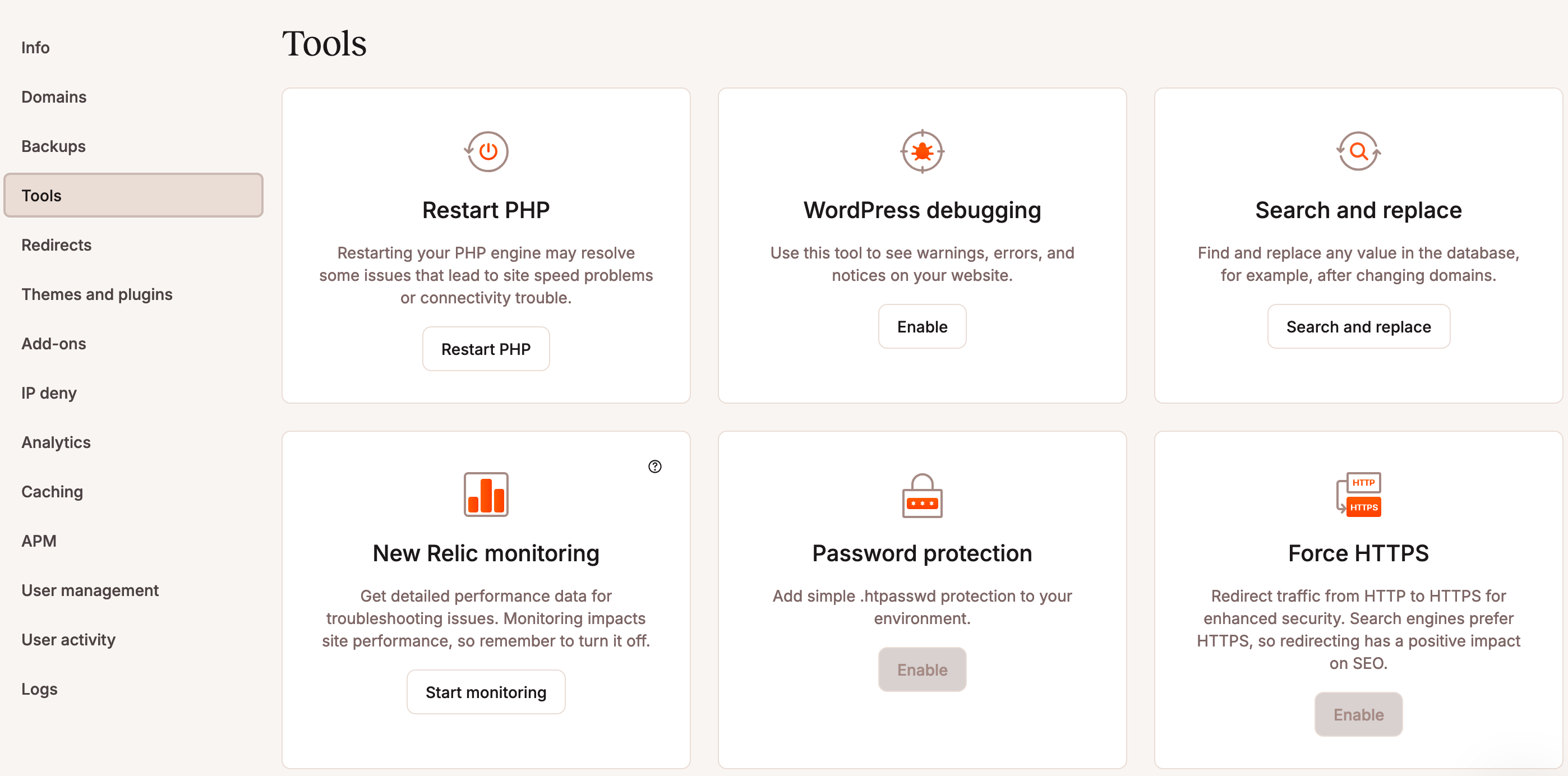
Here’s just some of what you can achieve with this intuitive, easy-to-use interface, where everything is accessible in one place:
- One-click WordPress installation
- Deployment of staging environments separate from your production site, with granular push to live. You choose what you put into production: either all or some files, the whole database, only some tables, or both.
- Performance optimization: edge caching activation/deactivation, CDN activation/deactivation, image optimization, code minification (CSS and JavaScript), and cache management
- Creation and management of backups (automatic and manual), with the option of downloading them and restoring your site
- Update and activate/deactivate your themes and plugins from the MyKinsta dashboard (without having to visit the WordPress admin). It’s even possible to select and operate on all selected items at once (update, activate, deactivate).
- Possibility of inviting an unlimited number of users, with management of their capabilities (roles)
- Adding 301 redirects to avoid 404 errors
- Application performance monitoring with APM (more on this later)
- PHP version modification
- Security management: easy activation of password protection (.htpasswd), free SSL certificates, one-click HTTPS, and database access via SSH or web interface
To find out more about the specifics of MyKinsta and how to use it, please refer to our dedicated guide.
For your information, the Kinsta teams were working on a global project at the time of publication of this page. It may well be finalized and available by the time you read this.
If so, you’ll benefit from the following additional features:
– automatic updates for WordPress core, plugins, and themes
– schedule daily/weekly updates
– modification of update start times
– screenshots and visual regression tests
– restoration of backups in the event of problems
– notifications for failed plugin updates (even detailed reports on the number of successful updates)
– notification settings at site and user level
DevKinsta, a tool for local development
If you browse MyKinsta, you’ll probably notice the DevKinsta application, which is fully integrated into your dashboard (you can also download it if you’re not a customer of WordPress host Kinsta).
This customized tool lets you create, develop, and deploy a WordPress site locally, directly on your machine (offline). A kind of Local (ex Local by Flywheel) with a Kinsta twist, if you like.

Free and available for macOS, Windows, and Ubuntu, DevKinsta is available in 10 languages. It’s a very convenient application for carrying out your tests in total security, without touching your site in production.
You can also use it to create a site from scratch or redesign it, with the option of transferring your modifications to a staging environment, then to production, with a simple click.
Here are some of the features of this tool:
- One-click creation of WP sites (including multisites), with automatic configuration (Nginx, PHP, and MySQL)
- Optimized for performance and security: DevKinsta is powered by Docker
- HTTPS support
- Integrated database manager (Adminer)
- Integration with MyKinsta, so you can work on your site in offline production, then push it back into your Kinsta staging environment
- Support for PHP 7.2 to 8.2, with the ability to change versions in just a few clicks
- Local email management
- Debugging PHP errors, thanks to the built-in WP_DEBUG function
- Etc.
APM, to monitor your site’s performance
Would you like to know what’s slowing down the performance of your WordPress site? Kinsta’s APM (Application Performance Monitoring) tool makes it possible.
Designed specifically for WordPress, APM eliminates the need for pricey third-party subscriptions to identify major performance issues.
Free with all plans offered by WordPress host Kinsta, this tool is also integrated into the MyKinsta dashboard.
You can then debug any problems that come to your attention:
- Slow WordPress themes and plugins
- Long calls to APIs and external domains
- Non-optimized MySQL database queries
Web tools and Kinsta’s REST API
Without further ado, let’s continue our tour of the highlights of Kinsta WordPress hosting, with a focus on several free web tools that will appeal to developers.
In this area, Kinsta offers:
- An IP address lookup tool
- A tool for checking the HTTP and redirect status of any URL instantly
- A WordPress theme finder .
Kinsta goes even further in terms of web development, giving you access to its open REST API.
With it, you can retrieve data, perform actions, and automate tasks such as creating new WordPress sites, collecting site data, automating cache clearing, or restarting PHP.
Free and unlimited migrations with Kinsta WordPress hosting
Finally, in this wide range of in-house tools and functionalities, let’s take a look at Kinsta’s free, unlimited migration service.
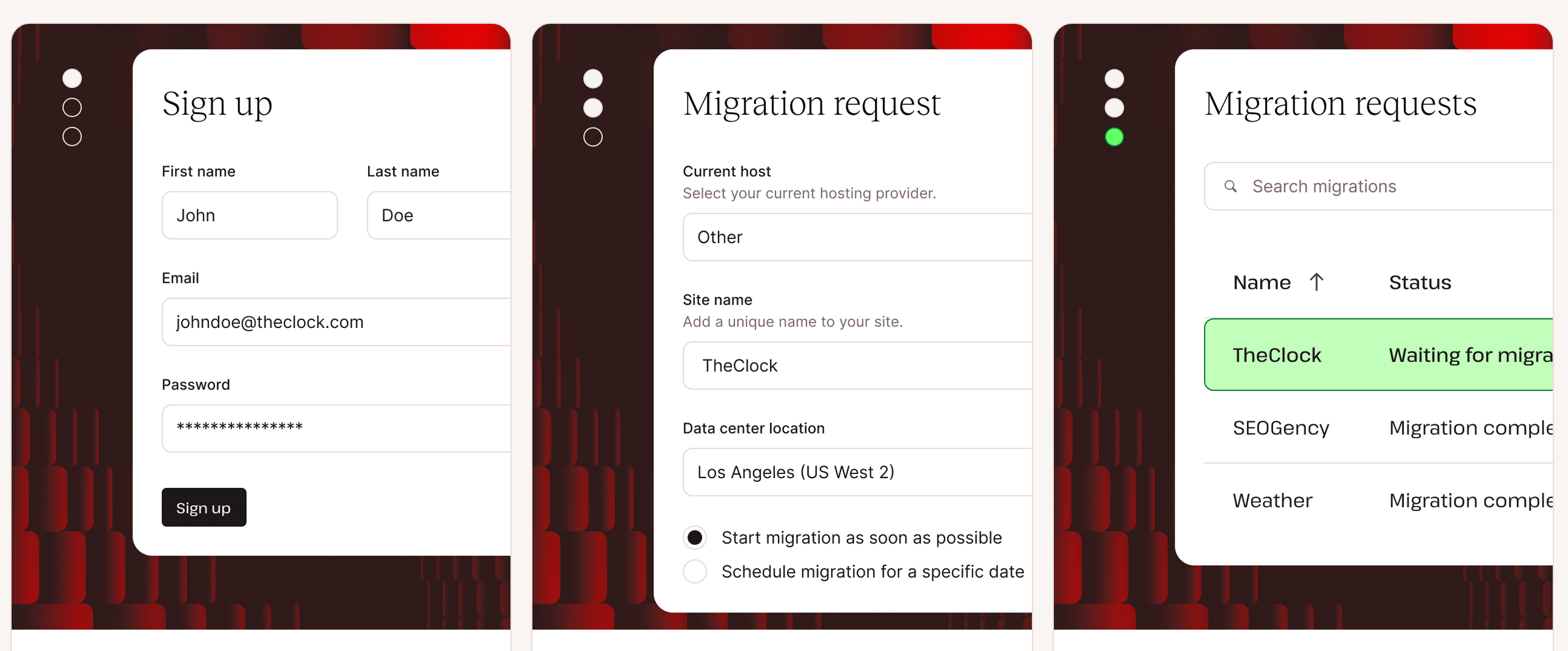
If you’d like to switch to Kinsta to host your WordPress site, it’s simple. An in-house team of experts will take care of migrating all the sites of your choice, without any interruption in service.
Once you’ve chosen the plan that best suits your needs, all you have to do is provide a few details (name of your current hosting provider, preferred data center for your hosting, desired migration schedule), and that’s it.
Kinsta takes care of the rest and notifies you as soon as the migration is complete, usually within two working days (unless you specify a specific date).
If your site is hacked or infected, the Kinsta team will even clean it up during migration!
24/7/365 expert support
Now you know what to expect in terms of performance and security if you choose a WordPress hosting package from Kinsta. But what about their customer service (support), one of the crucial points to consider when choosing a hosting provider?
Let’s face it: you don’t want a web host with poor support. If you have a problem or a technical question, you need to be able to rely on a professional, responsive team to help you out.
In this respect, you won’t be disappointed with Kinsta. The hosting provider goes the extra mile with 24/7 customer service, every day of the year!
The host advertises an average response time of less than two minutes, which we can confirm in practice (during the day, at any rate — we haven’t tested their reactivity in the middle of the night).
Support is available in 10 languages (English, Portuguese, Spanish, Italian, French, German, Japanese, Danish, Dutch, and Swedish), a real asset that also enables Kinsta to adapt to the world’s different time zones, so you can get a response 24 hours a day.
Support is accessible via an online messaging platform, from the MyKinsta dashboard. You can’t reach an expert by phone, however, unless you have an account manager (this would usually be the case if you’ve gone through the sales team).
On average, a request for assistance is processed and closed in a very short time: 39 minutes.

And if you ever want to go it alone, Kinsta offers a wide range of resources that are sure to have the answer to your problem: a knowledge base, documentation, a Kinsta blog, a YouTube channel, and so on.
Conclusion
As you’ve seen throughout these lines, Kinsta is committed to high-quality WordPress hosting.
To achieve this, the company focuses on several key aspects:
- Server optimization and service reliability
- The security of its infrastructure and that of its customers
- Constant innovation, with the regular launch of new in-house tools such as APM and DevKinsta
- User experience, with a pronounced focus on simplicity and ease of use. This is reflected, for example, in the MyKinsta personalized dashboard, suitable for beginners and experienced users alike.
And if you ever want to switch to their hosting service, don’t forget: they offer a free migration service to make your life easier!
