With Kinsta hosting, there’s no doubt about it. The shop window shines brightly and makes you want to come in.
There’s no shortage of selling points, and their marketing team knows exactly how to play them up.
On the one hand, there are the prestigious customers who place their trust in the company: NASA, Unicef, and TripAdvisor. That sets the scene.

And on the other, the promises, each more tempting than the last. These include, in no particular order, “lightning-fast load times,” a professional level of security, a feature-rich, managed WordPress hosting offer, and fast, reliable customer service. Not to mention free migrations.
All this makes your mouth water, making you wonder if you’re really missing out on something by not choosing this host.
The answer to this question can be found in our review of Kinsta. At the end of your reading, you’ll know whether this provider is worth adopting for your future site creation projects.
And you’ll find out all about how Kinsta operates and the services they offers.
- What is Kinsta?
- What are Kinsta's features and benefits?
- Performance of this WordPress host (speed and availability)
- Introducing MyKinsta, Kinsta's in-house management dashboard
- Support and customer service
- What are Kinsta's hosting rates and offers?
- What do customers say about Kinsta?
- Our final review of Kinsta
Transparency: This page is sponsored. Some links to the hosting company Kinsta are affiliate links. If you purchase hosting from them, WPMarmite will receive a commission.
Thanks to affiliation, WPMarmite is able to remunerate the research and writing work of the blog’s editors. However, we remain impartial. If a product isn’t worth it, we’ll say so (or we won’t mention it).
What is Kinsta?
A managed WordPress hosting platform
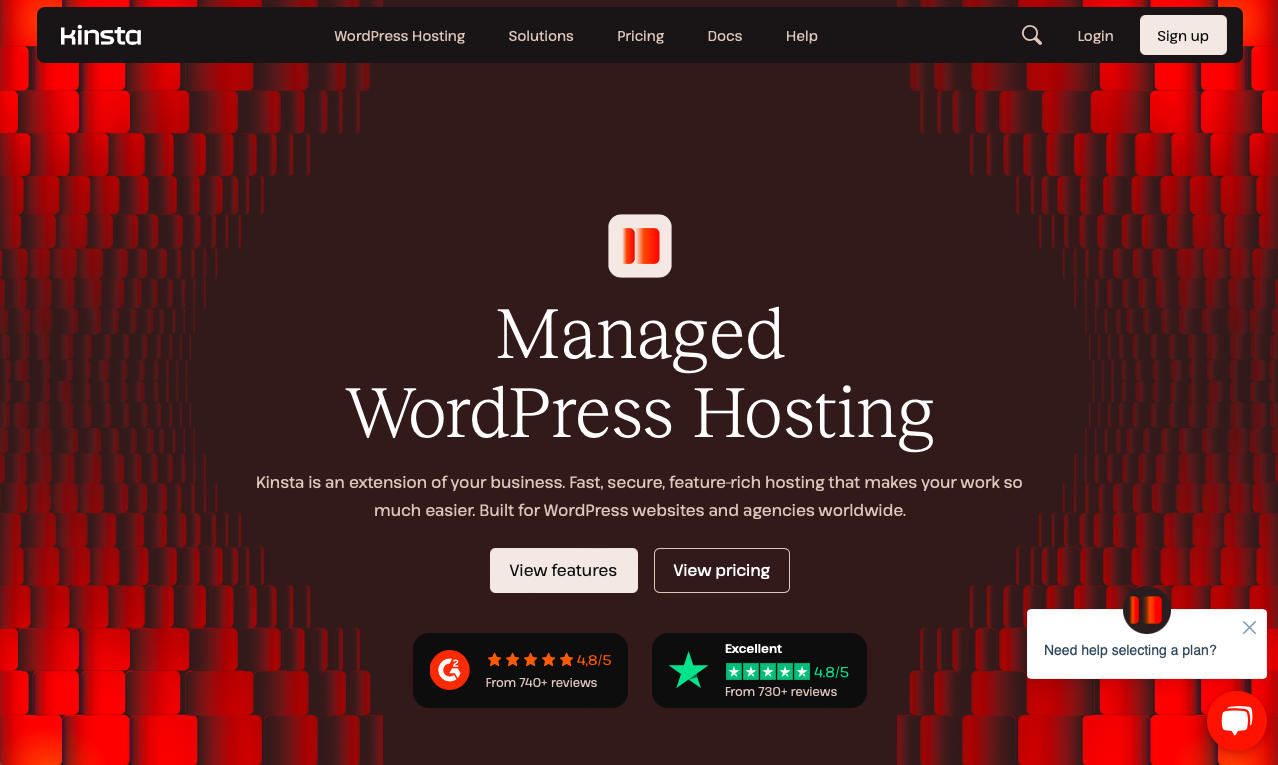
Kinsta is a hosting platform built on Google Cloud. Renowned — among other things — for its performance and wide range of features, it focuses specifically on WordPress, with a fast, secure, managed hosting offering.
Kinsta was founded in 2013 by developer Mark Gavalda (who is still the company’s CEO), with one goal in mind, as proclaimed on the “About us” page: “To create the best hosting platform in the world.”
Enjoying exceptional growth, Kinsta now boasts over 120,000 customers in 128 countries worldwide.
Kinsta has also been named best WordPress host by the G2 user review platform, in its ranking of the best WordPress hosts for 2025.
To establish its reputation and brand image, Kinsta has focused on one area in particular for which it is renowned: performance (loading speed).
On this subject, the company says the following: “We are obsessed with fine-tuning our servers to deliver maximum speeds.”
As you’ll see, we’ll be diving into the performance aspect throughout this article, because it’s inseparable from the Kinsta brand. If you like fast sites, be sure to read on — you’re sure to like what you see. 😉
Kinsta offers its users 4 main product families:
- Managed WordPress and WooCommerce hosting, which is the core of its offering (at least, that’s what it promotes most in its communications).
- Web application hosting.
- Outsourced database hosting.
- Free static site hosting.
How is Kinsta different from shared hosts?
In addition to performance, Kinsta sets itself apart from the competition by dedicating its hosting offering solely to one CMS (Content Management System): WordPress.
What’s more, every Kinsta site is hosted on a dedicated, managed server. This means that the server is made available only to you. Thanks to complete isolation technology, your site is 100% private.
Each Kinsta site is in its own container, and you don’t share your services (PHP, MySQL, Nginx…) and resources with anyone else, not even between your own sites. Whether you have 1 site or 2,000, like some of their customers, each one has 12 CPUs and 8GB RAM on the latest Google machines.
In short, unlike shared WordPress hosting, you don’t have to share resources (storage capacity, RAM, bandwidth, etc.) with other sites and users when you’re hosted with Kinsta.
This improves performance, especially during peak traffic periods. And security is reinforced. A managed server is also said to be more flexible and customizable.
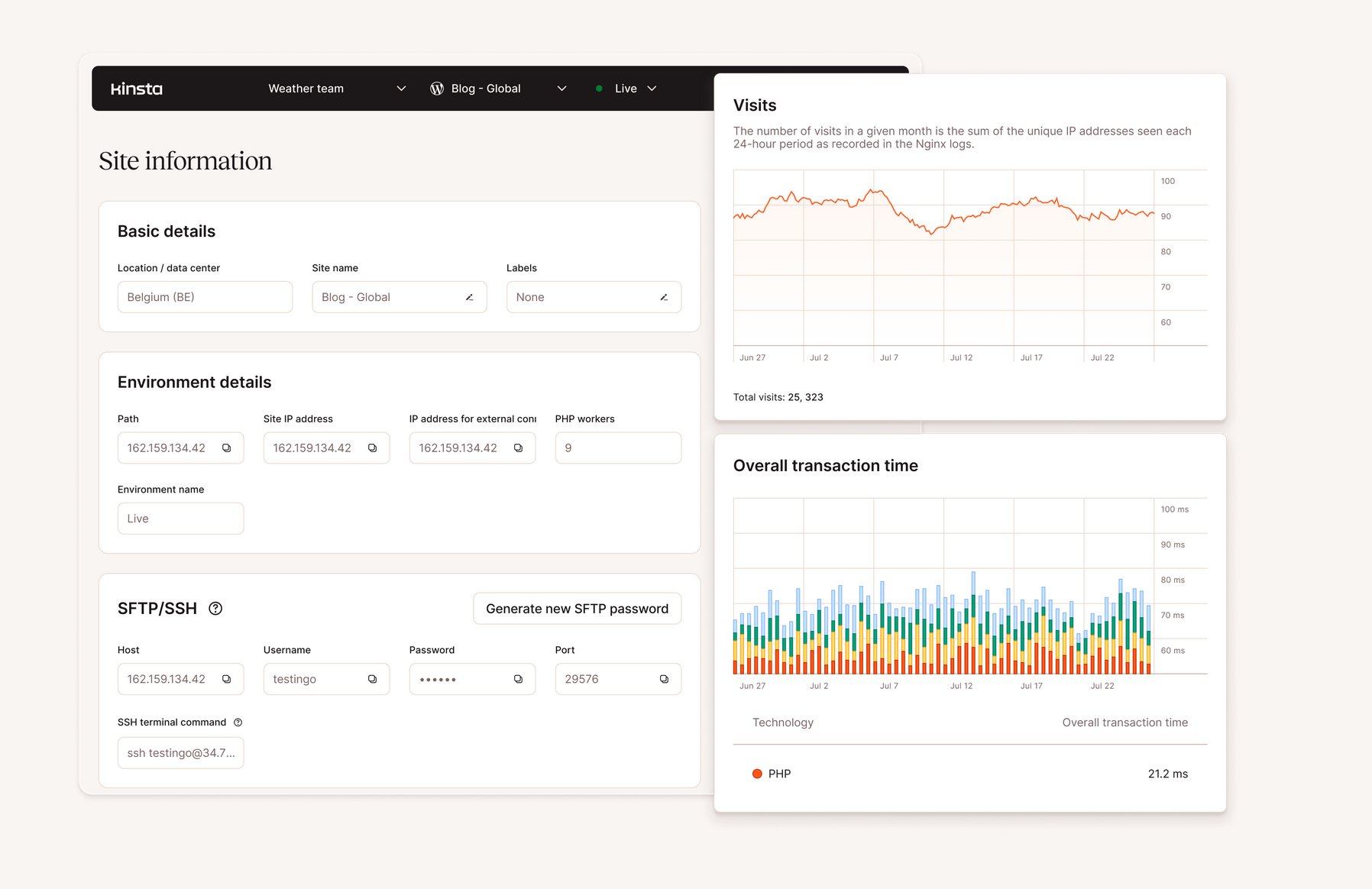
Managed hosting means that Kinsta takes care of all the technical aspects of hosting for you: server updates, backups, security, speed, and support.
So much for this overview of Kinsta. Without further ado, let’s take a closer look at the main features and benefits of this WordPress hosting solution.
What are Kinsta’s features and benefits?
Sites powered by Google Cloud Platform
Kinsta’s entire hosting platform is built on Google Cloud. This cloud computing platform is one of the fastest in the world, alongside competitors such as Amazon Web Service (AWS) and Microsoft Azure.
In concrete terms, how does it work? First, Google Cloud provides the global infrastructure.
Google explains that Google Cloud is “a set of physical assets, such as computers and hard disk drives, and virtual resources, such as virtual machines (VMs), that are contained in data centers around the globe.”
Then Kinsta joins in. The hosting provider places its customers’ sites on the fastest virtual machines (including the latest C2 and C3D machines for all customers at no extra cost), available in each of the 37 Google data centers where its servers are located.
This gives you access to the data centers closest to you.
In the United States, Google offers cloud locations in Los Angeles, Salt Lake City, Dallas, Council Bluffs (IA), Columbus (OH), and elsewhere.

Relying on Google’s infrastructure also enables Kinsta to offer you servers that are always perfectly maintained, secure, and up to date with the latest technologies and innovations.
By way of comparison, a hosting company that rents you its own servers has to maintain them and keep them running at peak performance.
According to its own figures, Kinsta claims that simply migrating to its Google Cloud Platform-based service will improve page load speed by 200%.
Free Kinsta integration with Cloudflare
Among Kinsta’s strong points, it’s impossible not to mention the free integration of Cloudflare in all its hosting packages.
Cloudflare is a global network offering services to improve the performance and security of websites around the world.
Thanks to this integration, you benefit from:
- A professional-level firewall to block malicious traffic and prevent attacks from reaching your server. This firewall complements Google Cloud Platform’s IP protection firewall, providing a welcome second layer of security.
- Protection against Distributed Denial of Service (DDoS) attacks, to safeguard your server resources.
- A high-performance CDN, powered by 260+ Cloudflare data centers worldwide. HTTP/3 compatible, this CDN is automatically activated when a site is created.
- Edge caching, to save your page content in Cloudflare data centers and serve it to your visitors even faster.
- HTTP/3 protocol support, including support for encrypted HTTPS-only connections and faster SSL exchanges.
- Support for SSL wildcard certificates.
- Support for the “early hints” web standard, which makes it possible to prepare the page for loading more quickly, saving up to 30% in page loading time.
- Automatic image optimization with conversion to WebP format.
- Brotli compression activated by default.
Find out more about Kinsta’s integration with Cloudflare in this case study.
A dashboard dedicated solely to WordPress
The Cloudflare integration extends to the in-house dashboard offered by Kinsta to its customers. What’s it called? MyKinsta.
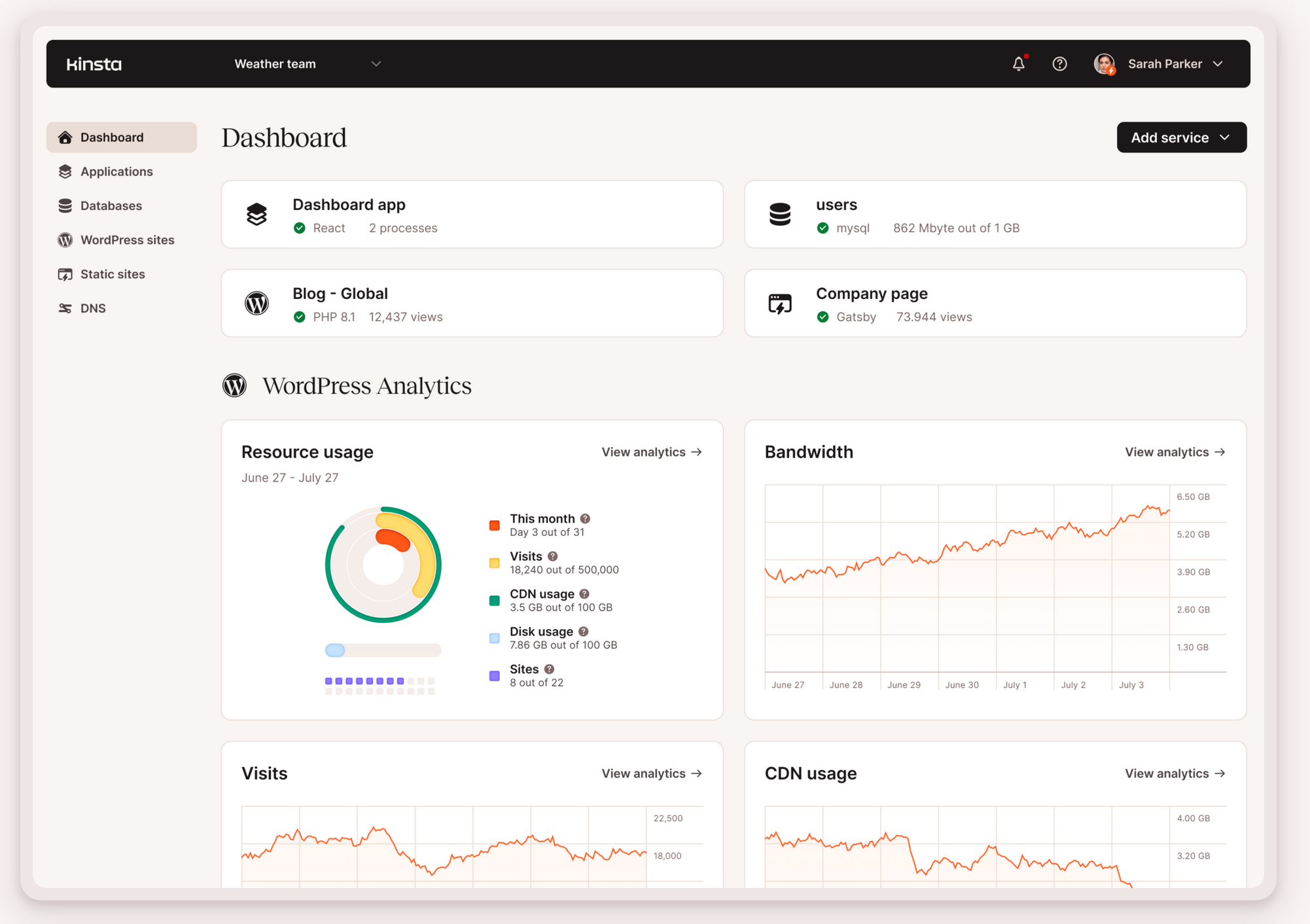
All the performance and security features offered by Cloudflare are integrated. And that’s not all.
Ergonomic and intuitive, MyKinsta only offers options dedicated to WordPress, unlike a more generalist tool like cPanel, which may be suitable for CMS such as Drupal, Joomla, Magento, Prestashop, etc.
MyKinsta offers a centralized interface for managing your WordPress sites, databases, and even applications all in one place.
We’ll give you more details on this dashboard and how it works in a dedicated section further down this page. Stay tuned!
As a foretaste, you should know that MyKinsta offers a performance monitoring tool, called Kinsta APM (included free of charge), tailor-made for WordPress sites.
With Kinsta APM, you can identify performance problems on your WordPress sites (e.g. slow database requests, external HTTP calls, etc.) and correct them in just one click, without any technical knowledge.
MyKinsta also includes a PHP performance tool for reviewing and managing your PHP resources. It allows customers of most Kinsta hosting plans to easily adjust the total amount of PHP memory on their websites and manage its allocation.
A serious focus on safety
While performance is a major concern for Kinsta, the company understands that security is just as important for its customers.
A hacked website can be very costly for a company, with losses of money and revenue that can be colossal in the event of a large-scale attack.
That’s why Kinsta doesn’t compromise on security. You’ve already read that integration with Cloudflare provides a very high level of security.
Well, Kinsta goes even further by integrating additional security tools into all its plans, such as:
- Regular checks on operating time (720 times a day), with automatic recovery in the event of a problem
- Automatic daily backups of your files and database
- Automatic database optimization
- Two-factor authentication
- Monitoring of plugins and themes, with a notification if you use any with known vulnerabilities
- Monitoring site activity to detect malicious activity
- A security guarantee. If your site is hacked at Kinsta, their security team will clean it up for free and put it back online!
A dedicated malware team even monitors your site on a daily basis and removes any intruders detected.
In terms of security, Kinsta is SOC2 certified. This is a voluntary international standard implemented by technology and cloud computing companies to guarantee data compliance and confidentiality.
This standard proves that Kinsta has established security procedures and complies with them. In August 2024, the hosting provider also obtained ISO 27001 certification for its data security and privacy protection efforts.
A free migration service
To make life easier for our customers, Kinsta also offers a very practical service: free migration of your WordPress site (showcase and/or WooCommerce).
A dedicated team takes care of everything for you, with no limit on the number of sites to be migrated. You’re free to choose a specific date for the migration, or leave it to the hosting company’s technicians (in general, a migration takes a maximum of two working days).
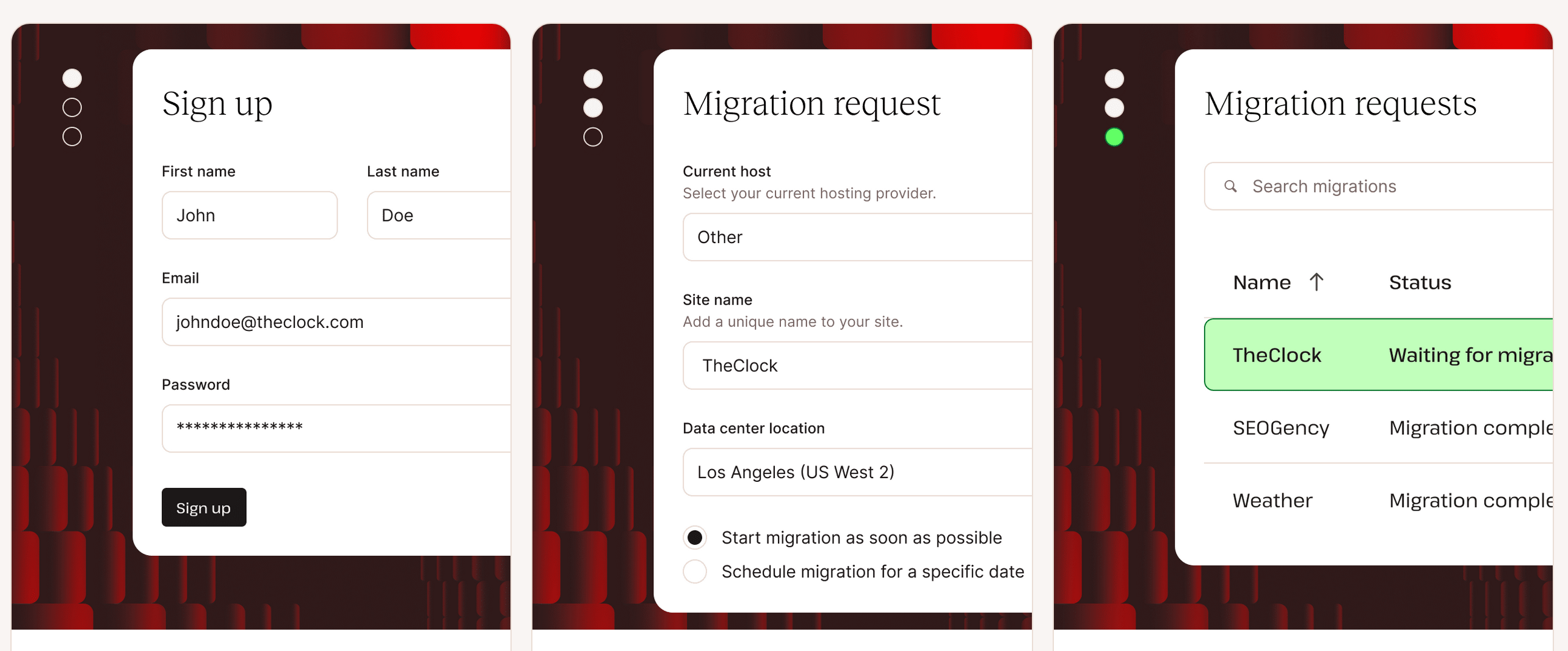
Note that if you’re in a hurry, you can also request an expedited migration, carried out within 8 hours of your request, for a $49 fee.
Tools for developers
Finally, the hosting provider launched in 2013 offers a range of tools for developers:
- An open REST API to perform multiple tasks and actions. For example, you can use the Kinsta API to install a new WordPress site automatically without having to connect to MyKinsta each time.
- Access to PHPmyAdmin to manage your database, from your MyKinsta dashboard.
- One-click activation of WordPress default debug messages.
- The ability to use Git and Composer.
- Compatibility with Bedrock and Trellis.
Does that give you a clearer picture? Then let’s move on to a crucial aspect for any self-respecting web host: performance.
Performance of this WordPress host (speed and availability)
Technically, a web host allows you to serve your website files to your visitors.
But its role is far more important than that, which is why it’s so important to choose it carefully to ensure the best possible user experience and conversions!
At the very least, opt for a high-performance web host (to optimize page loading speed) that is secure and offers fast, efficient customer service.
99.9% guaranteed uptime
That’s the basics. Now let’s take a closer look at the performance aspect, which is at the heart of Kinsta’s commercial offering. Naturally, we’re expecting the hosting provider to deliver on this front.
Remember: they describe themselves as “performance-obsessed.” And in point of fact, this obsession is reflected in savvy, focused decisions.
By using Google Cloud Platform exclusively, Kinsta enables its customers to benefit from the very high-end infrastructure offered by Google. As a result, server and system failures are extremely rare.
Kinsta even claims a guaranteed uptime of 99.9%. This corresponds to a Tier III infrastructure (an international certification assessing the security level of a data center), the highest available.
This means that your WordPress site will experience no more than 1.6 hours of downtime per year.
In fact, Kinsta doesn’t just claim this uptime: it’s guaranteed by their Service Level Agreement (SLA).
What’s more, thanks to Google Cloud Platform’s extensive network (37 data centers), you’re guaranteed to find a server close to you. This is essential if you want your visitors to be able to access your WP site and resources as quickly as possible.
Innovation and technical improvements
As Google Cloud Platform is an evolving infrastructure, it frequently innovates and offers new hardware. This enables Kinsta to offer its customers the latest technical enhancements.
For example, from December 2023, the hosting provider will migrate its customers’ sites to a new generation of hardware, C3D virtual machines (VMs), in the data centers where they are available.
Deemed more reliable and faster, they have replaced the C2 machines used until now. As an example, Kinsta claims that these C3D machines deliver a performance improvement of almost 47% in uncached page requests.
Finally, remember that Cloudflare integration allows you to benefit from cutting-edge performance technologies such as edge caching, a high-performance CDN, or the “early hints” web standard.
All in all, you’re in for a treat, and Kinsta deserves its reputation as a high-performance host.

Want to optimize your page loading speed? Your web host isn’t enough! Apply our tips from the following resources: How to optimize a WordPress site without breaking the bank, How to optimize a WordPress site for Core Web Vitals, Guide to PageSpeed Insights.
Introducing MyKinsta, Kinsta’s in-house management dashboard
Let’s continue our test and review of Kinsta with a short presentation of MyKinsta, the personalized dashboard for managing your WordPress services and sites.
First of all, this tool is unique to Kinsta. It was developed in-house. You won’t find it at any other hosting company, many of which use cPanel, for example.
Intuitive, clear, and easy to use, this interface gives you access to 6 main menus on the left of the screen, in a side tree:
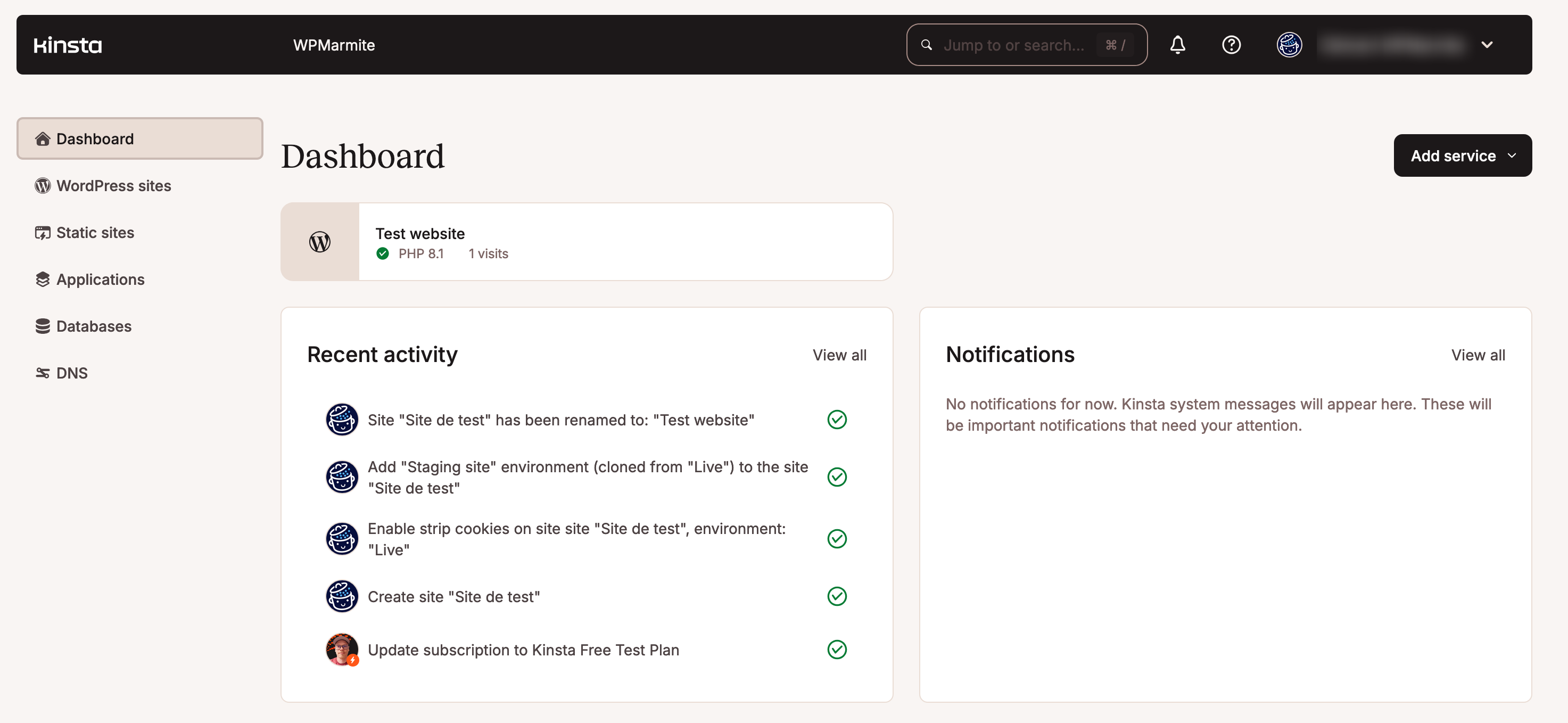
We won’t go into too much detail here, as we have a page dedicated to MyKinsta’s use and features.
Here are just some of the things you can do in one place with MyKinsta:
- One-click installation and creation of a WordPress site
- Access to a staging environment for testing, separate from the production site, with one-click switchover to production
- Create and restore backups with a single click
- Update your WordPress themes and plugins, with an automatic backup generated just before each update
- Theme and plugin activation/deactivation. It’s even possible to select and modify all selected elements at once (update, activate, deactivate)
- PHP version modification
- Database management via SSH or a web interface
- Performance monitoring with Kinsta APM (Application Performance Monitoring)
- Integration with DevKinsta, the free local development tool offered by Kinsta
- Take advantage of site management tools: cache, WordPress debugging, redirects, CDN activation, HTTPS forcing, etc.
- Support for custom SSL certificates and wildcards
- Unlimited addition of users with specific access rights
- Etc.
For your information, the Kinsta teams were working on a global project at the time this page was published. It may be finalized and available by the time you read this.
If so, you’ll benefit from the following additional features with MyKinsta:
– automatic updates for WordPress core, plugins, and themes
– scheduled daily/weekly updates
– changing the start time of updates
– screenshots and visual regression tests
– restoration of backups in the event of problems
– notifications for failed plugin updates (even detailed reports on the number of successful updates)
– notification settings at site and user level
Without further ado, let’s move on to Kinsta’s support and customer service. What do they offer?
Support and customer service
24/7 live customer service
Fast, reliable, and human (no AI!): these are just some of the features of Kinsta’s customer service.
Available 24/7 and 365 days a year, the support team is made up of experienced developers and engineers able to respond in ten languages (English, Portuguese, Spanish, Italian, French, German, Japanese, Danish, Dutch, and Swedish).
Kinsta claims an average response time of 3 minutes, which we can confirm, having tested their service! In every case, we’ve had feedback within one or two minutes.
Support is available in real time, but only by chat, directly on your MyKinsta dashboard.
Unlike other hosting providers such as SiteGround or GoDaddy, for example, Kinsta does not offer support by phone.
This is a strategic choice. Kinsta points out that this allows them to help their customers as quickly as possible, without the need for time-consuming identity checks, while offering the possibility of sharing links and screenshots.
Efficiency is the order of the day, as the host reports a 97% satisfaction rate for all its support requests.
According to Kinsta, the average time to resolve and close a request is 39 minutes, which is very fast.
You can contact customer support at any time of day, even in the middle of the night. But beware: if you have an urgent request at 4 a.m., you won’t necessarily get an answer in French.
Depending on the time of day, support may not be available in the language of your choice (English is offered 24/7):

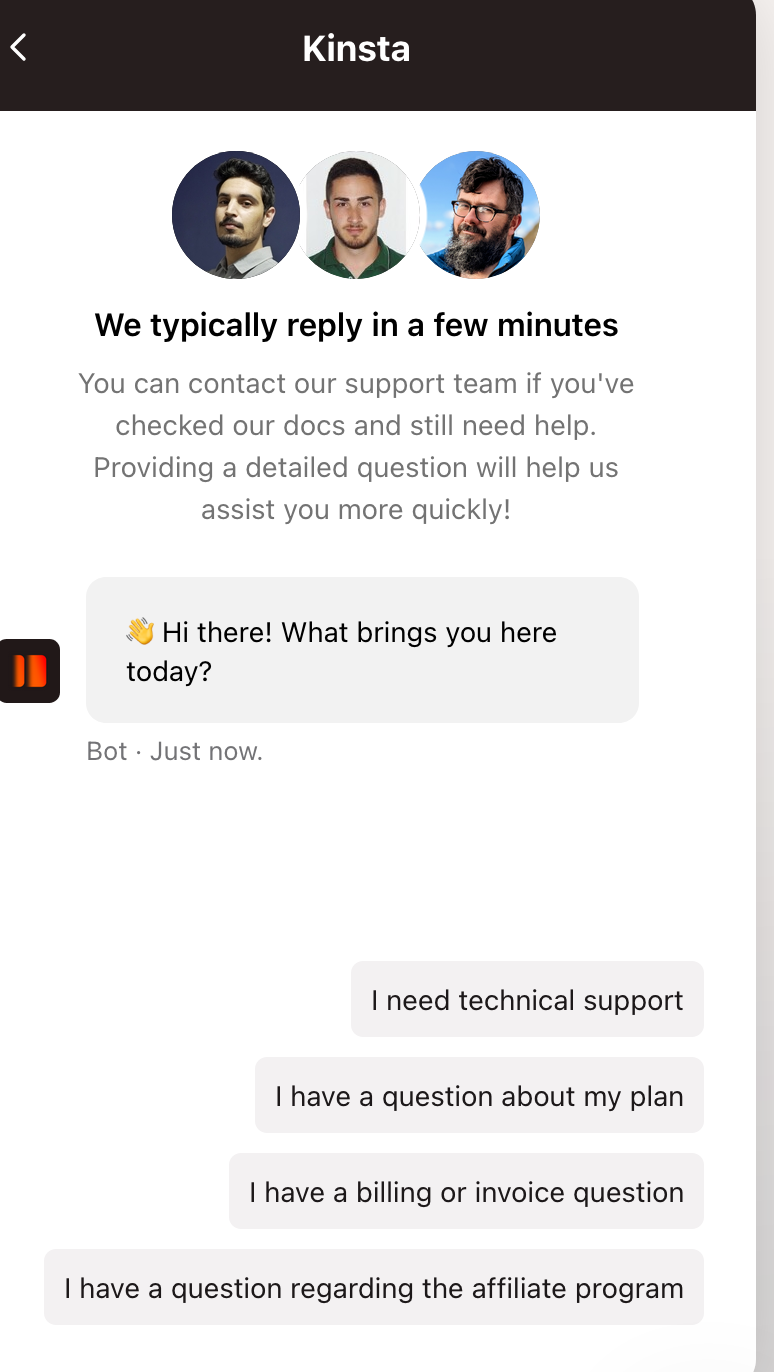
Bear in mind too that when you start using the live support chat, you’ll be asked to specify your query by selecting the reason for your request (technical, billing, affiliation, etc.).
You are then prompted to select several answers to refine your support, before being able to explain your problem.
How can I get support without going through Kinsta customer service?
If your problem isn’t urgent, or you’d rather go it alone, you can also take advantage of the many resources offered by the host to its users.
They are grouped together in a resource center with the following headings:
- A knowledge base that answers a wide range of general questions and offers WordPress tips for troubleshooting and optimizing your site
- An area dedicated to learning WordPress, with several well-targeted guides, such as one on how to speed up your site
- A blog containing hundreds of articles on WordPress and web development. The blog covers both general and relatively technical topics for advanced users.
- Exhaustive documentation covering WordPress hosting generally (among other topics)
- Ebooks to help you improve your skills in areas such as SEO, security, and performance
- Free video courses compiled within the Kinsta Academy, mainly on technical issues (Node.js, block development, etc.)
Kinsta also offers a regularly updated YouTube channel with over 500 videos (tutorials, case studies, tips, platform features, marketing, podcasts, etc.).
As far as support is concerned, please note that you can access a dedicated account manager from Kinsta’s “Business 2” plan and up. We’ll look at pricing and plans in the next section.
What are Kinsta’s hosting rates and offers?
Various plans to meet a variety of needs
Kinsta offers various managed WordPress hosting plans. Prices start at $30/month. They vary according to the number of WordPress installations you need, storage space, and the number of monthly visits you wish to host.
Kinsta’s hosting plans are grouped into three categories:
- Single-site
- Multiple-site
- Agency
In detail, here are the proposed plans for a single WordPress installation, with some of their key features:
- Single 35k ($30/month): 35,000 monthly visits, 10 GB storage, 125 GB CDN. In addition, you can try the first month for free.
- Single 65k ($42/month): 65,000 monthly visits, 10 GB storage, 250GB CDN.
- Single 125k ($75/month): 125,000 monthly visits, 10 GB storage, 500 GB CDN.
- Single 315k ($142/month): 315,000 monthly visits, 10 GB storage, 750 GB CDN.
- Single 500k ($242/month): 500,000 monthly visits, 15 GB storage, 1000 GB CDN.
- Single 750k ($313/month): 750,000 monthly visits, 15 GB storage, 1500 GB CDN.
- Enterprise Plans ($521/month): 1,250,000+ monthly visits, 15+GB storage, CDN 2,500+ GB.

You want to manage multiple WordPress sites? The following plans could suit your needs:
- WP 2 ($59 ex. VAT/month): 2 WordPress installations, 70,000 visits, 20 GB storage, 250 GB CDN. You can try it for free for the first month.
- WP 5 ($96 ex. VAT/month): 5 WordPress installations, 125,000 visits, 30 GB storage, 500 GB CDN.
- WP 10 ($188 ex. VAT/month): 10 WordPress installations, 315,000 visits, 40 GB storage, 750 GB CDN.
- WP 20 ($284 ex. VAT/month): 20 WordPress installations, 500,000 visits, 50 GB storage, 1,000 GB CDN.
- WP 40 ($375 ex. VAT/month): 40 WordPress installations, 750,000 visits, 60 GB storage, 1,500 GB CDN.
- Enterprise Plans (from $563 ex. VAT/month): 60+ WordPress installations, 1,250,000+ visits, 100+ GB storage, CDN 2,500+ GB.

In short, quality has to be paid for. Kinsta’s rates are much higher than those offered by other hosts (Bluehost, GoDaddy, etc.). But if you pay more at Kinsta, you also benefit from services you won’t find elsewhere. For example, Kinsta includes premium services in all its plans, such as access to Cloudflare Enterprise for consistent performance and security optimizations.
The host also offers special packages for high-needs sites, special packages for agencies, and fully customized packages on request. And if you’re a nonprofit organization, or wish to host a site for an open-source project, you can benefit from a 15% discount.
Finally, Kinsta offers an add-on to increase the number of sites available in your hosting plan, for $30 per additional site per month.
What does each plan include?
Whichever plan you choose, you’ll benefit from a server configured specifically for WordPress, with CMS-specific features such as:
- One-click WordPress installation
- Free SSL certificates
- Pre-installed plugins
- Staging environments
- Free, unlimited migration
- Backup retention periods ranging from 14 days to 30 days, depending on the plan chosen
- The option to update plugins and themes via MyKinsta
At the same time, each premium plan includes premium features such as Cloudflare Enterprise, Kinsta API, edge caching, and the integrated APM tool.
Note that Kinsta offers a 30-day money-back guarantee, so you can test their service without risk.
Finally, you should also be aware of the resource ceiling for each plan (visits, disk space, CDN). If you exceed it, you’ll pay a surcharge, for example $1 for every 1,000 additional visits.
But don’t panic: Kinsta automatically notifies you if you exceed the limit, and you can switch to a higher offer at any time to meet new needs.
Premium optional extras
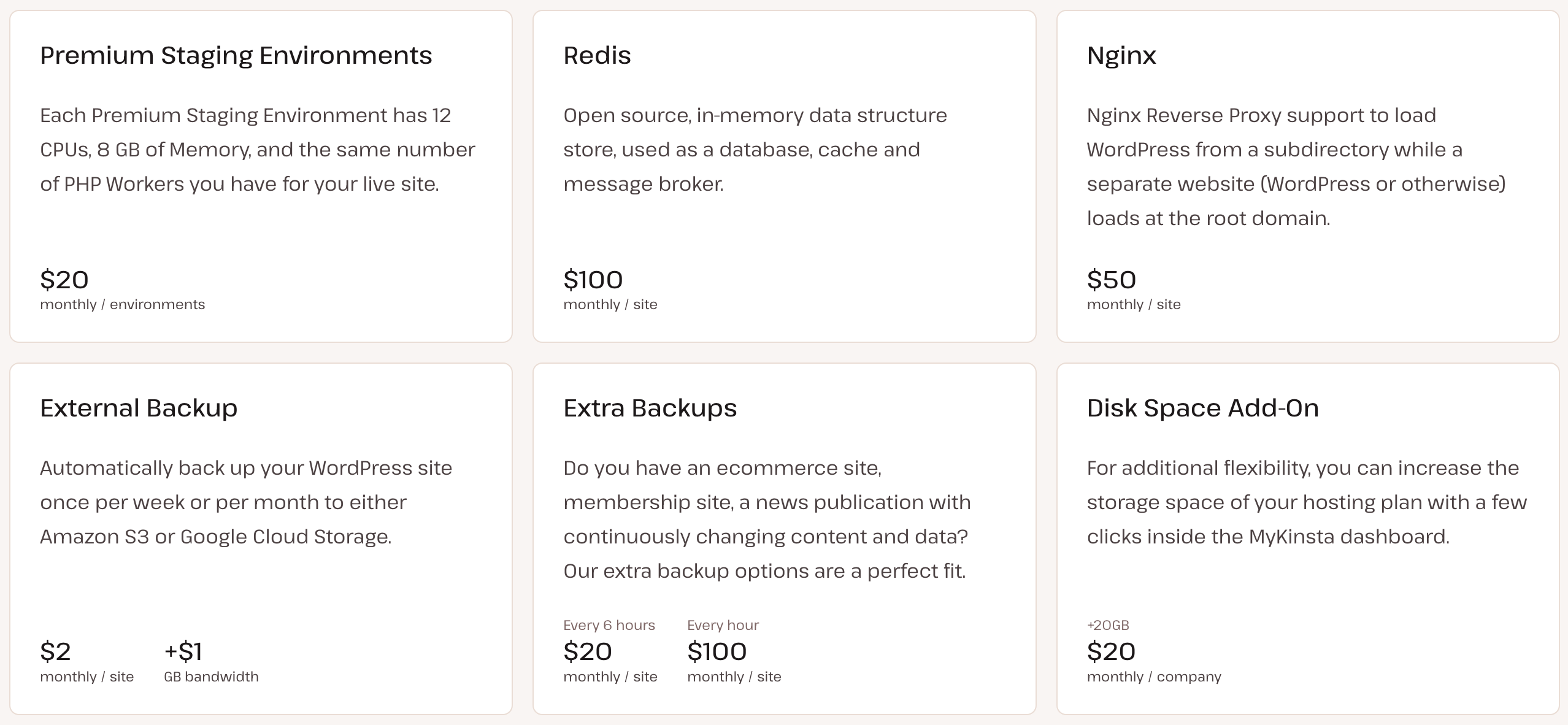
If you want to go even further and optimize your WordPress hosting service, Kinsta also offers additional paid options:
- Premium staging environments ($20/month per environment)
- Redis database storage system ($100/month per site)
- Nginx ($50/month per site)
- External backup ($2/month per site)
- Additional backup (from $20/month per site every 6 hours)
- Disk space add-on ($20/month per company)
- PHP memory limit ($50/month per site)
What do customers say about Kinsta?
As you’ve just seen, Kinsta’s hosting packages can suit every need. But in the end, is their quality of service really up to scratch?
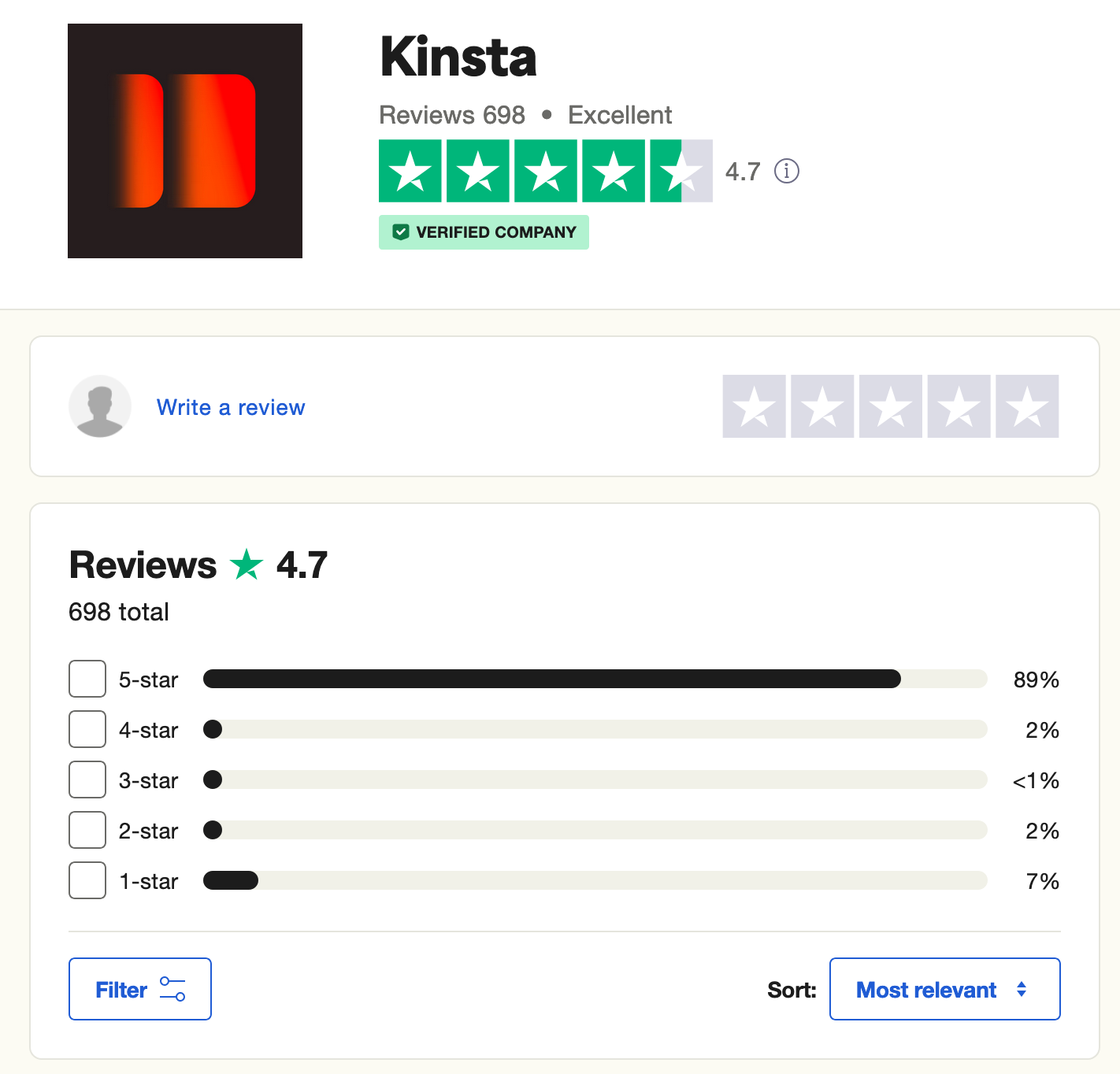
The answer is yes, according to reviews collected by the very serious Trustpilot platform. Kinsta gets excellent feedback, with an overall rating of 4.7/5 out of nearly 700 reviews left at the time of writing.
Hosting customers appreciate:
- Responsive and efficient customer support
- The technical level of the service
- Free migrations
- The quality of the interface and its ease of use
- Performance
- Etc.
What’s more, if you go to another highly reputable review site (G2), Kinsta is ranked first among the industry giants with a perfect 5-star rating, beating the runner-up on the list by 5 points.
These trends are also reflected in the customer reviews published on Kinsta’s official website.
If you’d like to see the results achieved by some of Kinsta’s customers, they’ve put together a number of case studies. For example, this agency shares in a video about how Kinsta saved them time and money:
Our final review of Kinsta
You’ve reached the end of this Kinsta review. Let’s recap what you’ve just read, by first taking a look at the strengths and weaknesses of this web host.
We’ll close by giving you our definitive opinion of Kinsta.
Advantages of Kinsta
- A specialized WordPress host that knows the CMS inside out and offers dedicated options for WordPress users.
- A managed hosting service with a 100% private server at your disposal.
- High-quality performance, thanks in particular to the integration of Cloudflare and the use of Google Cloud Platform infrastructure.
- An easy-to-use, intuitive, and comprehensive customer interface (MyKinsta).
- Clear, distinct pricing offers.
- Free site migrations.
- The efficiency and availability of the customer service.
- Top security with daily backups, availability control, site restoration in the event of a hack, free SSL certificates, database optimization, security guarantee after a hack, etc.

Platform drawbacks
- Higher prices than other general-purpose hosts.
- Limitations in terms of traffic, storage space, and number of sites to be installed on each plan.
- PHP memory limited to 256 MB (you can override this limit with the integrated PHP performance tool or a premium add-on).
- Kinsta does not offer domain names (free or not). It’s not a registrar, so you’ll have to get a domain name from another provider.
- You can’t create email addresses with hosting plans. Kinsta believes it’s best to keep email and hosting separate.
What does WPMarmite think?
Kinsta is an excellent host that keeps its promises. Renowned for its performance, it’ll give your WordPress site a big boost in page load speed, thanks to a host of premium features you won’t find anywhere else.
The integration of Cloudflare Enterprise comes to mind. During our test, we also really appreciated their in-house interface, MyKinsta.
Entirely dedicated to WordPress, it lets you perform all the basic operations required to manage your site without getting lost in endless, incomprehensible sub-menus. It’s simple, clear, and efficient.
All in all, we feel that Kinsta is suitable for all types of users. Beginners will appreciate MyKinsta’s automatic handling of many technical aspects (backups, migrations, hosting management, etc.) and its intuitiveness.
More technical profiles and developers will appreciate the many options available to them, such as the Kinsta API, for example.
The main drawback in our review of Kinsta is the prices of its plans. Inevitably, by offering a (very) high-end quality of service, prices are higher than elsewhere.
If you have a tight budget and a site/blog with little traffic, shared hosting may be more appropriate.
In all other cases, and especially if you’re a freelancer or agency looking for a very good compromise between performance and security, Kinsta won’t disappoint.
