
Thrive Architect is a WordPress page builder plugin that simplifies the creation of high-performance web pages for entrepreneurs and marketers.
This tool lets you design professional websites without technical skills, thanks to an intuitive drag-and-drop interface and conversion-oriented features.
With 269 landing page templates and 40 marketing widgets, Thrive Architect offers a complete solution for creating visually appealing web pages.
The tool features animations, parallax effects, and perfect mobile adaptability, maximizing visitor engagement and conversion.
Advantages and disadvantages

| Advantages | Disadvantages |
|---|---|
| Conversion-oriented page building with 269 landing page templates | Relatively high one-time cost of entry ($19/month with Thrive Suite) |
| Intuitive, high-performance drag-and-drop interface | Longer learning curve than other page builders |
| Extensive library of 40 specialized marketing widgets | These widgets are now only available with a full Thrive Suite subscription |
| Excellent responsive support on different devices | No free trial version |
| Live preview and advanced animations | A/B testing is not integrated, but external plugins can be used to add it. |
| Clean, SEO-optimized code | Requires full Thrive Suite subscription |
Thrive Architect in numbers
| Latest version | 10.5 |
| Date of last update | December 17, 2024 |
| Publisher | Thrive Themes |
| Number of templates | More than 300 templates |
| Number of pre-built blocks | 70 |
| Customizable elements | 40 widgets |
Thrive Architect plugin prices
| Thrive Architect | Thrive Architect Thrive Optimizer | Thrive Suite |
|---|---|---|
| $99/year | $199/year | $299/year |
|
|
|
Thrive Architect user reviews
Thrive Architect is a WordPress page builder that gets mixed reviews. Users mainly appreciate its ease of creating landing pages and its numerous templates, while pointing out recurring technical support and compatibility issues.
Strengths lie in ergonomic design and rich functionality, while weaknesses concern maintenance and customer support.
Jay Cameron: Thrive Architect allows me to build a lead-generating site without needing someone else to design and build the site for me.
Adam Preiser: Personally, I find Thrive Architect complicated. I don’t think the user interface is their strong point. But they offer more templates and useful sections to fill that gap.
Mark Anthony E.: Easy to learn, this website builder has the features you need to create a marketing-oriented web page.
More Thrive Architect testimonials
Find out how Thrive Architect measures up in terms of user satisfaction.
| Platform | Rating |
|---|---|
| G2 | 4.3 out of 5 |
Alternatives to Thrive Architect
Elementor Pro
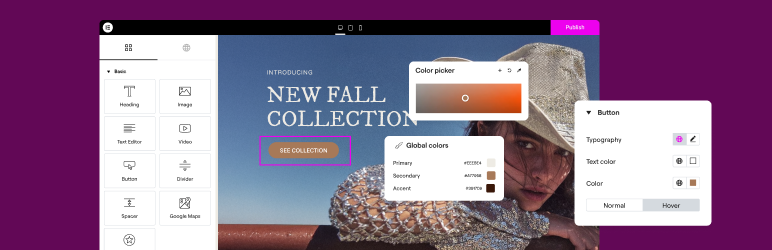
Elementor is an excellent alternative to Thrive Architect, especially for those seeking greater flexibility and power in page construction.
It offers a highly refined drag-and-drop interface, ideal for building complete websites, including dynamic headers and footers, as well as publication templates.
Elementor Pro benefits from an ecosystem of third-party plugins to extend its functionality and is well suited for marketers and developers alike.
Beaver Builder

Beaver Builder is a well-known WordPress page builder plugin that can rival Thrive Architect.
It offers an easy-to-use drag-and-drop interface, customizable widgets and modules, and live preview of modifications.
Although Beaver Builder lacks elements and landing page templates, it’s easy to use, even for beginners.
SeedProd

SeedProd is a popular WordPress page builder, with 600K+ active installations.
It lets you create custom pages by drag-and-drop, without touching the code.
SeedProd is particularly useful for maintenance pages, launch pages, and landing pages, and features a wide variety of templates and customization options.
Thrive Architect FAQs
How do I install Thrive Architect on my WordPress site?
To install Thrive Architect, you must first ensure that you have a valid license for the plugin.
Once you’ve purchased and downloaded the plugin, go to your WordPress dashboard. Go to Plugins > Add new and click on “Upload plugin.” Select the Thrive Architect ZIP file and click Install Now. Once installed, activate the plugin.
What are the main advantages of using Thrive Architect?
Thrive Architect offers a number of benefits, including the ability to create conversion-focused landing pages without coding knowledge. It saves you time and money by avoiding dependence on a designer or developer.
What’s more, it’s highly intuitive and easy to use thanks to its drag-and-drop interface, and it’s compatible with most WordPress themes and plugins.
How do I resolve conflicts between Thrive Architect and other plugins or themes?
Conflicts between Thrive Architect and other plugins or themes are often caused by JavaScript errors. To identify these errors, open your browser’s console (Ctrl Shift J) and look for red lines indicating errors.
To solve the problem, try switching to a default WordPress theme or disabling your plugins one by one to identify the culprit. You can also follow a quick troubleshooting guide for jQuery if necessary.
How do I use Thrive Architect to create sales pages and opt-in forms?
Thrive Architect allows you to create sales pages and opt-in forms in a visual and intuitive way. Once the plugin is installed, access your page or post in WordPress and select the option to use Thrive Architect.
You can then use the drag-and-drop interface to add elements such as opt-in forms, call-to-action buttons, and other necessary components to your sales pages. Thrive Architect also offers ready-to-use templates to facilitate the process.
Is Thrive Architect compatible with other WordPress themes and plugins?
Yes, Thrive Architect is designed to be compatible with most WordPress themes and plugins, provided they respect the rules of the WordPress Codex.
However, some themes or plugins that load different versions of jQuery or don’t follow WordPress standards may cause conflicts. In these cases, specific troubleshooting steps may be required to resolve the issues.
How can I integrate Thrive Architect with email marketing services and payment gateways?
Thrive Architect enables easy integration with email marketing services such as Aweber, helping you to grow your list of subscribers.
What’s more, it supports payment gateways like Stripe, enabling you to sell products or services directly from your pages without any coding knowledge.
What are Thrive Architect’s main features and tools?
Thrive Architect offers an intuitive drag-and-drop interface, ready-to-use landing page templates (over 290), and the ability to add various elements such as opt-in forms, call-to-action buttons, and customizable content sections.
It also allows you to view the changes you make to your page in real time, facilitating the creation process.
Thank you for visiting this page dedicated to Thrive Architect 🙏
The WPMarmite team hopes you’ve been able to find out more about this WordPress plugin!
To find out more, visit the official website and their social networks:
You can also share your experience with Thrive Architect by writing a review below. 👇
Found an error on this page? Click here to report it.

