
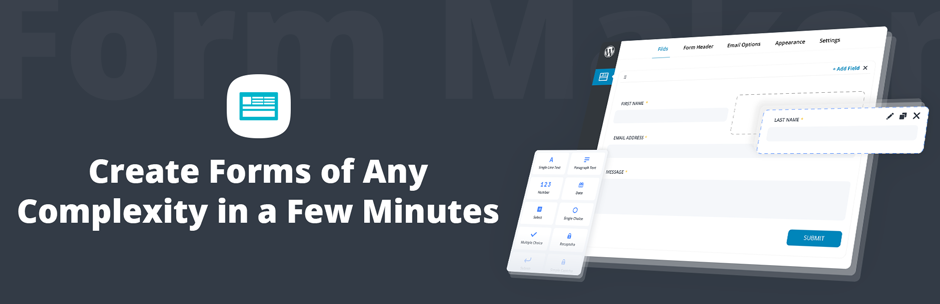
Form Maker by 10Web is a WordPress plugin dedicated to form creation, boasting over 30,000+ active installations. This tool offers a complete solution for developing customized forms, with 43 adaptable field types.
With an average rating of , Form Maker by 10Web reflects its ease of use. Its drag-and-drop interface and customization options enable webmasters from beginners to experts to quickly generate professional forms.
Advantages and disadvantages
| Advantages | Disadvantages |
|---|---|
| Intuitive drag-and-drop user interface for easy form creation | Some advanced features require the purchase of premium extensions |
| 43 different form field types for maximum flexibility | Creating complex forms can require time and expertise |
| Full mobile compatibility and responsive forms on all devices | Dependence on regular updates to maintain security and performance |
| Powerful integrations with PayPal, Stripe, Mailchimp, Dropbox, and Google Drive | Possible learning curve for users unfamiliar with form creation tools |
| Robust anti-spam protection with IP blocking and multiple captcha types | Performance potentially impacted if too many fields or integrations are used |
| 5 pre-designed templates and 15 customizable themes to suit all designs | Technical support may vary according to version and license type |
Form Maker by 10Web in numbers
| Latest version | 1.15.50 |
| Date of last update | |
| Active installations | 30,000+ |
| Average rating | |
| Publishing company | 10Web |
| Country of origin | Armenia |
| Types of form fields | 43 different types |
| Pre-designed form templates | 5 |
| Customizable themes | 15 |
| Customer support time | 24 hours |
Form Maker by 10Web plugin prices
| Free | Basic | Pro | Plugin Bundle |
|---|---|---|---|
| $0 | $30 | $60 | $100 |
| Use on 1 site | 1-site usage | 5-site usage | Use on 30 sites |
| Up to 7 fields in a form | Unlimited fields | Unlimited fields | Unlimited fields |
| 20+ field types | 40+ field types | 40+ field types | 40+ field types |
| 1 page form | Multi-page forms | Multi-page forms | Multi-page forms |
Form Maker by 10Web user reviews
The Form Maker by 10Web plugin is a big hit with WordPress users, with a particularly solid reputation for ease of use and customization.
Users unanimously praise the quality of the interface, the wealth of features, and the excellent customer support, even in the free version.
I’d tried several forms plugins but was still looking for a better one. Then I stumbled across Form Maker and decided to give it a try. I was delighted to see its features. It has more than I expected. Very customizable and easy to use.
Mayank
If I could give this plugin more than 5 stars, I would! The level of control is extremely nice — even with the free version — although I quickly purchased the PRO version! And the level of customer service for resolving forum questions is incredible!
Jonathan Wilson
This is the best plugin for creating functional forms and very user friendly even for non-technical users. I absolutely recommend it to everyone.
Denise Cox
Other testimonials on Form Maker by 10Web
Find out how Form Maker by 10Web ranks in terms of user satisfaction on various customer review platforms.
| Platform | Rating |
|---|---|
| WP.org | |
| TrustPilot | 4.8 out of 5 |
Alternatives to Form Maker by 10Web
Ninja Forms
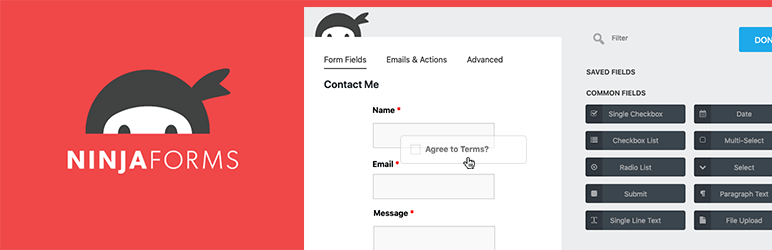
Ninja Forms is an excellent alternative to Form Maker by 10Web, offering an intuitive drag-and-drop interface for creating complex forms. It includes advanced features such as multi-step forms, file uploads, and payments.
This plugin offers pre-designed templates for various types of forms, as well as notification and submission export options, making it easy to manage your web forms from start to finish.
Formidable Forms

Formidable Forms is a powerful alternative, offering a smart form editor with advanced features like calculated fields and partial submissions.
This plugin lets you create simple or complex forms, including surveys, registration forms, and order forms. It also features charts and tables for data visualization.
Gravity Forms

Gravity Forms is a robust premium option that lets you create advanced custom forms thanks to its visual builder.
Although there’s no free version, it offers features such as security audits, digital signatures, and the Build Your Own Addon framework. Gravity Forms is ideal for those requiring highly customizable, secure forms.
Form Maker by 10Web FAQs
How do I install the Form Maker by 10Web plugin?
To install the Form Maker by 10Web plugin, you must first download it from the official WordPress directory or from the 10Web website. Once downloaded, go to your WordPress dashboard, click on Plugins > Add New then “Upload.”
Select the plugin ZIP file and click on “Install now.” Once installed, activate the plugin to start using it.
What are the main features of the Form Maker by 10Web plugin?
The Form Maker by 10Web plugin offers several key features, including:
- An intuitive drag-and-drop interface
- Responsive, mobile-friendly forms
- 43 different types of form fields
- Pre-designed form templates
- Fully customizable themes
- Spam protection
- Online payments via PayPal and Stripe
- Multi-step forms and conditional logic
It also allows you to manage submissions, export entries, and integrate third-party services such as Mailchimp and Google Drive.
How do I create a payment form with Form Maker by 10Web?
To create a payment form with Form Maker by 10Web, you need to add payment fields to your form. You can integrate PayPal and Stripe payment gateways.
Go to your form options, select the “Payment options” tab, and configure the corresponding options.
You’ll need to specify the payment method, currency, taxes, and email address for your PayPal or Stripe account.
How can I protect my forms against spam with Form Maker by 10Web?
To protect your forms against spam with Form Maker by 10Web, you can use several methods.
The plugin allows you to block specific IP addresses and activate captchas to prevent automatic submissions. You can configure these options in your form’s security settings.
What display options are available for forms created with Form Maker by 10Web?
Forms created with Form Maker by 10Web can be displayed in several ways.
You can integrate them directly into articles or pages, or display them as pop-ups, top bars, or scroll boxes. Each display option has its own customization parameters.
How do I manage and export form submissions with Form Maker by 10Web?
With Form Maker by 10Web, you can easily manage and export form submissions. The plugin lets you set up automatic email responses, track, and export all entries.
You can export entries and forms in XML format and import them to another site if required.
What extensions are available for the Form Maker by 10Web plugin?
The Form Maker by 10Web plugin offers several extensions to extend its functionality.
These include:
- Saving form progress
- Sending conditional emails
- Exporting and importing forms
- Pushover notifications
- Mailchimp integration
- Creation of WordPress registration forms
- Post generation
- Integrations with Dropbox and Google Drive
Thank you for visiting this page dedicated to Form Maker by 10Web 🙏
The WPMarmite team hopes you’ve been able to learn more about this WordPress plugin!
To find out more, visit the official website and their social networks:
You can also share your experience with Form Maker by 10Web by writing a review below. 👇
Found an error on this page? Click here to report it.

