
What if your favorite page builder could start from scratch (or almost) to fix all its weaknesses? That’s the bold move behind Divi 5.
After more than three years in development, this historic – and eagerly-awaited – new version promises a complete overhaul: the end of shortcodes, boosted performance, modernized architecture and enhanced compatibility with WordPress.

So, is it just a technical upgrade, or a real strategic turning point? In this article, we take a look at what‘s really changed compared to Divi 4, what’s actually new, what the advantages and limitations are, and above all, whether you should migrate to Divi 5 right now.
Ready to find out all about it? Follow us now!
This article contains affiliate links. This means that if you buy Divi 5, WPMarmite will receive a commission. This helps pay for the research and writing work of the blog’s editors, as well as building up a kitty to buy and test other WordPress plugins. To find out more about our publishing policy, check out this page.
What is Divi 5?
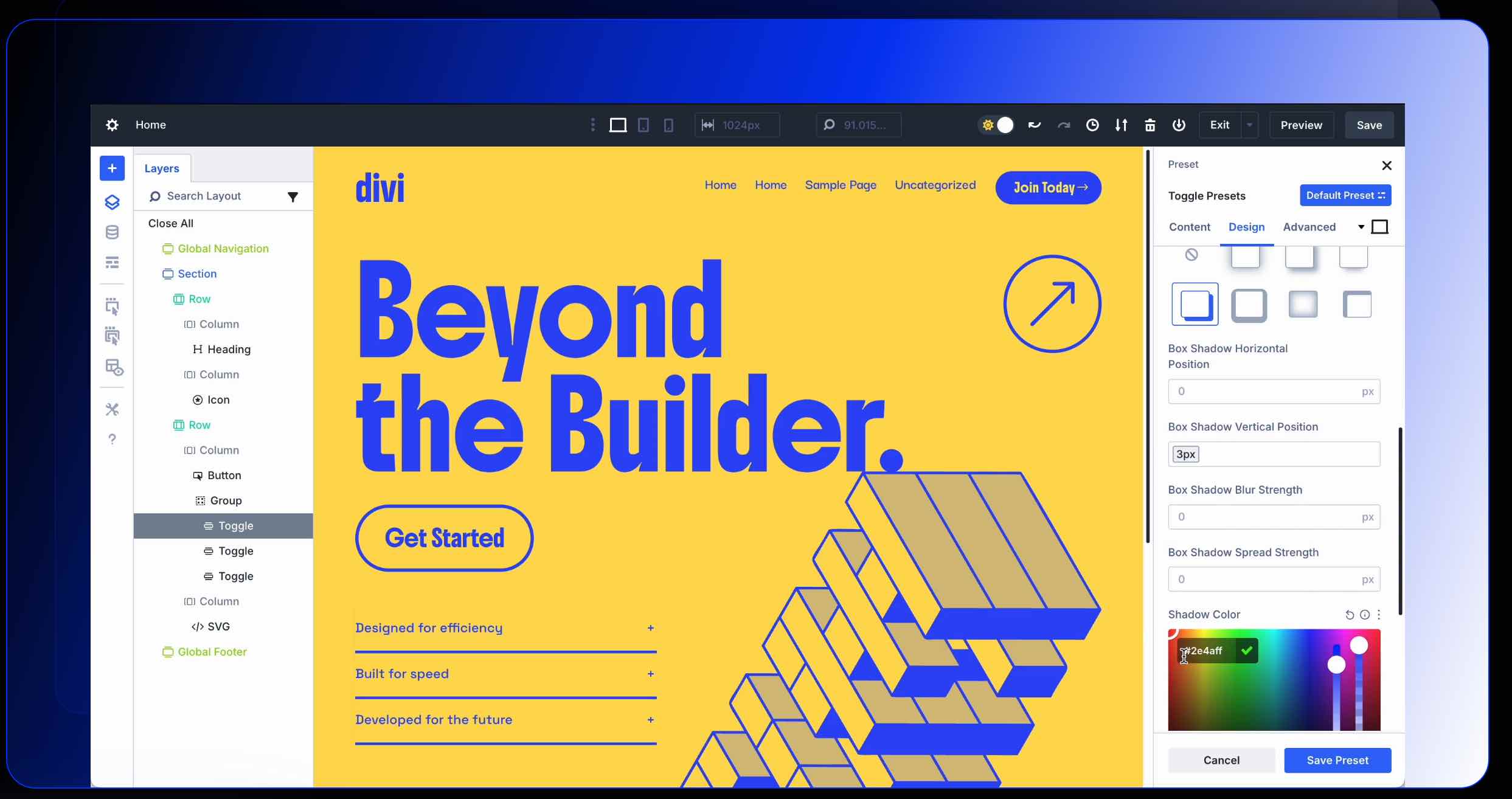
Divi 5 is a complete overhaul of the page builder’s core technologies, and has been redesigned from the ground up by its creator, Elegant Themes.
Internally, it’s referred to as the “Foundation Update”.
Elegant Themes says: “We started over and completely reinvented Divi, focusing on performance and advanced design systems. Divi 5 is fast, lean, and packed with modern features to lead the next generation of page builders.”
According to Elegant Themes, this rewrite places a strong emphasis on improving loading speed and user experience.
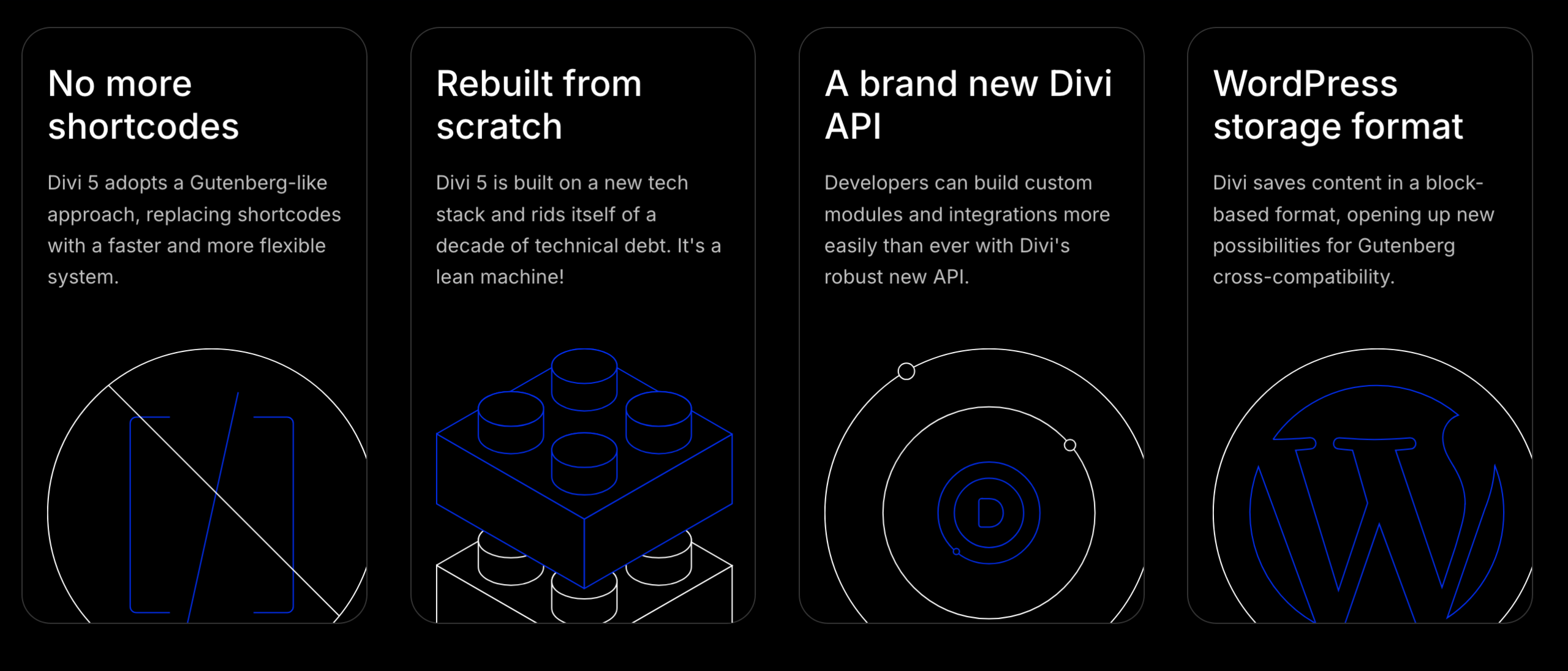
Technically, the redesign is built on 4 major foundations:
- The end of the shortcode system. “Divi 5 adopts a Gutenberg-like approach, replacing shortcodes with a faster and more flexible system”, the company says. The primary goal here is to improve performance.
- A completely redesigned technical architecture. For example, the editor loads much faster on your WordPress admin interface, as well as on the front-end.
- A new API, designed to allow developers to “build custom modules and integrations more easily than ever”. The tool aims to be more flexible and customizable than ever before.
- Adoption of WordPress’ storage format. With Divi 5, the page builder adopts a modular approach. It “saves content in a block-based format, opening up new possibilities for Gutenberg cross-compatibility”. Ultimately, the interaction between the native WordPress editor (Gutenberg) and Divi 5 is strengthened.
Regarding shortcodes, Nick Roach, CEO of Elegant Themes, tells you more in this video:
When will Divi 5 be available?
Divi 5 is a long-awaited project within the WordPress ecosystem and among Divi users.
The Elegant Themes team has been officially working on it since the end of 2022, when the first public announcements were made.
After more than three years of hard work, the official release date has been set for February 26, 2026.
By the time you read this, the new version should almost be live. 😉
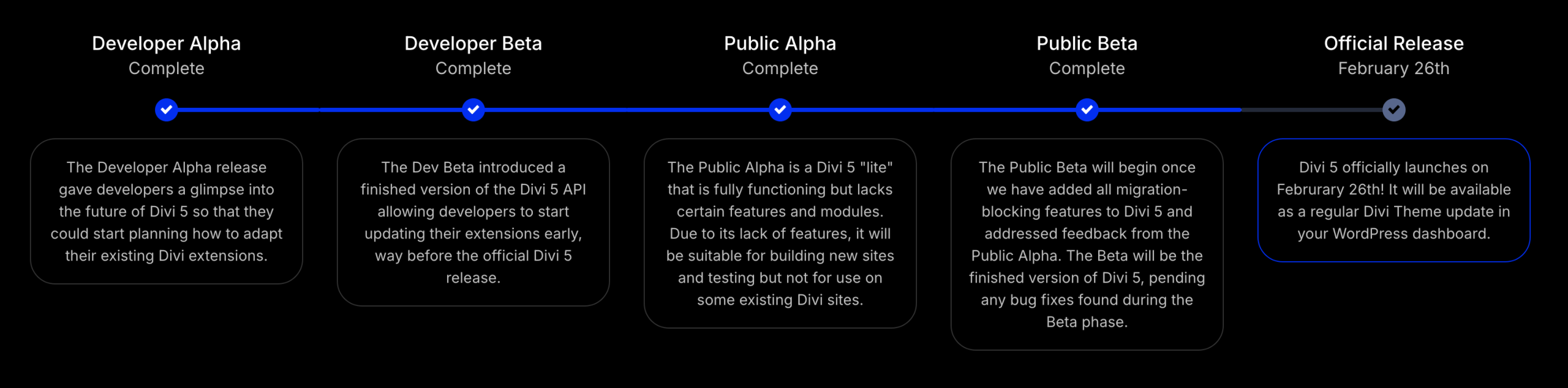
In the meantime, the project has followed a roadmap calibrated into 5 strategic phases:
- Developer Alpha
- Developer Beta
- Public Alpha
- Public Beta
- Official release
What is Divi: a quick reminder
Before going into more detail on the reasons behind this major overhaul, let’s take a quick look at what Divi is all about.
To refresh your memory (or enlighten you, if you’re not familiar with the subject), Divi is a 3-in-1 tool:
- A premium WordPress theme. There is no free version.
- A real-time visual page builder, called Divi Builder, for designing advanced layouts using sections, rows, columns and modules.
- A Theme Builder, to create custom headers, footers and more.
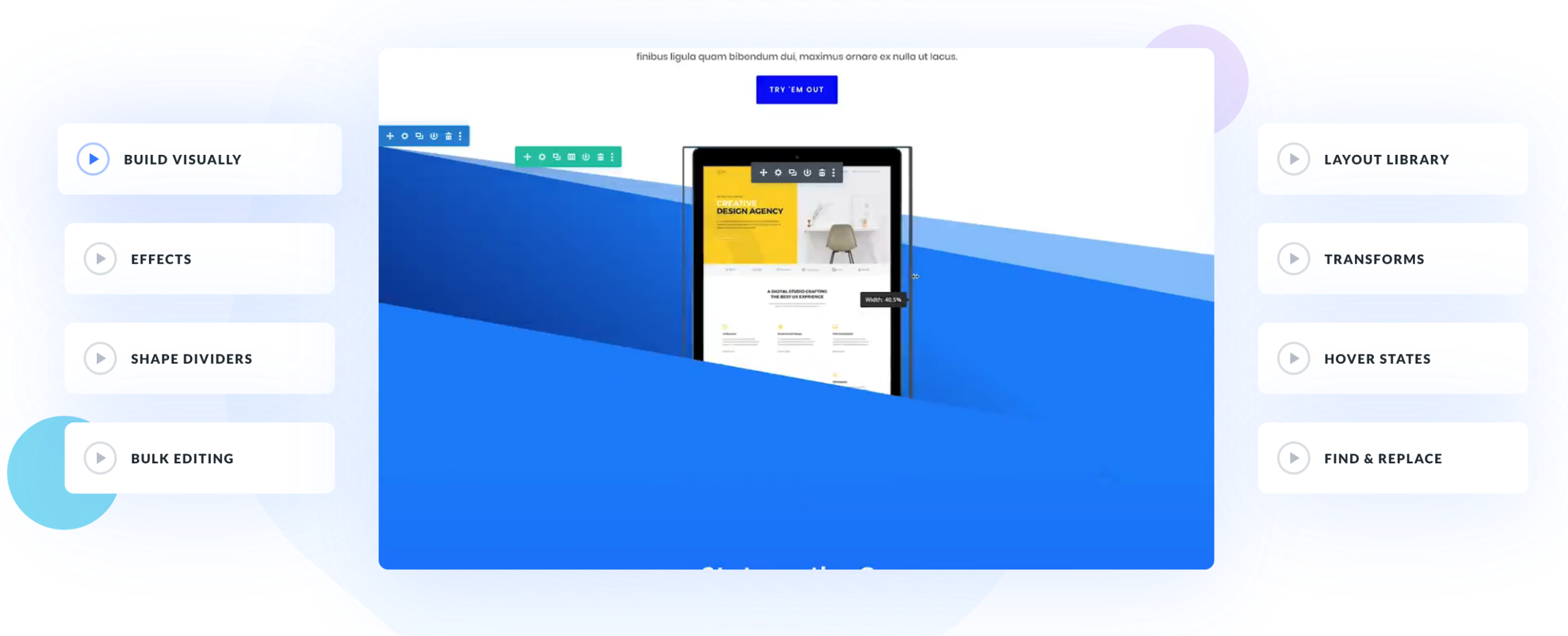
To find out everything you need to know about Divi and how it works, read our practical guide on the subject.
Although functional and very popular within the WordPress ecosystem (Elegant Themes claims over a million users), this powerful interface was in need of a major facelift. The reason? Its architecture had become outdated.
Why this redesign of Divi?
As we’ve just seen, Divi 5 isn’t a classic “big update”.
It’s a complete overhaul of the internal engine, and much more than that. Quite simply, it’s the most significant update since the page builder’s launch in 2013.
So why shake things up? There are several reasons why Elegant Themes has made this major shift.
Firstly, over the years, Divi has accumulated what is known in development as a technical debt:
- code inherited from previous versions
- a shortcode-based logic
- a structure that was difficult to scale
- performance limitations.
Rather than adding patches, Elegant Themes has decided to start afresh.
Then, another key factor, closely tied to that accumulated technical debt, is the gap it has fallen in relation to its main competitor: Elementor.
At its peak in 2016 (when Elementor was launched), Divi was THE number-one page builder on the market. No contest. Little by little, Elementor caught up with it, then dropped it, to the point of carving out a gigantic gap between the two.
Today, Elementor is active on 19 million sites and powers 13% of the world’s websites. Elementor is number one in the page builder market.
A simple evolution… or a strategic turning point?
Overall, Divi 5 marks a shift in philosophy. The stated goal can be summed up in 4 words: performance, stability, scalability and flexibility.
It’s a repositioning in respond to:
- WordPress’ native block editor
- builders such as Elementor, which Elegant Themes, through its CEO Nick Roach, has openly announced it intends to compete with in the long run.
As you can see, if Divi wants to remain competitive, it has no choice but to build a healthier technical base.
Moreover, Elegant Themes’ objective is very clear. They didn’t spend more than three years working relentlessly without a long-term strategic vision. With Divi 5.0, the horizon has been set at ten years.
“We started from scratch to directly address every pain point and criticism and build a foundation to propel Divi forward for the next decade”, says the San Francisco-based Californian company.
After this general presentation of the redesign and its context, let’s move on to the practical details: what’s actually changing with the release of Divi 5?
What are the new features and benefits of Divi 5 compared with Divi 4?
Well, first of all, there are some things that don’t change, rest assured. You can still do what you did with Divi 4.
The basic options remain the same, including:
- real-time editing via a visual WYSIWYG (What You See Is What You Get) editor
- drag and drop to add, modify and delete elements on your page
- the classic building structure in sections, columns and rows (with significant improvements, as you’ll see below)
- the ability to add modules, templates and other ready-to-use pages, all of which can be edited on the fly without touching a single line of code
- customization of every visual aspect of your layout: colors, typography, animations, responsive settings, etc.
These foundations have been preserved in Divi 5, with added value at various levels.
In short, the editor has become faster, simpler, more intuitive and more customizable.
Let’s get to the bottom of it all below.
A more modern, flexible and streamlined interface
If you’re already a Divi user, the first thing you’ll notice about Divi 5 is the modernized interface.
Gone is the old-fashioned look and the historic pastel purple and green colors that characterized the tool until now. With Divi 5, the interface is clearer, more streamlined and more in line with 2026 standards, take a look :

In fact, doesn’t it remind you of someone… or rather something? Yes, Divi 5 bears a striking resemblance to Gutenberg, the native WordPress editor, especially when it comes to page settings (on the right-hand side of the editor) and, above all, when it comes to adding modules:
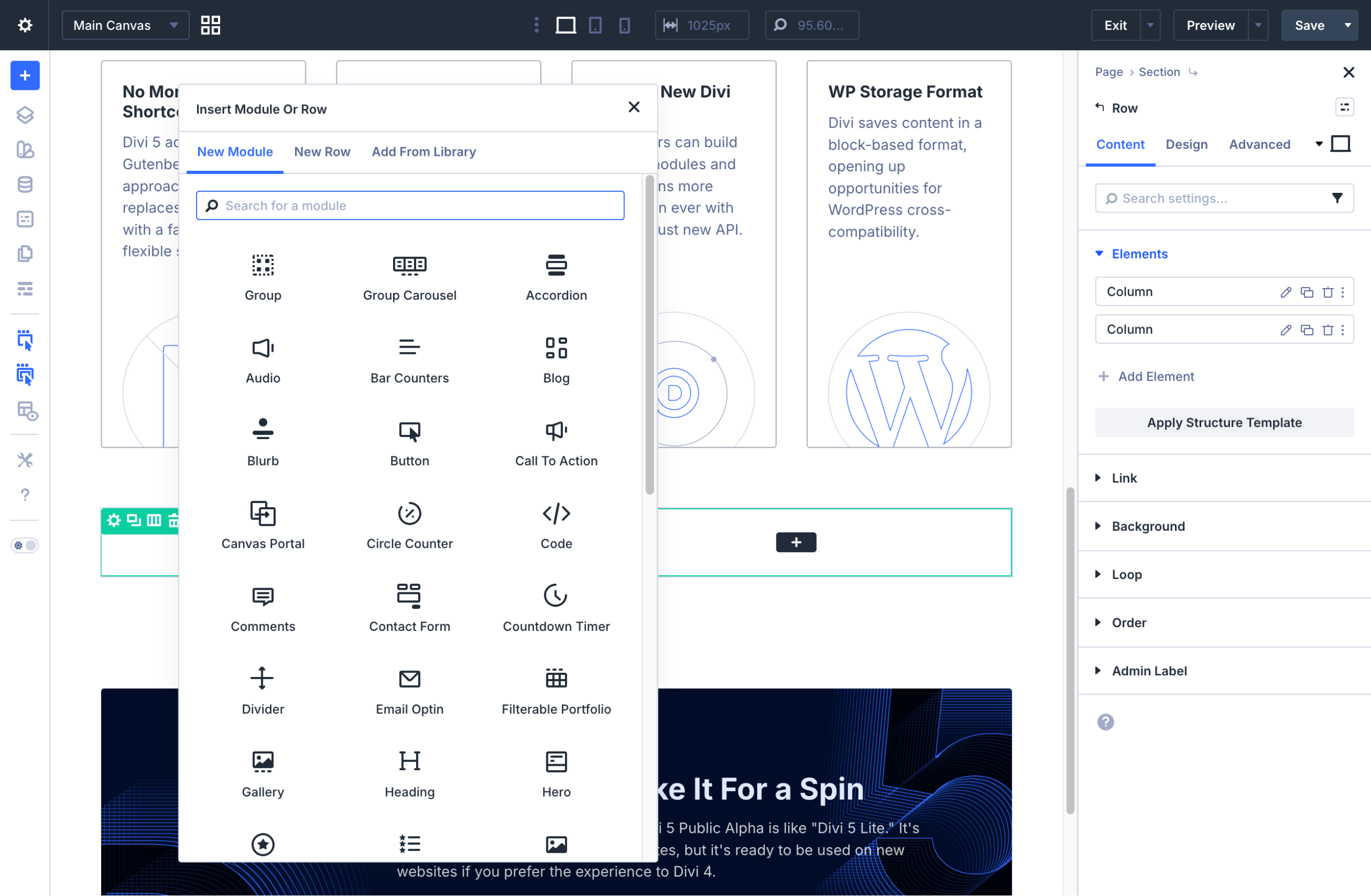
At the same time, it makes sense. Remember: Elegant Themes has clearly indicated its intention to strengthen compatibility with Gutenberg.
On the practical side, the interface introduces several user experience improvements, including :
- finer responsive management, by clicking on the desired screen size, without navigating through multiple menus. In addition, seven predefined responsive breakpoints cover all device types (desktop, smartphone, tablet). You can customize the width of each breakpoint, giving you control over your design whatever the screen size
- more advanced page layout, with the ability to pin, move or combine panels into tabbed windows
- a breadcrumb trail for a convenient overview of the parent containers of your current selection, so you can quickly navigate the structure of your layout and select elements more efficiently
- design presets that you can apply to elements or even to specific attributes such as borders, shadows, spacing, etc.
- keyword search and filtering within the settings
- field variables for sizes, colors, fonts, images, strings and URLs
- contextual actions when you right-click
- a dark/light mode
- undo and redo a change with a single click.

An editor that’s 2 to 4 times faster
Once you start using it, you’ll immediately feel the difference. Divi 5 is seriously fast.
According to Elegant Themes, the tool is 2 to 4 times faster than Divi 4, thanks to lighter, cleaner code.
This solves one of Divi’s most common grievances, which is that the editor can be slow to load.
To alleviate this major problem, Elegant Themes now relies on a modern framework and dynamic resources.
It has also taken drastic decisions in several areas, including :
- modularization of a large part of Divi’s JavaScript file, enabling it to load each JS library on demand, only when needed
- automatic generation of critical CSS, which allows your site to load faster by prioritizing only the styles needed for above-the-fold content
- reworked source code for greater efficiency, maintainability and long-term scalability.

Layout Builder and Design System
A faster, more modern interface, but also a new way of creating your layouts.
Divi 5 introduces what it calls the “Layout Builder.”
This design system is based on Flexbox (a layout method that lets you arrange your elements in rows and columns), which gives you very fine control over the spacing, alignment, size and order of elements (horizontally or vertically).
Your content can also be aligned on structured grids (CCS Grid), by defining rows and columns for multi-directional control.
Within this overall structure, Divi 5 gives you even greater control over page layout, with options such as:
- Option group presets to create reusable styles for individual elements (titles, borders, shadows, backgrounds) rather than just columns, sections or rows.
- Nested modules and rows: you can integrate modules into other modules with infinite nesting flexibility.
- Canvases for creating and managing content independently of the main layout. Elegant Themes explains that they can be used as a staging area for design updates or to experiment with new ideas.
- Global variables, allowing you to define colors, numbers, or images site-wide with a single click.
- CSS class presets. When you modify a preset, the change is automatically applied to the entire site.
- The ability to use custom templates, including headers, footers, layouts, eCommerce templates and much more.
- Code-free interactions that trigger animations, dynamic behaviors, activation/deactivation of an element’s visibility, etc.
- Global color variables, with the ability to dynamically adjust hue, saturation and brightness.
Loop Builder
Another great new feature in Divi 5 compared to Divi 4 is the Loop Builder.
Frankly, it’s a huge improvement. Thanks to this, you can visually design dynamic loops, i.e. repeated displays of content (articles, products, projects, portfolios, testimonials, etc.) without coding a custom query.
In other words, you create a layout once, and Divi automatically repeats it for each piece of content that matches your criteria (just as WordPress does with its Loop mechanism).
With Divi 4, you could already display articles, for example, but with limitations in terms of structure and design.
Divi 5’s Loop Builder lets you create a 100% customized template (featured image, title, extract, metadata, button, custom fields, etc.).
The Loop Builder even works with dynamic content (ACF custom fields, WooCommerce data, custom CPTs, etc.) for much more advanced uses (filterable portfolio, directory, real estate site, custom catalog, etc.).
Divi AI
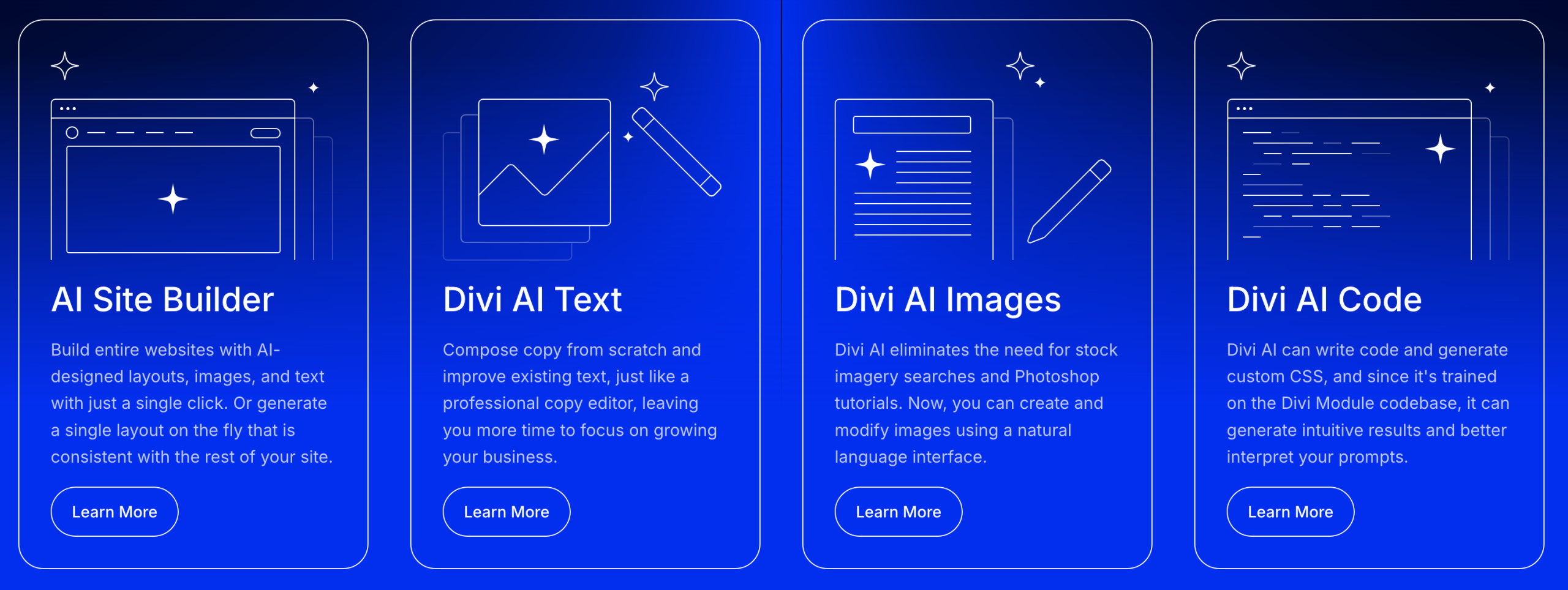
Last but not least, Divi 5 includes artificial intelligence features (Divi AI). Their in-house AI is capable of generating :
- pages or an entire website with text and images
- texts, as well as the possibility of improving and correcting them
- images, with a text prompt
- custom CSS code.
Once you’ve discovered what’s possible with Divi 5.0, you might be wondering: “Should I jump on this new tool right away, or wait?”. Find the answer in the next section.
Should you upgrade to Divi 5 now?
Is Divi 5 compatible with my current themes and plugins?
Although Divi 5 has been designed to maintain maximum compatibility with the existing ecosystem, its new internal architecture may impact:
- Divi-specific third-party modules
- plugins that add features to the page builder
- advanced CSS or JS customizations
- some child themes have been heavily modified.
Note that I’ve taken the precaution of saying “may impact”. In reality, there’s very little chance that you’ll encounter an incompatibility and that your site will break, because Elegant Themes has taken care to implement a mechanism “with a high level of backward compatibility with existing modules that may not be ready for Divi 5 when it launches”.
What does this mean? If you’re using plugins or addons from the Divi ecosystem that aren’t yet compatible with Divi 5, you can still continue using and editing these modules with the Divi 5 editor, while the developers take the necessary steps.
If you’re only using Divi 4’s native modules, it’s even simpler: you can go ahead with your eyes closed. The transition to Divi 5 is a natural one, with no risk of crashing your site.
Cases to be assessed
Then, on a case-by-case basis, there are two main situations:
- If you’re creating a new site, you can start directly with Divi 5. With its official release on February 26, 2026, the tool will be ready for use. Opting directly for this new base therefore makes sense.
- You already have a site in production. Test on a secure environment (staging, local) before migrating. Find more on this subject in the next section.
And more generally, if you’re a professional website builder with Divi, whether freelance or agency, we recommend you bet on Divi 5 as soon as it’s released (if you haven’t already).
The structural and strategic change is too great to stay on Divi 4. Nevertheless, before acting, plan to :
- test your internal processes
- check the compatibility of your in-house plugins
- inform your customers of the potential implications of this change, especially if you give them control over the back office (and page editing).
How to safely upgrade or migrate to Divi 5?
Ready to take the plunge with Divi 5? Find out now how to adopt this update safely.
How to download and install Divi 5?
To get started, log in to your Elegant Themes account and download Divi 5 from the “Themes & Plugins” section.
Then go to your WordPress administration interface, and add the zip file in Appearance > Themes > Add Themes > Upload Theme:
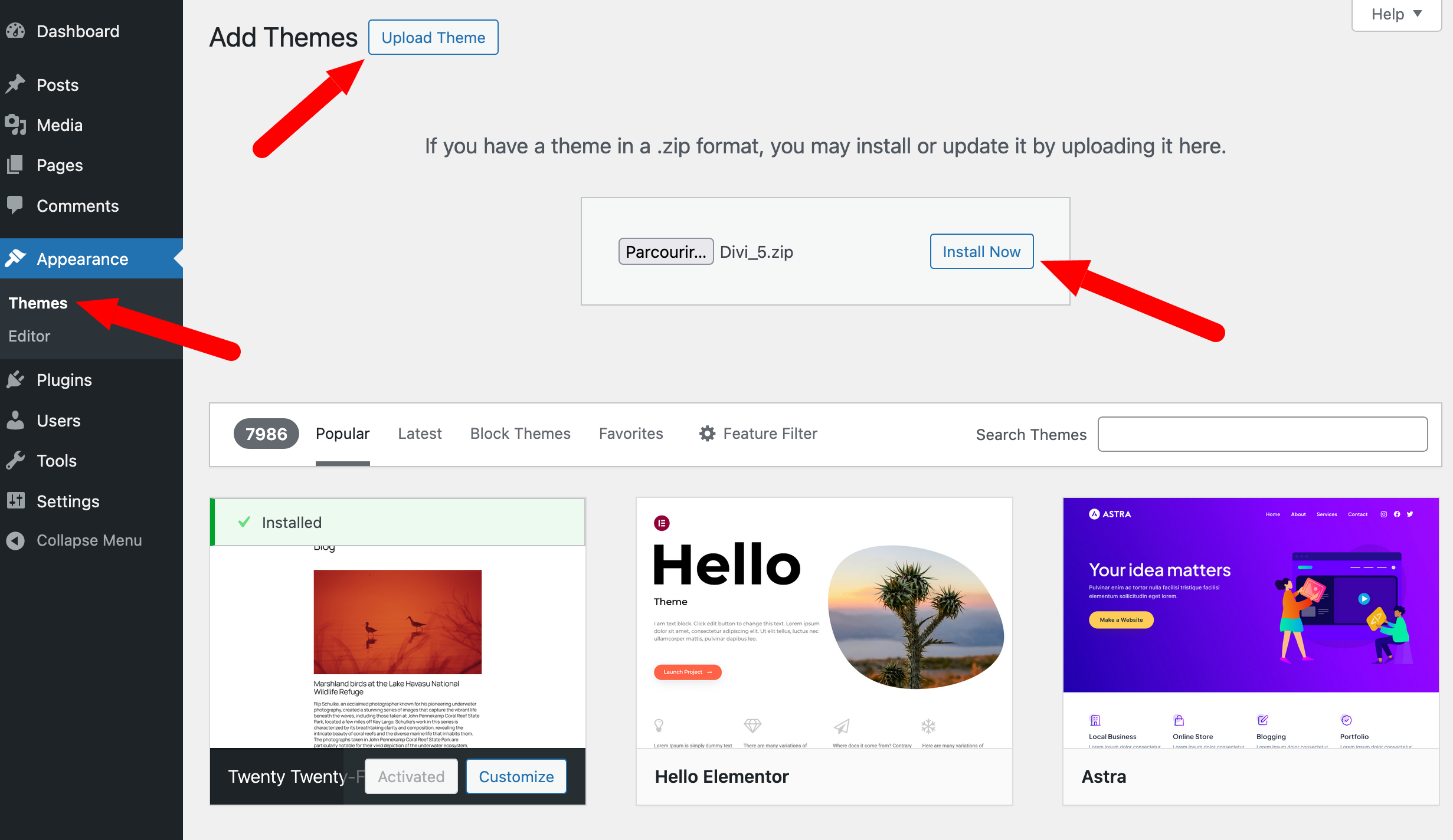
Once installed, activate the theme. Divi 5.0 is functional and ready to use.
Start the migration process
If you’re using Divi 4.0, you’ll need to launch a migration by going to the Divi > Divi 5 Migrator menu.
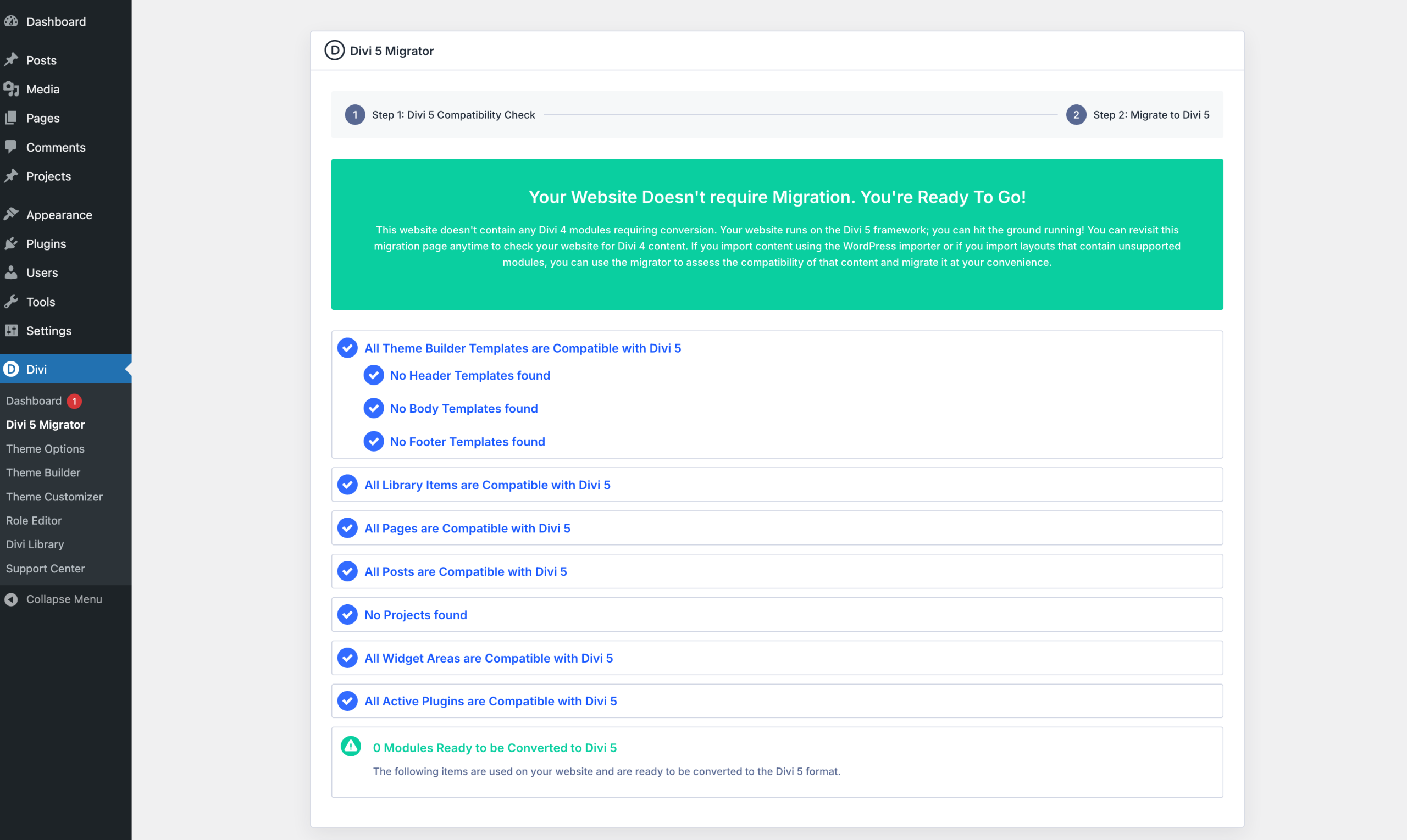
The tool will then launch an automatic compatibility test which will analyze several aspects: the theme builder templates, pages, articles, custom post types, WooCommerce products, items in the Divi media library, widgets and presets.
If everything’s OK for you, as shown in the screenshot below, you can start building your site with Divi 5.
If compatibility problems are detected, the scan displays warning messages at the relevant points:
- blue text indicates that the scanned items are compatible with Divi 5
- orange text indicates unsupported modules or features. These elements will be migrated, but unsupported components will operate in backward compatibility mode using Divi 4.
When you’re ready, click on the dedicated button to initiate migration.
Precautions to take before migration
If you’re already using Divi 4 on a production site and want to make the switch to Divi 5, we recommend that you test the migration in advance on an environment that poses no risk to your online site.
To do this, follow these steps:
- back up your site (files + database) using a dedicated plugin like UpdraftPlus or a global WordPress site management tool like WP Umbrella
- create a staging or pre-production environment at your hosting provider
- download and install Divi 5 on your test site
- launch the migration tool (Divi 5 Migrator)
- test the migrated site: display of pages, articles, images, buttons, forms, etc.
If you don’t encounter any problems, migrate from pre-production to production (if the tool you’re using allows it), or install and activate Divi 5 on your online site.
How much does Divi 5 cost?
Now it’s time to talk about Divi 5’s price. If you want to know what you’re getting yourself into, you need to distinguish between two types of users.
Case 1: you’re already an Elegant Themes customer
You’ve had Divi in your toolbox for a long time, and you’re a devotee? Good news for you.
There’s no additional cost for using Divi 5, as it’s included with every subscription (annual or lifetime).
To take advantage of this free service, all you need to do is perform the one-click migration described above.
Case 2: you’re not yet using Divi
Are you not yet an Elegant Themes customer and would like to purchase Divi 5? You have two possible options:
- yearly payment for Divi 5 alone ($89/year) or Divi Pro ($277/year) for Divi 5 (Theme + Builder) + Divi AI unlimited + Divi Cloud + Divi Teams + VIP Support (among others)
- the purchase of a lifetime license for Divi 5 alone ($249) or Divi 5 + Divi Pro ($297). Divi Pro cannot be purchased for life. You must then pay $212/year to use the Divi Pro service.

Our final review of Divi 5
Having reviewed the technical foundations, new features (Loop Builder, Layout Builder, Design System, Divi AI) and strategic implications of this redesign, it’s time to give you a clear opinion of Divi 5.
Divi 5 benefits
- Significantly improved performance: 2 to 4 times faster editor, optimized loading, automatic generation of critical CSS.
- No more shortcodes: modernized architecture, cleaner and more durable.
- Better Gutenberg compatibility: storage in native WordPress format, more modular approach.
- New developer API: easy creation of customized modules.
- Powerful Loop Builder: create 100%-customizable dynamic loops without coding.
- Layout Builder based on Flexbox and CSS Grid: precise layout control.
- Advanced Design System: global variables, class presets, enhanced visual consistency.
- Modernized interface: more intuitive, more fluid, more professional.
- Long-term vision: technical basis for the next decade.
Limits
- A transition phase is necessary to adapt to the new internal logic.
- Compatibility to be verified with certain third-party modules or advanced customizations.
- Learning curve required to fully exploit the Design System and new features.
- There’s little immediate visual revolution: the major changes are mostly technical and behind-the-scenes.
WPMarmite’s opinion of Divi 5
In our opinion, Divi 5 is excellent news for the Divi ecosystem and its users.
This is no cosmetic update. It’s an in-depth rebuild. Elegant Themes has taken the risk of starting from scratch to correct the weaknesses accumulated over several years and try to catch up with Elementor.
Will it be enough to fill the gap? Frankly, it seems like an impossible mission, because Elementor has entered another galaxy that seems unreachable.
But we’d like to tell you that that’s another battle. The priority was to get rid of this accumulating technical debt, while offering a new, modern and scalable tool.
Elegant Themes has risen to the challenge with flying colors. Divi 5 truly marks a strategic turning point in the brand’s history. And in our opinion, it’s the right one.
If you’re looking for a solid technical foundation on which to build professional websites for years to come, Divi 5 is clearly the right choice.
Would you like to try it out for yourself? Discover all its features and choose the package best suited to your needs:

Receive the next posts for free and access exclusive resources. More than 20,000 people have done it, why not you?


Continue reading
Articles posted in WordPress ThemesPowder: A WordPress theme that sets the world on fire?
Do you smell gunpowder? Or is it… some other kind of Powder? Rest assured, there’s no conflict in sight, and no fire to put out. Powder is the name of a block-based WordPress theme that’s compatible with Site Editor. We’ve…
Neve FSE: Test of this block-based WordPress theme
A block in your page header. Another in your footer. And since it’s also possible, here’s a pretty navigation menu designed entirely with blocks. Yes, it’s possible to create every part of a WordPress site from A to Z using…
Will Jupiter help you send sites into orbit?
You have your feet firmly planted on the ground? Then how about embarking on a trip to Jupiter? For fans of the Solar System and Antiquity, sorry in advance: we’re not going to talk about the huge planet or the…