Managing several WordPress sites for different customers is, well, not easy.
As a freelancer or WordPress agency, you have to deal with a number of constraints:
- Tight deadlines and managing numerous customer projects simultaneously
- High expectations in terms of performance and availability that directly affect your reputation
- The risk of security breaches affecting several sites — and several customers — at once
- The need to offer a top-of-the-range service, while remaining profitable and competitive

Faced with these challenges, your hosting provider needs to adapt to your workload, your methods, and your business requirements.
And as it happens, SiteGround offers hosting services tailored to the needs of professional WordPress site builders.
SiteGround is a solid choice. With over 20 years’ experience in specialized web hosting, the company manages more than three million domain names worldwide, around half of which have been entrusted to them by freelancers or partner agencies.
After reading this content, you’ll know exactly how SiteGround meets the needs of WP freelancers and agencies, with dedicated features for different aspects of your business (performance, security, reliability, development tools, additional income opportunities).
- The reliability of SiteGround hosting services: A trustworthy guarantee for agencies and freelancers
- A WordPress site up to 85% faster for your customers
- Enterprise-class security to protect your online reputation
- Powerful tools to streamline your workflows
- Services and tools dedicated to WordPress
- Turn hosting into recurring revenue with SiteGround
- Hosting plans tailored to freelancers and agencies managing multiple sites
- Conclusion on SiteGround hosting services for professionals
Transparency: This page is sponsored. Some links to SiteGround are affiliate links. If you purchase hosting from them, WPMarmite will receive a commission.
Thanks to affiliation, WPMarmite is able to remunerate the research and writing work of the blog’s editors. But we remain impartial. If a product isn’t worth it, we’ll say so (or we don’t tell you about it).
The reliability of SiteGround hosting services: A trustworthy guarantee for agencies and freelancers
We’re stating the obvious, but let’s be frank: a site that’s inaccessible or slow, even if only for a few minutes, can cost you visitors, conversions… and the trust of those who could become your future customers.
If the user experience isn’t up to scratch, you’ve got a thorn in your side:
- A WooCommerce store that stalls, stalls, and stalls again at checkout can lead to a chain of shopping cart abandonments.
- An online portfolio inaccessible when a prospect clicks on the link in your email signature? That’s a business opportunity that you just lost.
To avoid these setbacks, your web host must be impeccably reliable to ensure that your site is always online, fast, and secure.
This is precisely where SiteGround‘s hosting services stand out.
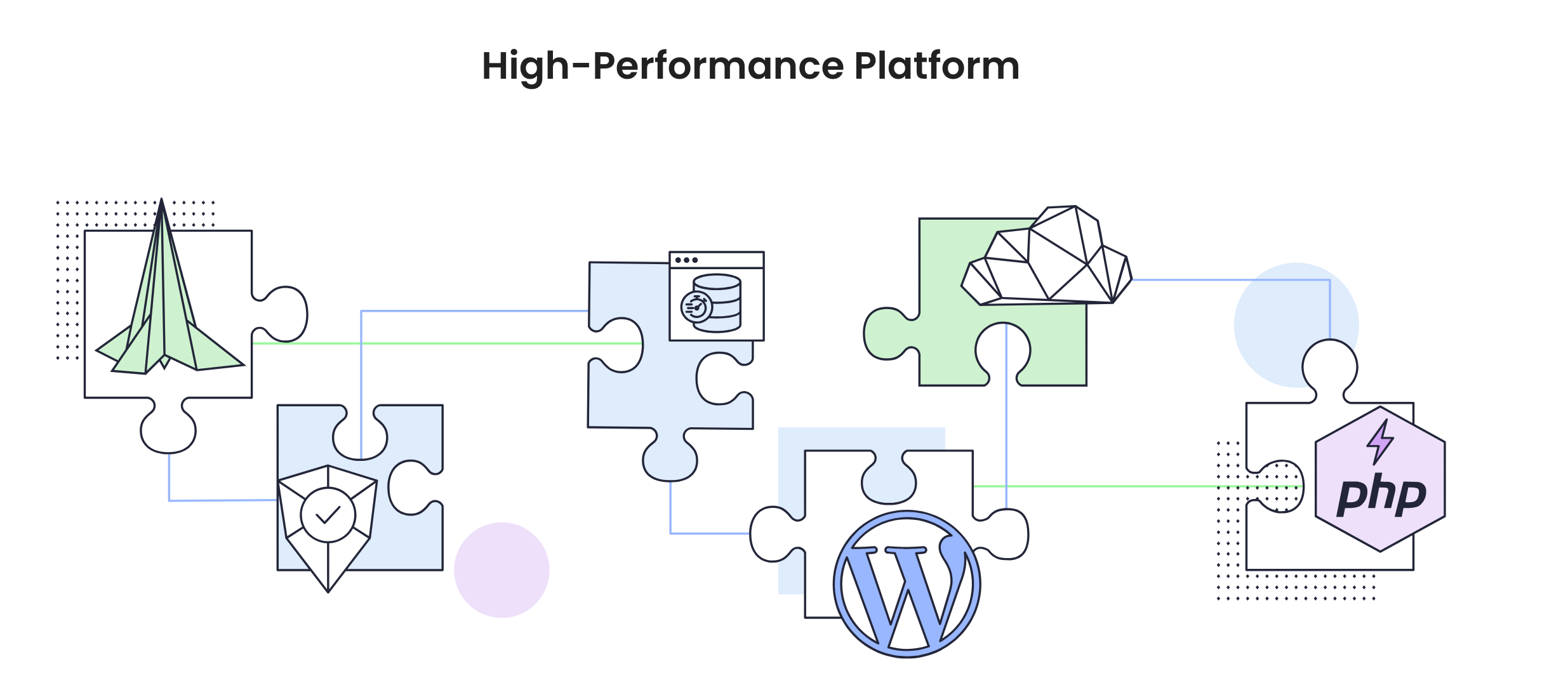
An infrastructure designed for stability, performance, and peace of mind
SiteGround has built a robust hosting infrastructure designed to minimize the risk of downtime, guarantee consistent performance, and proactively secure your WordPress sites (yours and your customers’).
Several key elements contribute to this reliability:
- 99.9% uptime guarantee. Founded in 2004, the web hosting provider is committed to a service level agreement (SLA ) of 99.9% uptime. This means that your site will be unavailable online for a maximum of 1.6 hours per year, a prerequisite for not missing out on sales or requests for bids!
- A server infrastructure based on the Google Cloud Premium Platform (GCP): Thanks to the global Google Cloud network, one of the fastest and most powerful in the world, your customers’ sites load very quickly (data centers are located all over the world). And in the rare event of a hosting server failure, a virtual machine takes over on another hosting node to attach the distributed storage volume (redundant backups).
- A platform optimized for speed and security. Even on shared hosting, each site is securely isolated thanks to an advanced architecture based on Chroot technology.
- An ultra-reactive monitoring system. Servers are checked every 0.5 seconds. In the event of an anomaly, action can be taken instantly, without waiting for a customer to report the problem.
- 24/7 security supervision. A team of experienced sysadmins continuously monitors for known threats. In practice, SiteGround often deploys patches even before official WordPress updates.
- Expert technical support available around the clock. The support team is available 24/7 via live chat, phone, and support tickets, with an average response time for support tickets of 15 minutes.
If you want to check the availability of your WordPress site (and be alerted immediately in the event of a problem), you can use a tool dedicated to WordPress maintenance like WP Umbrella, which has a monitoring feature (premium). There are also uptime/downtime monitoring tools like UptimeRobot (freemium).
A WordPress site up to 85% faster for your customers
According to a study by Google, 53% of visitors leave a page if it takes more than 3 seconds to load on their mobile device (e.g., smartphone).
And an estimated 47% of customers abandon a web page if it takes more than two seconds to load.
The page loading speed of your WordPress site has a direct impact on:
- User experience (UX): A fast site is a pleasant site to navigate.
- Your search engine optimization (SEO): Google favors fast sites and considers loading speed as a ranking criterion. For example, it takes into account what it calls Core Web Vitals when ranking a page in its search results.
- Your conversions: Amazon, for example, estimated that a latency of just 100ms reduced their sales by 1%!
- Your bounce rate, i.e. the percentage of visitors who leave a page of your WordPress site without visiting another page.
- Your credibility and brand image.
In short, a fast site is a must for every webmaster. It’s a guarantee of professionalism, better visibility, and success.
SiteGround’s technical advantages for ultra-fast websites

On average, a site migrated to SiteGround enjoys an 85% performance boost. All this is made possible by a combination of technical innovations:
- Three advanced caching options. SiteGround’s in-house SuperCacher technology acts on static caching (default activation of NGINX Direct Delivery), dynamic caching, and the database (Memcached system). This can make a hosted site perform up to 5 times faster.
- A customized PHP configuration that reduces the TTFB (Time to First Byte) to enable your web pages to load 30% faster than with standard PHP configurations.
- A free integrated cloud CDN service, based on over 170 edge locations offered by the internal Google Cloud network, spread over four continents (including several locations in the United States). Thanks to this, you can expect to serve your content up to 20% faster.
- Customized MySQL configuration to reduce the number of slow requests by between 10 and 20 times on the SiteGround server infrastructure.
- A free plugin (Speed Optimizer) to optimize the performance of your WordPress site. Discover all its features and how to set them up efficiently in our article dedicated to performance optimization at SiteGround.
- Brotli compression, active by default on all SiteGround hosting servers. It reduces the size of your site’s data (HTML, CSS, JavaScript files, etc.) by 15–20%.
- Use of the latest versions of PHP and MySQL, both for security and performance reasons.
Would you like to measure your website’s page load speed easily and free of charge? Use tools such as Google PageSpeed Insights, Pingdom, or WebPageTest.
Enterprise-class security to protect your online reputation
Ensuring the security of your WP sites and those of your customers is one of your daily missions as a freelancer or WordPress agency. It’s a technical mission, but above all a reputational one.
A hacked site, a compromised database, or a redirect to malicious content can have dramatic consequences on several levels:
- On your sales: The global average cost of a cyber attack for a company is $4.88 million and as high as $9.36 million in the United States. And it doesn’t just happen to others: a cyberattack takes place somewhere in the world every 39 seconds.
- On your site’s positioning on search engines: With a pirated site, you risk losing traffic on Google and its competitors because your positions may drop.
- On your customers’ perception of your services: If the sites you manage are frequently hacked, your customers and potential prospects will no longer trust you, and will turn to your competitors.
When it comes to safety, the ball is in your court, as they say. It’s up to you to take the necessary action. But not everything rests on your shoulders.
Your hosting provider also has a key role to play here. At this level, SiteGround provides you with an advanced security infrastructure, essential for blocking threats before they reach your sites.
A complete safety arsenal, active 24/7
SiteGround has made security a cornerstone of its hosting services. The hosting provider’s approach is both proactive and comprehensive, to effectively protect all the sites you host with them through a variety of measures:
- Web application firewall (WAF) to secure servers and web applications, with DDoS protection. Every day, 1.4 billion malicious requests are blocked before they reach customer sites.
- Anti-bot system using artificial intelligence to block brute-force attacks. SiteGround claims to block 25 to 30 million such attacks per hour across its entire network infrastructure.
- Use of an in-house, customized Nginx security module that analyzes incoming requests and protects sites against the most common attacks.
- Geographically distributed backups to minimize the risk of data loss and recover data quickly in the event of a problem.
- 24/7 server monitoring. In the event of a problem, immediate corrective action is taken.
- Malware alert system with daily reports (Site Scanner tool).
- WordPress security plugin (Security Optimizer) pre-installed on all new installations.
- Automatic WordPress updates (CMS core, theme, and plugins).
- Basic security options: Free SSL certificates to switch your site to HTTPS, two-factor authentication, etc.
Powerful tools to streamline your workflows
Like many of us, you probably don’t like wasting time. Even more so when it comes to your professional activity.
Problem: on a day-to-day basis, managing multiple time-consuming tasks (WordPress updates, bug fixes, backups, development tasks, back-and-forth between customer projects, etc.) can quickly become a headache… and waste many hours.
And as you know, time is money. To reduce technical friction and increase efficiency and fluidity, SiteGround offers a number of advantages.
Site Tools, the control panel that simplifies WordPress site management
For each hosting account, SiteGround provides you with a control and management interface developed by their in-house teams.
It’s an alternative to cPanel, with a major advantage: Site Tools excels in multi-site management.
You can manage all your websites from a single account, while maintaining each site’s own dedicated Site Tools dashboard, guaranteeing total isolation and security between sites, not to mention faster task management!
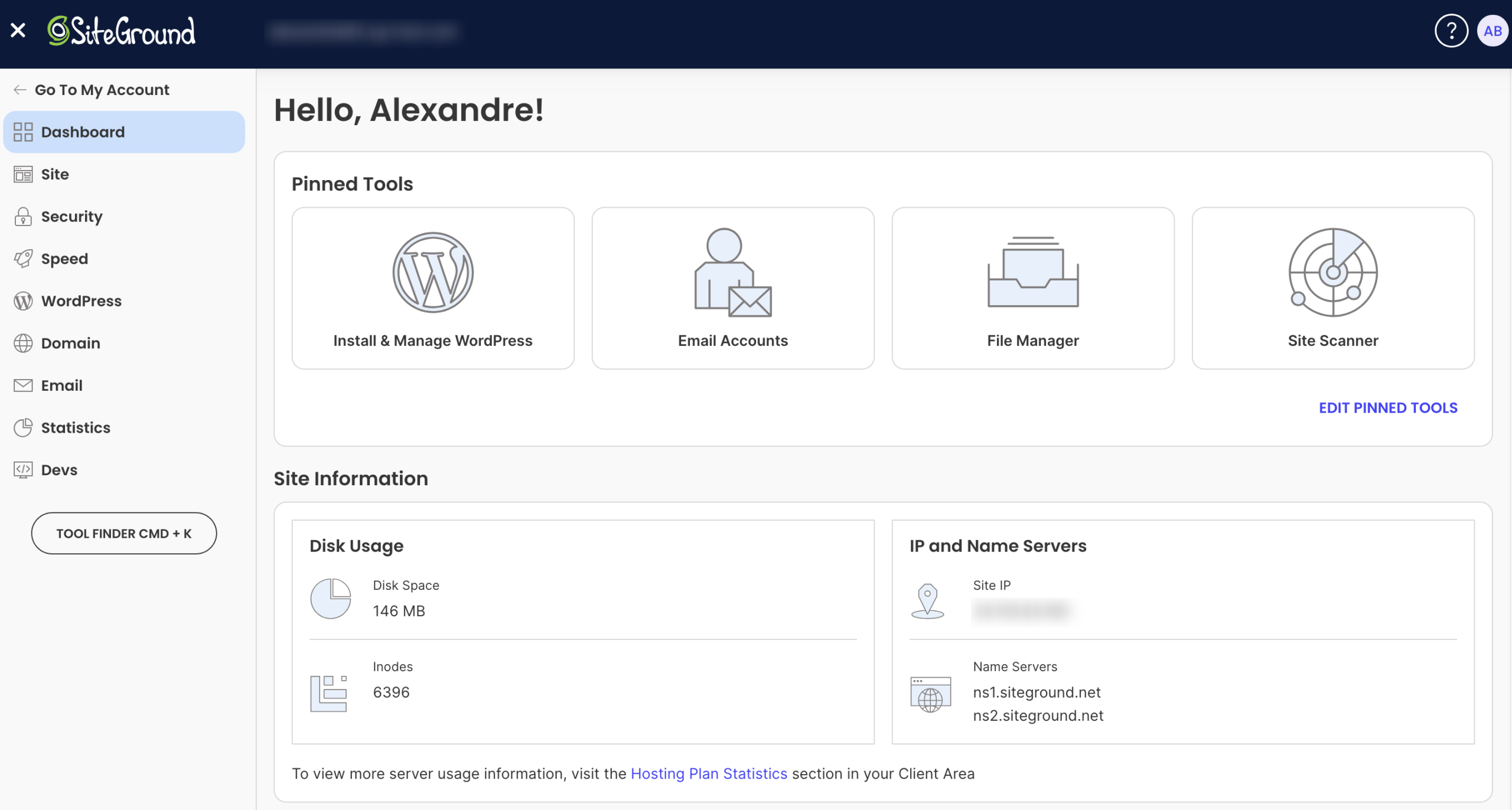
From a single interface, Site Tools brings together over 35 tools for managing your sites. Here’s a non-exhaustive overview:
- Files, database, and PHP version manager
- One-click WordPress installation
- Domain name management (sub-domains, redirects, etc.)
- Creation of manual backups (in addition to the automated daily backups included for up to 30 days)
- Site restoration
- You can give your team members access only to the websites they work on, while keeping control of the accounts on your side
- FTP accounts
- Email accounts
- Cache management
- CDN
- SSL manager
- Creation of protected URLs
- IP address blocking
- Etc.
Powerful, natively integrated development tools
Easy-to-use and intuitive, Site Tools is ideal for beginners who want to benefit from simple yet powerful tools.
Do you have a more experienced, technical profile? You’ll find what you’re looking for here, too, thanks to the presence of advanced development tools:
- Secure SSH and SFTP access
- Pre-installed WP-CLI for command-line management of WordPress (plugin installation, database cleanup, etc.)
- Git integration for smooth versioning and deployment
- One-click staging environment, with the ability to clone a site, modify it, then push it into production without risk
- Integrated backups for each pre-production instance
Features to simplify your projects
In parallel, SiteGround offers white-label access for your customers, while limiting access to certain functionalities (with GoGeek and Cloud hosting packages).
When your customer logs on to Site Tools on their website, they don’t see the SiteGround name or logo anywhere.
In keeping with their commitment to simplifying your projects, SiteGround lets you transfer ownership of a site (domain name, hosting, mailbox, etc.) to your customer in just a few clicks.
Finally, if you need to, you can keep your collaborator access even after the transfer, to continue to intervene if necessary (maintenance, updates, technical support, etc.).
Services and tools dedicated to WordPress
Reliability, performance, security: while SiteGround places particular emphasis on these three areas, the hosting provider has also developed a set of tools and features specifically designed for WordPress professionals.
In concrete terms, whatever hosting package you choose, SiteGround takes care of the technical management of your WP site (security optimization, performance optimization, automatic updates, etc.).
But rest assured, you have control over other practical aspects such as:
- Choosing the execution time for an automatic update of the WordPress Core (Immediate, 24 hours, 48 hours, or 72 hours after release)
- The creation of staging environments (starting with the GrowBig offer), as mentioned above, to work in complete serenity without the risk of “breaking” your online site
- Free automatic migrations, thanks to the Migrator plugin, which allows you to easily migrate the sites of your choice
- An all-in-one plugin (Speed Optimizer) to optimize WordPress performance at multiple levels (front-end, media, and environment)
- A security plugin (Security Optimizer) that lets you perform several actions: 2-factor authentication, modify the connection URL, limit connections to certain IP addresses, delete the default readme.txt file, hide your WP version, obtain detailed connection activity to identify threats, etc.

Turn hosting into recurring revenue with SiteGround
Long-term customer support is often one of the objectives of a professional WordPress site builder. It’s a guaranteed source of regular income, provided you know how to structure your offer strategically.
With SiteGround hosting services, you can integrate hosting directly into your services to offer additional services… and generate recurring monthly or annual revenue.
Resale of white-label hosting on a customized basis
The first concrete way to monetize hosting with SiteGround is to resell it directly to your customer on a white label basis.
GrowBig, GoGeek, and Cloud packages allow you to host an unlimited number of sites.
So you can pool your resources and create your own hosting packages tailored to different types of customer (small business, e-commerce, showcase site, etc.).
You have the upper hand on several levels:
- Option to use a private DNS, with your own domain name as the server (e.g. ns1.my-agency.com)
- Use of white-label site management tools (e.g. Site Tools), so that your customers never see the SiteGround name
- Ability to choose the data center closest to each customer’s audience
And if you opt for one of their Cloud hosting packages, you’ll even have granular control over resources and access, with the option of:
- Defining customized quotas for each site (disk space, CPU, etc.)
- Allocating restricted customer access to certain functions only
- Segmenting your infrastructure by project or customer
Generate additional revenue with SiteGround’s affiliate program
If you prefer not to manage your hosting yourself, you can activate another lever to monetize your hosting: affiliation.
How does that work? Well, it’s very simple: every time you recommend SiteGround to a customer (and they buy a hosting plan via a specific link), you earn a commission on the sale.
SiteGround offers a highly attractive affiliate program for web professionals. Simply put, the more new customers you refer each month, the higher your commissions.
To give you an idea, making between 1 and 5 affiliate sales a month will already bring you $50 per sale.
The benefits go even further if you opt for a dedicated agency hosting package. For example, you can take advantage of three months’ free service, as well as a dedicated account manager.

Hosting plans tailored to freelancers and agencies managing multiple sites
SiteGround WordPress hosting services for agencies and freelancers
When you start multiplying WordPress projects, whether for your own needs or those of your customers, it becomes essential to have a centralized, high-performance, and scalable hosting solution.
SiteGround offers two hosting packages perfectly tailored to the needs of freelancers and agencies.
Each offers managed WordPress functionality, unlimited traffic and websites, as well as key features (free domain name, free SSL and CDN, daily backups, enhanced security, caching, collaborator management, etc.).

The GrowBig offer
The GrowBig package is ideal for growing companies, as SiteGround explains. It offers 20 GB of web space and ~100,000 monthly visits.
Its exclusive features include:
- Backup copies on request
- 30% faster PHP
- The creation of pre-production environments (staging)
Price: $4.99/month for the first year
The GoGeek offer
The GoGeek plan “offers more power for large websites.” It provides you with 40 GB of web space and ~400,000 monthly visits.
In addition to the GrowBig plan, you also benefit from the following exclusive features:
- Git
- White-label customers
- Free private DNS
- Highest level of resources among the available hosting packages
- Priority assistance
Price: $7.99/month for the first year
SiteGround Cloud Hosting Service
If you need to take your business to the next level while gaining in power and customization, SiteGround also offers a fully managed cloud hosting service with self-upgrading plans.
With the cloud offer, you can choose from 4 packages, customizable to your needs. You can adjust core processors (CPU), RAM memory (GB), and SSD storage as you wish.
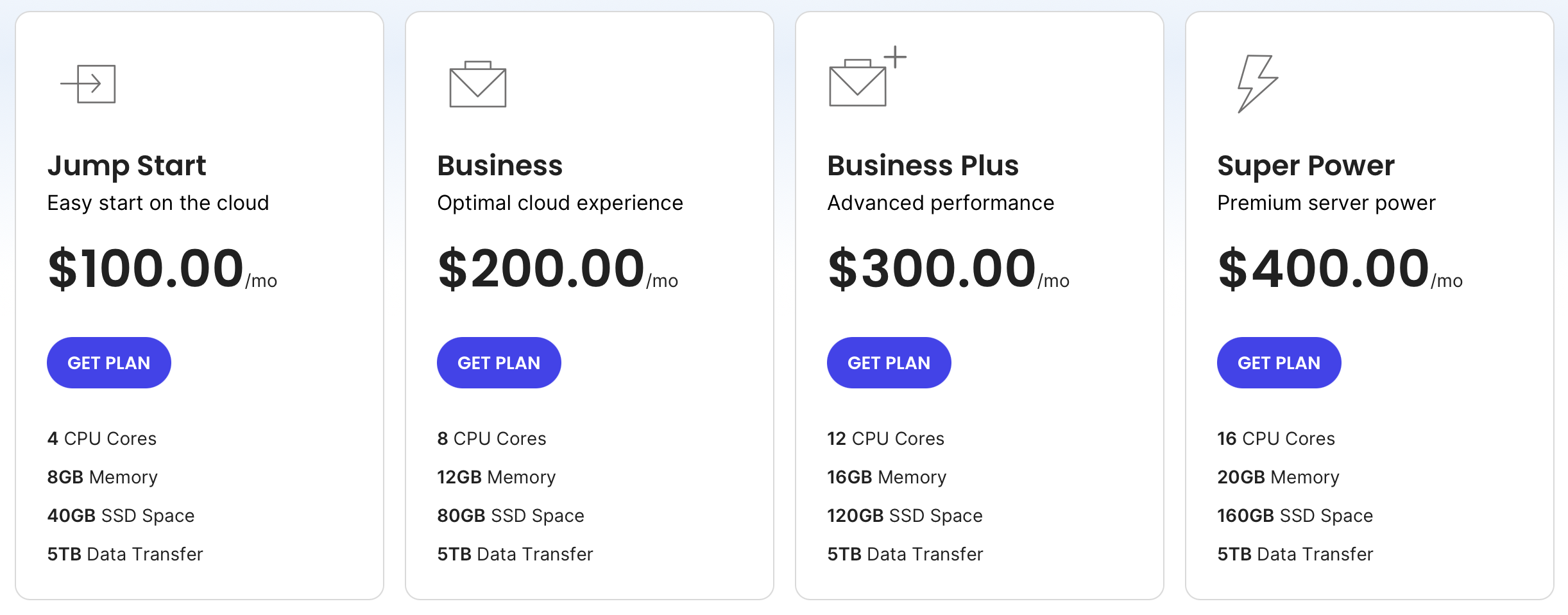
The advantages of SiteGround’s cloud offering include the following:
- The ability to create customized hosting packages for each customer, by defining specific customer roles. It’s also possible to adapt the resources allocated to each of the sites hosted on your cloud.
- Automatic scaling option, which automatically adds more resources during unexpected traffic peaks
- Creation of a white-label experience (private DNS, personalized branding)
- Choice of data center for each project, depending on target location
- Advanced tools for professionals: SSH, Git, WP-CLI, one-click staging, etc.
Price: From $100/month
Conclusion on SiteGround hosting services for professionals
As a freelancer or WordPress agency, you know that choosing a web hosting provider is a strategic decision that directly impacts your productivity and your customers’ satisfaction.
Throughout these lines, you’ve discovered that SiteGround’s hosting services are designed to meet the requirements of professional WP site builders.
With SiteGround, you benefit from the following tangible advantages:
- Save time with intuitive, centralized multisite management
- Powerful development tools tailored to your workflow
- Enhanced security to protect your projects and your reputation
- Optimized performance to satisfy your most demanding customers
- A scalable infrastructure that adapts to the growth of your business
- Complementary income opportunities through hosting resale or affiliation
Are you interested? Find out more about SiteGround’s hosting offers below:
