Just as a house needs a solid foundation to keep it from collapsing, a company website needs a good web host to thrive online.
And in this respect, it’s best not to slip up. Your reputation and sales depend on it.
Speaking of which, top-of-the-line managed WordPress hosting can be a game-changer. It takes care of all the technical aspects for you (server management, performance, backups, security, 24/7 support, etc.) so you can focus on your core business.

For businesses of all sizes, WordPress is often the platform of choice: flexible, scalable, and intuitive. Not to mention its vast ecosystem of themes and plugins, coupled with its huge community.
To help you get the most out of WordPress, SiteGround offers one of the most reliable, high-performance managed WordPress hosting packages on the market.
After reading this article, you’ll know exactly why SiteGround is the first choice for many small and medium-sized businesses that want to launch online or already have a well-established presence.
- Performance-related features to turn your visitors into customers
- Essential security solutions for greater peace of mind
- With SiteGround's managed WordPress hosting for SMBs, you get WP expertise tailored to businesses
- Features designed to make life easier for small businesses
- WordPress hosting plans to suit your growing business
- Conclusion
Transparency: This page is sponsored. Some links to SiteGround are affiliate links. If you purchase hosting from them, WPMarmite will receive a commission.
Thanks to affiliation, WPMarmite is able to remunerate the research and writing work of the blog’s editors. But we remain impartial. If a product isn’t worth it, we’ll say so (or we don’t share about it).
Performance-related features to turn your visitors into customers
In technical terms, WordPress is a very well-engineered CMS (Content Management System). Its core is stable and relatively lightweight, while offering the advantage of being naturally optimized for SEO (provided the right settings are in place).
But WordPress isn’t perfect either! A default WordPress installation, no matter how well thought-out, can also suffer from performance shortcomings on several levels:
- The CMS doesn’t offer a complete page caching system by default. And that’s just what’s needed to improve the loading speed of your pages.
- Depending on the quality of the code of the plugins and theme you use, performance may deteriorate.
- Front-end resources (CSS code, JavaScript, images) must be optimized, otherwise your pages’ performance will be considerably hampered.

The crucial impact of loading time on UX, SEO, and sales
As a small business owner, your goal is to have a site that’s not only functional, but also ultra-fast.
The loading time of your pages impacts several aspects:
- Your conversions (product purchase, PDF download, newsletter subscription, etc.)
- Crawl (exploration of your pages) by search engine robots. The faster your pages load, the more URLs the bots can crawl on your site.
- User experience (UX)
- Your search engine optimization (SEO): Google favors fast sites and considers loading speed as a ranking criterion. For example, it takes into account what it calls Core Web Vitals when ranking a page in its search results.
- Your bounce rate, i.e., the percentage of visitors who leave a page of your WordPress site without visiting any others
To improve the speed of your pages, you need a good, reliable web host. SiteGround has been specially designed to meet the needs of companies, particularly small and medium-sized businesses, with a wide range of features dedicated to speed.
High-performance network infrastructure
On average, at SiteGround, 85% of migrated sites receive a performance boost. To achieve such results, the hosting provider relies on a first pillar: its high-performance network infrastructure.
All hosting accounts are deployed on the Google Cloud Platform (GCP), at the Premium service level.
Thanks to this, your customers’ sites benefit from an enterprise-class infrastructure, combining reliability and state-of-the-art performance, all at affordable rates.
How does Google Cloud Premium work? It’s a highly reliable, low-latency private fiber optic network, reputed to be one of the fastest on the market.
With a global presence, Google Cloud Premium has over 100 points of presence (POPs) worldwide.
This optimizes connectivity and data transfer, giving you a fast network wherever you are.
And that’s not all. SiteGround also uses Google’s SSD persistent storage, which features multiple redundancies. The advantage? If the hosting server for one of your sites goes down (which happens very rarely), you can rest easy.
SiteGround takes care of launching a new virtual machine on another hosting node in its cloud space, while attaching the distributed storage volume to the new instance, instead of the failed instance, without wasting time on backup restoration.
SiteGround’s free, integrated CDN: A global boost for your visitors
In today’s connected world, your visitors can come from the four corners of the globe. To give them a seamless browsing experience wherever they are, SiteGround includes an integrated cloud CDN service free of charge on all its hosting packages.
This CDN increases website loading speed by an average of 20%.
A CDN is a Content Delivery Network made up of servers (physical or virtual) distributed around the world. The aim is to distribute your site’s resources as quickly as possible, using the server located closest to your visitor.
This worldwide network of servers on five continents (North America, South America, Europe, Asia, and Australia) caches your site content and delivers it from the server closest to the visitor.
The result: shorter loading times for your international audience, enabling VSBs and SMBs to conquer new markets.
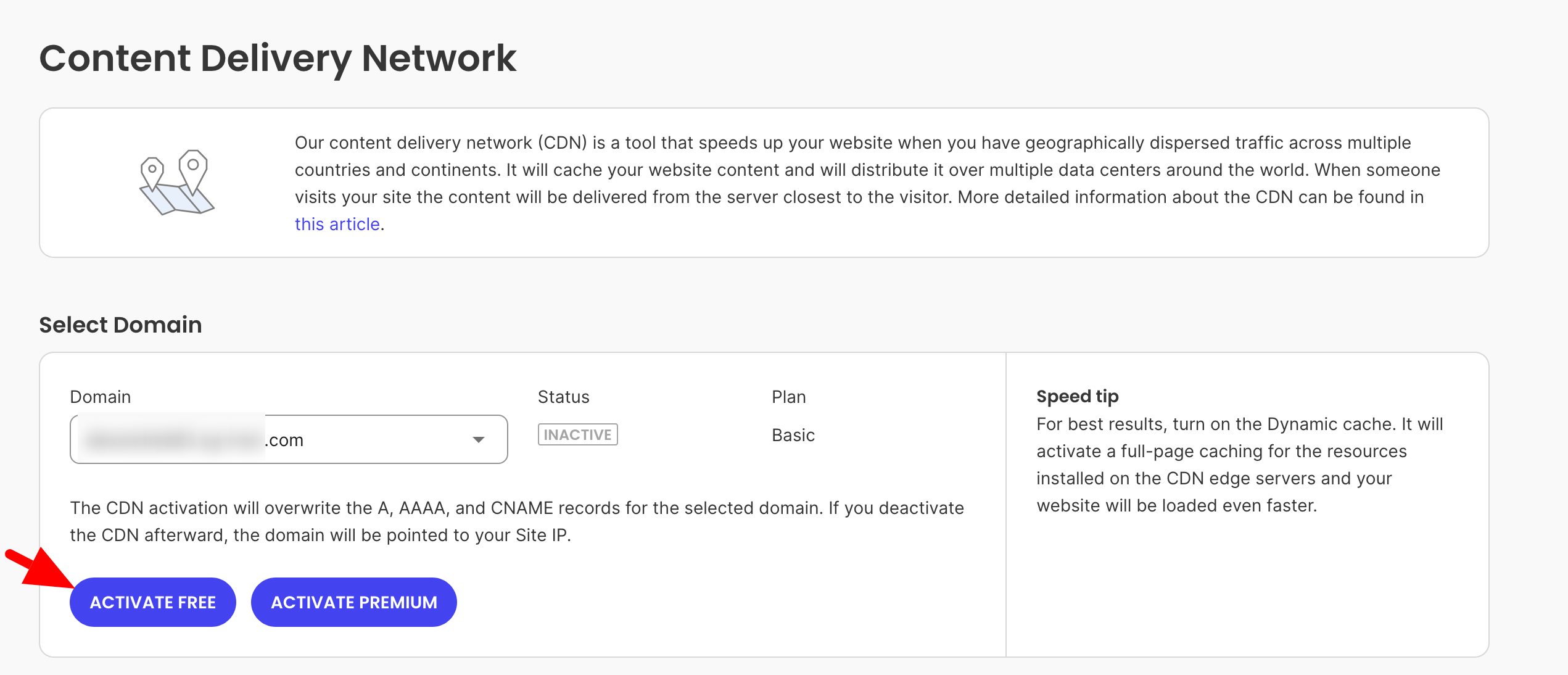
CDN activation is a one-click process, with no additional site reconfiguration required. Simply go to Site Tools and access the following menu: Speed > CDN:
Intelligent three-level caching
To optimize your page loading speed, SiteGround also relies on its proprietary SuperCacher solution, offered on all its hosting plans.
SuperCacher is a three-layer caching mechanism that enables:
- Static cache (NGINX Direct Delivery), active by default
- Dynamic caching, to cache the HTML output of your PHP code
- Memcached (a memory caching system), for database-driven sites
With this, you’re all set to cope with traffic peaks.
Ultra-fast PHP and MySQL optimization on SiteGround’s managed WordPress hosting packages for small and medium-sized businesses
The speed of a WordPress site depends largely on how quickly the server handles PHP requests and interactions with the MySQL database.
SiteGround leaves nothing to chance in this respect, offering a customized configuration of:
- PHP, to use less memory and enable the server to process a greater number of requests more quickly (starting with the GrowBig plan). This makes it possible, for example, to speed up the checkout process on a WooCommerce site to reduce cart abandonment and increase conversions.
- MySQL, to handle a large number of database queries simultaneously and manage large queries so that your websites load quickly, even under heavy load. For sites with large product catalogs, voluminous customer data, or a large number of transactions, a fast WordPress database is essential.
Speed Optimizer: The SiteGround plugin dedicated to performance
Finally, as part of its multi-level approach to performance optimization, SiteGround offers its users a free all-in-one plugin to optimize the performance of your WordPress sites in several areas: caching, frontend, media, environment, etc.
This powerful, easy-to-use tool requires no in-depth technical expertise and no additional development costs.
Everything happens on your WordPress dashboard, with one-click options:
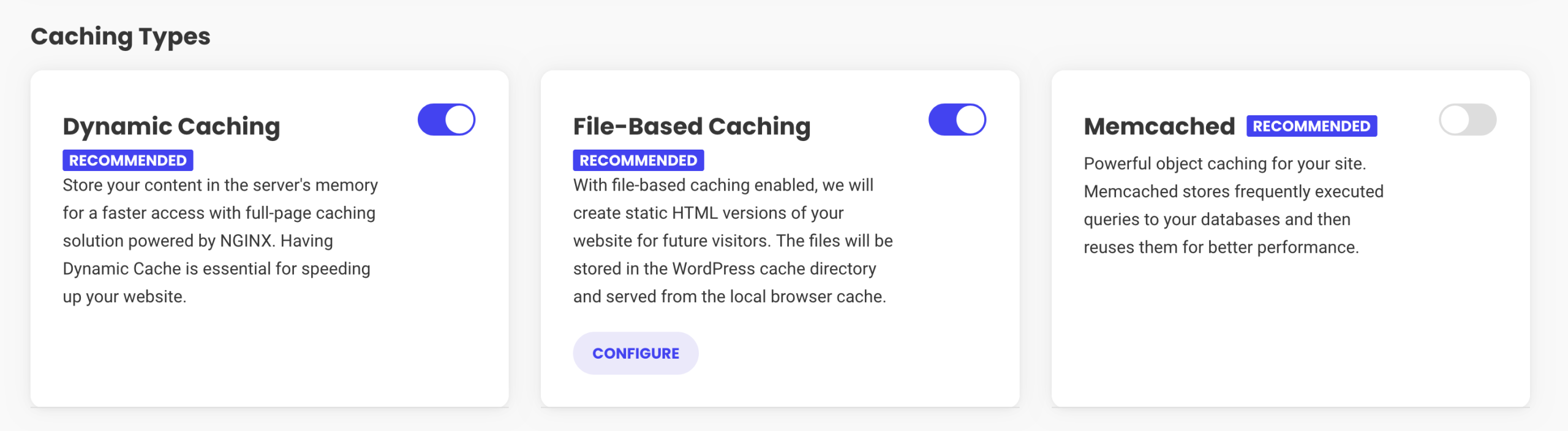
The Speed Optimizer plugin can be used even if you’re not hosted by SiteGround. Please note, however, that some features are only available for websites hosted on the SiteGround platform (e.g., dynamic caching and Memcached). This ensures better results in the end.
Essential security solutions for greater peace of mind
WordPress is the world’s most popular CMS. It’s simple: nearly one out of every two websites on the planet runs on this CMS.
This popularity is both a strength and a weakness. The more widespread a platform is, the more it attracts cyber-attacks. In total, an estimated 4,700,000 WordPress sites are hacked every year!
Faced with this considerable attack surface, VSEs and SMEs, often less well armed than large corporations, become prime targets.
On average around the world, cyber attacks happen every 39 seconds. The average cost of a hack remains very high. For small businesses with fewer than 500 employees, the average cost of a cyberattack is $3.31 million.
Not to mention the impact on reputation, brand image, and potential data leakage.
When it comes to security, it’s essential to apply good practices to protect your site. We’ve gathered the top WordPress security plugins in a comparison page so you can find the one that best suits your needs.
Beyond performance, SiteGround prides itself on offering robust, proactive security solutions designed for businesses.
Automatic updates for continuous protection
One of the most common vulnerabilities on WordPress comes from outdated versions of plugins or themes.
Each new version brings with it its share of essential security patches. With SiteGround, this crucial task is automated.
The hosting provider automatically manages WordPress core updates (major and minor) for you. For your part, you can choose the execution time for each update (immediate, 24 hours, 48 hours, or 72 hours after release).
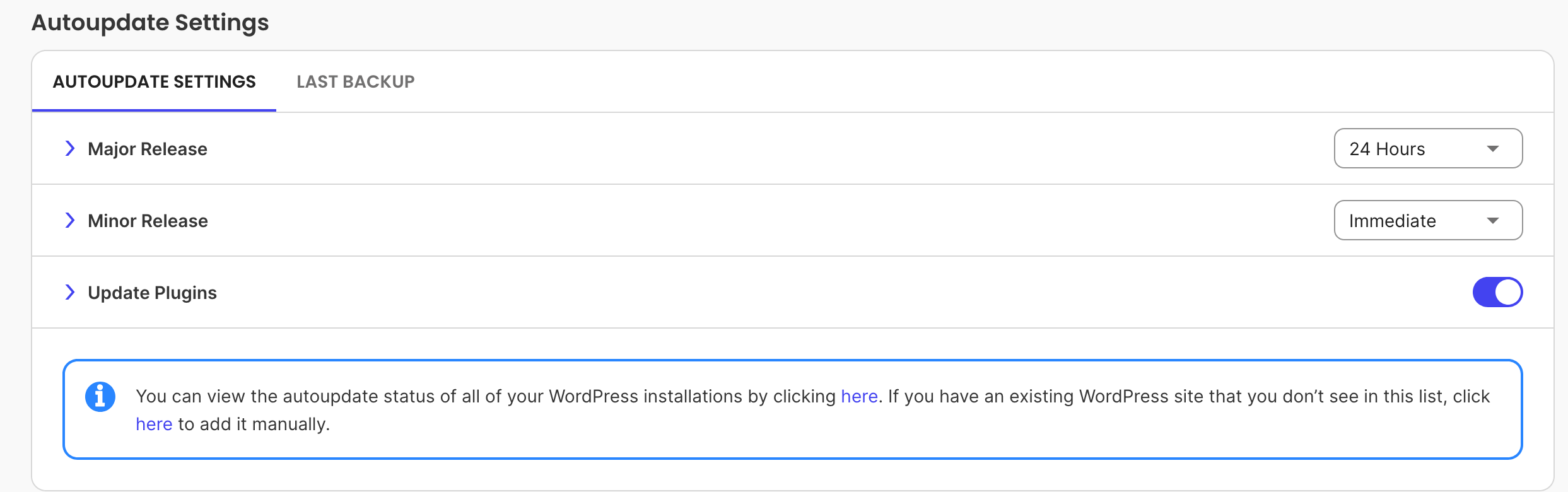
At the same time, SiteGround also takes care of updating your plugins and themes. All this ensures that your customers’ sites are constantly protected against the latest threats, without the need for manual intervention by you or your customers.
Distributed daily backups
Protecting your site also requires an effective and frequent backup policy. Here, too, SiteGround takes matters into its own hands.
Each account is backed up daily on a distributed basis. This means that several copies are stored in a different data center location from the one hosting your actual account.
In the event of an incident (hacking, server failure, configuration error, plugin conflict, etc.), your site can be restored and put back online very quickly, with no loss of data. Each backup is kept for 30 days.
Free SSL certificates with Let’s Encrypt
With SiteGround, the Let’s Encrypt SSL certificate (a certification authority) is included and automatically renewed on every hosted domain, at no extra cost.
The SSL certificate is what allows you to switch your WordPress site to HTTPS and benefit from a secure connection.
It’s essential to protect sensitive data exchanged with your customers (payments, forms, accounts, etc.) and to inspire confidence in your visitors (a green padlock in a navigation bar is reassuring).
What’s more, it enhances the user experience. If you have an unsecured site (without HTTPS), most browsers (Chrome, Firefox, Opera, Safari) will simply prevent visitors from accessing it, telling them that the connection is not secure.
The Security Optimizer plugin
SiteGround doesn’t just provide server-level security. SiteGround also provides tools to enhance the security of your WordPress installation itself.
The Security Optimizer plugin, developed by the SiteGround team, offers a set of key security-enhancing features, without the need for advanced technical skills or additional tools to activate them.
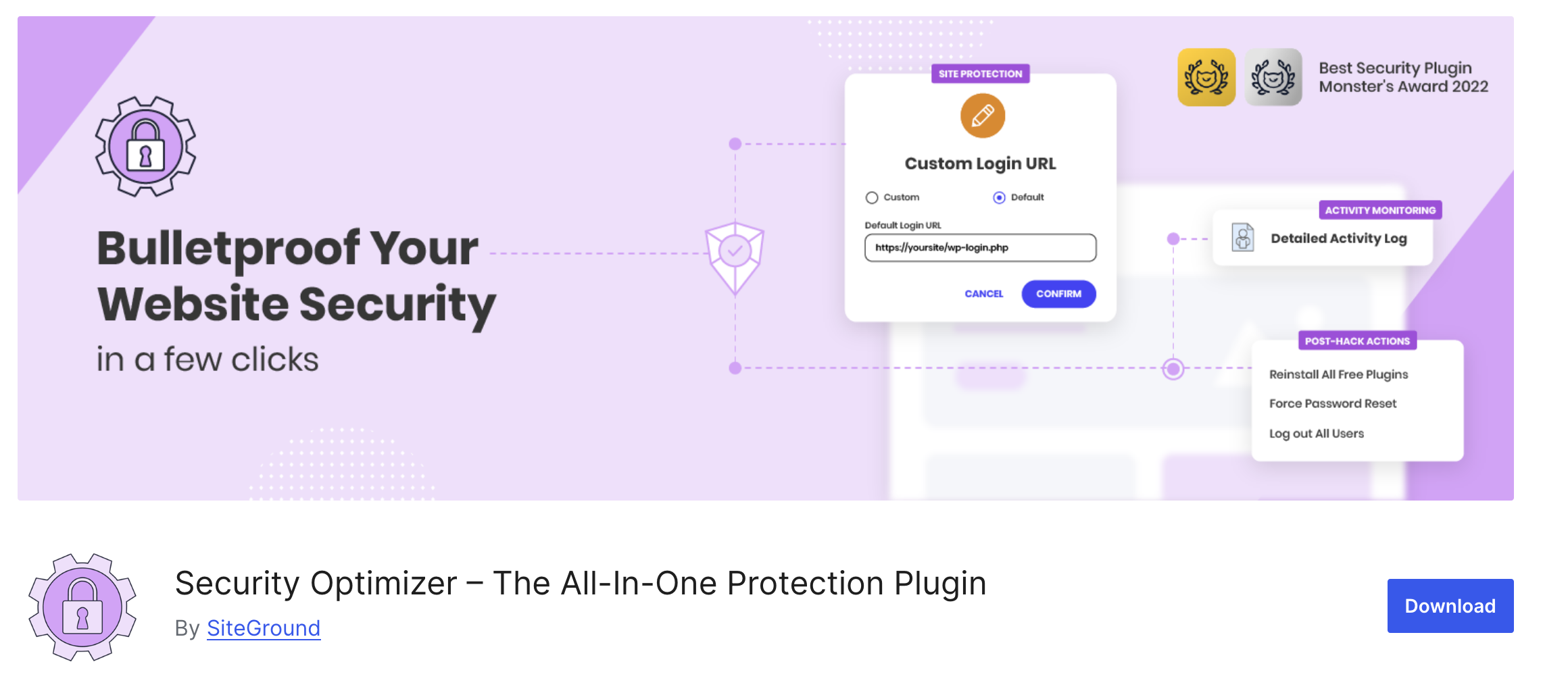
For example, you can:
- Protect yourself against brute force attacks
- Activate two-factor authentication (2FA)
- Modify the WordPress administration login URL
- Lock and protect system folders such as wp-admin
- Deactivate the themes and plugins editor
- Hide your WordPress version
With SiteGround’s managed WordPress hosting for SMBs, you get WP expertise tailored to businesses
As a small business owner using WordPress, you rely on your website to effectively represent your company and interact with your customers.
For your part, you’re pretty much dependent on your web host, who has to take care of several things.
You’ve discovered that performance, reliability, and security are all aspects to be taken very seriously when choosing a good web host.
Let’s move on to another crucial element: customer service and support. In the event of a technical problem, it must be resolved very quickly.
If you don’t, your customers are likely to show their teeth, and rightly so. A problem that drags on can impact their sales, their brand image, their conversions, or even their SEO.
With SiteGround’s managed WordPress hosting for SMBs, you benefit from the support of a team of experts renowned for their skills and know-how.
Professional, dedicated support available 24/7
SiteGround does not outsource its customer service. Whatever your hosting plan, you have access to an in-house team of experts, available 24 hours a day, 7 days a week.
To facilitate communication, SiteGround offers three ways to contact its support team:
- Live chat
- Support tickets to solve your most complex problems
- Phone
You choose the channel that suits you best, depending on the urgency of the situation or the complexity of the problem.

WordPress expertise forged by over 20 years of experience
Launched in 2004, SiteGround has been supporting WordPress users for over two decades.
Over the past twenty years, all their teams have acquired genuine expertise in the world’s No. 1 CMS.
Each technician is fully competent after a long period of training and has in-depth knowledge of the technical specifics of the platform, including its plugins, themes, and best practices for optimizing performance and security.
90% of problems solved on first contact
SiteGround’s support service is also renowned for its efficiency:
- 90% of problems are solved on first contact.
- On average, support tickets are processed within 15 minutes, with near-instantaneous responses by phone and chat.
All these elements contribute to user confidence. In fact, SiteGround has the highest Trustpilot rating for its hosting range: 4.8/5.

Features designed to make life easier for small businesses
As a small business owner, you know how precious your time is, and you want to make the most of it.
SiteGround understands this. That’s why SiteGround offers a range of integrated tools.
Intuitive, easy-to-use tools that let you manage everything from a single location: site, emails, security, collaborators.
All without having to multiply the number of service providers or pay extra for essential services.
Intuitive customer area and control interface
First of all, the customer area is very user-friendly. It’s easy to navigate, with all the essential information available at a glance.

This intuitive, user-friendly approach is reflected in Site Tools. Available on every hosting account, Site Tools is a control and management interface developed in-house by the SiteGround teams.
Site Tools excels in multi-site management. You can manage all your websites from a single account, while maintaining each site’s own dedicated Site Tools dashboard, guaranteeing total isolation and security between sites. Not to mention faster task management.
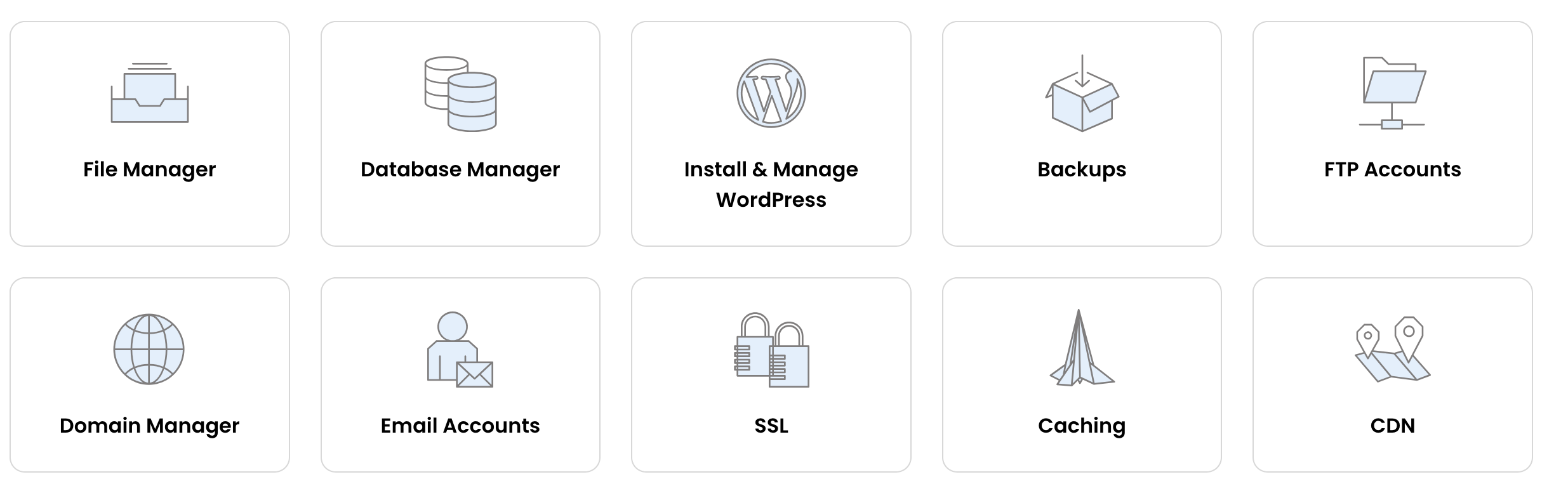
Designed for both seasoned developers and beginners, the interface offers a wide range of essential features — including WordPress-specific tools — from a single dashboard:
- File and database manager
- Installation and management of WordPress
- Management of your domain names (sub-domains, redirects, etc.)
- Creation of manual backups (in addition to the automated daily backups included for up to 30 days)
- Site restoration
- Caching
- CDN
- FTP accounts
- Email accounts
- SSL manager
Tools dedicated to WordPress
On Site Tools, SiteGround offers a one-click WordPress and WooCommerce installer, complete with a configuration wizard.
In just a few minutes, your site is ready for customization, with no need for complex procedures.
To take things a step further, once you’ve installed your site, you can also use the WordPress Starter tool, which offers a range of ready-to-use site templates. These can be installed in just a few clicks (with the essential plugins), with no technical knowledge required.

This is a great way to get your project off the ground without starting from scratch, by choosing a visual base that matches your expectations. You’ll save precious time in the early stages of development.
Collaborative features to facilitate teamwork
Do you work in a team with developers, designers, or copywriters? SiteGround has thought of you with its collaborative feature.
You can grant secure access to only the websites they work on (in case you have more than one), while retaining control of the account.
And of course, you don’t need to share your personal login or billing information.
Create unlimited business email addresses
Finally, SiteGround includes the creation of unlimited business email addresses at no extra cost.
Whether support@yourbusiness.com or employeename@yourbusiness.com, create as many mailboxes as necessary for the different needs of your company and your employees.
WordPress hosting plans to suit your growing business
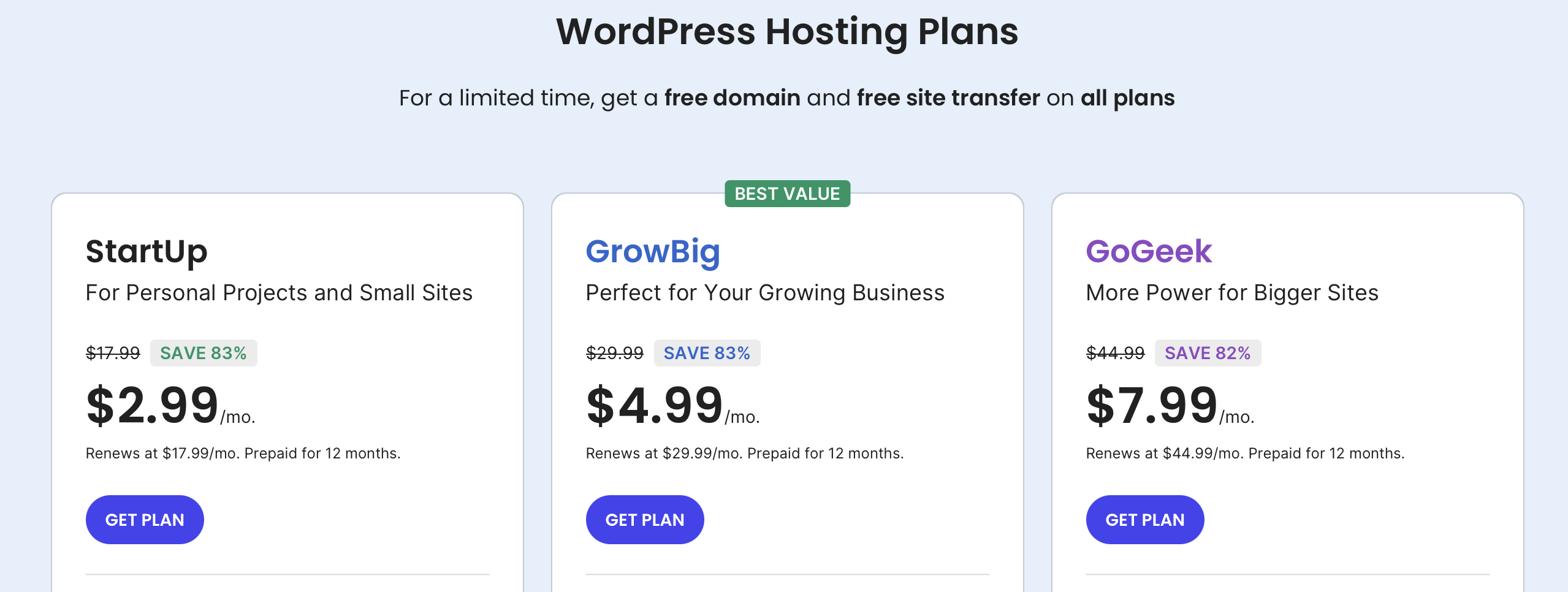
To meet the traffic and resource requirements of your small business customers, SiteGround offers three flexible, scalable WordPress hosting packages.
Each package includes the same managed WordPress features (automatic installations, updates, and migrations; Speed Optimizer and Security Optimizer plugins; WooCommerce enabled; WP-CLI and SSH).
The difference between each plan lies in the number of sites you can host, the web space available, and the traffic each offer can support.
Each offer comes with a 30-day money-back guarantee and exclusive features.
The little extra? You can switch from one plan to another without interruption and with just a few clicks. In the process, your site remains accessible and your visitors don’t notice any changes.
The StartUp offer: For small, personal websites
The StartUp offer is designed for small businesses launching online. It’s ideal for a showcase site, a small blog, or an online store just starting out.
It includes all the essential features for a first WordPress site (this is also the case with other hosting plans): easy installation, a free domain name, free email address creation, solid performance thanks to the Google Cloud platform, free SSL certificates, daily backups, and responsive customer support.
The StartUp package offers 10 GB of web space and ~10,000 monthly visits. It can host only one site.
Price: $2.99/month for the first year
The GrowBig offer: For growing companies
The GrowBig plan is suitable for growing businesses that need more resources and need to absorb more traffic. This could be an e-commerce store, an agency, or a news website, for example.
This plan offers you 20 GB of web space and ~100,000 monthly visits. It includes all the functions of the StartUp plan, plus exclusive features such as:
- Backup copies on request
- 30% faster PHP
- The creation of pre-production environments (staging)
Price : $4.99/month for the first month
The GoGeek offer: For companies that receive a lot of traffic
SiteGround’s GoGeek plan is aimed primarily at established businesses with higher traffic volumes, multiple projects, and advanced development tools.
It’s designed for sites that demand maximum performance and stability, with a significantly higher number of server resources.
In detail, you get 40 GB of web space and ~400,000 visits per month.
In addition to the features included in the GrowBig plan, you also benefit from the following exclusive features:
- Git
- White-label customers
- Free private DNS
- Highest level of resources among the available hosting packages
- Priority assistance
Price: $7.99/month for the first year
Conclusion
Throughout these lines, you’ve discovered that SiteGround’s managed WordPress hosting for SMBs lets you optimize, secure, and easily manage your sites on a day-to-day basis.
To achieve this, SiteGround relies on a number of different components:
- Optimized performance for WordPress: Google Cloud Premium platform, free CDN, ultra-fast PHP and MySQL, intelligent caching system, etc.
- WordPress-specific security features such as automatic updates, daily backups, Security Optimizer plugin, etc.
- Management tools designed specifically for the world’s #1 CMS, such as the Site Tools control panel and WordPress Starter site templates.
- Expert support trained in the specifics of WordPress, available 24/7, with a first-contact resolution rate of 90%.
If competing hosting providers offer slightly lower rates, it’s often at the price of outsourced support, essential options only available at an addition cost (SSL, backups, CDN), or less efficient performance.
With SiteGround, everything is included from the outset, with no hidden fees. The end result is a faster, more secure, and better managed site that reduces your costs and maximizes your return on investment.
To find out more about WordPress hosting packages for small businesses, click just below:
