“The partner of choice for small and medium-sized businesses.” This is how IONOS presents itself on its About page.
To best support its target clientele, the hosting provider offers a wide range of solutions to help SMBs and VSBs create and develop their online business.
Among these solutions are IONOS tools dedicated to WordPress, featuring several innovative artificial intelligence (AI) features.

Would you like to design your next WordPress site in just a few clicks, even though you have no technical knowledge?
And right from your administration interface, no less? It’s possible in just a few minutes.
We explain everything you need to know in this article. And as you’ll see, at IONOS, AI on WordPress isn’t limited to site creation.
You can also use it to generate text, get help, or access ready-to-use design templates.
- At IONOS, they focus on very small businesses
- What are the advantages of IONOS for small businesses?
- What is the IONOS AI tool for WordPress?
- How to create a WordPress site from A to Z with IONOS AI
- What additional AI options does IONOS offer for WordPress?
- The alternative to WordPress: MyWebsite Now from IONOS
- Conclusion
Transparency point: This page is sponsored. Some links to IONOS are affiliate links. If you purchase hosting from them, WPMarmite will receive a commission.
Thanks to affiliation, WPMarmite is able to remunerate the research and writing work of the blog’s writers. But we remain impartial. If a product isn’t worth it, we’ll say so (or we don’t talk about it).
At IONOS, they focus on very small businesses

Founded in 1988, IONOS is one of the world’s leading providers of web hosting and cloud infrastructures.
Renamed IONOS in 2021, the Germany-based group carries its weight, as they say.
Listed on the stock exchange since February 2023, IONOS Group SE has enjoyed continuous growth. According to figures released by the Group in November 2024, IONOS has 6.30 million customers worldwide.
With over 100,000 servers in operation worldwide, IONOS also hosts a staggering 22 million domain names!
Their priority target, as indicated on their About page, is small and medium-sized businesses.
IONOS wants to forge strong links with their clients, to become their “partner of choice” while helping them “get started” and “develop their Internet business.”
To achieve this, they offer a broad “portfolio of key products and services,” as you will discover in the next section.
What are the advantages of IONOS for small businesses?
Complementary services to accelerate your online growth
When we think of IONOS, we often think first of hosting or domain names.
Indeed, the web host has built much of its online reputation on these two services, which are indispensable for designing a showcase site or an online store.
IONOS even presents itself as the European leader in domain names. But that’s not to mention all the other aspects of the German group’s business. And there are plenty of them.
With IONOS, you can benefit from dozens of services, many of them complementary:
- A tailor-made website creation service by experts
- A tool (RankingCoach) to help you improve your search engine optimization (SEO) and Google ranking (no SEO or marketing knowledge required)
- A GDPR-compliant office suite
- Professional email addresses and secure online messaging
- AI-enabled email marketing software
- Virtual and dedicated servers
- Cloud computing, with a range of IaaS (Infrastructure as a Service) solutions for computing, storage, and backup, as well as high-performance PaaS (Platform as a Service) services (Kubernetes, managed databases, etc.).
In short, you have a complete toolbox for launching, developing, and maintaining your online website.

A personal advisor to help you focus on your core business
Most of the time, the main concerns of VSB and SMB managers focus on two aspects when it comes to creating an online site:
- Lack of time
- Lack of technical knowledge
These two components prevent them from taking action. IONOS understands this. The German-based group is therefore focusing on follow-up and support for its customers.
As he puts it, “our customers are at the heart of our concerns.” To give them complete satisfaction, IONOS offers a unique, tailor-made service that defies all competition: the free provision of a dedicated personal advisor.
Your advisor can be reached from Monday to Friday by telephone via a direct line, by chat, or by email.
You’ll never feel alone. You’ll benefit from fast, competent, and personalized support, tailored to your needs.
And you get expert advice and help with all your questions, both administrative and technical.
Your advisor can, for example, solve a problem concerning your contract, set up your domain name, create your email address, or manage your website.
In addition to this advisor, you can of course contact a member of the technical team 24/7 (by phone or chat).

Reliability and security at the heart of the hosting provider’s concerns
Another notable strength of IONOS is that it does not compromise on security and reliability, which “are an integral part of our products and services,” as stated on the company’s About page.
Reliability is demonstrated by the fact that IONOS has built up its own network of some thirty data centers, spread across Europe and North America.
This guarantees users maximum performance and geo-redundancy. In fact, the German host claims an uptime of 99.98% for its WordPress hosting services, which in technical terms corresponds to a Tier 3 data center.

When it comes to security, IONOS is not to be outdone either. The company says it is committed to “upholding a tradition of cutting-edge technology, data security, personal data protection, and respect for privacy.”
A case in point? All their data centers are ISO/IEC 27001 certified.
So much for this general overview of IONOS web hosting. If you’re a small or medium-sized business looking to create a website and become visible online, you may already have heard of WordPress.
It is the world’s most popular web design tool. At the time of writing, it was being used by almost one in two sites worldwide.
The reason WordPress is so popular is that it’s free, flexible, and infinitely customizable. What’s more, the administration interface is intuitive and easy to use.
Speaking of WordPress, IONOS has an artificial intelligence (AI) tool built into all its WordPress hosting packages.
With this tool, you’ll be able to design a WordPress site in just a few clicks and automatically, even if you don’t have any technical knowledge.
We’ll explain everything in the next section.
What is the IONOS AI tool for WordPress?
What can you expect from this AI tool? To begin with, it will help you create your site.
We’ll come back to this in detail later, but here’s the idea: you answer a few brief questions about your activity and business. Then you wait. The AI takes care of everything. In less than a minute, you have a new site with:
- Text
- Images
- Key pages (Home, About, etc.)
Then, depending on the WordPress hosting package you choose, you have access to an extension capable of automatically generating text from the WordPress Content Editor editing interface.
And that’s not all. If you have any questions or doubts, you can rely on a virtual assistant to give you a precise answer.
To find out more, read on. We’ll show you how it all works in practice.
How to create a WordPress site from A to Z with IONOS AI
Step 1: Sign up for an IONOS WordPress hosting package
First, you need to choose one of the WordPress hosting packages offered by IONOS:
- The “WordPress Hosting” package is ideal for creating a blog or showcase site. Here, unlike a managed package, you take care of technical administration (updates, etc.).
- The “Managed WordPress Hosting” package. This is a turnkey package for beginners. IONOS takes care of technical and server administration (security, updates, performance, etc.).
- The “WooCommerce Hosting” package. Compared to the two previous packages, the WooCommerce hosting package offers more storage (100 GB), higher file limits, and better performance.
Once you’ve selected the offer that best suits your profile, all you have to do is choose one of the 3 packs on offer (Start, Grow, or Boost).
Note that only the Boost package (the most comprehensive and expensive) allows you to create both a site and content with AI. The Start and Grow packages do not.
The situation is different for WooCommerce hosting, where you have access to only a single package (which includes all AI options).

Just so you know, all the AI features offered by IONOS are included in every package at no extra cost.
So, have you found the offer best suited to your needs? Go on to the next step.
Step 2: Install WordPress
Then install WordPress. To do this, go to your IONOS customer area. In the “Websites & stores” menu of your My IONOS interface, click on the “Configure website” button.
Continue by giving your project a name, then click on the “Start WordPress installation” button. Wait for the CMS (Content Management System) to install automatically.
Once you have created your site, you can choose between two options:
- Creation of your site (text + images) with AI, according to your preferences and needs.
- Creation in total autonomy, without AI. However, you can call on IONOS’s artificial intelligence at a later date, if you wish.
For the purposes of this article, we’ll choose option #1, AI-assisted creation.
Step 3: Answer a series of questions
Next, the IONOS AI assistant prompts you to answer seven questions to share more about your business, so it can create a site that reflects your image.
It’ll ask you:
- The subject of your WordPress site. You can choose from a wide range of business areas (Catering, Construction, Personal Sites, Website Design, Graphic Design, etc.). Choose the one that’s closest to your core business.
- The name of your site, for example WPMarmite.
- The structure of your site: multi-page website or one-page website.

- Your WordPress site’s objectives: increase site traffic, e-commerce, get subscribers to your newsletter, promote a physical business, receive phone calls, or publish a blog, for example. You can select more than one goal at a time.
- Choose the design of your future site. There are 18 templates to choose from, all of which can be customized at a later date.

- Choose which pages to add to your site. By default, the IONOS AI tool has selected several common pages: Home, About, Contact, Portfolio, Services, and Testimonials. You can also add FAQ, Gallery, Pricing, Resources, and Team pages.
- Describe your site or company to create customized content. Optionally, you can also select the tone of the site: professional, friendly, inspiring, informative, or compelling.
Wait about 30 seconds, and there you have your freshly created WordPress site, complete with text and royalty-free images. Here’s what the home page of ours looks like:

In a nutshell:
- The tool lives up to its promise. We expected to create a site with 6 pages in total, text and images, and everything is there, including a logo.
- Key elements are present: Call-to-action buttons, service presentation, customer testimonials, and social network icons. What’s missing is a contact form, or at least a way to get in touch with the company.
- The design of the site is very classic. Don’t expect a dynamic site with scrolling wow effects or the like. That’s not the purpose of the tool, but it’s worth bearing in mind.
Let’s end this section by pointing out that a dozen or so plugins are also activated at the same time as the site is created.
Here are a few examples:
- All in One SEO Pack to manage your on-page SEO
- Performance, which installs a caching system
- Security, which provides a range of security features: analysis of potential vulnerabilities in your WordPress plugins and themes (with the help of the WPScan tool database), SSL status, XML-RPC, and connection protection.

In addition to its AI website creation service, IONOS offers a custom website design service starting at $45/month before tax.
What additional AI options does IONOS offer for WordPress?
In addition to its flagship AI-assisted site creation and customization service, IONOS offers you other artificial intelligence features directly in your WordPress administration space.
Find out more below.
Site assistant
The Site Assistant helps you set up your first WordPress site in just a few quick and easy steps.
You can access it via the “Site Assistant” menu at the top of the sidebar of your WordPress administration interface:

A Site Guide…
A Site Guide welcomes you at the top of the page and suggests the following steps:
- Experience the AI-Powered Help Center
- Explore the Design Library
- Connect your domain
- Edit your home page
- Upload a logo
- Upload a site icon
- Add a site description
- Add a page
- Configure All in One SEO
As soon as you click on the step of your choice, you are redirected to the relevant menu or page.

… and quick links from IONOS on WordPress
A little further down the page, you’ll also find a series of quick links for classic actions such as adding a page or post, or modifying the style.

Chatbot AI
Are you facing a problem to which you can’t find an answer? You can get instant assistance with an AI chatbot called Co-Pilot, available on your WordPress admin.
To take advantage of it, click on the “IONOS – Help Center” insert, then on the “Ask AI” section:

You then have the option of asking the question of your choice to a conversational agent, which comes in handy when you need to get out of a jam:

This chatbot is connected to the WordPress.org database, enabling you to get help on the vast majority of WordPress-related topics.
Design Library
Another major feature is the presence of a customized design library for each site.
It can be accessed from the WordPress Editor, via the “Design Library” button:

Clicking on it opens a highlighted window, with whole pages and ready-to-use sections to add to your content with a single click.
Templates are available in various categories:
- About
- Blog
- CTA
- Contents
- Hero
- Pricing
- Social proof
- Team
These pages and sections change depending on the type of site you choose:

Technically speaking, each section or page offered is made up of Gutenberg blocks, like a more traditional pattern.
You can then modify and personalize each block of the section as you see fit. Modifications are made live, in WYSIWYG mode (What You See Is What You Get).
Text creation in the editor
Finally, if you’ve opted for a WordPress “Boost” hosting package or a WooCommerce hosting package, you’ll also be able to generate AI text directly on the WordPress Content Editor interface.
This was not yet the case at the time of writing (December 2024), but IONOS also plans to offer AI-driven image creation as soon as possible.
The alternative to WordPress: MyWebsite Now from IONOS
Are you a freelancer or a small business owner who doesn’t want to use WordPress? It can happen! Although powerful and flexible, the CMS isn’t always suited to every project.
IONOS knows this, which is why it has been offering its own in-house website builder since 2014: MyWebsite Now.
Over the years, the tool has undergone numerous evolutions. For some years now, it has of course offered artificial intelligence functionalities to generate a website.
Unlike IONOS’s onboarding offer for WordPress, MyWebsite Now has its own interface.
For the rest, the options are similar to what is offered on WordPress:
- You enter information about your company and your business.
- Artificial intelligence generates your site with design, text, and images.
- You customize your site to suit your needs.
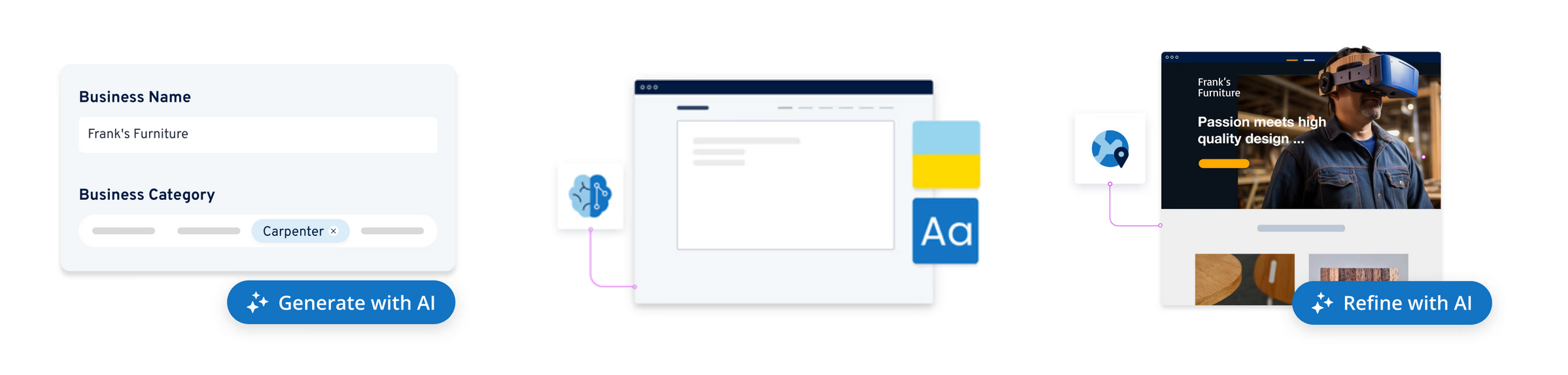
No programming skills are required to use this tool, which also features 100% editable ready-to-use elements and sections.
With MyWebsite Now’s AI, you can:
- Generate text to save writing time
- Adapt the tone of your communication to your target audience: professional, playful, inspiring, or persuasive
- Generate SEO metadata (title and metadescription tags)
- Generate entire sections in your pages
- Generate unique images
- Create your own color palettes
However, with MyWebsite Now, there’s no possibility of self-hosting like with WordPress. 😉 Well, yes, you can’t have everything.
Conclusion
Throughout these lines, you’ve discovered the solutions offered by IONOS for small and medium-sized businesses.
The German hosting giant offers a range of key services to help you start and grow your Internet business.
As a WordPress user, for example, you can save precious time by relying on the following artificial intelligence-based tools:
- An AI-based site builder, capable of creating a functional site for you in just a few minutes
- A conversational robot capable of answering your questions and removing your sticking points
- A design library with ready-to-use sections
- A text generator to design all your content
And all this directly from your administration interface, without you having to touch a single line of code. These tools are designed for beginners who want to concentrate on their core business.
Are you interested? Find out more about the IONOS hosting packages below:
