
Ever heard of WPPot? It’s literally the translation of WPMarmite. Let’s face it: it’s not the catchiest of names.
A perfect translation is very important. It reinforces your brand image and builds trust with your readers.
And of course, it helps you boost your SEO, with the aim of capturing new customers. Not to mention all the new markets opening up for you…

But for that, you need a tool that’s up to the task. Weglot on WordPress falls into this category. You may know it by name.
It’s one of the major players in the market for solutions to make your WordPress site multilingual.
How has this tool, created by two Frenchmen, managed to establish itself in less than ten years as one of the most popular options for translating a website?
Is it really effective and suited to your needs? That’s what you’ll find out after reading our full review of Weglot.
Transparency point: This article is sponsored. Some links to the Weglot tool are affiliate links. If you purchase a premium license from them, WPMarmite will earn a commission (at no extra cost to you).
Thanks to affiliation, WPMarmite is able to remunerate the research and writing work of the blog’s editors. We remain impartial. If a tool isn’t worth it, we’ll say so (or we don’t tell you about it).
What is Weglot?

Weglot is an all-in-one online tool that makes multilingualizing your WordPress site quick and easy.
Thanks to its integration with WordPress, it automatically detects and translates all your site’s content (posts, pages, custom fields, menus, WooCommerce products, etc.).
This SaaS tool (Software as a Service) founded in 2016 by two Frenchmen, Augustin Prot and Rémy Berda, claims to work with over 110,000 brands in all sectors (eCommerce, web agencies, marketing, public services, internal applications, etc.).
HBO, Decathlon, Amazon Studios, IBM and Nielsen, for example, rely on Weglot to translate their websites.
In less than a decade, this tool, the idea of which germinated in the mind of Rémy Berda during a summer walk, has quite simply established itself as one of the major players in the field of online translation.
Weglot, a powerful, flexible and scalable no-code tool…
To carve out a good slice of the cake in a highly competitive market, Weglot has a number of strengths that have contributed to its exponential growth:
- It simplifies website translation by automatically translating your entire site for you, thanks to AI and an advanced translation API. All in just a few minutes.
- It allows you to manually edit automatically translated content and use professional human translators.
- It is an easy-to-use, cloud-based, no-code solution. For example, you can manually edit your translations directly on the visible interface of your WordPress site (front-end) using a Visual Editor.
- Your WordPress site can be translated into over 110 languages, with the option of creating your own custom languages.
- The made-in-France translation tool offers unique options, such as its AI Language Model feature, which enables you to generate automatic translations tailored to your brand identity.
- Weglot is compatible with all web technologies, in particular the most popular CMS such as WordPress (a dedicated plugin is available on the official WordPress directory), Drupal, Wix, Shopify, Webflow, Squarespace, etc.
- The tool is customizable (you can set translation and exclusion rules) and perfectly suited to collaborative work, with the possibility of adding several members.
- The SaaS solution integrates multilingual SEO features that are essential in the eyes of Google, such as setting up dedicated URLs for each language, creating subdirectories or subdomains for each new language, managing hreflang tags for precise indexing, and translating metadata.
- Weglot offers a glossary feature so you can import your own wording and check the quality of your translation without any constraints.
To find out more, take a look at this video presentation of the tool:
… and a committed company
In addition to its technical aspects, Weglot is a company that stands out for its social and responsible commitments.
The French company states on its About page, for example, that it supports “efforts to promote inclusion, equality, sustainability and well-being at work”.
We also learn that since 2020, it has been donating 50% of sales made on Black Friday and Cyber Monday to charities (i.e. €60,000 donated in 2023).
Finally, Weglot is committed to reducing its carbon footprint and preserving the environment on a daily basis.
How does Weglot work?
Now that we’ve got the introductions out of the way, let’s take a look at the technical side, which is essential for understanding how the Weglot tool works on WordPress.
So, what’s under the hood, Weglot? Well, it’s all a well-oiled machine, we’d like to tell you.
Your website can be translated in just a few steps, in just a few minutes and without any technical intervention on your part:
- You connect WordPress to Weglot via its dedicated plugin. Once the plugin is installed, you choose your translation language.
- Weglot automatically detects your website’s content and translates it: blog posts, pages, menus, eCommerce products, widget zones, headers, sidebars, popups and more.
- The tool offers a first layer of automatic AI translation, based on neural translation technologies such as DeepL, Microsoft and Google Translate.
- Your translated content is displayed on your site. A language selector is added automatically, via language-specific URLs (e.g. mywebsite.com/it/).

And that’s it, it was quite easy, wasn’t it? Once the first layer of translation is complete, don’t worry, you’re still in control.
This is one of Weglot’s strengths: you have complete control over the translations the tool offers you, with the option of editing them manually (it’s even possible to import your own translations) in real time from a Visual Editor.
Want to hand over the reins? It’s perfectly possible to call in professional translators from your customer interface.
On the technical side, Weglot keeps your translations on its online interface rather than in your WordPress database, so you don’t have to worry about page load times. That’s really nice.
Finally, in terms of SEO, the SaaS tool lets you choose between a subdirectory structure like WPMarmite (e.g. mywebsite.com/en) or a subdomain structure (e.g. en.mywebsite.com).
Which of these two structures you choose will depend on your project and your needs, as explained in this post.
How to make your WordPress site multilingual with Weglot?
Basically, there’s nothing more you need to know about how Weglot works. If you’re interested in the tool, maybe you’d like to use it on your website?
Come on, vamos. In this section, we’ll show you how to activate it on your WordPress site, and above all how to use it to translate your site.
First of all, Weglot is compatible with all WordPress websites. And of course, with its entire ecosystem of themes and plugins.
It will integrate perfectly with your favorite page builder (Elementor, Divi Builder), your favorite SEO plugin (Yoast, Rank Math, SEOPress), or even your online store designed with WooCommerce.
Install Weglot on WordPress
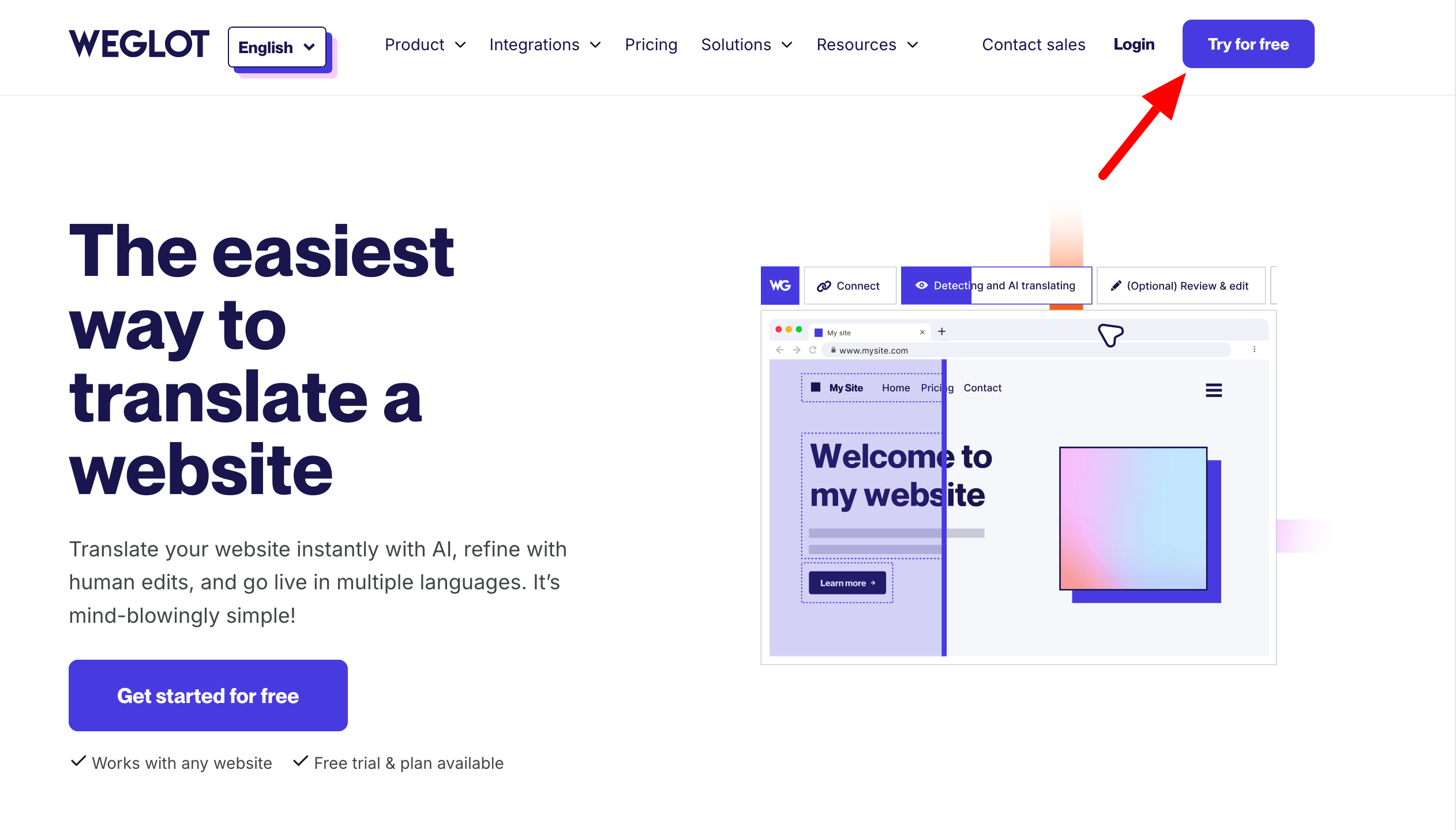
First, create an account on the official Weglot website. To do so, click on the “Try for free” button at the top right of the page:
Once this is done, create a project on your Weglot interface, selecting WordPress as the technology:

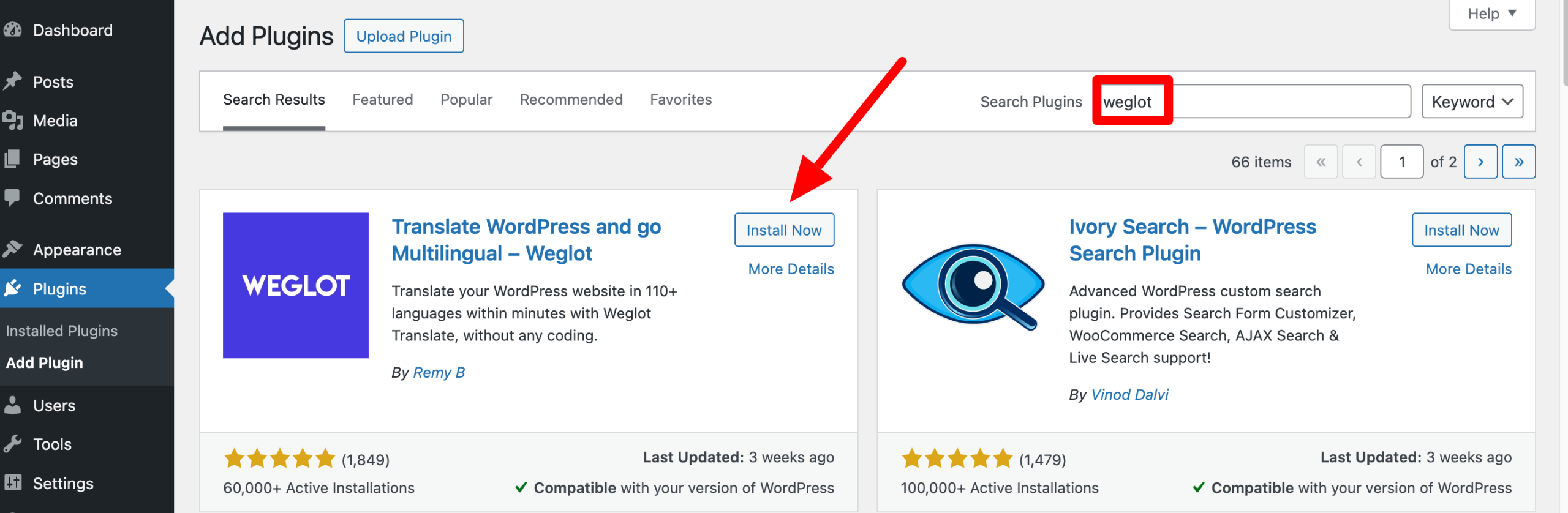
Once this is done, install and activate the Weglot plugin on your WordPress dashboard, from the Plugins > Add plugin menu:
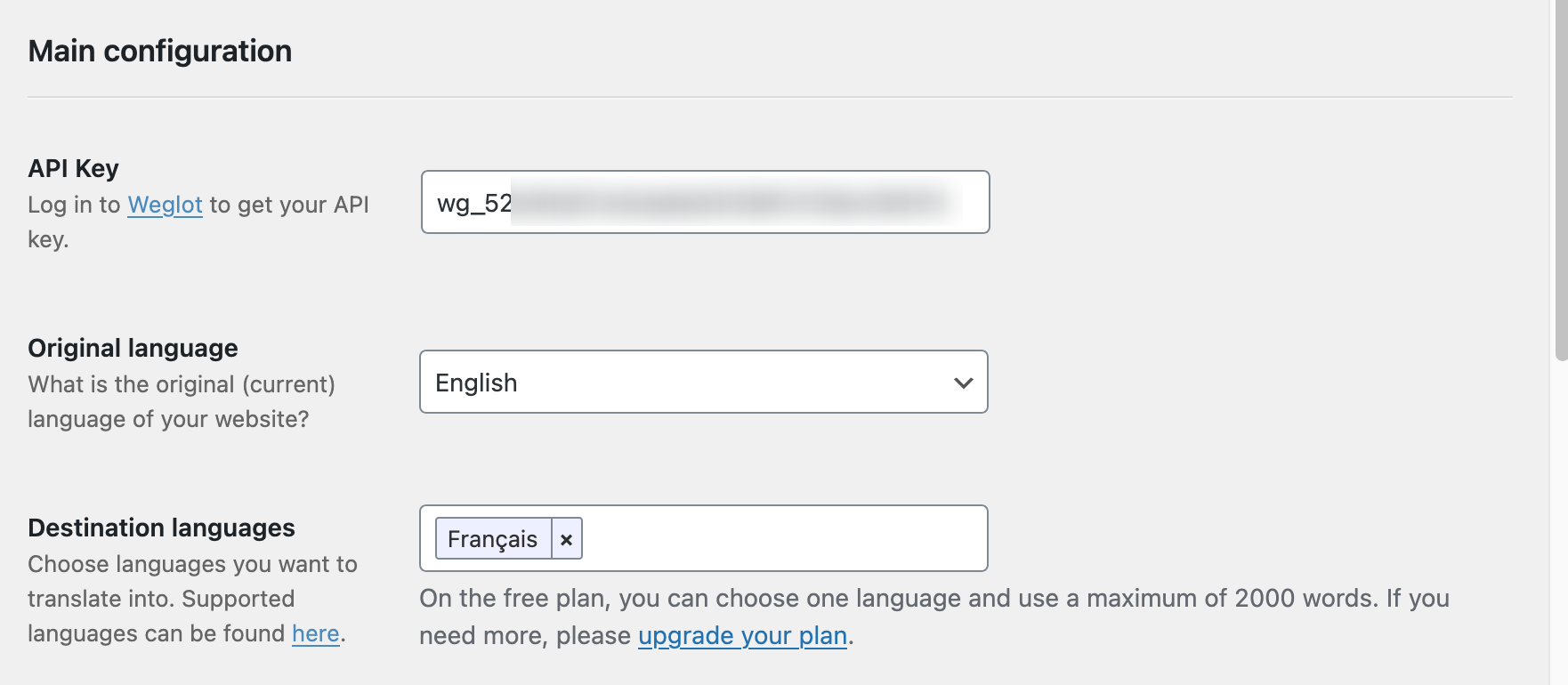
Are you all set? Continue the installation process by adding your Weglot API key by clicking on the “Weglot” menu in the left-hand sidebar on your WordPress dashboard.
This API key can be found in your Weglot customer area. To finish, simply choose:
- Your original language, i.e. the language in which you created your site. For us, the default is English.
- Your destination language, i.e. the language into which you wish to translate your site. In our example, we choose French. You can add multiple languages if you wish to translate your site into different languages.
Remember to save your changes for a brand new multilingual site.
Configure Weglot on WordPress
Before you start fine-tuning the translations you’ve already done automatically, take a look at the Weglot settings panel on your WordPress dashboard.
Here’s what you can customize:
- The language selector displayed on your site. You can, for example, display the selector as a drop-down menu, add a flag or not, add CSS code, or define the location of your selector (in a menu, in a widget area, or wherever you like). Find out more in this video:
- Translation exclusions. By default, all pages on your site are translated. If required, you can exclude pages or parts of pages (side columns, menus, paragraphs, etc.) from translation.
- Other options, such as: redirect users according to their browser language, translate WordPress default emails, allow your users to search in the language they use, etc.

Edit your translations
If you’ve been following along so far, you’ll know that Weglot’s first translation layer is automatic.
The result is really very high quality, but you’ll probably have to make a few small adjustments. Even if tools like DeepL, Microsoft and Google Translate are very powerful, they’re still machines.
Occasionally, you’ll come across small typos or translations that are too literal. Wherever possible, we advise you to reread what has already been done and put your own stamp on it.
To edit a translation, you have two options:
- Go to the “Edit my translations” button in the “Weglot” menu on your WordPress administration interface. You’ll then be redirected to the Weglot interface, where you can edit all the words and texts detected on your site. You can refine the results by using the filters at the top of the page:

- Use the Visual Editor, by clicking on the “Edit with visual editor” link in your WordPress back office. This allows you to edit translations directly on the front-end of your site. Simply click on the text you want to edit, edit the translation in the pop-up window that’s just opened, and there you go. The change is made in real time. It’s a great way to see how your site looks in a new language!
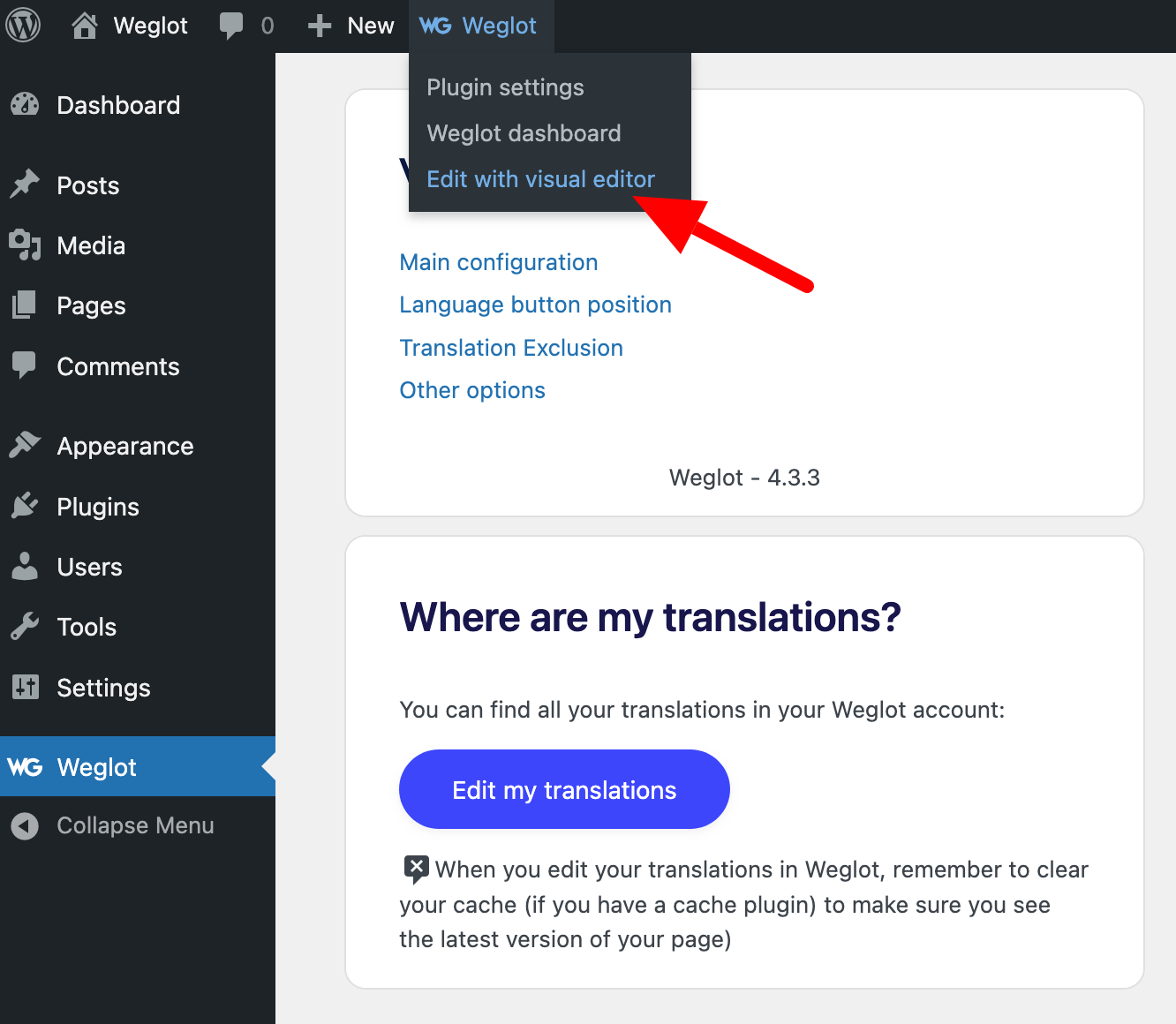
To recap, here’s a look at the two editing modes available to you:
Take advantage of translation rules, exclusions and teamwork
With your intervention, your translations should now be just right. To take things a step further, there are a number of ways in which you can further enhance your translations. For example, you can:
- Define translation rules (“Glossary” menu in the Weglot interface) to be applied to certain words or groups of words, to ensure that they are correctly translated into another language. This could be the case for your brand name or slogan, for example. You can, for example, never translate or always translate a particular word.
- Add advanced rules to exclude a URL or a group of words (“Translation Exclusions” menu).
- Integrate members to work as a team on a translation project, with the option of giving them more or less power (“Project Members” menu).
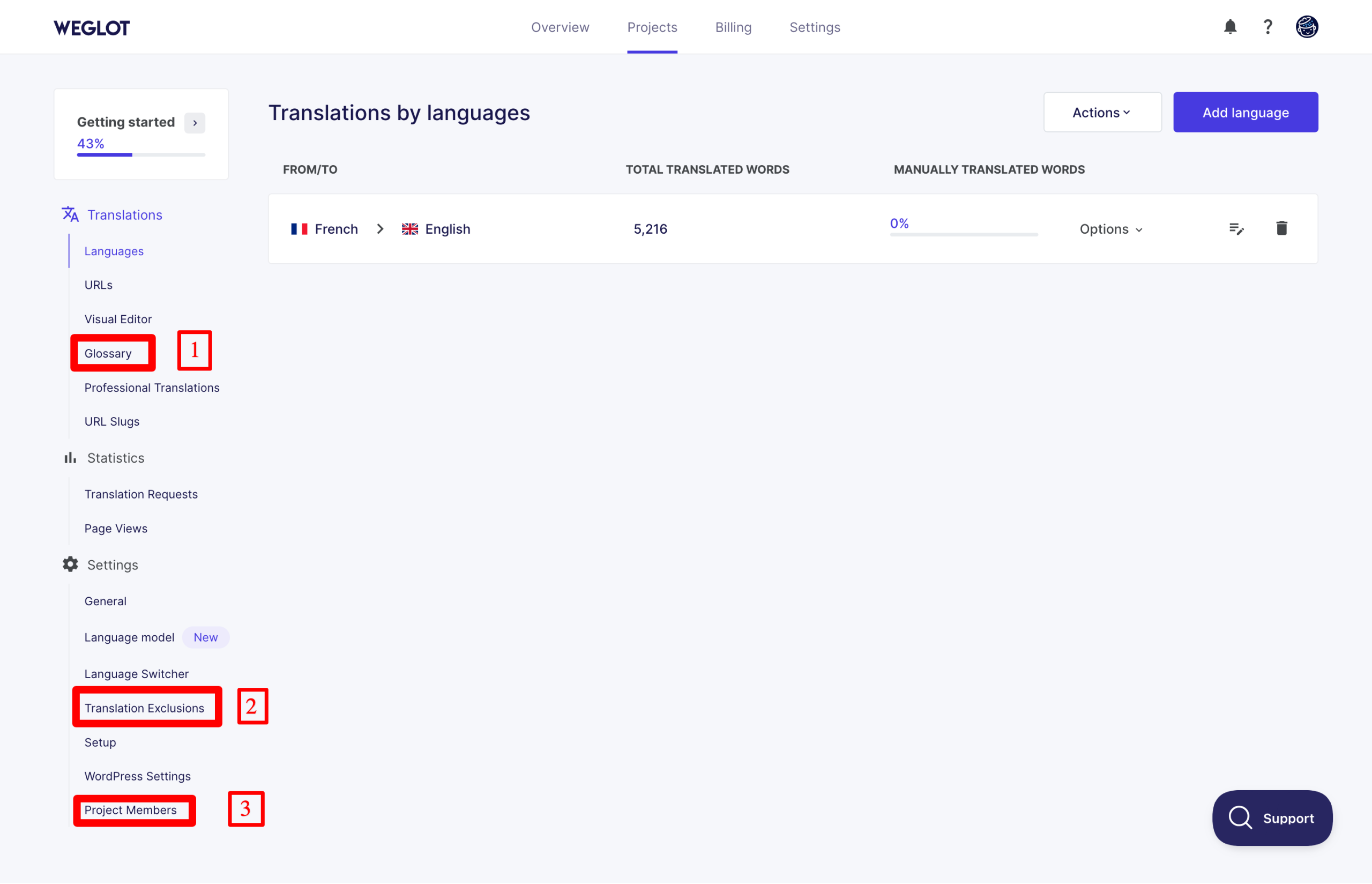
If you’d like third-party help translating the content of your WordPress site, Weglot can put you in touch with professional translators via the “Professional Translations” menu in your customer interface. Rates start at $0.13 per word.
How to translate with Weglot’s AI language model feature?
Update: In late September 2026, Weglot released a new version of its WordPress plugin. Its new AI translation model uses your brand voice, tone, and instructions from the very first translation. A new image translation feature is also available, along with an MCP that lets you manage your translations from your AI assistant. Learn more in our Weglot 2.0 review.
Think you’ve seen it all with Weglot? Wait a minute! This SaaS tool still has a lot to offer, we warn you.
Just recently (our post was published in June 2025), Weglot kicked things into high gear with a major update designed to further improve the quality of its translations.
If you use one of the paid versions of Weglot, you gain access to the AI Language Model feature (AI credits are awarded according to the number of words in your plan).
Based on artificial intelligence, this innovative and powerful feature allows you to create your own linguistic model to generate automatic translations that reflect your brand as closely as possible.
How does Weglot’s Language Model update work?
Your AI language model is an intelligent layer on top of the AI translation providers used by Weglot (DeepL and others, depending on the language being translated). In particular, it offers improved contextual awareness of translated elements.
To translate, the Weglot algorithm relies on:
- the description of your brand, tone, style and target audience
- your glossary
- your previous translations
- your manually revised translations
- custom instructions that you can define.
The more you review and correct translations, the smarter your model becomes, and the more it translates as you would tend to do yourself. This reduces your manual intervention.
With your AI language model, you always have a choice. You can:
- use it on specific translations (from your list of translations)
- bulk edit all your translations.
How do you set up your language model?
To create your own IA language model, go to the “Language model” menu in your Weglot customer interface.
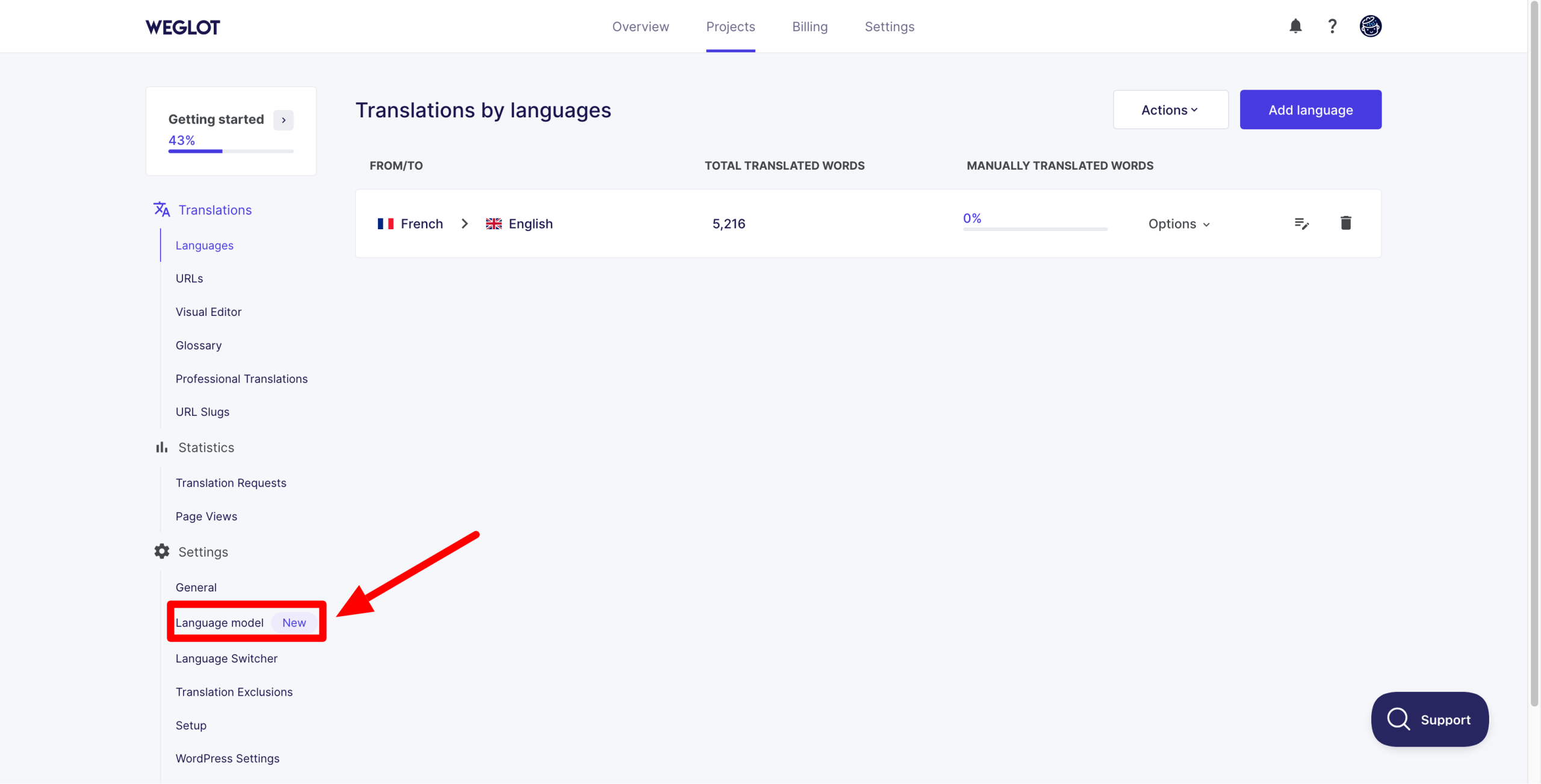
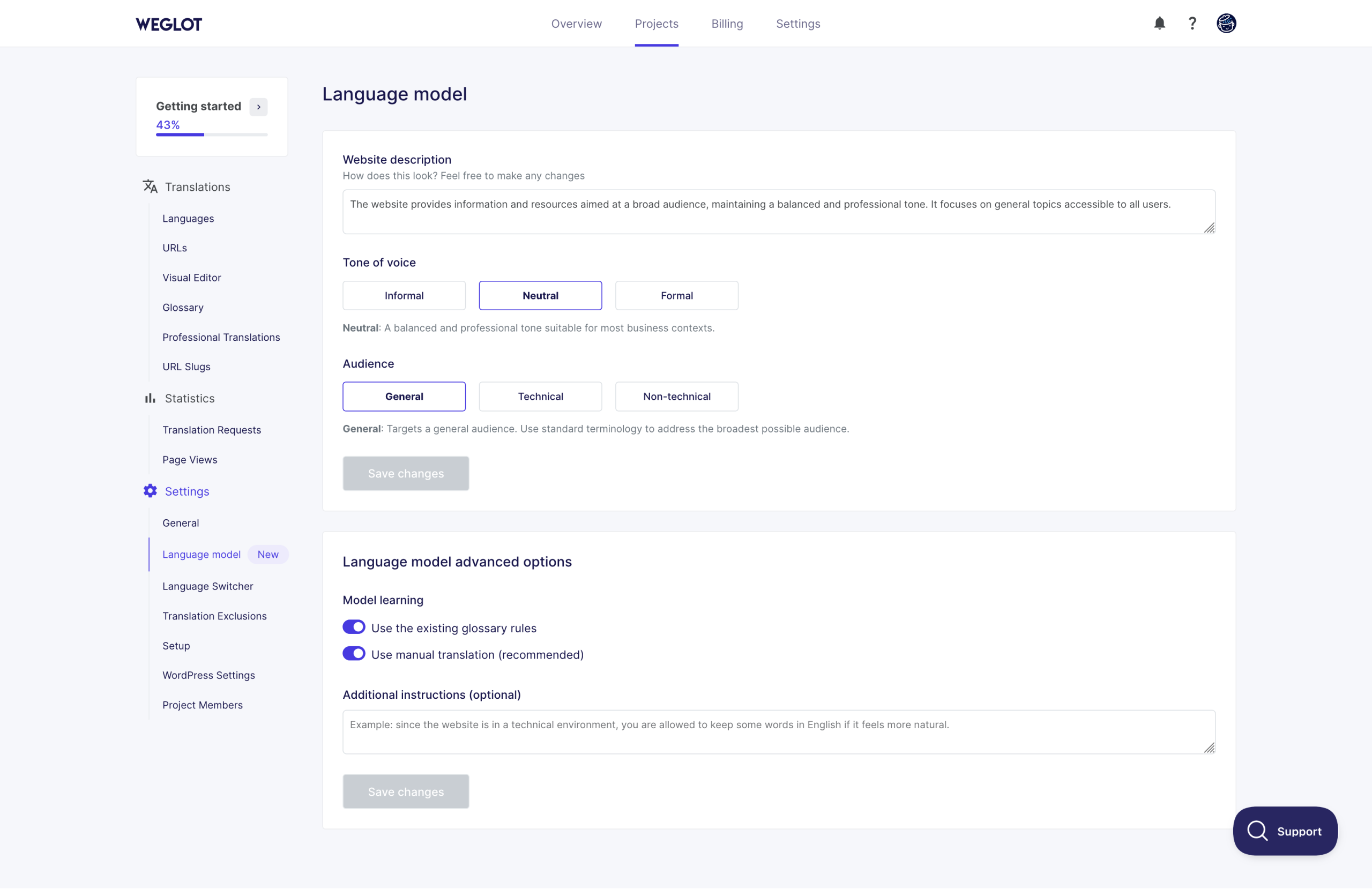
To start enjoying (and training) your model, make the following settings:
- Enter a description of your site, providing as much detail and context as possible about what you offer to your audience.
- Choose the tone of the translation (informal, neutral or formal).
- Target your audience (general, technical or non-technical).
- Choose whether you want to include rules from your glossary and use your manual translations to train your model.
- Add custom instructions, if required.
Remember to click on the “Save” button to save your work. Your AI language model is now up and running.
Weglot support and customer service
A customer service in high demand
Intuitive and easy to use, Weglot does have its own special features that you’ll need to get used to. But rest assured, the learning curve is very steep.
Whether on your WordPress back office or on the tool’s in-house interface, the settings are succinct and self-explanatory.
Even so, you may encounter technical problems during use – this can always happen – or have questions.
When it comes to support, Weglot still sets the bar very high. Its users are particularly impressed by the efficiency of its customer service, according to the reviews left on the Trustpilot verified reviews platform (overall rating of 4.9/5):
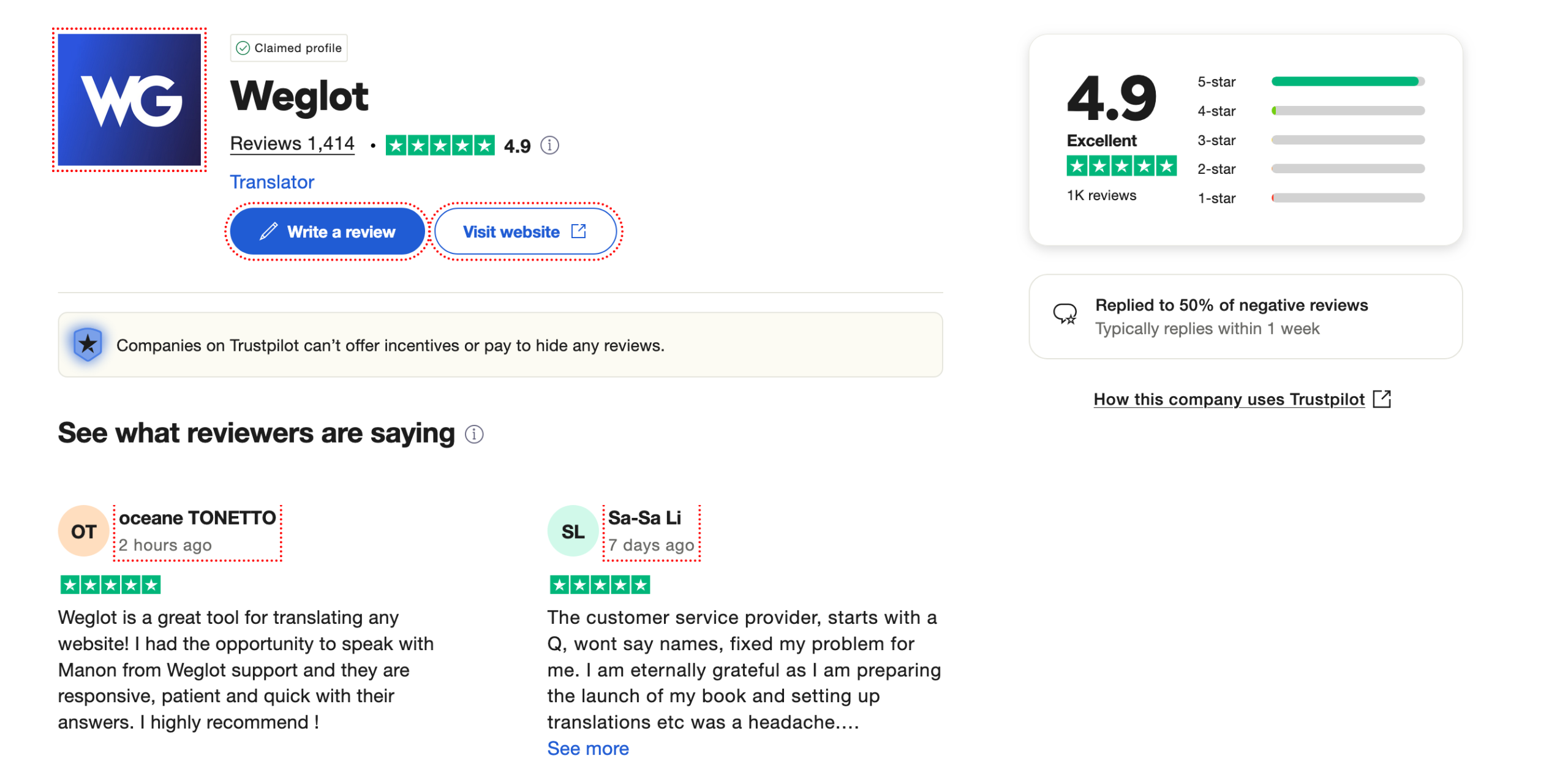
Reviews are just as positive on other platforms such as G2 Reviews, or the official WordPress directory (4.9 out of 5 stars).

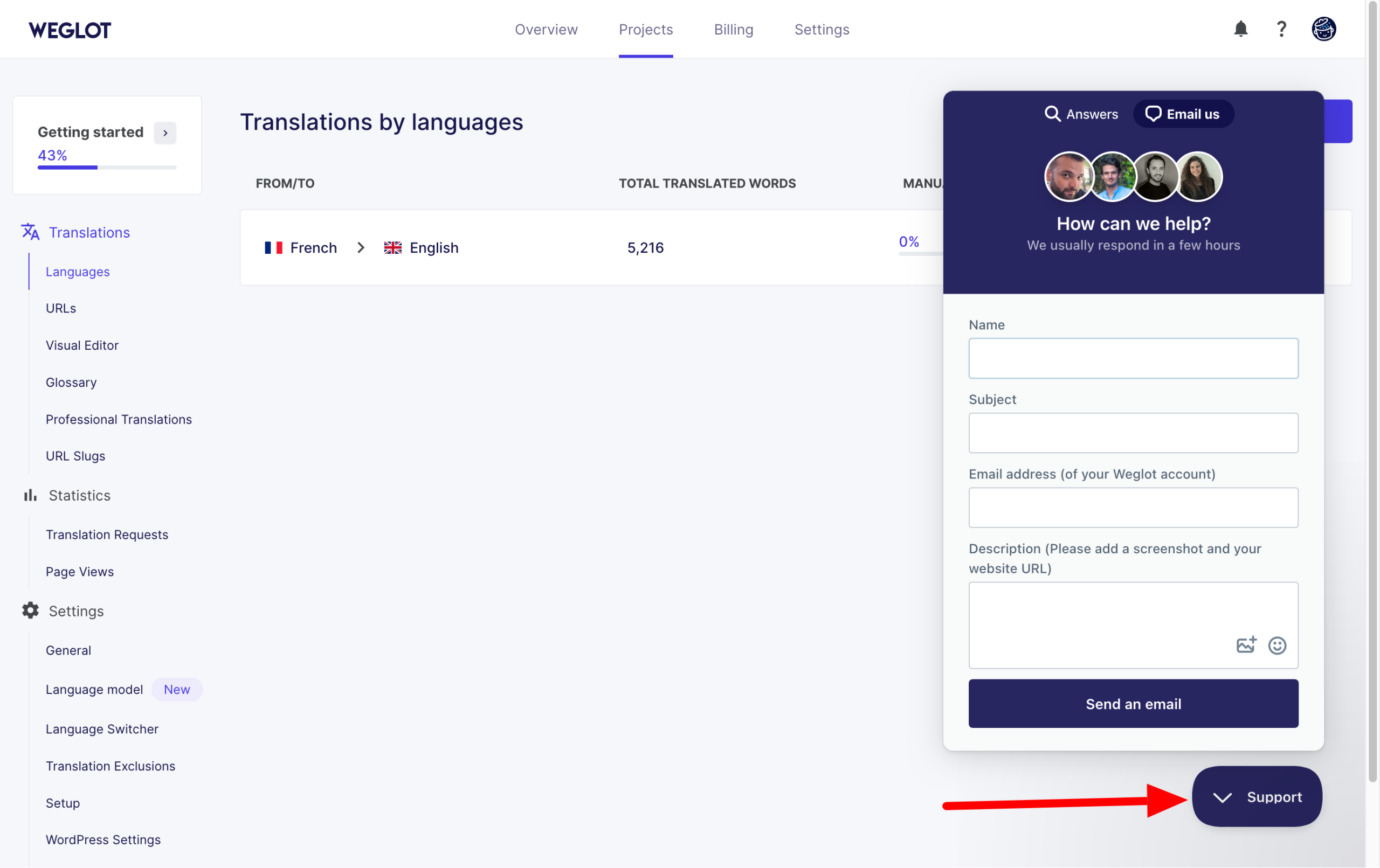
If you ever need to contact a member of the Weglot support, click on the “Support” button on your customer interface, to open an email request.
The support teams are hyper-responsive (most responses are within the hour).
A wealth of resources to help you learn how to use the tool
You prefer to try and find the answer to a problem yourself? Take a look at one of Weglot’s many resources:
- a help center, including content on how to install and get started with Weglot
- a blog for advice on translating websites, for example
- a resources center, including ebooks, webinars and guides
- Weglot Academy, for free online courses in website translation
- a YouTube channel with over a hundred videos to guide you through the use of the tool, as well as offering advice on translation, web design and SEO.
How much does Weglot cost?
Without further ado, let’s move on to Weglot’s pricing. First of all, Weglot offers a free trial. I might as well tell you right away that this is primarily for testing the tool, as it quickly reaches its limits.
With it, you can translate up to 2,000 words, within the limit of one translated language.
Then there are 5 paying plans, ranging from $17/month (“Starter” plan) to $769/month (“Extended” plan).
The difference between each plan lies in the number of words you wish to translate, and the number of languages to be translated.
Everything is detailed in the screenshot below:
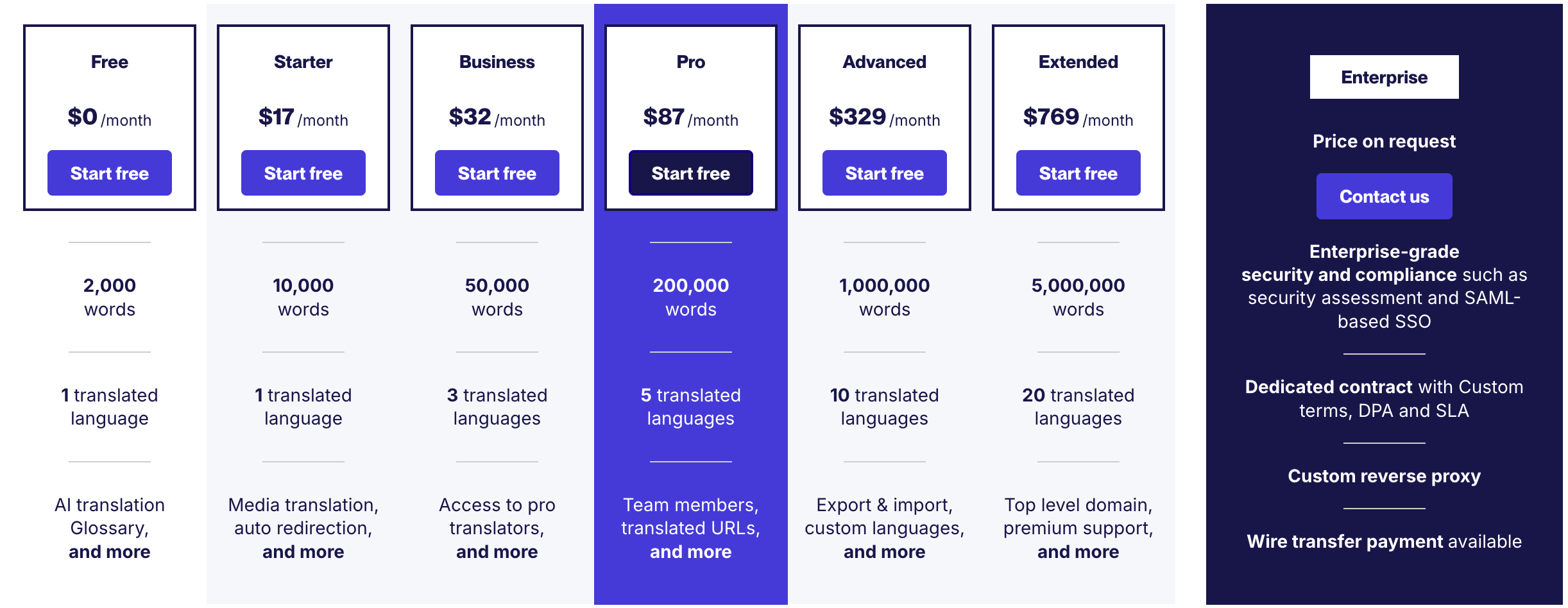
At the same time, certain options may or may not be available, depending on the plan you choose. For example, you can add customized languages from the “Advanced” version of Weglot.
The differences between each version are shown in this comparison table.
In addition, you can get 2 months free by paying for the tool on an annual basis (rather than monthly). Finally, on-demand pricing is also available for larger companies.
What are the alternatives to Weglot on WordPress?
At the start of this post, we explained that the market for translation tools was dense and competitive.
So Weglot isn’t the only big fish in the aquarium. Looking specifically at WordPress, there are several alternatives to Weglot:
What’s Polylang vs Weglot? Or TranslatePress vs Weglot? To find out more, read our page on the best multilingual plugins for WordPress.
Our final review of Weglot
What? Already? Well, you’ve reached the end of this presentation of Weglot on WordPress.
It’s time to recap the tool’s strengths and limitations, and to give you our opinion of Weglot.
Advantages of Weglot
- A tool that’s easy to use, thanks to an intuitive interface with a polished UX and automatic language detection. What’s more, no technical knowledge is required (Weglot is a no-code tool).
- Translation speed. It only takes a few minutes to automatically translate an entire site.
- The ability to manually edit translations.
- Translations are updated in real time, and all new content is automatically translated.
- A tool suited to all types of profiles, from beginners to experienced technicians (who can also use the Weglot API, if required).
- Compatibility with all themes and plugins in the WordPress ecosystem.
- The collaborative aspect of the tool. You can add members of your own team and involve professional translators (for a fee).
- Weglot is available in over 110 languages.
- Native SEO optimization (translated URLs, hreflang tags, metadata).
- The AI Linguistic Model feature, unique on the market, to create automated translations that reflect your brand image.
- An all-in-one translation platform where you can manage and edit all your translations.
- A dedicated, responsive customer support.
- The little extras: the visual editor and page view to see where your traffic is coming from and in which language you can also translate your site.
Disadvantages
- You need to exit your WordPress interface to benefit from certain options.
- Premium plans are expensive if you want the most advanced features.
- Each language you add doubles the number of words to be translated. Take this into consideration before choosing your plan.
- The free offer is very limited.
- Some translations (but this is very minor) are imprecise.
- You depend on an external translation service.
WPMarmite’s review of Weglot
For us, Weglot is a big “yes”! We love the ease of use and efficiency of the tool. It saves an incredible amount of time, thanks to its first layer of automatic translation.
While you’ll still need to carry out some manual checks, you’ll be able to do so without tearing your hair out, which is not the case with many of its competitors, which are more complex to learn and configure (like WPML, for example).
All in all, Weglot will be an excellent companion if you want to have identical versions of your site in several languages, without worrying about possible technical problems.
But just because Weglot is an excellent tool doesn’t mean it’s right for you.
Before adopting it, think carefully about your needs and how they match up with Weglot’s features (and prices).
If the two of you are a good fit, don’t hesitate and go for it:

Receive the next posts for free and access exclusive resources. More than 20,000 people have done it, why not you?


Continue reading
Articles posted in WordPress PluginsUpdraftPlus: The must-have plugin to back up, migrate, and restore your WordPress site
I’ll never forget that day. And not just because I thought I was going to throw my computer out of the window… Ah, if only I’d used a plugin like UpdraftPlus to avoid catastrophe. The catastrophe? Let me tell you…
WPML review: Ultimate test of the plugin to make WordPress multilingual
A second job. For a long time, creating and managing a multilingual WordPress site often meant doing the same work twice. Once you’d written a piece of content, you had to translate it. Then you had to check each version,…
Our review of B2BKing: A WooCommerce plugin built for B2B commerce
“Hi, I need 200 units of this product with fast shipping please”. As an online store owner, receiving this kind of message puts a smile on your face. Answering it, on the other hand, becomes a lot less fun… Basically,…